
Business Continuity
UPS for a NAS and PoE Network: VA, Watts, Runtime and Safe Shutdown Explained
A UPS must support the complete service, not only the NAS power cable. Learn how to count router and PoE loads, compare VA and watt ratings, check runtime and plan a supported shutdown path, with Eaton 5E Gen2 and 5P Gen2 examples.
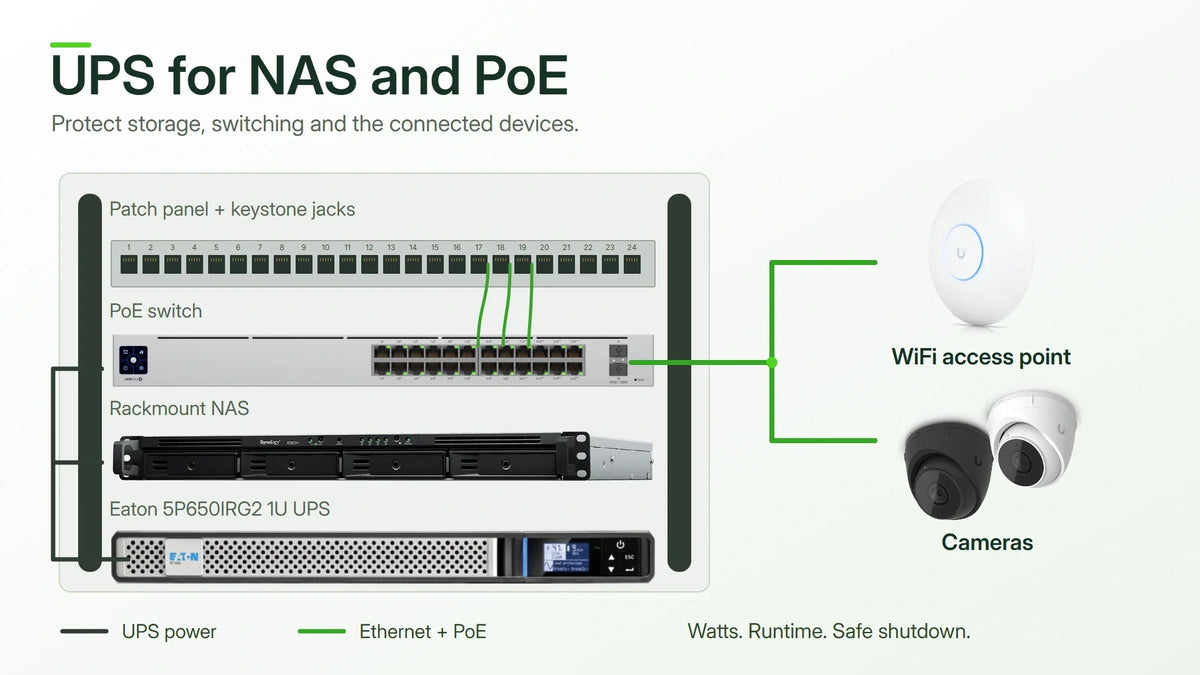
Quick answer: Choose a UPS by the complete protected load, both its VA and watt limits, and the required runtime. Then confirm how the NAS receives the UPS status and enters its supported safe state. A unit can have enough capacity to power a NAS yet still leave the switch, router or shutdown communication path unprotected.
A power plan starts with the service that needs to survive. Keeping a NAS running, preserving local access and maintaining camera recording are different objectives. Each depends on a different chain of equipment.
Highlights
- VA and watts are separate limits. A larger VA number alone does not establish a larger usable watt capacity.
- PoE loads belong in the calculation. Include powered devices and losses without counting the same load twice.
- Runtime is model- and load-specific. It cannot be calculated by dividing VA by watts.
- A power cable is not a shutdown signal. A compatible USB or network monitoring path is required for automated NAS response.
- Test the failure and the return of power. Recovery behaviour matters as much as the initial battery-backed period.
Protect the Service, Not Just One Device
If the NAS stays on but its switch stops, users may lose access even though storage is still running. If the router survives but the required internet termination equipment loses power, the business may still be offline. For camera recording, the recorder, cameras and network path all need to remain available.
| Objective | Equipment commonly involved | Limit to keep visible |
|---|---|---|
| Clean NAS safe state | NAS, compatible UPS status connection and any network path carrying that status | Battery-backed power alone does not configure automated response |
| Continued local file access | NAS, required switches and a powered client | A laptop may have its own battery; a desktop may not |
| Internet access | Router, required termination equipment and local network | The ISP’s infrastructure remains outside the local UPS design |
| Selected camera recording | Recorder, camera power path and required network equipment | A recorder on battery cannot record from cameras that have lost power |
This list determines the power requirement. It also prevents an unnecessary display or workstation from using battery energy intended for storage and network continuity.

VA vs Watts: Read Both Ratings
VA describes apparent power; watts describe real power. The UPS must support the installation within both limits. Do not select by VA alone or use an assumed universal conversion factor for all devices.
| Published model rating | VA limit | Watt limit |
|---|---|---|
| Eaton 5E Gen2 900 USB | 900 VA | 480 W |
| Eaton 5P Gen2 650 | 650 VA | 520 W |
The 650 VA example supports a higher published watt load than the 900 VA example. That makes a useful point about capacity, but says nothing by itself about which unit runs a particular installation for longer. Battery capacity and the runtime curve are separate considerations.
Where practical, measure input consumption during representative operation. Keep maximum and startup requirements available for the capacity check. A device’s power-supply label may describe its maximum output rather than its typical consumption.
A Worked NAS and PoE Load Example
The following is an illustrative planning example, not a measurement of a named installation. It separates switch electronics from power delivered to connected devices.
| Protected load | Illustrative demand | Counting method |
|---|---|---|
| NAS with its drives | 70 W | NAS input load under the intended workload |
| Router and connection equipment | 20 W | The equipment needed for the chosen connection |
| Switch electronics | 25 W | Switch demand excluding the PoE allowance below |
| Four PoE devices | 32 W | 4 × 8 W at the devices |
| Subtotal before additional losses | 147 W | 70 + 20 + 25 + 32 |
If the switch’s measured AC input already includes those four powered devices, use that total rather than adding the 32 W again. If estimating from individual loads, account for conversion and cable losses when moving from delivered PoE power to AC input demand.
Adding an illustrative 20% planning allowance to 147 W gives 176.4 W, before any other uncounted losses or startup requirement. The percentage is an example, not a universal rule. The selected UPS still needs the required VA capacity, watt capacity and runtime at the complete design load.
A switch’s advertised PoE budget is a limit, not its normal consumption. Camera infrared illumination, heaters and other operating modes can change demand. Include the state that matters during an outage, rather than only a quiet daytime reading.
What Runtime Actually Tells You
A runtime curve estimates how long a particular UPS can support a given load. Battery condition, temperature and configuration affect the result. The headline VA rating does not identify a fixed number of minutes.
Define the sequence the battery must support: detecting the failure, waiting through the configured delay, completing the NAS safe-state operation and retaining a suitable margin. If continued operation is required before shutdown begins, include that period as a separate requirement.
For example, a proposed sequence containing a two-minute delay, a four-minute safe-state allowance and a further margin needs more than four minutes of demonstrated support. Those timings are planning inputs to verify, not a promise about a particular NAS or UPS.
Use the exact unit’s runtime data at the intended watt load. Two units with the same VA rating can have different batteries, watt limits and runtime behaviour.
Eaton 5E Gen2 and 5P Gen2: What to Compare
The Eaton 5E Gen2 USB tower range is a starting point for compact power protection. The Eaton 5P Gen2 tower range adds capabilities relevant to more managed IT installations.

Compare the exact VA/W rating, outlets, USB support and runtime for the protected load.

Compare the exact VA/W rating, waveform, battery management and optional network monitoring.
| Buying question | 5E Gen2 USB range | 5P Gen2 range |
|---|---|---|
| What capacity is required? | Check the selected VA and watt rating | Check the selected VA and watt rating |
| How is NAS status communicated? | Verify USB support for the exact UPS/NAS pair | Verify the supported connection and any required management option |
| What additional control is needed? | Evaluate the chosen model’s monitoring and shutdown fit | Evaluate pure sine-wave output, battery management and load-segment control |
| Is network management included? | Do not infer it from the family name | An optional network card is not included with every configuration |
| Which one is suitable? | The one meeting the measured load, runtime and integration requirement | Additional capabilities are useful when the installation will actually use them |
Neither family should be selected from its front-panel photograph alone. Input and output connections, physical dimensions and management options belong in the equipment list, particularly when installing a unit in a rack or behind existing power distribution.
The NAS Needs Status as Well as Power
A compatible communication connection lets the NAS respond while battery power is still available. With USB monitoring, the NAS reads the attached UPS. With a supported network arrangement, it receives status through the configured network path.
Synology DSM also supports a network UPS server arrangement that relays status to permitted Synology clients. If that design depends on a switch, the switch must remain powered long enough to carry the message.
DSM’s Standby Mode stops services and unmounts volumes as part of protecting data before battery power is exhausted. The desired response and return-of-power behaviour should be verified for the installed NAS, software and compatible UPS.
Commissioning and Recovery Checklist
- Verify the physical power path. Identify the protected outlets and the devices supplied by each.
- Confirm status communication. Check that the NAS recognises the UPS and reports the expected information.
- Configure the timing. Base the safe-state delay on the required objective and usable runtime.
- Arrange a controlled test. Use a maintenance window and the supported test procedure instead of creating an unplanned production outage.
- Observe the response. Confirm the status path, NAS safe state and power behaviour of dependent equipment.
- Verify recovery. Check what restarts, what needs operator action and whether services return correctly.
Repeat affected checks after a material load, battery, firmware or topology change. Keep battery access, ventilation and service history in the operational plan rather than treating the UPS as an appliance that needs no attention after installation.
When a Larger UPS Is Not the First Answer
If runtime is short because non-essential equipment shares the battery, review the protected load first. If the NAS never receives a status signal, extra battery capacity does not correct that integration problem. If the internet provider’s equipment is unavailable, a larger local UPS may not restore the service.
Capacity becomes the right upgrade when the complete design needs more supported load or a longer verified operating window. Choose it after identifying which limitation the change is meant to solve.
Frequently Asked Questions
Can runtime be calculated by dividing VA by watts?
No. That division does not calculate battery energy or runtime. Use the selected model’s runtime information at the intended load.
Does a USB socket guarantee NAS shutdown compatibility?
No. Compatibility depends on the exact UPS, NAS, software and connection method. Recognition and the intended safe-state behaviour need to be tested.
Should the PoE budget be added to measured switch power?
Not if the measurement already includes the powered devices. Avoid double-counting; when estimating from component loads, include the relevant losses.
Can one UPS support more than one NAS?
It may, when power capacity and the supported monitoring arrangement meet the design. Keep any network path carrying UPS status powered for the required period.
What information makes a useful UPS specification?
List the protected equipment, measured or documented load, required runtime, communication method, outlet types, physical installation and recovery objective.
Design from the Load and Failure Sequence
A suitable UPS is the one that protects the required service for the required period and gives storage a supported path to a safe state. Count the equipment, separate capacity from runtime, and test the complete sequence. Those decisions matter more than choosing the largest VA number that fits a budget.
Related Planning Guides and Product Details
- PoE, PoE+ and PoE++ explained: understand powered-device requirements.
- UniFi enterprise core, aggregation and access design: see how switching and PoE requirements fit into a larger network.
- Eaton UPS models and power-protection options: compare the relevant physical and management configurations.


