


TP-Link Tapo C222 2K QHD Pan Tilt WiFi Security Camera
An indoor view with WiFi or Ethernet to suit the room The TP-Link Tapo C222 offers a 2K QHD 4MP view with motorised pan and tilt, infrared night viewing and two-way audio. Choose 2.4GHz WiFi for a convenient connection or Ethernet where a wired data route is available, then use the included DC adapter for power. The Tapo app brings together live viewing, event alerts and playback. A compatible memory card keeps a local recording archive without a required cloud subscription, making the camera a practical choice for a room or indoor entrance. Highlights A view with useful detail 2K QHD 4MP video; 360° horizontal and 110° vertical viewing coverage. Built-in night viewing for checking activity after dark. Connection suited to the location 2.4GHz WiFi or 10/100Mbps Ethernet. Live view, event review and two-way audio through the Tapo app. Recording and everyday operation 9V / 0.6A DC; power adapter included. No PoE power input. Local recording on a compatible microSD card; card sold separately. Optional Tapo Care cloud services require a subscription. Key Features A wired data option alongside WiFi Ethernet gives you an alternative when the camera position is easier to reach by cable than by a reliable wireless signal. The port carries data only; the supplied DC power adapter is still required. Place the camera indoors on a secure surface or use the included mounting accessories, keeping its power and network cables safely routed. Look around and review relevant activity The motorised view provides 360° horizontal and 110° vertical viewing coverage, with motion tracking and supported AI event detection. Infrared illumination helps when the room is dark, while two-way audio lets you communicate through the built-in microphone and speaker. Set notification preferences and activity zones around your needs Check the connection before installation 2.4GHz WiFi or 10/100Mbps Ethernet. 9V / 0.6A DC; power adapter included. No PoE power input. Test the connection at the final mounting position. Walls, distance and local interference can affect wireless performance; select the available network method around the actual installation. Focus alerts on relevant activity Supported motion and AI detections help you find useful events without treating every change in the scene the same way. Set activity zones, sensitivity and notification schedules around your location. The built-in microphone and speaker provide two-way communication. Results depend on lighting, subject movement, placement and settings; detection supports awareness and review rather than guaranteeing that every event will be captured. Keep a recording arrangement that suits your needs Use a compatible microSD card to keep a local recording archive, with event or scheduled recording configured through the app. Recorded duration depends on image quality, frame rate, activity and storage settings. Tapo Care is an optional paid service for cloud storage and supported rich notifications. For third-party recording, check the exact RTSP or ONVIF capabilities in the specifications rather than assuming that every app feature transfers to another recorder. Install for a clear and serviceable view Choose a stable indoor location with a clear view, and secure the power cable away from children and pets. Keep the moving lens clear of obstructions. Use privacy controls and notification schedules to suit the people sharing the space, and avoid recording neighbouring or private areas unnecessarily. Summary Tapo C222 combines 2K QHD 4MP imaging with flexible app-controlled monitoring for living rooms, indoor entrances and small work areas. Match the power and network arrangement to the location, set the detection preferences around the view you need and choose a suitable recording method. Its practical value comes from bringing viewing, event review and communication into one familiar app. Frequently Asked Questions Which network connection does it use?ExpandCollapse 2.4GHz WiFi or 10/100Mbps Ethernet. Confirm a reliable connection at the intended position before installation. Use the separate included power adapter even when Ethernet is selected; the Ethernet port is not a PoE power input. How is the camera powered?ExpandCollapse 9V / 0.6A DC; power adapter included. No PoE power input. Use a safe, suitable power route and protect outdoor connections where applicable. Can it record without a cloud subscription?ExpandCollapse Yes. Insert a compatible microSD card, sold separately, and configure local recording in the Tapo app. Tapo Care cloud storage is optional and paid. Event and scheduled recording can be configured for the local card. Can I use it outdoors?ExpandCollapse This is an indoor camera. Install it in a dry indoor location within the operating temperature range and keep the power cable secure. Can I record with third-party software?ExpandCollapse RTSP and ONVIF are supported where listed in the specifications. Confirm the recorder’s resolution, codec, firmware and event support; not every Tapo app function is available through a third-party connection.
Add-ons (1)
Pickup available at 3005, Ubi Avenue 3, #01-88
Usually ready in 2-4 Business Day (Excluding Public Holiday)
TP-Link Tapo C222 2K QHD Pan Tilt WiFi Security Camera
Description
An indoor view with WiFi or Ethernet to suit the room
The TP-Link Tapo C222 offers a 2K QHD 4MP view with motorised pan and tilt, infrared night viewing and two-way audio. Choose 2.4GHz WiFi for a convenient connection or Ethernet where a wired data route is available, then use the included DC adapter for power. The Tapo app brings together live viewing, event alerts and playback. A compatible memory card keeps a local recording archive without a required cloud subscription, making the camera a practical choice for a room or indoor entrance.
Highlights
A view with useful detail
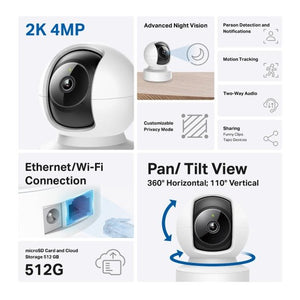
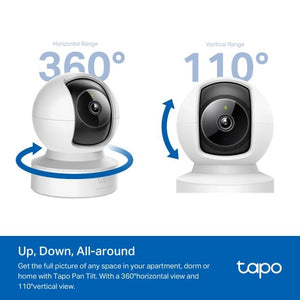
- 2K QHD 4MP video; 360° horizontal and 110° vertical viewing coverage.
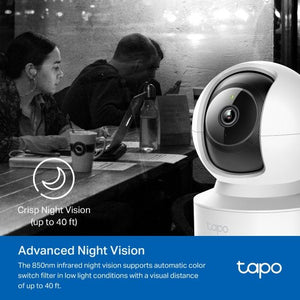
- Built-in night viewing for checking activity after dark.
Connection suited to the location
- 2.4GHz WiFi or 10/100Mbps Ethernet.
- Live view, event review and two-way audio through the Tapo app.
Recording and everyday operation
- 9V / 0.6A DC; power adapter included. No PoE power input.
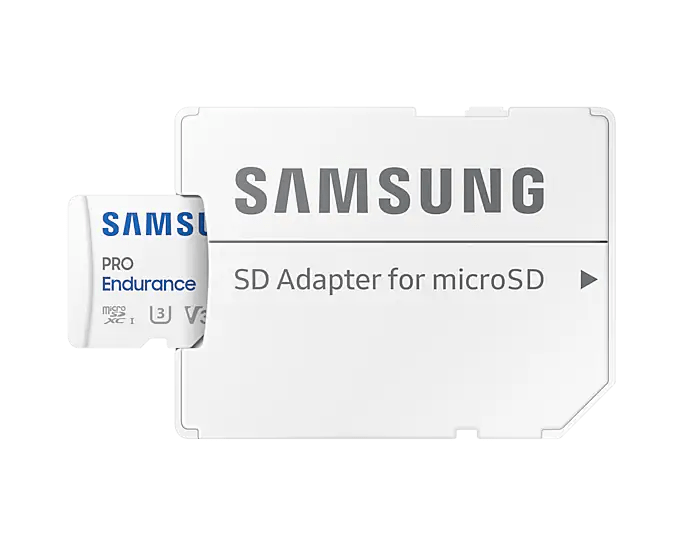
- Local recording on a compatible microSD card; card sold separately. Optional Tapo Care cloud services require a subscription.
Key Features
A wired data option alongside WiFi
Ethernet gives you an alternative when the camera position is easier to reach by cable than by a reliable wireless signal. The port carries data only; the supplied DC power adapter is still required. Place the camera indoors on a secure surface or use the included mounting accessories, keeping its power and network cables safely routed.
Look around and review relevant activity
The motorised view provides 360° horizontal and 110° vertical viewing coverage, with motion tracking and supported AI event detection. Infrared illumination helps when the room is dark, while two-way audio lets you communicate through the built-in microphone and speaker. Set notification preferences and activity zones around your needs
Check the connection before installation
2.4GHz WiFi or 10/100Mbps Ethernet. 9V / 0.6A DC; power adapter included. No PoE power input. Test the connection at the final mounting position. Walls, distance and local interference can affect wireless performance; select the available network method around the actual installation.
Focus alerts on relevant activity
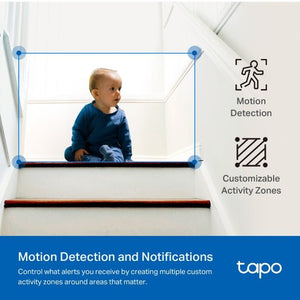
Supported motion and AI detections help you find useful events without treating every change in the scene the same way. Set activity zones, sensitivity and notification schedules around your location. The built-in microphone and speaker provide two-way communication. Results depend on lighting, subject movement, placement and settings; detection supports awareness and review rather than guaranteeing that every event will be captured.
Keep a recording arrangement that suits your needs
Use a compatible microSD card to keep a local recording archive, with event or scheduled recording configured through the app. Recorded duration depends on image quality, frame rate, activity and storage settings. Tapo Care is an optional paid service for cloud storage and supported rich notifications. For third-party recording, check the exact RTSP or ONVIF capabilities in the specifications rather than assuming that every app feature transfers to another recorder.
Install for a clear and serviceable view
Choose a stable indoor location with a clear view, and secure the power cable away from children and pets. Keep the moving lens clear of obstructions. Use privacy controls and notification schedules to suit the people sharing the space, and avoid recording neighbouring or private areas unnecessarily.
Summary
Tapo C222 combines 2K QHD 4MP imaging with flexible app-controlled monitoring for living rooms, indoor entrances and small work areas. Match the power and network arrangement to the location, set the detection preferences around the view you need and choose a suitable recording method. Its practical value comes from bringing viewing, event review and communication into one familiar app.
Frequently Asked Questions
Which network connection does it use?
2.4GHz WiFi or 10/100Mbps Ethernet. Confirm a reliable connection at the intended position before installation. Use the separate included power adapter even when Ethernet is selected; the Ethernet port is not a PoE power input.
How is the camera powered?
9V / 0.6A DC; power adapter included. No PoE power input. Use a safe, suitable power route and protect outdoor connections where applicable.
Can it record without a cloud subscription?
Yes. Insert a compatible microSD card, sold separately, and configure local recording in the Tapo app. Tapo Care cloud storage is optional and paid. Event and scheduled recording can be configured for the local card.
Can I use it outdoors?
This is an indoor camera. Install it in a dry indoor location within the operating temperature range and keep the power cable secure.
Can I record with third-party software?
RTSP and ONVIF are supported where listed in the specifications. Confirm the recorder’s resolution, codec, firmware and event support; not every Tapo app function is available through a third-party connection.
Specs
TP-Link Tapo C222 2K QHD Pan Tilt WiFi Security Camera
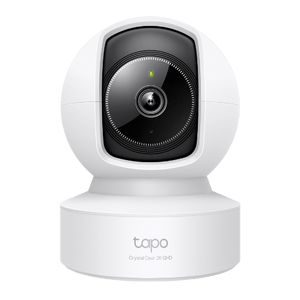
The TP-Link Tapo C222 2K QHD Pan Tilt WiFi Security Camera is designed for living rooms, indoor entrances and small work areas. It combines 2K QHD 4MP imaging with 2.4GHz WiFi or 10/100Mbps Ethernet and a permanent external power connection. The grouped specifications below cover the viewing system, detection and audio, recording, connectivity, power, installation and package. Select storage and any separately required accessories to suit the site. Published imaging and environmental limits describe the camera; they do not establish a guaranteed identification distance, recording duration or installation result.
| Specification | Details |
|---|---|
| Imaging and Optics | |
| Resolution | 2K QHD 4MP. |
| Image sensor | 1/3-inch progressive-scan CMOS sensor. |
| Lens and optical field of view | Approximately 4mm fixed lens; F2.2; approximately 90° diagonal field of view. |
| Viewing coverage | 360° horizontal and 110° vertical viewing coverage. |
| Night viewing | 850 nm IR LED (up to 12m) |
| Frame rate | 15/20/25/30 fps (Default 15fps) |
| Video compression | H.264 |
| Image processing | 3D noise reduction; BLC |
| Detection and Audio | |
| Detection | Motion Detection; Person Detection; Line-Crossing Detection; Tamper Detection; Baby cry Detection; Vehicle Detection; Pet Detection; Meow Detection; Bark Detection; Glass-Breaking Detection. |
| Activity zones | Yes. |
| Audio | Built-in microphone and speaker; two-way audio with noise cancellation. |
| Alarms | Built-in sound alarm. |
| Recording and Storage | |
| Local storage | One microSD card up to 512GB; card sold separately. |
| Cloud storage | Optional paid Tapo Care subscription; supported rich notifications may require a subscription. |
| Recording operation | Event and scheduled recording configured through the Tapo app; local recording requires a suitable microSD card. |
| Connectivity and Management | |
| Connection | 2.4GHz WiFi or 10/100Mbps Ethernet. |
| RTSP and ONVIF | Supported; verify third-party recorder features. |
| Management | Tapo app with a TP-Link ID. Internet is required for remote access. Tapo is a separate system from Omada/VIGI. |
| Power and Charging | |
| Power and adapter | 9V / 0.6A DC; power adapter included. No PoE power input. |
| Power cable | 3m, as specified in the V1.0/1.8 datasheet. |
| Power consumption | 3W typical; 5.7W maximum. |
| Physical and Environment | |
| Dimensions | 82.05 × 82 × 112.6mm. |
| Placement | Indoor, dry location. |
| Operating temperature | 0°C to 40°C |
| Storage temperature | -40°C to 70°C |
| Operating humidity | 10%~90% RH, Non-condensing |
| Device weight | 200g; camera only. |
| Mounting | Tabletop; ceiling-mounted. |
| Package and Warranty | |
| Package | Camera, supplied power adapter, mounting accessories and quick-start guide. |
| Warranty | 3 years. |
Add-ons