



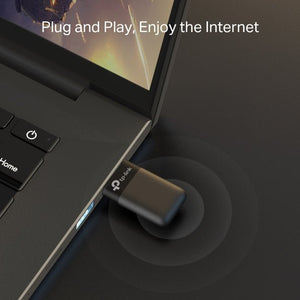
TP-Link Archer TX50U AX3000 Dual Band Wi-Fi 6 USB Adapter
Dual-band Wi-Fi 6 in a compact USB adapter The TP-Link Archer TX50U adds Wi-Fi 6 connectivity to a Windows desktop or laptop through USB 3.0. Its compact body houses two internal antennas and connects to 2.4 GHz or 5 GHz networks without an external antenna assembly. Highlights Dual-band wireless AX3000 Wi-Fi 6 with maximum link rates of 2402 Mbps on 5 GHz and 574 Mbps on 2.4 GHz. OFDMA and MU-MIMO support with a compatible access point. Compact USB connection USB 3.0 interface for a desktop or laptop USB port. Two internal dual-band antennas in a 19.4 × 7.9 × 43.9 mm body. Windows setup and security Preloaded driver installer for CD-free setup. Windows 10 and Windows 11 compatibility, with WPA3 support on compatible networks. Key Features A choice of 2.4 GHz and 5 GHz Connect the computer to the band available from its router or access point. Wi-Fi 6 features require corresponding network support. The quoted speeds are separate maximum wireless link rates; they do not describe a combined internet connection or guaranteed throughput. USB 3.0 and internal antennas The adapter plugs directly into a computer without a separate desktop cradle. USB 3.0 is recommended to avoid restricting its host connection. The internal antennas keep the adapter compact, while its 6.3 g device weight suits portable use. Installation without a CD Run the stored driver installer when the adapter is connected, then join a wireless network through Windows. Installation may require administrator access. Use a driver that matches the adapter’s hardware version and region, and check for an update after a major operating-system change. Security matched to the network WPA3 is available when supported by the router or access point. WPA and WPA2 compatibility is also provided. Actual connection performance depends on the computer, router, network settings, interference and the adapter’s position. Summary Archer TX50U suits Windows computers that need a compact USB Wi-Fi 6 connection. It combines dual-band networking and internal antennas with a preloaded installer, while keeping the USB port and driver requirements straightforward. Frequently Asked Questions Which operating systems are supported?ExpandCollapse The manufacturer datasheet lists Windows 10 and Windows 11 in 64-bit versions. Check the driver for the exact hardware version and region before installation. Does AX3000 mean a 3Gbps internet connection?ExpandCollapse AX3000 is a wireless speed class. The separate maximum link rates are 2402 Mbps on 5 GHz and 574 Mbps on 2.4 GHz. Actual throughput depends on the whole connection. Is a driver still required?ExpandCollapse Yes. The adapter carries a preloaded installer for CD-free setup. Run the installer, then connect through Windows. A matching downloaded driver can be used if the stored installer is unavailable. Which USB port should be used?ExpandCollapse The manufacturer recommends USB 3.0. Connect the adapter directly to a suitable computer USB port. What is needed for Wi-Fi 6 and WPA3?ExpandCollapse The router or access point must support the corresponding feature. The adapter’s driver and the computer must also be compatible.
Pickup available at 3005, Ubi Avenue 3, #01-88
Usually ready in 2-4 Business Day (Excluding Public Holiday)
TP-Link Archer TX50U AX3000 Dual Band Wi-Fi 6 USB Adapter
Description
Dual-band Wi-Fi 6 in a compact USB adapter
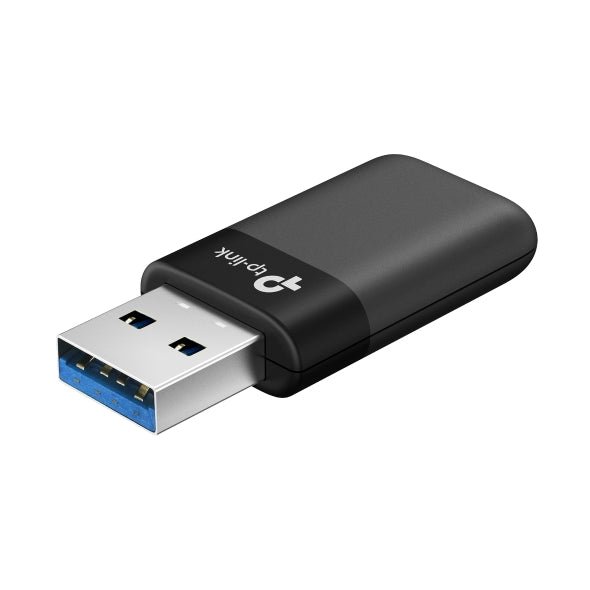
The TP-Link Archer TX50U adds Wi-Fi 6 connectivity to a Windows desktop or laptop through USB 3.0. Its compact body houses two internal antennas and connects to 2.4 GHz or 5 GHz networks without an external antenna assembly.
Highlights
Dual-band wireless
- AX3000 Wi-Fi 6 with maximum link rates of 2402 Mbps on 5 GHz and 574 Mbps on 2.4 GHz.
- OFDMA and MU-MIMO support with a compatible access point.
Compact USB connection
- USB 3.0 interface for a desktop or laptop USB port.
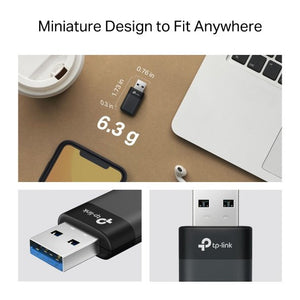
- Two internal dual-band antennas in a 19.4 × 7.9 × 43.9 mm body.
Windows setup and security
- Preloaded driver installer for CD-free setup.
- Windows 10 and Windows 11 compatibility, with WPA3 support on compatible networks.
Key Features
A choice of 2.4 GHz and 5 GHz
Connect the computer to the band available from its router or access point. Wi-Fi 6 features require corresponding network support. The quoted speeds are separate maximum wireless link rates; they do not describe a combined internet connection or guaranteed throughput.
USB 3.0 and internal antennas
The adapter plugs directly into a computer without a separate desktop cradle. USB 3.0 is recommended to avoid restricting its host connection. The internal antennas keep the adapter compact, while its 6.3 g device weight suits portable use.
Installation without a CD
Run the stored driver installer when the adapter is connected, then join a wireless network through Windows. Installation may require administrator access. Use a driver that matches the adapter’s hardware version and region, and check for an update after a major operating-system change.
Security matched to the network
WPA3 is available when supported by the router or access point. WPA and WPA2 compatibility is also provided. Actual connection performance depends on the computer, router, network settings, interference and the adapter’s position.
Summary
Archer TX50U suits Windows computers that need a compact USB Wi-Fi 6 connection. It combines dual-band networking and internal antennas with a preloaded installer, while keeping the USB port and driver requirements straightforward.
Frequently Asked Questions
Which operating systems are supported?
The manufacturer datasheet lists Windows 10 and Windows 11 in 64-bit versions. Check the driver for the exact hardware version and region before installation.
Does AX3000 mean a 3Gbps internet connection?
AX3000 is a wireless speed class. The separate maximum link rates are 2402 Mbps on 5 GHz and 574 Mbps on 2.4 GHz. Actual throughput depends on the whole connection.
Is a driver still required?
Yes. The adapter carries a preloaded installer for CD-free setup. Run the installer, then connect through Windows. A matching downloaded driver can be used if the stored installer is unavailable.
Which USB port should be used?
The manufacturer recommends USB 3.0. Connect the adapter directly to a suitable computer USB port.
What is needed for Wi-Fi 6 and WPA3?
The router or access point must support the corresponding feature. The adapter’s driver and the computer must also be compatible.
Specs
TP-Link Archer TX50U AX3000 Dual Band Wi-Fi 6 USB Adapter
Archer TX50U is a compact dual-band USB Wi-Fi 6 adapter with two internal antennas. Its signal rates describe wireless link capability. Performance and feature availability depend on the computer, compatible access point, settings and driver.
| Specification | Details |
|---|---|
| Wireless connectivity | |
| Wi-Fi standards | IEEE 802.11a/b/g/n/ac/ax |
| Bands | 2.4 GHz and 5 GHz |
| Maximum Wi-Fi 6 signal rates | 5 GHz: up to 2402 Mbps; 2.4 GHz: up to 574 Mbps |
| Wireless features | OFDMA and MU-MIMO; corresponding access-point support required |
| Wireless mode | Infrastructure mode |
| Security | WEP, WPA/WPA2/WPA3 and WPA-PSK/WPA2-PSK; WPA3 requires a compatible access point |
| Host connection and installation | |
| Interface | USB 3.0 |
| Supported operating systems | Windows 10 and Windows 11, 64-bit |
| Driver installation | Preloaded installer; a driver matching the hardware version and region is required |
| Indicator | Status LED |
| Physical design | |
| Antennas | Two internal dual-band antennas |
| Dimensions W × D × H | 19.4 × 7.9 × 43.9 mm |
| Device weight | 6.3 g |
| Environment | |
| Operating temperature | 0–40°C |
| Operating humidity | 10–90% RH, non-condensing |
| Storage humidity | 5–90% RH, non-condensing |
| Supplied items and warranty | |
| Package contents | Archer TX50U USB adapter; Quick Installation Guide |
| Warranty | 3 years |