



Seagate FireCuda Forge USB4 Desktop Hard Drive
A compatible NVMe SSD is required and sold separately. Combine a large game or creative library with an automatically managed SSD cache. Seagate FireCuda Forge brings an included 8TB or 20TB hard drive and a user-installed NVMe SSD together as one USB4 desktop volume, with Alkemi technology managing frequently used data in the background. Install the SSD before first use. A 1TB M.2 2280 NVMe SSD without a heatsink is recommended; Forge recognises up to 1TB of cache. The SSD does not increase the drive's advertised HDD capacity. Highlights 8TB or 20TB HDD capacity: choose STNS8000400 or STNS20000400 for games, captures, footage and project libraries. Adaptive SSD caching: Alkemi prioritises frequently accessed data on the installed SSD while presenting one volume to the computer. USB4 connection: Seagate specifies up to 2,500MB/s read and 2,000MB/s write with a suitable SSD and compatible system. Actual performance depends on the workload, cache state, SSD and connection. User-serviceable storage: the SSD and HDD can be replaced. Replacing either recreates the volume and erases its data, so make a separate backup first. Programmable RGB: customise the lighting with Seagate Toolkit on Windows. Choose the Right SSD Use an M.2 2280 NVMe SSD with PCIe Gen3 or later and rated sequential speeds of at least 2,400MB/s read and 2,000MB/s write. Seagate recommends an SSD with DRAM cache. A SATA M.2 drive is not the specified drive type. A 1TB SSD is recommended. Larger SSDs are supported, but only up to 1TB is recognised and extra capacity does not improve Forge performance. Smaller SSDs are supported with potentially reduced performance. PCIe Gen4 and later drives do not improve performance over a suitable Gen3 drive inside Forge. Do not install a heatsink-equipped SSD; use the included thermal pads. Check the Computer and Connection For the specified host connection, use USB4 or a compatible Thunderbolt 3, 4 or 5 port with the included USB-C to USB-C USB4 cable. A USB-C socket alone does not establish compatibility. A dock must carry the required USB4 or compatible Thunderbolt connection; older USB-A-only hubs are unsuitable. Seagate lists Windows 11 and macOS 26 or later. The volume initially formats as NTFS for Windows. A Mac can read NTFS but cannot natively write to it; reformat for the intended Mac or cross-platform workflow after backing up any data. Formatting and storage-component replacement erase data. For Changing Libraries and Active Projects Forge suits a large library in which a smaller selection of games or working files receives repeated access. It does not make every first read or long transfer run at the advertised peak. For predictable access across an entire active dataset, compare an SSD-based setup; for straightforward bulk copies, compare an ordinary external HDD. Included in the Box FireCuda Forge HDD base unit in the selected capacity 12V DC, 4A power supply and regional plug adapters USB4 cable with USB-C connectors M.2 mounting screw and two thermal pads 2mm hex screwdriver The SSD is not included. An M.2 screw requires a PH1 screwdriver, which is not included. Keep a separate recovery copy of important files; the cache and HDD form one device rather than an independent backup.
Pickup available at 3005, Ubi Avenue 3, #01-88
Usually ready in 2-4 Business Day (Excluding Public Holiday)
Seagate FireCuda Forge USB4 Desktop Hard Drive
Description
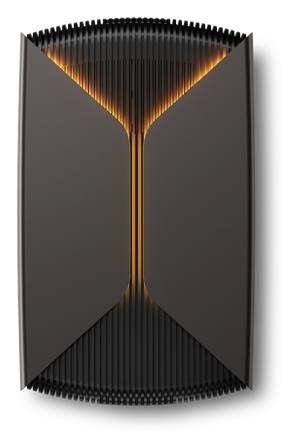
A compatible NVMe SSD is required and sold separately. Combine a large game or creative library with an automatically managed SSD cache. Seagate FireCuda Forge brings an included 8TB or 20TB hard drive and a user-installed NVMe SSD together as one USB4 desktop volume, with Alkemi technology managing frequently used data in the background.
Install the SSD before first use. A 1TB M.2 2280 NVMe SSD without a heatsink is recommended; Forge recognises up to 1TB of cache. The SSD does not increase the drive's advertised HDD capacity.
Highlights
- 8TB or 20TB HDD capacity: choose STNS8000400 or STNS20000400 for games, captures, footage and project libraries.
- Adaptive SSD caching: Alkemi prioritises frequently accessed data on the installed SSD while presenting one volume to the computer.
- USB4 connection: Seagate specifies up to 2,500MB/s read and 2,000MB/s write with a suitable SSD and compatible system. Actual performance depends on the workload, cache state, SSD and connection.
- User-serviceable storage: the SSD and HDD can be replaced. Replacing either recreates the volume and erases its data, so make a separate backup first.
- Programmable RGB: customise the lighting with Seagate Toolkit on Windows.
Choose the Right SSD
Use an M.2 2280 NVMe SSD with PCIe Gen3 or later and rated sequential speeds of at least 2,400MB/s read and 2,000MB/s write. Seagate recommends an SSD with DRAM cache. A SATA M.2 drive is not the specified drive type.
A 1TB SSD is recommended. Larger SSDs are supported, but only up to 1TB is recognised and extra capacity does not improve Forge performance. Smaller SSDs are supported with potentially reduced performance. PCIe Gen4 and later drives do not improve performance over a suitable Gen3 drive inside Forge. Do not install a heatsink-equipped SSD; use the included thermal pads.
Check the Computer and Connection
For the specified host connection, use USB4 or a compatible Thunderbolt 3, 4 or 5 port with the included USB-C to USB-C USB4 cable. A USB-C socket alone does not establish compatibility. A dock must carry the required USB4 or compatible Thunderbolt connection; older USB-A-only hubs are unsuitable.
Seagate lists Windows 11 and macOS 26 or later. The volume initially formats as NTFS for Windows. A Mac can read NTFS but cannot natively write to it; reformat for the intended Mac or cross-platform workflow after backing up any data. Formatting and storage-component replacement erase data.
For Changing Libraries and Active Projects
Forge suits a large library in which a smaller selection of games or working files receives repeated access. It does not make every first read or long transfer run at the advertised peak. For predictable access across an entire active dataset, compare an SSD-based setup; for straightforward bulk copies, compare an ordinary external HDD.
Included in the Box
- FireCuda Forge HDD base unit in the selected capacity
- 12V DC, 4A power supply and regional plug adapters
- USB4 cable with USB-C connectors
- M.2 mounting screw and two thermal pads
- 2mm hex screwdriver
The SSD is not included. An M.2 screw requires a PH1 screwdriver, which is not included. Keep a separate recovery copy of important files; the cache and HDD form one device rather than an independent backup.
Specs
Seagate FireCuda Forge Specifications
| Product | Seagate FireCuda Forge desktop storage |
|---|---|
| Capacity and model | 8TB: STNS8000400; 20TB: STNS20000400 |
| Storage architecture | Included HDD plus required user-installed NVMe SSD; Alkemi manages an SSD cache behind one volume |
| SSD included | No. A compatible SSD must be installed before use |
| Required SSD type | M.2 2280 NVMe, PCIe Gen3 or later; no heatsink |
| SSD performance requirement | At least 2,400MB/s read and 2,000MB/s write; SSD DRAM cache recommended |
| SSD cache capacity | 1TB recommended. Above 1TB supported but recognised only up to 1TB; below 1TB supported with potentially reduced performance |
| PCIe generation | Gen4 and later SSDs supported, without a performance improvement over a suitable Gen3 SSD inside Forge |
| Displayed volume capacity | Determined by the HDD; SSD cache capacity is not added. Formatted capacity is lower than nominal capacity |
| Host interface | USB4. Specified host ports: USB4 or compatible Thunderbolt 3, 4 or 5 |
| Manufacturer transfer rating | Up to 2,500MB/s read and 2,000MB/s write; depends on SSD, host, connection, cache state and workload |
| Supported operating systems | Windows 11 and macOS 26 or later, as listed by Seagate |
| Initial volume format | NTFS. Reformatting required for native Mac write access; formatting erases data |
| Power | External 12V DC, 4A power supply |
| Dimensions | 65.2 × 146.8 × 240.3mm, in Seagate's listed dimension order |
| Product weight | 8TB: 1,845g; 20TB: 1,919g |
| Lighting | Programmable RGB; Toolkit RGB customisation on Windows |
| Serviceability | User-replaceable SSD and HDD. Replacing either recreates the volume and erases existing data |
| Included accessories | Regional power adapters, USB-C to USB-C USB4 cable, M.2 mounting screw, two thermal pads, 2mm hex screwdriver |
| Additional tool | PH1 screwdriver for the SSD mounting screw, not included |