






QNAP TS-873A 8-Bay Ryzen Tower NAS
More Drive Bays for a Growing Business Library The QNAP TS-873A brings eight drive bays to teams managing expanding project libraries, business backups and shared working files. A Ryzen processor and dual 2.5GbE ports support everyday collaboration, with dedicated NVMe slots and two PCIe expansion slots for a more tailored system. The larger drive layout offers more RAID choices than a compact entry system, while QTS or QuTS hero lets administrators choose a storage environment suited to their applications. Highlights Ryzen Processing and Memory Flexibility Four cores and eight threads with 8GB DDR4 installed. Two SODIMM slots support up to 64GB; compatible ECC memory is an optional replacement. Separate Capacity and Acceleration 8 hot-swappable SATA drive bays. Two M.2 NVMe slots without occupying the front bays. Network and Application Options Dual 2.5GbE ports and two PCIe Gen3 x4 slots. QTS or suitably resourced QuTS hero with operating-system-specific applications. Key Features A capable platform for everyday business storage The Ryzen V1500B keeps shared folders, backup services and supported business applications on one manageable system. Its four cores and eight threads provide a useful foundation for mixed office activity, with hardware encryption acceleration for supported tasks. Assess the complete workload when planning performance: drive selection, network links and simultaneous services matter as much as the processor. Keep flash acceleration separate from the drive bays The dedicated NVMe slots allow compatible SSDs to serve supported caching or storage roles without occupying the front SATA bays. Each slot uses a PCIe Gen3 x1 connection, so it should be planned around the application rather than the headline speed of a newer SSD. Use suitably sized heatsinks and verify the drive, firmware and cache configuration before deployment. Build a network upgrade around the system Two built-in 2.5GbE ports offer a practical step beyond Gigabit Ethernet when the switch and clients support it. Two PCIe Gen3 x4 slots can accept compatible network or storage cards for a more demanding installation. Link aggregation requires a suitable network configuration; it does not automatically give a single transfer the combined speed of both ports. Choose QTS or ZFS with the right memory QTS provides the familiar EXT4 storage environment and supported Qtier configurations. QuTS hero offers ZFS features such as data integrity checking, compression and supported deduplication. QuTS hero needs at least 8GB RAM, while deduplication needs at least 16GB and benefits from more. Switching operating systems reinitialises storage, so make and verify a separate backup first. Bring backup and recovery into the same plan Hybrid Backup Sync coordinates scheduled copies to another NAS, supported cloud storage or a connected backup drive. Snapshots provide useful recovery points for supported volumes, shared folders and iSCSI LUNs, according to the selected operating system. Keep a separate, tested backup: RAID and snapshots on the same appliance do not protect against every equipment failure, stolen system or compromised administrator account. Share information with clearer control SMB and NFS file services connect business workstations and supported servers, while directory integration, shared-folder permissions and encrypted connections help administrators manage access. Qsync supports synchronised working folders for suitable clients. Set permissions around the team and its applications rather than giving every user broad access, and keep the NAS and applications updated as part of normal maintenance. Use applications with resources to match Virtualization Station and Container Station can place suitable virtual machines and containers near their storage. Available memory, processor demand, licensing and operating-system support determine what should run together. Reserve resources for file services, backups and surveillance before adding other workloads. Hardware encryption acceleration helps supported security tasks, but does not remove the need for sound access controls and recovery procedures. Summary The TS-873A is a practical foundation for a growing business storage library. Eight SATA bays provide room to choose a suitable capacity and RAID layout, while separate NVMe slots and PCIe options keep future changes more flexible. Match the drives and memory to the workload, and maintain an independent recovery plan. Are drives and upgrade cards included?ExpandCollapse The NAS is supplied without storage drives. Optional networking, NVMe adapters and external expansion equipment are purchased separately. Which operating system should I choose?ExpandCollapse QTS supplied; QuTS hero alternative requires at least 8GB RAM. Switching OS reinitialises storage. Select QTS or QuTS hero around the application, storage layout and required features, and keep an independent backup. Can I expand storage beyond the built-in bays?ExpandCollapse Yes. Supported USB, SATA, SAS and USB4 expansion enclosures are listed in the specifications. USB4 requires the optional QXP-40G2UC card, a supported BIOS/firmware combination and direct USB4 cabling. Expansion types have different pool rules. How many cameras can the NAS record?ExpandCollapse QVR Surveillance QTS planning estimate up to 79 recording channels for the factory memory configuration, subject to the stated scenario and licences. QVR Surveillance QTS planning estimate for recording only, 1080p H.264, 30 fps and 4.096 Mb/s per camera, with all 8 SATA bays populated in RAID 6; no AI analysis or local playback. An estimate is not a certified model maximum. Actual capacity depends on drives, retention, network and other workloads. QVR Pro on supported QTS provides 8 included camera channels. QVR Surveillance provides 2 base channels plus 6 additional channels after eligible registration, giving 8 in total. Additional channels require the applicable licences and supported software. Does RAID replace a separate backup?ExpandCollapse No. RAID can maintain access through selected drive faults, while snapshots can help recover supported earlier states. Neither replaces a separate backup against theft, major hardware failure or compromised credentials. Keep protected copies and test that important data can be restored. Which service and storage add-ons should I choose?ExpandCollapse The 5–8-bay NASCare tier is the relevant starting point for this chassis, subject to service eligibility. Choose a qualified NAS drive from the recommended IronWolf family and confirm its exact model and firmware against the intended RAID and workload.
Add-ons (3)
Pickup available at 3005, Ubi Avenue 3, #01-88
Usually ready in 2-4 Business Day (Excluding Public Holiday)
QNAP TS-873A 8-Bay Ryzen Tower NAS
Description
More Drive Bays for a Growing Business Library
The QNAP TS-873A brings eight drive bays to teams managing expanding project libraries, business backups and shared working files. A Ryzen processor and dual 2.5GbE ports support everyday collaboration, with dedicated NVMe slots and two PCIe expansion slots for a more tailored system. The larger drive layout offers more RAID choices than a compact entry system, while QTS or QuTS hero lets administrators choose a storage environment suited to their applications.
Highlights
Ryzen Processing and Memory Flexibility
- Four cores and eight threads with 8GB DDR4 installed.
- Two SODIMM slots support up to 64GB; compatible ECC memory is an optional replacement.
Separate Capacity and Acceleration
- 8 hot-swappable SATA drive bays.
- Two M.2 NVMe slots without occupying the front bays.
Network and Application Options
- Dual 2.5GbE ports and two PCIe Gen3 x4 slots.
- QTS or suitably resourced QuTS hero with operating-system-specific applications.
Key Features
A capable platform for everyday business storage
The Ryzen V1500B keeps shared folders, backup services and supported business applications on one manageable system. Its four cores and eight threads provide a useful foundation for mixed office activity, with hardware encryption acceleration for supported tasks. Assess the complete workload when planning performance: drive selection, network links and simultaneous services matter as much as the processor.
Keep flash acceleration separate from the drive bays
The dedicated NVMe slots allow compatible SSDs to serve supported caching or storage roles without occupying the front SATA bays. Each slot uses a PCIe Gen3 x1 connection, so it should be planned around the application rather than the headline speed of a newer SSD. Use suitably sized heatsinks and verify the drive, firmware and cache configuration before deployment.
Build a network upgrade around the system
Two built-in 2.5GbE ports offer a practical step beyond Gigabit Ethernet when the switch and clients support it. Two PCIe Gen3 x4 slots can accept compatible network or storage cards for a more demanding installation. Link aggregation requires a suitable network configuration; it does not automatically give a single transfer the combined speed of both ports.
Choose QTS or ZFS with the right memory
QTS provides the familiar EXT4 storage environment and supported Qtier configurations. QuTS hero offers ZFS features such as data integrity checking, compression and supported deduplication. QuTS hero needs at least 8GB RAM, while deduplication needs at least 16GB and benefits from more. Switching operating systems reinitialises storage, so make and verify a separate backup first.
Bring backup and recovery into the same plan
Hybrid Backup Sync coordinates scheduled copies to another NAS, supported cloud storage or a connected backup drive. Snapshots provide useful recovery points for supported volumes, shared folders and iSCSI LUNs, according to the selected operating system. Keep a separate, tested backup: RAID and snapshots on the same appliance do not protect against every equipment failure, stolen system or compromised administrator account.
Share information with clearer control
SMB and NFS file services connect business workstations and supported servers, while directory integration, shared-folder permissions and encrypted connections help administrators manage access. Qsync supports synchronised working folders for suitable clients. Set permissions around the team and its applications rather than giving every user broad access, and keep the NAS and applications updated as part of normal maintenance.
Use applications with resources to match
Virtualization Station and Container Station can place suitable virtual machines and containers near their storage. Available memory, processor demand, licensing and operating-system support determine what should run together. Reserve resources for file services, backups and surveillance before adding other workloads. Hardware encryption acceleration helps supported security tasks, but does not remove the need for sound access controls and recovery procedures.
Summary
The TS-873A is a practical foundation for a growing business storage library. Eight SATA bays provide room to choose a suitable capacity and RAID layout, while separate NVMe slots and PCIe options keep future changes more flexible. Match the drives and memory to the workload, and maintain an independent recovery plan.
Are drives and upgrade cards included?
The NAS is supplied without storage drives. Optional networking, NVMe adapters and external expansion equipment are purchased separately.
Which operating system should I choose?
QTS supplied; QuTS hero alternative requires at least 8GB RAM. Switching OS reinitialises storage. Select QTS or QuTS hero around the application, storage layout and required features, and keep an independent backup.
Can I expand storage beyond the built-in bays?
Yes. Supported USB, SATA, SAS and USB4 expansion enclosures are listed in the specifications. USB4 requires the optional QXP-40G2UC card, a supported BIOS/firmware combination and direct USB4 cabling. Expansion types have different pool rules.
How many cameras can the NAS record?
QVR Surveillance QTS planning estimate up to 79 recording channels for the factory memory configuration, subject to the stated scenario and licences. QVR Surveillance QTS planning estimate for recording only, 1080p H.264, 30 fps and 4.096 Mb/s per camera, with all 8 SATA bays populated in RAID 6; no AI analysis or local playback. An estimate is not a certified model maximum. Actual capacity depends on drives, retention, network and other workloads. QVR Pro on supported QTS provides 8 included camera channels. QVR Surveillance provides 2 base channels plus 6 additional channels after eligible registration, giving 8 in total. Additional channels require the applicable licences and supported software.
Does RAID replace a separate backup?
No. RAID can maintain access through selected drive faults, while snapshots can help recover supported earlier states. Neither replaces a separate backup against theft, major hardware failure or compromised credentials. Keep protected copies and test that important data can be restored.
Which service and storage add-ons should I choose?
The 5–8-bay NASCare tier is the relevant starting point for this chassis, subject to service eligibility. Choose a qualified NAS drive from the recommended IronWolf family and confirm its exact model and firmware against the intended RAID and workload.
Specs
QNAP TS-873A 8-Bay Ryzen Tower NAS
The QNAP TS-873A combines an AMD Ryzen processor with eight hot-swappable SATA bays, separate NVMe slots and dual 2.5GbE networking. It provides a flexible foundation for shared business files, scheduled backups and suitably resourced applications. Two PCIe slots support compatible networking and storage expansion, while the choice of QTS or QuTS hero lets administrators match the file system to their storage design. Drives, network upgrades and expansion equipment are purchased separately.
| Specification | Details |
|---|---|
| Hardware and connectivity | |
| Processor | AMD Ryzen Embedded V1500B; 4 cores/8 threads; 2.2GHz; x86-64; AES-NI encryption acceleration. |
| Factory memory | 8GB DDR4 non-ECC SODIMM. |
| Memory expansion | 2 SODIMM slots; maximum 64GB using 2 × 32GB. Compatible ECC memory is supported as a replacement configuration; do not mix ECC and non-ECC modules. |
| System flash | 5GB with dual-boot OS protection. |
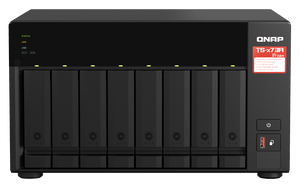
| SATA storage | 8 × SATA 6Gb/s bays for compatible 3.5-inch HDDs or 2.5-inch SATA SSDs; hot-swappable. |
| NVMe storage | 2 × M.2 2280 NVMe slots; PCIe Gen3 x1 per slot. SSDs and suitable heatsinks are optional. Built-in M.2 slots are not hot-swappable. |
| SATA RAID | QTS Single, JBOD and RAID 0/1/5/6/10/50/60. QuTS hero supports applicable ZFS mirrored and parity layouts. Minimum drive counts and OS rules apply. |
| NVMe RAID | Two-drive supported storage arrangements are Single, RAID 0 or RAID 1, according to OS and role; cache settings are separate. |
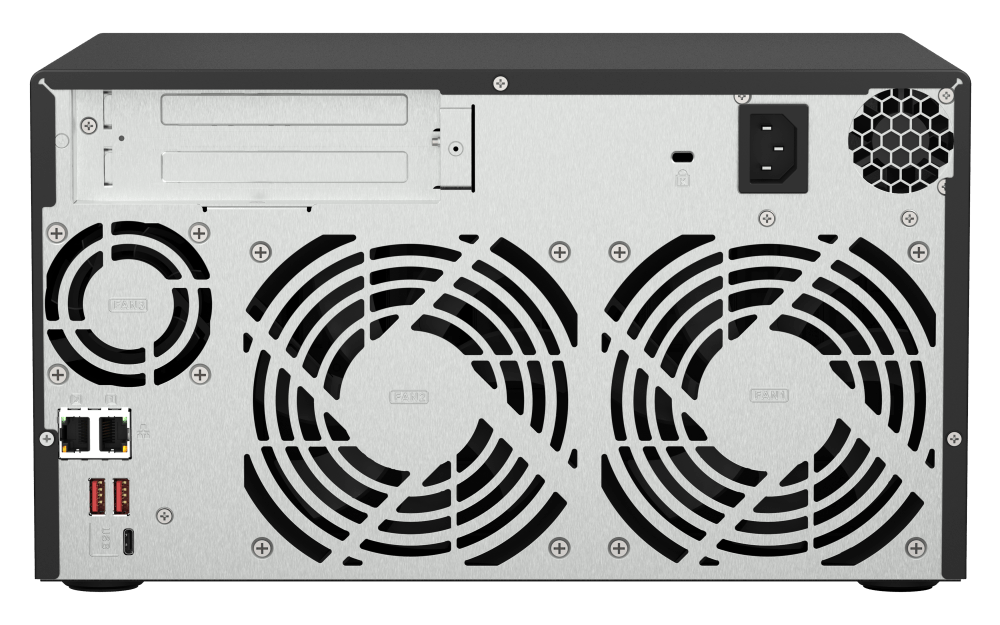
| Network interfaces | 2 × 2.5GBASE-T RJ45; compatible 5/10GbE networking is optional via PCIe. |
| PCIe expansion | 2 × PCIe Gen3 x4 slots; high-profile cards up to 200 × 131.15 × 18.76mm. Check exact card compatibility; wider cards can occupy the adjacent slot area. |
| USB interfaces | 3 × USB-A 10Gb/s; 1 × USB-C 5Gb/s. |
| Display output | No built-in HDMI output; compatible optional graphics hardware is required for supported display applications. |
| Operating system and data services | |
| Operating system | QTS supplied; QuTS hero alternative requires at least 8GB RAM. Switching OS reinitialises storage. |
| File system | QTS uses EXT4; QuTS hero uses ZFS. Operating-system changes require a backup and storage reinitialisation. |
| Snapshots and recovery | QTS volume/LUN snapshots or QuTS hero shared-folder/LUN snapshots; replication, retention and recovery features depend on the selected OS and available resources. |
| Backup and synchronisation | Hybrid Backup Sync for supported local, remote and cloud destinations; Qsync; supported Time Machine backups. Cloud capacity and third-party services may require separate subscriptions. |
| File sharing and access | SMB, NFS and FTP/SFTP services; directory integration, shared-folder permissions and encrypted connections. |
| Accounts and shared folders | QTS supports up to 4,096 local users, 512 groups and 512 shared folders; actual concurrent SMB connections up to 2,000 with maximum memory. OS-specific limits apply. |
| iSCSI storage | Thick/thin LUNs; QTS supports file-based and block-based LUNs, QuTS hero supports block-based LUNs. Multipath and snapshot capabilities depend on host and OS configuration. |
| Virtualisation and containers | Virtualization Station and Container Station for supported guests and images; usable capacity depends on CPU, installed RAM and concurrent workloads. |
| Data reduction | QuTS hero compression and inline deduplication; deduplication requires at least 16GB RAM, with 32GB or more recommended. QTS Qtier is available only in compatible QTS storage configurations. |
| Surveillance | |
| Included camera channels | QVR Pro on supported QTS provides 8 included camera channels. QVR Surveillance provides 2 base channels plus 6 additional channels after eligible registration, giving 8 in total. Additional channels require the applicable licences and supported software. |
| Camera capacity | QVR Surveillance QTS planning estimate up to 79 recording channels with factory 8GB RAM, subject to the scenario and licences. This is a memory-tier estimate, not a tested maximum. |
| Capacity conditions | QNAP selector: recording only, 1080p H.264, 30 fps and 4.096 Mb/s per camera, with all 8 SATA bays populated in RAID 6; no AI analysis or playback. Actual capacity depends on drives, retention, network and other workloads. |
| Surveillance OS qualification | QTS planning figures do not establish QuTS hero capacity. QVR Surveillance extra-channel expansion on QuTS hero must be verified before deployment; included-channel entitlement and application availability follow the installed OS. |
| Storage expansion | |
| USB expansion enclosures | Up to 2 × TL-D800C or TL-R1200C-RP; up to 2 × TR-002, TR-004 or TR-004U. TR hardware RAID enclosures use a separate pool or volume and cannot expand an existing internal RAID group. |
| SATA expansion enclosures | Up to 2 × TL-D400S, TL-D800S, TL-D1600S, TL-R400S or TL-R1200S-RP. Matching QXP SATA HBA and SFF-8088/SFF-8644 cables are required; select the card for the enclosure port count and available PCIe slot. |
| USB4 expansion enclosures | Up to 2 × TL-D810TC4 or TL-R1210TC4-RP with optional QXP-40G2UC USB4 card, supported BIOS/firmware and a direct USB4 cable. The built-in USB 3 ports do not provide USB4 operation. |
| SAS expansion enclosures | Up to 4 × TL-R1220Sep-RP or 3 × TL-R1620Sep-RP with a compatible QNAP SAS HBA and external SFF-8644 SAS cables. Verify host card fit, lane width and memory requirements before purchase. |
| Expansion planning | Limits apply by expansion type and supported configuration; do not add the separate maxima together. Check NAS memory, card lanes, firmware, cables and the supported storage-pool arrangement before deployment. |
| Physical and electrical | |
| Form factor | 8-bay tower. |
| Dimensions H × W × D | 180.2 × 329.3 × 279.6mm, excluding feet. |
| Weight | Net 7.4kg; manufacturer gross 8.3kg. |
| Power supply | 250W; AC 100–240V, 50–60Hz. |
| Typical consumption | 54.067W operating; 25.668W standby under the manufacturer test configuration. Actual use varies. |
| Cooling | 2 × 120mm system fans; 1 × 60mm CPU fan. |
| Environment | Operating 0–40°C; storage −20–70°C; 5–95% non-condensing relative humidity; wet-bulb 27°C. |
| Warranty | 3 years. |
| Package | NAS, power cord, Ethernet cable, drive-mounting hardware, tray keys and quick installation guide. Drives and optional cards are not included. |
Add-ons


NASCare Extended Warranty with Loaner Unit for 5-8 Bays


