


Insta360 Mic Air Wireless Microphone
A Smaller Microphone for Everyday Stories Insta360 Mic Air keeps voice recording light and straightforward. The compact wearable transmitter weighs approximately 7.9 g before the button magnet, with omnidirectional pickup and one-touch noise reduction. Pair it directly with a supported Insta360 camera, or choose the transmitter-and-receiver package for a compatible USB-C phone or computer. It suits travel videos, spoken demonstrations and everyday filming where a smaller setup is easier to carry and wear. Highlights Wear It Comfortably Approximately 7.9 g transmitter, excluding the button magnet. Magnetic, clip-on and pendant wearing options. Keep the Voice Clear 48 kHz audio with omnidirectional pickup. One-touch noise reduction, mute and supported camera recording controls. Choose Your Connection Direct Bluetooth connection to supported Insta360 cameras. Optional receiver bundle for supported USB-C phones, computers and phone-based Flow setups. Key Features Stay Close to the Speaker A microphone worn near the voice can give a more useful perspective than a camera several steps away. Mic Air’s small circular design is easy to position on suitable clothing without building a large camera rig. Keep it away from rubbing fabric and make a short recording check before the main take. Reduce Distractions without Complicating the Setup The transmitter provides one-touch noise reduction for everyday surroundings. Its windshield helps address wind at the microphone, while the omnidirectional capsule captures sound from around the unit. Noise reduction is a processing tool rather than sound isolation, so microphone position and the recording environment still matter. Connect Directly to a Supported Camera A compatible Insta360 camera can receive Mic Air audio over Bluetooth without the USB-C receiver. Current support includes the Luna series, X6, X5, X4, X4 Air, Ace Pro 2 and GO Ultra, with firmware requirements for some models. Use the transmitter button for supported recording, noise reduction or mute actions while keeping attention on the shot. Add the Receiver for Mobile Recording The receiver version connects to a compatible USB-C phone or computer and draws power from that device. When filming with a Flow gimbal, the receiver connects to the phone, rather than treating the gimbal as an audio recorder. Device, operating-system and app support still apply; the transmitter alone is not a general-purpose Bluetooth microphone for a phone. Understand the Range and Runtime The up-to-300 m figure describes the transmitter-to-receiver link in an open, unobstructed, interference-free environment. Direct camera Bluetooth range is shorter and depends on conditions. The transmitter runs for up to 10 hours with a receiver, or approximately 7.5 hours when connected directly to a camera, under tests with noise reduction off. Keep the Workflow Simple Mic Air records through the connected camera, phone or computer. It has no internal recorder or memory-card slot, so check that the receiving device is recording and has suitable storage. Its receiver is part of the Mic Air system and cannot be mixed with Mic or Mic Pro transmitters. Choose the Right Package from the Start Choose the transmitter-only option if you have a supported direct camera workflow. Choose the one-transmitter and one-receiver package for a suitable USB-C device. The transmitter charges through its magnetic charging base; the receiver is powered by its host device. Keep both protected from rain, splashes and dust. Summary Mic Air is a compact choice for creators who value comfortable wear and a simple camera or USB-C recording setup. Its direct camera support, noise reduction and small footprint make everyday voice capture easier to manage, provided you choose the right receiver option and check device compatibility. Frequently Asked Questions Do I Need the Receiver with an Insta360 Camera?ExpandCollapse Not when your exact Insta360 camera supports Mic Air over Bluetooth and has the required firmware. The receiver package is mainly useful for supported USB-C phones and computers. Check the specific camera model before choosing the transmitter-only option. Can I Connect the Transmitter Directly to a Phone by Bluetooth?ExpandCollapse No. The manufacturer does not support that connection for Mic Air. Use its USB-C receiver with a supported phone. A Flow gimbal setup also records through the connected phone, rather than through the gimbal itself. Does Mic Air Record a Backup Audio File?ExpandCollapse No. Mic Air has no internal recording or memory-card support. Audio is recorded by the connected camera, phone or computer, so check that device’s recording and storage before filming. Does the 300 m Range Apply to a Direct Camera Connection?ExpandCollapse No. That maximum is for the transmitter-to-receiver link in open, unobstructed, interference-free conditions. Direct Bluetooth camera range is shorter and varies with camera, orientation, obstacles and interference. Will It Run for 10 Hours in Every Setup?ExpandCollapse No. The up-to-10-hour result uses a receiver with noise reduction off in controlled conditions. The manufacturer gives approximately 7.5 hours for direct camera use under its test conditions. Settings, temperature and signal conditions affect runtime.
Pickup available at 3005, Ubi Avenue 3, #01-88
Usually ready in 2-4 Business Day (Excluding Public Holiday)
Insta360 Mic Air Wireless Microphone
Description
A Smaller Microphone for Everyday Stories
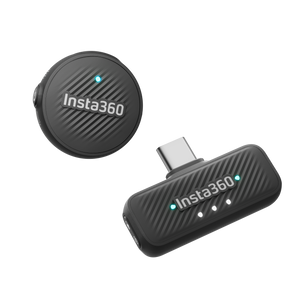
Insta360 Mic Air keeps voice recording light and straightforward. The compact wearable transmitter weighs approximately 7.9 g before the button magnet, with omnidirectional pickup and one-touch noise reduction. Pair it directly with a supported Insta360 camera, or choose the transmitter-and-receiver package for a compatible USB-C phone or computer. It suits travel videos, spoken demonstrations and everyday filming where a smaller setup is easier to carry and wear.
Highlights
Wear It Comfortably
- Approximately 7.9 g transmitter, excluding the button magnet.
- Magnetic, clip-on and pendant wearing options.
Keep the Voice Clear
- 48 kHz audio with omnidirectional pickup.
- One-touch noise reduction, mute and supported camera recording controls.
Choose Your Connection
- Direct Bluetooth connection to supported Insta360 cameras.
- Optional receiver bundle for supported USB-C phones, computers and phone-based Flow setups.
Key Features
Stay Close to the Speaker
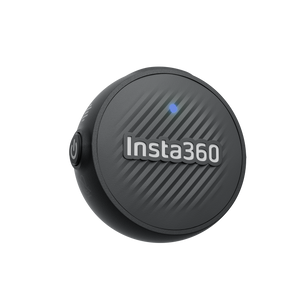
A microphone worn near the voice can give a more useful perspective than a camera several steps away. Mic Air’s small circular design is easy to position on suitable clothing without building a large camera rig. Keep it away from rubbing fabric and make a short recording check before the main take.
Reduce Distractions without Complicating the Setup
The transmitter provides one-touch noise reduction for everyday surroundings. Its windshield helps address wind at the microphone, while the omnidirectional capsule captures sound from around the unit. Noise reduction is a processing tool rather than sound isolation, so microphone position and the recording environment still matter.
Connect Directly to a Supported Camera
A compatible Insta360 camera can receive Mic Air audio over Bluetooth without the USB-C receiver. Current support includes the Luna series, X6, X5, X4, X4 Air, Ace Pro 2 and GO Ultra, with firmware requirements for some models. Use the transmitter button for supported recording, noise reduction or mute actions while keeping attention on the shot.
Add the Receiver for Mobile Recording
The receiver version connects to a compatible USB-C phone or computer and draws power from that device. When filming with a Flow gimbal, the receiver connects to the phone, rather than treating the gimbal as an audio recorder. Device, operating-system and app support still apply; the transmitter alone is not a general-purpose Bluetooth microphone for a phone.
Understand the Range and Runtime
The up-to-300 m figure describes the transmitter-to-receiver link in an open, unobstructed, interference-free environment. Direct camera Bluetooth range is shorter and depends on conditions. The transmitter runs for up to 10 hours with a receiver, or approximately 7.5 hours when connected directly to a camera, under tests with noise reduction off.
Keep the Workflow Simple
Mic Air records through the connected camera, phone or computer. It has no internal recorder or memory-card slot, so check that the receiving device is recording and has suitable storage. Its receiver is part of the Mic Air system and cannot be mixed with Mic or Mic Pro transmitters.
Choose the Right Package from the Start
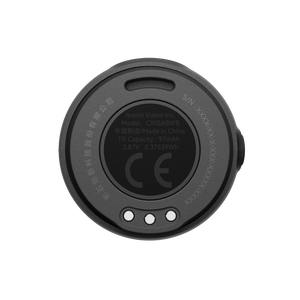
Choose the transmitter-only option if you have a supported direct camera workflow. Choose the one-transmitter and one-receiver package for a suitable USB-C device. The transmitter charges through its magnetic charging base; the receiver is powered by its host device. Keep both protected from rain, splashes and dust.
Summary
Mic Air is a compact choice for creators who value comfortable wear and a simple camera or USB-C recording setup. Its direct camera support, noise reduction and small footprint make everyday voice capture easier to manage, provided you choose the right receiver option and check device compatibility.
Frequently Asked Questions
Do I Need the Receiver with an Insta360 Camera?
Not when your exact Insta360 camera supports Mic Air over Bluetooth and has the required firmware. The receiver package is mainly useful for supported USB-C phones and computers. Check the specific camera model before choosing the transmitter-only option.
Can I Connect the Transmitter Directly to a Phone by Bluetooth?
No. The manufacturer does not support that connection for Mic Air. Use its USB-C receiver with a supported phone. A Flow gimbal setup also records through the connected phone, rather than through the gimbal itself.
Does Mic Air Record a Backup Audio File?
No. Mic Air has no internal recording or memory-card support. Audio is recorded by the connected camera, phone or computer, so check that device’s recording and storage before filming.
Does the 300 m Range Apply to a Direct Camera Connection?
No. That maximum is for the transmitter-to-receiver link in open, unobstructed, interference-free conditions. Direct Bluetooth camera range is shorter and varies with camera, orientation, obstacles and interference.
Will It Run for 10 Hours in Every Setup?
No. The up-to-10-hour result uses a receiver with noise reduction off in controlled conditions. The manufacturer gives approximately 7.5 hours for direct camera use under its test conditions. Settings, temperature and signal conditions affect runtime.
Specs
Insta360 Mic Air Wireless Microphone
Insta360 Mic Air is a compact wearable microphone for supported direct-camera and USB-C recording workflows. Choose the transmitter-only option for a compatible Insta360 camera, or the transmitter-and-receiver package for supported phones and computers. Neither package includes a charging case. Audio is recorded by the connected device, rather than an internal recorder. The table distinguishes receiver-link range from direct Bluetooth use and explains the different runtime figures. Performance depends on the recording setup, firmware, software and the manufacturer’s stated test conditions.
| Specification | Details |
|---|---|
| Audio Capture | |
| Microphone and sample rate | Single omnidirectional microphone; 48 kHz audio capture |
| Audio controls | One-level noise reduction; mute and supported camera recording controls |
| Internal recording | Not supported; no onboard recording storage or memory-card slot |
| Receiver channel mode | Mono; system supports up to 2 Mic Air transmitters with a compatible receiver, with additional transmitter sold separately |
| Connections and Compatibility | |
| Wireless system | 2.4 GHz digital wireless; Bluetooth 5.3 |
| Maximum receiver-link range | Up to 300 m in an open, unobstructed, interference-free environment; this is not the direct camera Bluetooth range |
| Direct camera connection | Supported Insta360 cameras include Luna Ultra/Pro, X6, X5, X4, X4 Air, Ace Pro 2 and GO Ultra; current model-specific firmware requirements apply |
| USB-C receiver | Connects to supported USB-C phones, tablets and computers; host-powered, with USB 2.0 interface |
| Phone and Flow workflow | Receiver connects to the supported phone; transmitter-to-phone Bluetooth is not supported; Flow gimbal use records through the phone |
| System compatibility | Mic Air transmitters and receiver are not interchangeable with Mic or Mic Pro equipment |
| Computer requirements | Manufacturer lists Windows 10 or later with USB-C, or an M-series Mac with USB-C; supported software required |
| Power and Charging | |
| Transmitter battery | 97 mAh, 3.87 V rechargeable battery |
| Operating time | Up to 10 hours with receiver; approximately 7.5 hours with direct camera connection, under controlled tests with noise reduction off |
| Charging | Magnetic charging base; approximately 100 minutes to full with a suitable 5 V supply |
| Receiver power | Draws power from the connected USB-C device; no receiver battery |
| Physical and Environmental | |
| Transmitter dimensions and weight | 26.91 mm diameter × 11.61 mm high; approximately 7.9 g excluding button magnet |
| Receiver dimensions and weight | 40.19 × 25.56 × 9.3 mm (L × W × H); approximately 5.4 g |
| Temperature | Operating: −10°C to 45°C; transmitter charging: 0°C to 45°C |
| Water and dust protection | No waterproof or dustproof rating; protect from rain, splashes and dust |
| Package and Support | |
| Transmitter-only option | 1 Mic Air transmitter; receiver not included |
| Transmitter + receiver option | 1 Mic Air transmitter and 1 USB-C Mic Air receiver |
| Warranty | 1 year |