






Insta360 Luna Ultra ND Filter Set
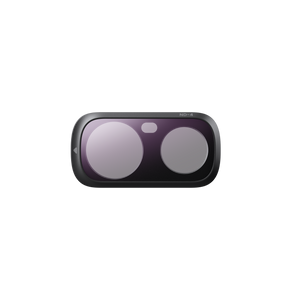
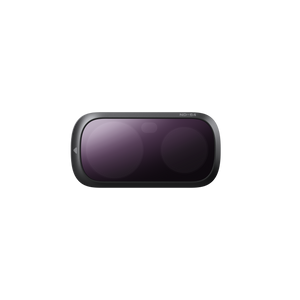
Shape the Light Around the Moment Give shutter speed and movement a more deliberate role in the image. Insta360 Luna Ultra ND Filter Set provides camera-specific magnetic filters that reduce the light reaching the lens. Choose the strength for the scene when you want a slower shutter in bright conditions or a longer exposure for a creative effect, then keep the filters organised in the supplied storage box. Highlights Camera-specific magnetic ND filters for Insta360 Luna Ultra. Different light-reduction strengths for changing conditions. Supports slower-shutter and long-exposure techniques when the scene permits. Lightweight filters with optical glass and an aluminium-alloy frame. Includes a storage box and lens-cleaning cloth. Key Features Reduce Light Before It Reaches the Lens An ND filter reduces incoming light, giving you more flexibility to choose the exposure settings for the intended result. Select the density according to the brightness, shutter speed and camera mode. A stronger filter is not automatically the better choice; too much reduction can leave the image underexposed. Make Motion Blur a Creative Choice In brighter conditions, a suitable ND filter can help you use a slower shutter without admitting as much light. This can give movement a more natural or expressive blur when the camera settings and subject suit the technique. It does not guarantee a cinematic result or improve every recording simply by being attached. Plan Longer Exposures for a Different Look Light reduction can also support a longer exposure when that is appropriate for the scene, such as a considered moving-light or motion effect. Choose the camera mode and settings first, then check the exposure and support the camera appropriately. The filter is part of the exposure workflow, rather than a substitute for the camera’s settings or a stable setup. Fit the Magnetic Frame in the Correct Orientation With the camera powered on, gently align the filter with the Luna Ultra lens and let it seat in place as instructed. Observe the correct top orientation and check the attachment before recording. The model-specific shape matters: the Luna Pro set is a different fit and should not be treated as interchangeable. Change Filters Carefully Between Scenes Use the filter’s removal notch and lift gently, taking care not to drop it or touch the optical surface unnecessarily. Keep the glass clean with appropriate lens care. The magnetic connection makes changing filters convenient, but it still needs clean mating surfaces and careful handling. Keep the Set Together in the Camera Kit The supplied storage box keeps the filters organised between recordings, with a cleaning cloth included for routine lens care. Carry the set separately from loose hard objects that could mark the glass. The camera and any additional lens attachments are separate; this offer is the dedicated ND filter set. Summary Insta360 Luna Ultra ND Filter Set gives the compatible camera a practical way to reduce incoming light and plan a more deliberate exposure. Choose the density for the conditions, fit the magnetic frame correctly and check the image before recording. The supplied box and cloth make it easier to keep the set ready for the next scene. Frequently Asked Questions Which Camera Does This Set Fit?ExpandCollapse It is designed specifically for Insta360 Luna Ultra. The Luna Pro ND set uses a different shape, so do not assume the two sets are interchangeable. What Is Included in the Set?ExpandCollapse The package contains one ND4 filter, one ND16 filter, one ND64 filter, one storage box and one lens-cleaning cloth. The camera and other lens attachments are not included. How Do I Choose the Filter Strength?ExpandCollapse ND4 reduces light by 2 stops, ND16 by 4 stops and ND64 by 6 stops. Choose the strength for the actual brightness and intended exposure settings, then check the image. Using the strongest filter in a dim scene can make the image too dark. Will an ND Filter Automatically Improve My Video?ExpandCollapse No. It reduces incoming light and can help you use a slower shutter when conditions permit. The result depends on lighting, movement, camera mode and exposure settings. Check the intended effect rather than leaving a filter attached for every scene. How Do I Attach and Remove a Filter?ExpandCollapse Follow the manufacturer’s powered-on fitting sequence, align the filter in the correct top orientation and seat it gently. To remove it, use the notch and lift carefully. Keep optical and mating surfaces clean and return the filter to its storage box after use.
Pickup available at 3005, Ubi Avenue 3, #01-88
Usually ready in 2-4 Business Day (Excluding Public Holiday)
Insta360 Luna Ultra ND Filter Set
Description
Shape the Light Around the Moment
Give shutter speed and movement a more deliberate role in the image. Insta360 Luna Ultra ND Filter Set provides camera-specific magnetic filters that reduce the light reaching the lens. Choose the strength for the scene when you want a slower shutter in bright conditions or a longer exposure for a creative effect, then keep the filters organised in the supplied storage box.
Highlights
- Camera-specific magnetic ND filters for Insta360 Luna Ultra.
- Different light-reduction strengths for changing conditions.
- Supports slower-shutter and long-exposure techniques when the scene permits.
- Lightweight filters with optical glass and an aluminium-alloy frame.
- Includes a storage box and lens-cleaning cloth.
Key Features
Reduce Light Before It Reaches the Lens
An ND filter reduces incoming light, giving you more flexibility to choose the exposure settings for the intended result. Select the density according to the brightness, shutter speed and camera mode. A stronger filter is not automatically the better choice; too much reduction can leave the image underexposed.
Make Motion Blur a Creative Choice
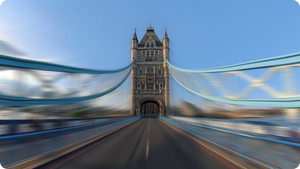
In brighter conditions, a suitable ND filter can help you use a slower shutter without admitting as much light. This can give movement a more natural or expressive blur when the camera settings and subject suit the technique. It does not guarantee a cinematic result or improve every recording simply by being attached.
Plan Longer Exposures for a Different Look
Light reduction can also support a longer exposure when that is appropriate for the scene, such as a considered moving-light or motion effect. Choose the camera mode and settings first, then check the exposure and support the camera appropriately. The filter is part of the exposure workflow, rather than a substitute for the camera’s settings or a stable setup.
Fit the Magnetic Frame in the Correct Orientation
With the camera powered on, gently align the filter with the Luna Ultra lens and let it seat in place as instructed. Observe the correct top orientation and check the attachment before recording. The model-specific shape matters: the Luna Pro set is a different fit and should not be treated as interchangeable.
Change Filters Carefully Between Scenes
Use the filter’s removal notch and lift gently, taking care not to drop it or touch the optical surface unnecessarily. Keep the glass clean with appropriate lens care. The magnetic connection makes changing filters convenient, but it still needs clean mating surfaces and careful handling.
Keep the Set Together in the Camera Kit
The supplied storage box keeps the filters organised between recordings, with a cleaning cloth included for routine lens care. Carry the set separately from loose hard objects that could mark the glass. The camera and any additional lens attachments are separate; this offer is the dedicated ND filter set.
Summary
Insta360 Luna Ultra ND Filter Set gives the compatible camera a practical way to reduce incoming light and plan a more deliberate exposure. Choose the density for the conditions, fit the magnetic frame correctly and check the image before recording. The supplied box and cloth make it easier to keep the set ready for the next scene.
Frequently Asked Questions
Which Camera Does This Set Fit?
It is designed specifically for Insta360 Luna Ultra. The Luna Pro ND set uses a different shape, so do not assume the two sets are interchangeable.
What Is Included in the Set?
The package contains one ND4 filter, one ND16 filter, one ND64 filter, one storage box and one lens-cleaning cloth. The camera and other lens attachments are not included.
How Do I Choose the Filter Strength?
ND4 reduces light by 2 stops, ND16 by 4 stops and ND64 by 6 stops. Choose the strength for the actual brightness and intended exposure settings, then check the image. Using the strongest filter in a dim scene can make the image too dark.
Will an ND Filter Automatically Improve My Video?
No. It reduces incoming light and can help you use a slower shutter when conditions permit. The result depends on lighting, movement, camera mode and exposure settings. Check the intended effect rather than leaving a filter attached for every scene.
How Do I Attach and Remove a Filter?
Follow the manufacturer’s powered-on fitting sequence, align the filter in the correct top orientation and seat it gently. To remove it, use the notch and lift carefully. Keep optical and mating surfaces clean and return the filter to its storage box after use.
Specs
Insta360 Luna Ultra ND Filter Set
Insta360 Luna Ultra ND Filter Set contains camera-specific magnetic filters for controlling the light reaching the lens. Different densities support different exposure choices, from a slower shutter in bright conditions to selected long-exposure techniques. The dimensions and weight below apply to a single filter rather than the complete packaged set. Match the set to Luna Ultra, fit each filter in the correct orientation and check the exposure after changing density. A storage box and cleaning cloth are supplied for organisation and routine care.
| Specification | Details |
|---|---|
| Optics and Camera Fit | |
| Compatible Camera | Insta360 Luna Ultra |
| Filter Densities | ND4, ND16 and ND64 |
| Light Reduction | ND4: 2 stops; ND16: 4 stops; ND64: 6 stops |
| Attachment | Camera-specific magnetic frame |
| Application | Exposure control for slower-shutter and selected long-exposure techniques; suitable camera settings required |
| Physical Design | |
| Single-Filter Dimensions | Approximately 20.7 × 41 × 2.7 mm |
| Single-Filter Weight | Approximately 3.5 g |
| Core Construction | Optical glass and aluminium alloy with magnetic attachment |
| Fitting and Care | |
| Installation | Fit gently with the camera powered on and the filter in its correct top orientation |
| Removal | Lift carefully from the filter notch; avoid dropping the filter |
| Storage | Keep filters in the supplied box; protect optical and mating surfaces from dirt and impact |
| Package and Warranty | |
| Included | 1 ND4 filter, 1 ND16 filter, 1 ND64 filter, 1 storage box and 1 lens-cleaning cloth |
| Sold Separately | Insta360 Luna Ultra camera and additional lens attachments |
| Warranty | 3 months |