


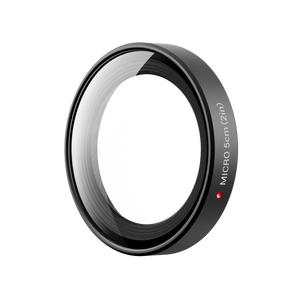


Insta360 GO Ultra Micro Lens Kit
Give Small Details More of the Frame Look closer at the texture of a flower, a carefully prepared dish or a detail that gives the story its character. Insta360 GO Ultra Micro Lens Kit brings four purpose-designed close-up lenses to the camera, each intended for a different subject distance. Choose the lens that suits the scene, confirm its matching Lens Master setting and compose around the desired detail and background. The compact set makes a more deliberate close-up approach part of a small filming kit. Highlights Four close-up lenses designed specifically for Insta360 GO Ultra. Optimal subject distances of 5 cm, 11.6 cm, 21.5 cm and 38 cm. Different working ranges for detail shots, still subjects and closer vlogging. Snap-on fitting with a matching Lens Master selection on the camera. Supported FOV modes are MegaView, UltraWide and Linear. Includes a lens cloth and storage bag; intended for dry use. Key Features Choose the Lens Around the Subject The four lenses are designed for different shooting distances, rather than acting as one adjustable zoom. Choose the marked 5 cm, 11.6 cm, 21.5 cm or 38 cm lens around the space between the camera and subject. Work within its published range and review the result on the Action Pod before recording an important detail. Bring Texture and Fine Detail Forward The closer-distance lenses help isolate small subjects and create a more pronounced background-blur effect. They suit a considered static setup where the camera and subject can be held at the correct distance. The 5 cm lens has a particularly narrow working range, so careful placement matters more than simply moving the camera as close as possible. Leave More Room for Everyday Framing The 21.5 cm and 38 cm lenses provide longer working distances with a subtler blur effect. They offer another approach to vlogging, handheld perspectives and medium-distance detail shots when extreme close-up framing would be too restrictive. Choose the working distance that keeps the intended subject sharp and leaves the right amount of context in the image. Match the Camera Setting to the Lens After fitting the selected lens firmly, open Accessories, Other Accessories and Lens Master on the camera and choose the setting matching its markings. Correct configuration is part of the supported workflow. The current guide limits this lens selection to MegaView, UltraWide and Linear; return to Standard Lens after removing the attachment. Keep the Setup Clean and Dry Install the lens in a clean, dry environment, with the lens, Lens Guard and surrounding areas free of moisture and debris. The manufacturer says not to use these lenses underwater. Keep the optical surfaces clean with appropriate care and use the supplied bag to organise the detached lenses between scenes. Carry a Complete Close-Up Set The package brings the four marked lenses together with a lens cloth and storage bag, so the different distances can travel as one small set. The Micro Lens Kit is distinct from the separately offered single Micro Lens. The camera and Action Pod are separate, and the kit's lens markings describe optimal subject distance rather than focal length or total zoom. Summary Insta360 GO Ultra Micro Lens Kit offers a practical choice of close-up distances for detail-led photography and video. Select the correct lens, position the subject within its working range and match Lens Master before recording. The result is a more considered way to bring small subjects and background separation into a GO Ultra story. Frequently Asked Questions Is This One Lens or a Four-Lens Kit?ExpandCollapse This is the four-lens GO Ultra Micro Lens Kit, containing lenses marked 5 cm, 11.6 cm, 21.5 cm and 38 cm. These markings identify their optimal subject distances. It is a different product from the separately offered single Micro Lens, and it is not an adjustable zoom lens. Which Lens Should I Choose?ExpandCollapse Choose by the distance between the camera and subject. The 5 cm lens works at approximately 4.8–5.2 cm; 11.6 cm at 10.5–12.8 cm; 21.5 cm at 18–26.5 cm; and 38 cm at 28–58 cm. Keep the subject within the relevant range and check the preview. Do I Need to Change a Camera Setting?ExpandCollapse Yes. After fitting the selected lens securely, open Accessories, Other Accessories and Lens Master, then choose the matching marked lens. Keep the camera firmware current. Return to Standard Lens after removing it. The current guide supports MegaView, UltraWide and Linear with these lens settings. Can I Use the Lenses Underwater?ExpandCollapse No. The manufacturer says not to use the Micro Lens Kit underwater. Install and remove the lenses in a clean, dry environment, keeping the lens, Lens Guard and surrounding areas clean and dry. What Is Included and Which Camera Fits?ExpandCollapse The set is designed for Insta360 GO Ultra and includes one lens for each of the four marked distances, one lens cloth and one storage bag. The camera and Action Pod are not included. Do not assume the kit fits another GO model.
Pickup available at 3005, Ubi Avenue 3, #01-88
Usually ready in 2-4 Business Day (Excluding Public Holiday)
Insta360 GO Ultra Micro Lens Kit
Description
Give Small Details More of the Frame
Look closer at the texture of a flower, a carefully prepared dish or a detail that gives the story its character. Insta360 GO Ultra Micro Lens Kit brings four purpose-designed close-up lenses to the camera, each intended for a different subject distance. Choose the lens that suits the scene, confirm its matching Lens Master setting and compose around the desired detail and background. The compact set makes a more deliberate close-up approach part of a small filming kit.
Highlights
- Four close-up lenses designed specifically for Insta360 GO Ultra.
- Optimal subject distances of 5 cm, 11.6 cm, 21.5 cm and 38 cm.
- Different working ranges for detail shots, still subjects and closer vlogging.
- Snap-on fitting with a matching Lens Master selection on the camera.
- Supported FOV modes are MegaView, UltraWide and Linear.
- Includes a lens cloth and storage bag; intended for dry use.
Key Features
Choose the Lens Around the Subject
The four lenses are designed for different shooting distances, rather than acting as one adjustable zoom. Choose the marked 5 cm, 11.6 cm, 21.5 cm or 38 cm lens around the space between the camera and subject. Work within its published range and review the result on the Action Pod before recording an important detail.
Bring Texture and Fine Detail Forward
The closer-distance lenses help isolate small subjects and create a more pronounced background-blur effect. They suit a considered static setup where the camera and subject can be held at the correct distance. The 5 cm lens has a particularly narrow working range, so careful placement matters more than simply moving the camera as close as possible.
Leave More Room for Everyday Framing
The 21.5 cm and 38 cm lenses provide longer working distances with a subtler blur effect. They offer another approach to vlogging, handheld perspectives and medium-distance detail shots when extreme close-up framing would be too restrictive. Choose the working distance that keeps the intended subject sharp and leaves the right amount of context in the image.
Match the Camera Setting to the Lens
After fitting the selected lens firmly, open Accessories, Other Accessories and Lens Master on the camera and choose the setting matching its markings. Correct configuration is part of the supported workflow. The current guide limits this lens selection to MegaView, UltraWide and Linear; return to Standard Lens after removing the attachment.
Keep the Setup Clean and Dry
Install the lens in a clean, dry environment, with the lens, Lens Guard and surrounding areas free of moisture and debris. The manufacturer says not to use these lenses underwater. Keep the optical surfaces clean with appropriate care and use the supplied bag to organise the detached lenses between scenes.
Carry a Complete Close-Up Set
The package brings the four marked lenses together with a lens cloth and storage bag, so the different distances can travel as one small set. The Micro Lens Kit is distinct from the separately offered single Micro Lens. The camera and Action Pod are separate, and the kit's lens markings describe optimal subject distance rather than focal length or total zoom.
Summary
Insta360 GO Ultra Micro Lens Kit offers a practical choice of close-up distances for detail-led photography and video. Select the correct lens, position the subject within its working range and match Lens Master before recording. The result is a more considered way to bring small subjects and background separation into a GO Ultra story.
Frequently Asked Questions
Is This One Lens or a Four-Lens Kit?
This is the four-lens GO Ultra Micro Lens Kit, containing lenses marked 5 cm, 11.6 cm, 21.5 cm and 38 cm. These markings identify their optimal subject distances. It is a different product from the separately offered single Micro Lens, and it is not an adjustable zoom lens.
Which Lens Should I Choose?
Choose by the distance between the camera and subject. The 5 cm lens works at approximately 4.8–5.2 cm; 11.6 cm at 10.5–12.8 cm; 21.5 cm at 18–26.5 cm; and 38 cm at 28–58 cm. Keep the subject within the relevant range and check the preview.
Do I Need to Change a Camera Setting?
Yes. After fitting the selected lens securely, open Accessories, Other Accessories and Lens Master, then choose the matching marked lens. Keep the camera firmware current. Return to Standard Lens after removing it. The current guide supports MegaView, UltraWide and Linear with these lens settings.
Can I Use the Lenses Underwater?
No. The manufacturer says not to use the Micro Lens Kit underwater. Install and remove the lenses in a clean, dry environment, keeping the lens, Lens Guard and surrounding areas clean and dry.
What Is Included and Which Camera Fits?
The set is designed for Insta360 GO Ultra and includes one lens for each of the four marked distances, one lens cloth and one storage bag. The camera and Action Pod are not included. Do not assume the kit fits another GO model.
Specs
Insta360 GO Ultra Micro Lens Kit
Insta360 GO Ultra Micro Lens Kit contains four close-up attachments with different optimal subject distances and working ranges. The markings describe camera-to-subject distance rather than lens focal length. Each lens uses the corresponding Lens Master setting, with supported FOV modes defined by the current camera guide. The individual size and weight figures below help distinguish the lenses without adding another product selector. Choose the appropriate lens before fitting, keep the optical surfaces dry and confirm focus in the preview.
| Specification | Details |
|---|---|
| Camera Fit and Operation | |
| Compatible Camera | Insta360 GO Ultra |
| Lens Selection | Four separate lenses; fit one and select its matching Lens Master setting |
| Supported FOV Modes | MegaView, UltraWide and Linear |
| Water Use | Not for underwater use; install in a clean, dry environment |
| Close-Up Distances | |
| 5 cm Lens | Optimal distance 5 cm; working range 4.8–5.2 cm |
| 11.6 cm Lens | Optimal distance 11.6 cm; working range 10.5–12.8 cm |
| 21.5 cm Lens | Optimal distance 21.5 cm; working range 18–26.5 cm |
| 38 cm Lens | Optimal distance 38 cm; working range 28–58 cm |
| Physical Design | |
| 5 cm Lens Size and Weight | 30 mm diameter × 5.7 mm thick; 6.1 g |
| 11.6 cm Lens Size and Weight | 30 mm diameter × 3 mm thick; 3.7 g |
| 21.5 cm Lens Size and Weight | 30 mm diameter × 2.5 mm thick; 3.6 g |
| 38 cm Lens Size and Weight | 30 mm diameter × 2 mm thick; 3.1 g |
| Materials | Metal, glass and silicone |
| Package | |
| Included | 1 × 5 cm lens; 1 × 11.6 cm lens; 1 × 21.5 cm lens; 1 × 38 cm lens; 1 lens cloth; 1 storage bag |
| Sold Separately | Insta360 GO Ultra camera and Action Pod |