






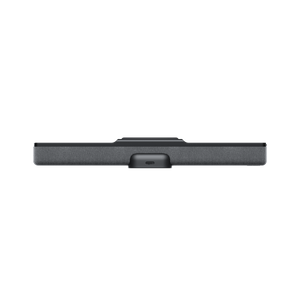


Insta360 Connect Dual-4K Camera AI Video Bar
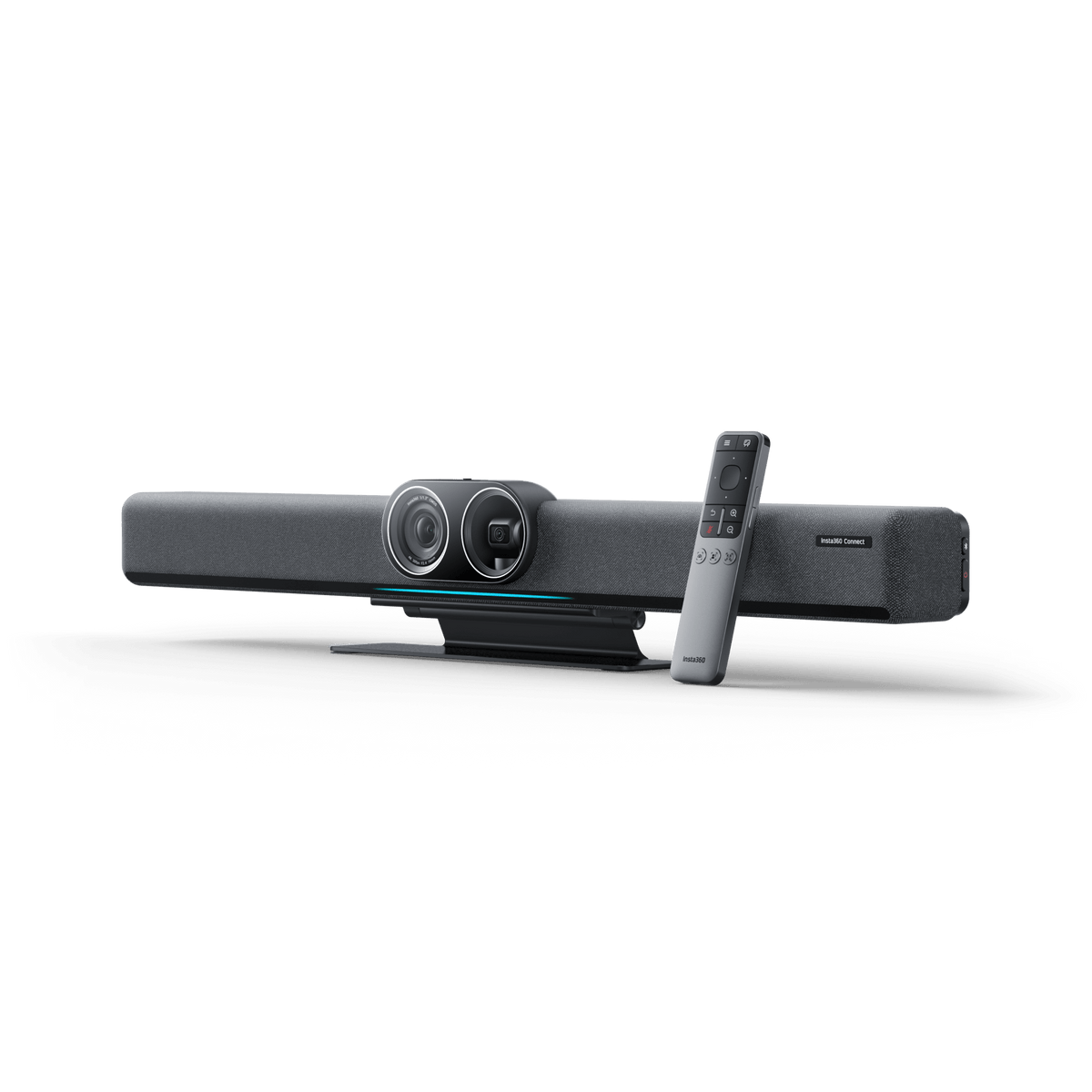
Bring Every Voice and Perspective Into the Meeting A productive hybrid meeting depends on the people at the far end feeling part of the room. Insta360 Connect combines wide-angle and telephoto 4K cameras, intelligent framing, a 14-microphone array and an integrated speaker in one video bar. It gives small and medium meeting rooms a considered audio and video setup for discussions, presentations and whiteboard sessions, with USB BYOD operation and support for a properly configured Zoom Rooms environment. Highlights Two Cameras for Different Views A wide group view and a motorised telephoto view help remote participants follow the room. Both cameras support up to 4K at 30fps; the conferencing platform determines the transmitted result. A More Natural Conversation Speaker tracking and group framing adapt the view as the discussion changes. A 14-microphone array provides voice pickup from up to 10 metres under suitable room conditions. A Practical Meeting-Room System USB BYOD works with major computer-based conferencing platforms. An included desk stand, remote control and connection cables support straightforward installation. Key Features A Room View and a Closer Perspective The wide-angle camera uses a large 1/1.3-inch sensor and a 110° horizontal field of view to show the team together. The telephoto camera adds a narrower view on a motorised pan-and-tilt gimbal, helping speakers farther along the table remain visible. This two-camera approach is useful when a single fixed laptop camera would leave faces small or miss participants at the edges. Framing That Follows the Discussion Use Group Framing for an inclusive room view, Speaker Tracking to concentrate on the active speaker, or 8K Gallery Mode to arrange participants in individual windows. AI Resolution+ processes image detail when framing people. The Gallery Mode name describes a camera feature; it does not mean every meeting service receives an 8K video stream. Lighting, seating and the chosen meeting application still matter. Integrated Audio Across the Table The built-in 14-microphone array works with echo cancellation, noise reduction and automatic gain control to make conversation easier to follow. Its integrated speaker has a 20W rated output. For the cleanest meeting setup, select Connect as the room microphone and speaker, and mute other nearby devices that would otherwise create echo. The stated pickup range is a maximum, rather than a promise for every reverberant or noisy room. Bring a Laptop and Use Familiar Meeting Software Connect a compatible computer by USB and select Connect as the camera, microphone and speaker in the meeting application. This BYOD workflow supports platforms such as Zoom, Microsoft Teams and Google Meet without making the video bar a replacement for the laptop or its service account. Resolution, screen sharing and call controls depend on the platform, computer and room configuration. A Clear Path to Zoom Rooms Connect is certified for Zoom Rooms. A dedicated room deployment requires the appropriate computer, control device, software, network and active Zoom Rooms account. The Standard Bundle does not include a Zoom Rooms licence or the optional Touch Panel. Plan the complete room system before installation so certification is matched by a working and manageable setup. Make the Whiteboard Part of the Conversation Whiteboard Mode corrects perspective and improves the view of a suitably positioned board so remote attendees can follow ideas as they develop. The remote control provides a convenient way to change meeting modes without reaching behind the display. When video is unnecessary, Bluetooth Speakerphone Mode lets a compatible mobile device use the room audio system. Physical Privacy with a Visible State Slide the Privacy Mode switch to conceal the wide-angle lens, direct the gimbal camera down and mute the microphones. The physical state makes it easier to recognise when the room is private. While this switch is engaged, the remote control and Touch Panel cannot reactivate the video or microphone; the switch must be returned to its normal position. Installation That Suits the Room Use the included desk stand for tabletop placement, or plan a separately supplied compatible display or wall mount. HDMI input, two HDMI outputs, USB, Gigabit Ethernet and dual-band Wi-Fi support room integration; the two display outputs show the same content. An approved multi-camera setup can add up to three compatible Link 2 cameras with the required firmware, cabling and powered hub where necessary. Additional cameras, mounts and control accessories are separate from the Standard Bundle. Summary Choose Insta360 Connect when a meeting room needs integrated audio, more flexible views and a simple laptop connection. Its dual-camera design, automatic framing and physical privacy control suit teams that move between discussion and presentation. Match the mounting, computer, display and conferencing service to the room, then let the video bar handle the shared view and sound. Frequently Asked Questions Can I use Connect with Microsoft Teams or Google Meet?ExpandCollapse Yes. In USB BYOD mode, connect a compatible computer and select Connect as its camera, microphone and speaker in the meeting software. The computer and service account host the meeting; available video resolution and controls depend on that platform. Does the Standard Bundle include everything for Zoom Rooms?ExpandCollapse No. Connect is Zoom Rooms certified, but a complete room deployment also needs the appropriate computer, control device, network, Zoom Rooms software and active account. The optional Touch Panel and a Zoom Rooms licence are not included in the Standard Bundle. Does 8K Gallery Mode mean my call is transmitted in 8K?ExpandCollapse No. Gallery Mode arranges participants into individual windows. The cameras support up to 4K at 30fps, and the actual video sent during a call depends on the conferencing platform, computer, connection and selected settings. Can I connect two displays or add more cameras?ExpandCollapse Two HDMI outputs are provided and show the same content. A supported multi-camera deployment can use up to three compatible Link 2 cameras. It requires the specified firmware, suitable cables and a powered hub when the device count exceeds the direct-connection arrangement. Additional cameras and accessories are sold separately. What happens when I turn on Privacy Mode?ExpandCollapse The wide-angle lens is concealed, the gimbal camera points down and the microphones are muted. The remote control or Touch Panel cannot reactivate video or audio while the physical privacy switch is on. Move the switch back to resume normal use.
Pickup available at 3005, Ubi Avenue 3, #01-88
Usually ready in 2-4 Business Day (Excluding Public Holiday)
Insta360 Connect Dual-4K Camera AI Video Bar
Description
Bring Every Voice and Perspective Into the Meeting
A productive hybrid meeting depends on the people at the far end feeling part of the room. Insta360 Connect combines wide-angle and telephoto 4K cameras, intelligent framing, a 14-microphone array and an integrated speaker in one video bar. It gives small and medium meeting rooms a considered audio and video setup for discussions, presentations and whiteboard sessions, with USB BYOD operation and support for a properly configured Zoom Rooms environment.
Highlights
Two Cameras for Different Views
- A wide group view and a motorised telephoto view help remote participants follow the room.
- Both cameras support up to 4K at 30fps; the conferencing platform determines the transmitted result.
A More Natural Conversation
- Speaker tracking and group framing adapt the view as the discussion changes.
- A 14-microphone array provides voice pickup from up to 10 metres under suitable room conditions.
A Practical Meeting-Room System
- USB BYOD works with major computer-based conferencing platforms.
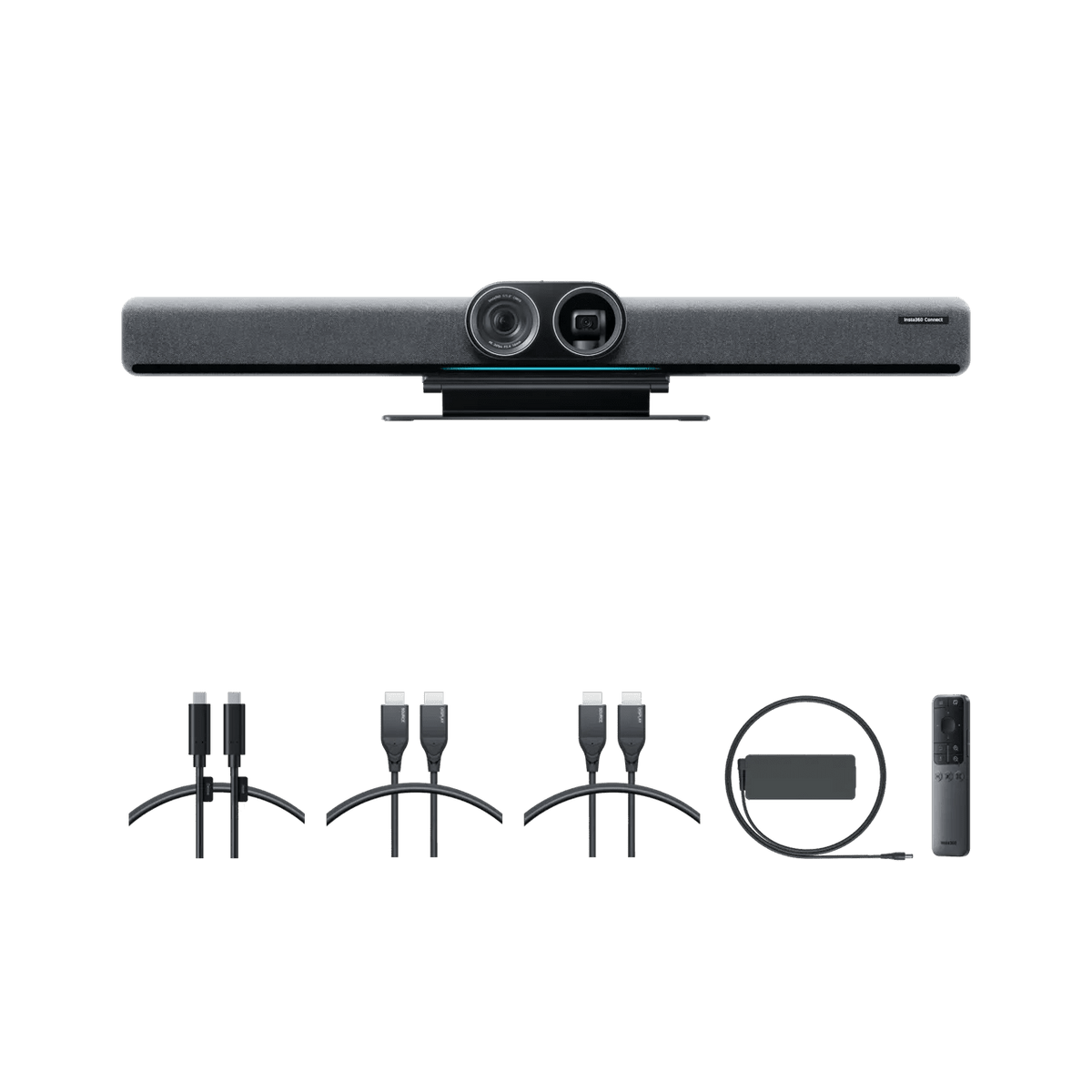
- An included desk stand, remote control and connection cables support straightforward installation.
Key Features
A Room View and a Closer Perspective
The wide-angle camera uses a large 1/1.3-inch sensor and a 110° horizontal field of view to show the team together. The telephoto camera adds a narrower view on a motorised pan-and-tilt gimbal, helping speakers farther along the table remain visible. This two-camera approach is useful when a single fixed laptop camera would leave faces small or miss participants at the edges.
Framing That Follows the Discussion
Use Group Framing for an inclusive room view, Speaker Tracking to concentrate on the active speaker, or 8K Gallery Mode to arrange participants in individual windows. AI Resolution+ processes image detail when framing people. The Gallery Mode name describes a camera feature; it does not mean every meeting service receives an 8K video stream. Lighting, seating and the chosen meeting application still matter.
Integrated Audio Across the Table
The built-in 14-microphone array works with echo cancellation, noise reduction and automatic gain control to make conversation easier to follow. Its integrated speaker has a 20W rated output. For the cleanest meeting setup, select Connect as the room microphone and speaker, and mute other nearby devices that would otherwise create echo. The stated pickup range is a maximum, rather than a promise for every reverberant or noisy room.
Bring a Laptop and Use Familiar Meeting Software
Connect a compatible computer by USB and select Connect as the camera, microphone and speaker in the meeting application. This BYOD workflow supports platforms such as Zoom, Microsoft Teams and Google Meet without making the video bar a replacement for the laptop or its service account. Resolution, screen sharing and call controls depend on the platform, computer and room configuration.
A Clear Path to Zoom Rooms
Connect is certified for Zoom Rooms. A dedicated room deployment requires the appropriate computer, control device, software, network and active Zoom Rooms account. The Standard Bundle does not include a Zoom Rooms licence or the optional Touch Panel. Plan the complete room system before installation so certification is matched by a working and manageable setup.
Make the Whiteboard Part of the Conversation
Whiteboard Mode corrects perspective and improves the view of a suitably positioned board so remote attendees can follow ideas as they develop. The remote control provides a convenient way to change meeting modes without reaching behind the display. When video is unnecessary, Bluetooth Speakerphone Mode lets a compatible mobile device use the room audio system.
Physical Privacy with a Visible State
Slide the Privacy Mode switch to conceal the wide-angle lens, direct the gimbal camera down and mute the microphones. The physical state makes it easier to recognise when the room is private. While this switch is engaged, the remote control and Touch Panel cannot reactivate the video or microphone; the switch must be returned to its normal position.
Installation That Suits the Room
Use the included desk stand for tabletop placement, or plan a separately supplied compatible display or wall mount. HDMI input, two HDMI outputs, USB, Gigabit Ethernet and dual-band Wi-Fi support room integration; the two display outputs show the same content. An approved multi-camera setup can add up to three compatible Link 2 cameras with the required firmware, cabling and powered hub where necessary. Additional cameras, mounts and control accessories are separate from the Standard Bundle.
Summary
Choose Insta360 Connect when a meeting room needs integrated audio, more flexible views and a simple laptop connection. Its dual-camera design, automatic framing and physical privacy control suit teams that move between discussion and presentation. Match the mounting, computer, display and conferencing service to the room, then let the video bar handle the shared view and sound.
Frequently Asked Questions
Can I use Connect with Microsoft Teams or Google Meet?
Yes. In USB BYOD mode, connect a compatible computer and select Connect as its camera, microphone and speaker in the meeting software. The computer and service account host the meeting; available video resolution and controls depend on that platform.
Does the Standard Bundle include everything for Zoom Rooms?
No. Connect is Zoom Rooms certified, but a complete room deployment also needs the appropriate computer, control device, network, Zoom Rooms software and active account. The optional Touch Panel and a Zoom Rooms licence are not included in the Standard Bundle.
Does 8K Gallery Mode mean my call is transmitted in 8K?
No. Gallery Mode arranges participants into individual windows. The cameras support up to 4K at 30fps, and the actual video sent during a call depends on the conferencing platform, computer, connection and selected settings.
Can I connect two displays or add more cameras?
Two HDMI outputs are provided and show the same content. A supported multi-camera deployment can use up to three compatible Link 2 cameras. It requires the specified firmware, suitable cables and a powered hub when the device count exceeds the direct-connection arrangement. Additional cameras and accessories are sold separately.
What happens when I turn on Privacy Mode?
The wide-angle lens is concealed, the gimbal camera points down and the microphones are muted. The remote control or Touch Panel cannot reactivate video or audio while the physical privacy switch is on. Move the switch back to resume normal use.
Specs
Insta360 Connect Dual-4K Camera AI Video Bar
Insta360 Connect Dual-4K Camera AI Video Bar combines wide-angle and telephoto cameras with integrated meeting-room audio. USB BYOD lets a compatible computer use the bar as its camera, microphone and speaker. A dedicated Zoom Rooms setup needs separate supporting equipment and an active account. The Standard Bundle includes a desk stand, remote and cables. Camera output, room pickup and display behaviour depend on configuration; the table separates rated hardware figures from the practical requirements for deployment.
| Specification | Details |
|---|---|
| Imaging and Framing | |
| Wide-Angle Camera | 48MP 1/1.3-inch CMOS; 110° horizontal field of view |
| Telephoto Gimbal Camera | 48MP 1/2.8-inch CMOS; 40° horizontal field of view |
| Camera Video Output | Each camera supports up to 4K at 30fps and 1080p at 30fps; platform limits apply |
| Zoom and Movement | Camera specifications list up to 3× digital zoom per camera; telephoto pan ±35° and tilt ±20° |
| Intelligent Views | Group Framing, Speaker Tracking, 8K Gallery Mode and AI Resolution+ |
| Video Coding | H.265, H.264 SVC, H.264 High Profile and H.264 AVC |
| Audio and Privacy | |
| Microphones and Pickup | 14 omnidirectional microphones; up to 10 m voice pickup |
| Audio Processing | Echo cancellation, active noise reduction and automatic gain control |
| Integrated Speaker | 1 speaker; 20W rated output and 25W maximum output |
| Meeting Modes | BYOD video conferencing, Whiteboard Mode and Bluetooth Speakerphone Mode |
| Physical Privacy Switch | Conceals wide-angle lens, tilts gimbal camera down and mutes microphones |
| Connections and Network | |
| Video Connections | 1 HDMI input and 2 HDMI outputs; both outputs show the same content |
| USB Connections | 1 USB-A 2.0, 1 USB-A 3.0 and 1 USB-C 3.0 |
| Network | 10/100/1000 Mbps Ethernet; Wi-Fi 802.11a/b/g/n/ac/ax on 2.4 GHz and 5 GHz; IPv4/IPv6 |
| Bluetooth | Bluetooth 5.1 |
| Security | Physical security slot |
| Room Deployment and Compatibility | |
| BYOD Platforms | Compatible computer-based Zoom, Microsoft Teams, Google Meet and other platforms that recognise the device |
| Zoom Rooms | Certified peripheral; appropriate computer, controller, software, network and active Zoom Rooms account required separately |
| Multi-Camera Expansion | Up to 3 compatible Link 2 cameras; Connect firmware v 1.1.31 or later and latest camera firmware; suitable cables and powered hub may be required |
| Mounting | Desk stand included; compatible TV and wall mounts supplied separately |
| Physical and Environmental | |
| Dimensions (W × H × D) | 685 × 76 × 85 mm |
| Device Weight | 2.27 kg without desk stand; approximately 2.57 kg with desk stand |
| Power Input | DC 12V/7A; power adapter included |
| Temperature | Operating 0°C to 40°C; storage −40°C to 70°C |
| Humidity | Below 90% |
| Supplied Equipment and Warranty | |
| Standard Bundle | Connect, desk stand, remote control, 2× 1.8 m HDMI cables, 1× 1.8 m USB-C cable and power adapter |
| Main-Unit Warranty | 2 years |