


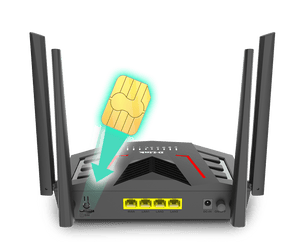


D-Link DWR-M975X 4G+ LTE Cat6 AX1500 Wi-Fi 6 Router
4G+ Broadband with Wi-Fi 6 and Gigabit Connections The D-Link DWR-M975X is a 4G+ LTE Cat6 router with AX1500 dual-band Wi-Fi 6, designed for a home office or small site that wants 4G+ service, modern dual-band Wi-Fi and Gigabit Ethernet in one device. Insert a compatible active SIM, configure the mobile service and share the connection with wireless and Ethernet devices. External cellular and Wi-Fi antennas support flexible positioning for an indoor installation. Use Ethernet for fixed equipment and Wi-Fi for mobile devices, with browser-based controls available for setup and everyday administration. Highlights Mobile Broadband and Wi-Fi 4G+ LTE Cat6 AX1500 dual-band Wi-Fi 6 1 × Nano SIM slot Connections for Your Setup 1 × Gigabit WAN/LAN; 3 × Gigabit LAN 2 × 5dBi LTE and 2 × 5dBi Wi-Fi external antennas Practical Management Web management; DHCP, DDNS, QoS, port forwarding, IPv6 and IGMP/MLD WPA/WPA2/WPA3; NAT/SPI firewall; IP and MAC filtering 3-year hardware warranty Key Features Share a Mobile-Data Connection DWR-M975X connects through a compatible operator SIM and data plan. Check the operator's supported bands, APN requirements and router-use policy before installation. Cellular headline rates are theoretical radio capabilities; coverage, congestion, plan limits, signal strength and the connected device determine actual performance. Put Dual-Band Wi-Fi 6 to Work Dual-band Wi-Fi provides separate 2.4GHz and 5GHz connections for compatible clients. 2.4GHz up to 300 Mbps; 5GHz up to 1204 Mbps. These are wireless link rates, not promised internet speeds or a combined speed for one device. Client capability, distance, walls and interference affect the usable connection. Connect Wired Equipment with the Right Port 1 × Gigabit WAN/LAN; 3 × Gigabit LAN. Gigabit Ethernet is useful for fixed PCs, switches and other compatible wired equipment. The router port speed does not by itself establish the speed of the mobile internet service. Prepare a Second Internet Route Where supported and configured, Ethernet WAN and cellular connectivity provide alternative internet routes. Switching services can interrupt active sessions and depends on the backup connection being available. Test the intended recovery behaviour before using the router for business-critical applications. Choose Placement and Security Carefully Set up this indoor router where the mobile signal is usable and ventilation remains clear. WPA/WPA2/WPA3; NAT/SPI firewall; IP and MAC filtering. IPsec VPN pass-through. These controls support a managed network, but do not guarantee protection from every threat or replace secure client devices and sensible access settings. Summary Choose the D-Link DWR-M975X when 4G+ LTE Cat6, AX1500 dual-band Wi-Fi 6 and its specific wired interfaces match the site. Plan the mobile service and placement first, then use the router's available controls to build a clear, manageable connection for the devices that matter. Frequently Asked Questions Does the DWR-M975X Need a SIM and Mobile Plan?ExpandCollapse Yes. A compatible active SIM and an appropriate mobile-data plan are required for cellular internet. They are not supplied with the router. Confirm supported bands, APN details and any operator restrictions on router use. Is This a 4G or 5G Cellular Router?ExpandCollapse It is a 4G+ LTE Cat6 router, not a 5G cellular router. LTE download up to 300 Mbps; upload up to 50 Mbps. Headline rates are theoretical and actual mobile speeds vary. What Wired Connections Are Available?ExpandCollapse 1 × Gigabit WAN/LAN; 3 × Gigabit LAN. The Ethernet network interfaces support Gigabit connections; the mobile service may run at a different speed. Does Failover Mean the Connection Cannot Go Down?ExpandCollapse No. Failover provides another route when it is configured and available, but switching can interrupt sessions. Power, usable coverage and an active backup service remain necessary. Test recovery behaviour for important applications. Will the Advertised Wireless Rate Be My Internet Speed?ExpandCollapse No. 2.4GHz up to 300 Mbps; 5GHz up to 1204 Mbps. These describe theoretical wireless link capabilities. The cellular service, signal, client device and local radio conditions determine actual internet throughput. What Should I Check Before Buying?ExpandCollapse Confirm the operator's bands and plan policy, SIM requirements, wired port speeds and the installation's power arrangements. 3-year hardware warranty is provided; it is not a commitment to a fixed firmware-support period.
Pickup available at 3005, Ubi Avenue 3, #01-88
Usually ready in 2-4 Business Day (Excluding Public Holiday)
D-Link DWR-M975X 4G+ LTE Cat6 AX1500 Wi-Fi 6 Router
Description
4G+ Broadband with Wi-Fi 6 and Gigabit Connections
The D-Link DWR-M975X is a 4G+ LTE Cat6 router with AX1500 dual-band Wi-Fi 6, designed for a home office or small site that wants 4G+ service, modern dual-band Wi-Fi and Gigabit Ethernet in one device. Insert a compatible active SIM, configure the mobile service and share the connection with wireless and Ethernet devices.
External cellular and Wi-Fi antennas support flexible positioning for an indoor installation. Use Ethernet for fixed equipment and Wi-Fi for mobile devices, with browser-based controls available for setup and everyday administration.
Highlights
Mobile Broadband and Wi-Fi
- 4G+ LTE Cat6
- AX1500 dual-band Wi-Fi 6
- 1 × Nano SIM slot
Connections for Your Setup
- 1 × Gigabit WAN/LAN; 3 × Gigabit LAN
- 2 × 5dBi LTE and 2 × 5dBi Wi-Fi external antennas
Practical Management
- Web management; DHCP, DDNS, QoS, port forwarding, IPv6 and IGMP/MLD
- WPA/WPA2/WPA3; NAT/SPI firewall; IP and MAC filtering
- 3-year hardware warranty
Key Features
Share a Mobile-Data Connection
DWR-M975X connects through a compatible operator SIM and data plan. Check the operator's supported bands, APN requirements and router-use policy before installation. Cellular headline rates are theoretical radio capabilities; coverage, congestion, plan limits, signal strength and the connected device determine actual performance.
Put Dual-Band Wi-Fi 6 to Work
Dual-band Wi-Fi provides separate 2.4GHz and 5GHz connections for compatible clients. 2.4GHz up to 300 Mbps; 5GHz up to 1204 Mbps. These are wireless link rates, not promised internet speeds or a combined speed for one device. Client capability, distance, walls and interference affect the usable connection.
Connect Wired Equipment with the Right Port
1 × Gigabit WAN/LAN; 3 × Gigabit LAN. Gigabit Ethernet is useful for fixed PCs, switches and other compatible wired equipment. The router port speed does not by itself establish the speed of the mobile internet service.
Prepare a Second Internet Route
Where supported and configured, Ethernet WAN and cellular connectivity provide alternative internet routes. Switching services can interrupt active sessions and depends on the backup connection being available. Test the intended recovery behaviour before using the router for business-critical applications.
Choose Placement and Security Carefully
Set up this indoor router where the mobile signal is usable and ventilation remains clear. WPA/WPA2/WPA3; NAT/SPI firewall; IP and MAC filtering. IPsec VPN pass-through. These controls support a managed network, but do not guarantee protection from every threat or replace secure client devices and sensible access settings.
Summary
Choose the D-Link DWR-M975X when 4G+ LTE Cat6, AX1500 dual-band Wi-Fi 6 and its specific wired interfaces match the site. Plan the mobile service and placement first, then use the router's available controls to build a clear, manageable connection for the devices that matter.
Frequently Asked Questions
Does the DWR-M975X Need a SIM and Mobile Plan?
Yes. A compatible active SIM and an appropriate mobile-data plan are required for cellular internet. They are not supplied with the router. Confirm supported bands, APN details and any operator restrictions on router use.
Is This a 4G or 5G Cellular Router?
It is a 4G+ LTE Cat6 router, not a 5G cellular router. LTE download up to 300 Mbps; upload up to 50 Mbps. Headline rates are theoretical and actual mobile speeds vary.
What Wired Connections Are Available?
1 × Gigabit WAN/LAN; 3 × Gigabit LAN. The Ethernet network interfaces support Gigabit connections; the mobile service may run at a different speed.
Does Failover Mean the Connection Cannot Go Down?
No. Failover provides another route when it is configured and available, but switching can interrupt sessions. Power, usable coverage and an active backup service remain necessary. Test recovery behaviour for important applications.
Will the Advertised Wireless Rate Be My Internet Speed?
No. 2.4GHz up to 300 Mbps; 5GHz up to 1204 Mbps. These describe theoretical wireless link capabilities. The cellular service, signal, client device and local radio conditions determine actual internet throughput.
What Should I Check Before Buying?
Confirm the operator's bands and plan policy, SIM requirements, wired port speeds and the installation's power arrangements. 3-year hardware warranty is provided; it is not a commitment to a fixed firmware-support period.
Specs
D-Link DWR-M975X 4G+ LTE Cat6 AX1500 Wi-Fi 6 Router
The D-Link DWR-M975X combines 4G+ LTE Cat6 mobile connectivity with AX1500 dual-band Wi-Fi 6 for an indoor shared network. Its Ethernet interfaces, SIM arrangement and power requirements determine how it fits into the installation. The specifications below distinguish cellular radio rates from local Wi-Fi and wired links, and include supported bands, management functions, physical details and environmental limits. Check operator compatibility and actual coverage before selecting a mobile-data service.
| Specification | Details |
|---|---|
| Cellular Connectivity | |
| Cellular Technology | 4G+ LTE Cat6 |
| Cellular Data Rates | LTE download up to 300 Mbps; upload up to 50 Mbps; theoretical maximums, service-dependent |
| SIM Interface | 1 × Nano SIM slot |
| Supported Cellular Bands | LTE FDD B1/3/5/7/8/20/28; TDD B38/40/41; WCDMA B1/5/8 |
| Antenna System | 2 × 5dBi LTE and 2 × 5dBi Wi-Fi external antennas |
| Wi-Fi and Wired Networking | |
| Wi-Fi Standard and Class | AX1500 dual-band Wi-Fi 6 |
| Wireless Link Rates | 2.4GHz up to 300 Mbps; 5GHz up to 1204 Mbps |
| Network Interfaces | 1 × Gigabit WAN/LAN; 3 × Gigabit LAN |
| Wireless Client Reference | Manufacturer lists up to 64 connected clients; capacity is not a throughput or coverage guarantee |
| Network Modes | Router, access point, wireless client, EasyMesh and repeater; firmware and peer compatibility apply |
| Management and Security | |
| Wireless and Network Security | WPA/WPA2/WPA3; NAT/SPI firewall; IP and MAC filtering |
| Management and Services | Web management; DHCP, DDNS, QoS, port forwarding, IPv6 and IGMP/MLD |
| VPN Functions | IPsec VPN pass-through |
| Connection Resilience | Configured alternate WAN/cellular route; switching and recovery depend on the available service |
| Physical and Power | |
| Dimensions | 164 × 101 × 187 mm |
| Device Weight | 180 g |
| Power | 12V DC / 1.5A adapter; 100–240V AC input |
| Installation | Indoor use; maintain ventilation and check mobile-signal conditions |
| Environment | |
| Operating Temperature | −10 to 40°C |
| Storage Temperature | −40 to 70°C |
| Humidity | Operating and storage 10–95% RH, non-condensing |
| Warranty and Deployment | |
| Warranty | 3 years |
| Security Updates | D-Link commits to security updates until 31-Dec-2027. Extended support and individual patch releases remain at D-Link's discretion. This commitment is separate from the hardware warranty. |
| Service Requirements | Compatible operator SIM and data plan; usable coverage; suitable power source |
| Performance Conditions | Cellular and Wi-Fi rates are theoretical. Actual throughput depends on network, plan, client, placement and radio conditions |