

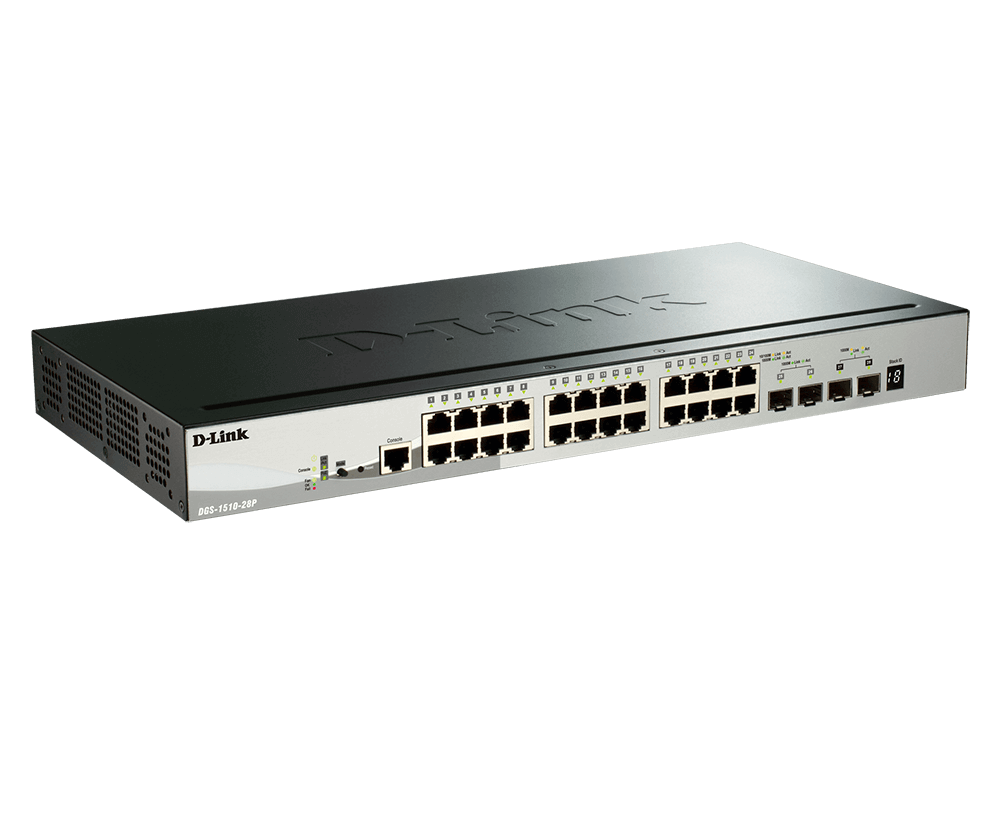


D-Link DGS-1510-28P 28-Port Gigabit PoE+ Stackable Smart Managed Switch with 10G Uplinks
Power the Access Network and Manage Its Traffic The D-Link DGS-1510-28P brings 24 Gigabit RJ45 PoE+ ports plus 2 Gigabit SFP ports and 2 10G SFP+ ports together in a managed rackmount switch. It suits an office or workgroup that needs organised wired connectivity, with faster optical uplinks for supported connections to servers, storage or the wider network. A 193W standard PoE budget supplies compatible access points, cameras and IP phones from the Ethernet ports. VLANs, traffic priorities and static routing help keep different workloads organised, while physical stacking provides a defined expansion path. Highlights Access and Uplinks 24 × 10/100/1000Mbps RJ45 PoE+ ports 2 × Gigabit SFP slots 2 × 10G SFP+ slots Managed Traffic 802.1Q VLANs, voice and surveillance VLAN features IPv4 and IPv6 static routing QoS, access controls and multicast management Deployment and Expansion Physical stacking of up to six compatible units 92Gbps published switching capacity 193W standard PoE budget Key Features Match Device Connections to Faster Uplinks Use the 24 copper ports for compatible Gigabit devices and the optical slots for the appropriate uplink or stacking connection. The dedicated Gigabit SFP slots are separate from the 2 10G SFP+ slots, so choose a module for the correct interface. Suitable optical modules or direct-attach cables are required separately; the complete link depends on compatible equipment at both ends. Plan Power for the Connected Devices IEEE 802.3af/at supports compatible powered devices at up to 30W per copper port, within the 193W shared standard budget. Add the actual requirements of all connected devices rather than multiplying the maximum port rating by the port count. Scheduled PoE and PD-Alive functions can assist an appropriate deployment. Separate Users and Applications With VLANs Tagged VLANs, voice VLAN and surveillance VLAN features help organise staff, phones, cameras and other network traffic. Traffic separation must be designed across the relevant switch ports, uplinks and routing equipment. VLAN configuration is part of a network policy, not a substitute for firewall rules or appropriate authentication. Use Static Routing Where It Fits the Design IPv4 and IPv6 static routing can move traffic between configured IP networks without sending every inter-VLAN exchange to a separate router. The switch supports a defined set of static routes and IP interfaces. It is not a full-featured Internet security gateway, and a design needing dynamic routing or firewall inspection requires equipment with those specific capabilities. Build a Compatible Physical Stack Up to six compatible switches can form a physical stack using the designated SFP+ stacking ports and suitable connections. The published full-duplex stacking bandwidth is up to 40Gbps. Stacking uses ports that would otherwise serve as uplinks, and a linear configuration can also reserve an unused partner stacking port. Single IP Management for up to 32 devices is a separate management feature, not a 32-unit physical stack. Keep Configuration and Fault-Finding Accessible Browser management, a command-line interface, console access and SNMP provide several administration routes. Cable diagnostics, sFlow, logs and port mirroring assist fault investigation, while spanning-tree protocols, loop detection and link aggregation support a planned network. Keep the installed firmware, saved configuration and access policy aligned with the deployment, and allow ventilation around the rack-mounted enclosure. Summary The D-Link DGS-1510-28P suits a managed 24-port Gigabit access network that needs 2 Gigabit SFP ports and 2 10G SFP+ ports, VLANs and static routing. Its 193W standard PoE budget supports a carefully sized collection of compatible powered devices. Choose suitable optics or DAC cables, account for the ports used by stacking and size the rack, power and cooling for the installation. Frequently Asked Questions Which Data Ports Are Provided?ExpandCollapse It provides 24 Gigabit RJ45 PoE+ ports plus 2 Gigabit SFP ports and 2 10G SFP+ ports. The console interface is for administration and is not an extra Ethernet data uplink. Does It Supply Power over Ethernet?ExpandCollapse Yes. The 24 copper ports support IEEE 802.3af/at at up to 30W per port within a shared 193W standard budget. Not every port can deliver its maximum rating simultaneously unless the total power requirement fits the available budget. Can I Stack Several Switches?ExpandCollapse Up to six compatible units can form a physical stack using the designated SFP+ ports and suitable cables or modules. The published stacking bandwidth is up to 40Gbps full duplex. Ports assigned to stacking cannot also be used as ordinary uplinks; Single IP Management of up to 32 devices is a different feature. Are Optical Modules and DAC Cables Included?ExpandCollapse Optical modules and direct-attach cables are separate choices. Match the interface, supported module or cable, fibre type, connector and required distance to the equipment at both ends. Do not assume a populated optical uplink from an empty SFP or SFP+ slot. Can It Replace a Router or Firewall?ExpandCollapse It supports IPv4 and IPv6 static routing between configured networks. It is not a substitute for every router function, dynamic-routing protocol or Internet firewall. Choose the network edge and security equipment according to the actual connection and policy requirements. How Should I Plan the Rack and Power?ExpandCollapse Allow a 1U mounting position, suitable brackets and clear ventilation. The switch uses a 100–240V AC internal supply and 2 smart fans. Include the connected PoE loads when checking the power budget and UPS capacity. Its device weight is 2.54kg; shipping weight is a separate measurement.
Pickup available at 3005, Ubi Avenue 3, #01-88
Usually ready in 2-4 Business Day (Excluding Public Holiday)
D-Link DGS-1510-28P 28-Port Gigabit PoE+ Stackable Smart Managed Switch with 10G Uplinks
Description
Power the Access Network and Manage Its Traffic
The D-Link DGS-1510-28P brings 24 Gigabit RJ45 PoE+ ports plus 2 Gigabit SFP ports and 2 10G SFP+ ports together in a managed rackmount switch. It suits an office or workgroup that needs organised wired connectivity, with faster optical uplinks for supported connections to servers, storage or the wider network.
A 193W standard PoE budget supplies compatible access points, cameras and IP phones from the Ethernet ports. VLANs, traffic priorities and static routing help keep different workloads organised, while physical stacking provides a defined expansion path.
Highlights
Access and Uplinks
- 24 × 10/100/1000Mbps RJ45 PoE+ ports
- 2 × Gigabit SFP slots
- 2 × 10G SFP+ slots
Managed Traffic
- 802.1Q VLANs, voice and surveillance VLAN features
- IPv4 and IPv6 static routing
- QoS, access controls and multicast management
Deployment and Expansion
- Physical stacking of up to six compatible units
- 92Gbps published switching capacity
- 193W standard PoE budget
Key Features
Match Device Connections to Faster Uplinks
Use the 24 copper ports for compatible Gigabit devices and the optical slots for the appropriate uplink or stacking connection. The dedicated Gigabit SFP slots are separate from the 2 10G SFP+ slots, so choose a module for the correct interface. Suitable optical modules or direct-attach cables are required separately; the complete link depends on compatible equipment at both ends.
Plan Power for the Connected Devices
IEEE 802.3af/at supports compatible powered devices at up to 30W per copper port, within the 193W shared standard budget. Add the actual requirements of all connected devices rather than multiplying the maximum port rating by the port count. Scheduled PoE and PD-Alive functions can assist an appropriate deployment.
Separate Users and Applications With VLANs
Tagged VLANs, voice VLAN and surveillance VLAN features help organise staff, phones, cameras and other network traffic. Traffic separation must be designed across the relevant switch ports, uplinks and routing equipment. VLAN configuration is part of a network policy, not a substitute for firewall rules or appropriate authentication.
Use Static Routing Where It Fits the Design
IPv4 and IPv6 static routing can move traffic between configured IP networks without sending every inter-VLAN exchange to a separate router. The switch supports a defined set of static routes and IP interfaces. It is not a full-featured Internet security gateway, and a design needing dynamic routing or firewall inspection requires equipment with those specific capabilities.
Build a Compatible Physical Stack
Up to six compatible switches can form a physical stack using the designated SFP+ stacking ports and suitable connections. The published full-duplex stacking bandwidth is up to 40Gbps. Stacking uses ports that would otherwise serve as uplinks, and a linear configuration can also reserve an unused partner stacking port. Single IP Management for up to 32 devices is a separate management feature, not a 32-unit physical stack.
Keep Configuration and Fault-Finding Accessible
Browser management, a command-line interface, console access and SNMP provide several administration routes. Cable diagnostics, sFlow, logs and port mirroring assist fault investigation, while spanning-tree protocols, loop detection and link aggregation support a planned network. Keep the installed firmware, saved configuration and access policy aligned with the deployment, and allow ventilation around the rack-mounted enclosure.
Summary
The D-Link DGS-1510-28P suits a managed 24-port Gigabit access network that needs 2 Gigabit SFP ports and 2 10G SFP+ ports, VLANs and static routing. Its 193W standard PoE budget supports a carefully sized collection of compatible powered devices. Choose suitable optics or DAC cables, account for the ports used by stacking and size the rack, power and cooling for the installation.
Frequently Asked Questions
Which Data Ports Are Provided?
It provides 24 Gigabit RJ45 PoE+ ports plus 2 Gigabit SFP ports and 2 10G SFP+ ports. The console interface is for administration and is not an extra Ethernet data uplink.
Does It Supply Power over Ethernet?
Yes. The 24 copper ports support IEEE 802.3af/at at up to 30W per port within a shared 193W standard budget. Not every port can deliver its maximum rating simultaneously unless the total power requirement fits the available budget.
Can I Stack Several Switches?
Up to six compatible units can form a physical stack using the designated SFP+ ports and suitable cables or modules. The published stacking bandwidth is up to 40Gbps full duplex. Ports assigned to stacking cannot also be used as ordinary uplinks; Single IP Management of up to 32 devices is a different feature.
Are Optical Modules and DAC Cables Included?
Optical modules and direct-attach cables are separate choices. Match the interface, supported module or cable, fibre type, connector and required distance to the equipment at both ends. Do not assume a populated optical uplink from an empty SFP or SFP+ slot.
Can It Replace a Router or Firewall?
It supports IPv4 and IPv6 static routing between configured networks. It is not a substitute for every router function, dynamic-routing protocol or Internet firewall. Choose the network edge and security equipment according to the actual connection and policy requirements.
How Should I Plan the Rack and Power?
Allow a 1U mounting position, suitable brackets and clear ventilation. The switch uses a 100–240V AC internal supply and 2 smart fans. Include the connected PoE loads when checking the power budget and UPS capacity. Its device weight is 2.54kg; shipping weight is a separate measurement.
Specs
D-Link DGS-1510-28P 28-Port Gigabit PoE+ Stackable Smart Managed Switch with 10G Uplinks
The DGS-1510-28P combines 24 Gigabit copper ports with 2 Gigabit SFP ports and 2 10G SFP+ ports in a managed 1U switch. Its VLAN, QoS, security and static-routing features suit an organised business network. Plan the optical connections and any physical stack together because designated stacking ports are reserved for that role. Size connected loads within the 193W standard PoE budget. Published forwarding and switching figures describe the switching system, rather than the throughput of an individual application.
| Specification | Details |
|---|---|
| Interfaces and Performance | |
| Copper Data Ports | 24 × 10/100/1000Mbps RJ45, IEEE 802.3af/at PoE+ capable |
| Gigabit Optical Slots | 2 × Gigabit SFP |
| 10G Optical Slots | 2 × 10G SFP+ |
| Console Interface | Out-of-band administration; not an additional data uplink |
| Switching and Forwarding | 92Gbps switching capacity; up to 68.45Mpps packet forwarding |
| Packet Handling | Store-and-forward; 1.5MB packet buffer; jumbo frames up to 9,216 bytes |
| MAC Table | Up to 16,384 entries; up to 512 static MAC entries |
| System Memory | 256MB DRAM and 32MB flash |
| Power and PoE | |
| AC Input | 100–240V AC, 50/60Hz; internal universal supply |
| PoE Output | IEEE 802.3af/at on ports 1–24; up to 30W per port |
| Shared PoE Budget | 193W total |
| PoE Control | Time-based PoE and PD-Alive; connected loads must fit the available shared budget |
| Published Power Consumption | 238.7W with PoE; 29W without PoE; 21W standby |
| Energy Features | IEEE 802.3az EEE; link-status, LED/port shut-off and system-hibernation power saving |
| Stacking and Network Resilience | |
| Physical Stacking | Up to six compatible units; chain or ring topology; up to 40Gbps full-duplex stacking bandwidth |
| Stacking Port Use | Designated SFP+ pair reserved for stacking; unused partner ports in a linear stack can also remain reserved |
| Single IP Management | Up to 32 devices per virtual management stack; separate from physical stacking |
| Spanning Tree and Loop Control | IEEE 802.1D STP, 802.1w RSTP, 802.1s MSTP, loopback detection and ERPS |
| Link Aggregation | IEEE 802.3ad; up to 32 groups with up to eight ports per group |
| VLANs and Layer 3 Functions | |
| VLAN Features | 802.1Q tagged VLANs, up to 4K groups; asymmetric, MAC/protocol-based, voice and surveillance VLAN features |
| IP Interfaces | Up to 16 configured IP interfaces |
| Static Routing | Up to 64 IPv4 and 32 IPv6 static route entries; default route support |
| Address Services | ARP, IPv6 neighbour discovery, DHCP server/client/relay and UDP helper |
| Multicast | IGMP v1/v2/v3 and MLD v1/v2 snooping; up to 512 groups, querier and fast-leave functions |
| Security and Traffic Priority | |
| Authentication | 802.1X, MAC/web-based access control, RADIUS/local authentication and TACACS+ administration |
| Access Control Lists | Up to 256 access lists and 768 rules; MAC, IPv4/IPv6 and time-based ACL functions |
| Port and Address Protection | Port security, IP-MAC-port binding, DHCP snooping, IP source guard, dynamic ARP inspection and IPv6 guard features |
| Network Protection | Storm control, D-Link Safeguard Engine, traffic segmentation, ARP-spoofing and BPDU/DoS protection |
| QoS | Eight queues per port; 802.1p/DSCP and other classification; SPQ, WRR and DRR scheduling |
| Bandwidth Control | Ingress/egress port-based control; minimum 64Kb/s granularity on Gigabit copper ports |
| Administration and Diagnostics | |
| Management | Browser GUI, CLI, console, SSH and SNMP v1/v2c/v3 |
| Monitoring | System logs, SNMP traps, LLDP/LLDP-MED, RMON v1, sFlow and port/ACL mirroring |
| Maintenance | Cable diagnostics, multiple firmware images, DHCP auto-configuration and D-Link Network Assistant support |
| Firmware Conditions | Use compatible firmware and configurations across the intended deployment |
| Physical and Environmental | |
| Mounting Format | 19-inch rack mounting, 1U height |
| Dimensions W × D × H | 440 × 210 × 44mm |
| Device Weight | 2.54kg |
| Cooling and Published Acoustics | 2 smart fans; 46.4dB(A) |
| Published Heat Dissipation | 813.97BTU/hr |
| Operating Conditions | −5–50°C; 0–95% relative humidity, non-condensing |
| Storage Conditions | −20–70°C; 0–95% relative humidity, non-condensing |
| Published MTBF | 275,428 hours; statistical reliability figure rather than a guaranteed service life |
| Connection Planning | |
| Required Connection Accessories | Suitable Ethernet cables; supported optical modules, fibre or DAC cables as required |
| Optional Power Expansion | No optional power expansion is specified for this model |