

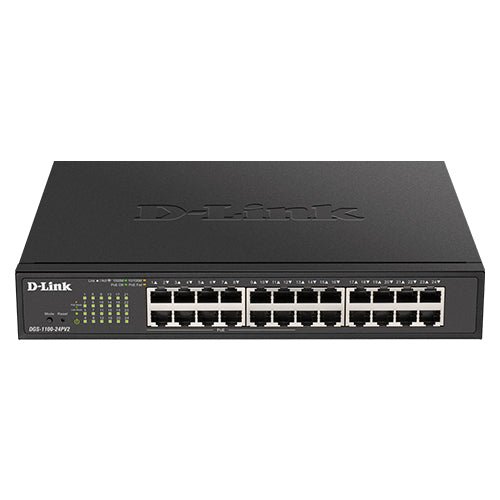


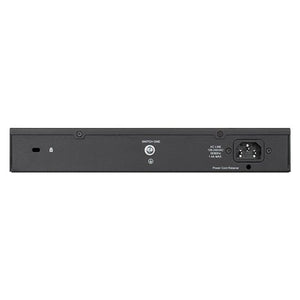
D-Link DGS-1100-24PV2 24-Port Gigabit PoE+ Smart Managed Switch
Powered and Data-Only Connections in One Managed Switch The D-Link DGS-1100-24PV2 brings 24 Gigabit data connections into a manageable business network. Its 12 powered copper ports share a 100W PoE budget for compatible access points, cameras and phones. The web interface gives an administrator direct control over the switch without turning an ordinary access installation into a complex routing project. VLAN, traffic-priority and diagnostic functions help structure the network around its actual users and equipment. A fanless design keeps the switch suitable for quiet indoor workspaces. The per-port limit and total PoE budget must both be respected. A suitable router or firewall remains separate. Highlights Connections Matched to the Installation 24 simultaneous Gigabit data ports Copper Ethernet connections with automatic negotiation 12 powered ports; 100W shared budget Practical Traffic Control Port-based and IEEE 802.1Q VLANs Eight traffic queues per port Surveillance and voice VLAN functions Installation and Administration Fanless operation IPv4/IPv6 web-based management Loopback detection and copper-cable diagnostics Key Features Use the Right Ports for Each Connection 24 × 10/100/1000 Mbps RJ45 ports; ports 1–12 provide PoE+, ports 13–24 are data-only. There is no optical slot to populate. These are Gigabit interfaces, rather than 2.5GbE or 10GbE access ports. Plan Power Around the Actual Devices The switch provides 100W of shared PoE output. Ports 1–12 support IEEE 802.3af/at, up to 30W per port. Add the connected devices' maximum requirements before installation, including any device that draws more during startup or when heaters, illuminators or motors operate. The shared budget is separate from the switch's AC input consumption; port count multiplied by the per-port maximum is not the available total. Keep Different Traffic Organised Port-based and IEEE 802.1Q VLANs allow the administrator to separate users, devices or services. Voice and surveillance VLAN functions provide useful options for a correctly configured installation. The model supports 128 static VLAN groups. The router, authentication and security design still determine how traffic moves between those segments. Prioritise Traffic Without Promising More Bandwidth Eight queues per port, strict-priority or weighted-round-robin scheduling and port-based bandwidth controls let the administrator plan how traffic shares each connection. IGMP snooping helps keep multicast traffic on the links that need it. These controls organise existing link capacity; they do not create a faster internet connection or guarantee an application's response time. Troubleshoot from a Manageable Interface Use the IPv4/IPv6 web interface for configuration and monitoring. Loopback detection and cable diagnostics help investigate common link faults, with mirroring available for traffic analysis. STP/RSTP and IEEE 802.3ad aggregation support a structured installation, with up to eight aggregation groups and eight ports per group. Do not confuse link aggregation with one client's guaranteed single-stream speed. Allow for the Complete Installation The device measures 280 × 230 × 44 mm and weighs 2.00 kg, excluding shipping packaging. Desktop or 19-inch rack installation is documented, with mounting brackets included. When selecting a UPS or circuit, include the switch itself as well as the connected PoE load. Use appropriate Ethernet cabling and keep the installation within the published environmental limits. Summary The DGS-1100-24PV2 combines 24 Gigabit data connections with useful VLAN, traffic-priority and diagnostic controls. Its 100W budget supports a planned collection of compatible powered devices, while per-port limits remain important. Match the switch, gateway and connected equipment to the actual installation. Frequently Asked Questions Can Every Powered Port Supply Its Maximum Together?ExpandCollapse Not necessarily. All powered ports share 100W. Ports 1–12 support IEEE 802.3af/at, up to 30W per port. Whether a set of devices can run together depends on its combined demand and the configured power allocation. Plan the total before installation. Does It Have Fibre Uplinks?ExpandCollapse No. This exact model provides copper Gigabit RJ45 connections. Choose a model with a verified optical interface if fibre is required. Is It Fanless?ExpandCollapse Yes. The manufacturer specifies fanless operation and 0dB(A) acoustic output. Leave the ventilation clear and install it within the published temperature range. Does It Replace a Router or Firewall?ExpandCollapse No. This is a smart managed Ethernet switch for organising local-network connections and traffic. Internet access, routing between networks and the required firewall design remain separate. Do not assume an uplink slot provides those services. Does It Include D-Lite Cloud Management?ExpandCollapse This exact model is documented with local web-based administration. It is not being supplied as a D-Lite Cloud switch. Choose management equipment and software around the exact supported platform and firmware rather than assuming all D-Link products share one controller. What Warranty Is Provided?ExpandCollapse The hardware warranty is 5 years. Installation, internet connectivity, third-party power equipment and separately purchased optical modules have their own scope and terms.
Add-ons (1)
Pickup available at 3005, Ubi Avenue 3, #01-88
Usually ready in 2-4 Business Day (Excluding Public Holiday)
D-Link DGS-1100-24PV2 24-Port Gigabit PoE+ Smart Managed Switch
Description
Powered and Data-Only Connections in One Managed Switch
The D-Link DGS-1100-24PV2 brings 24 Gigabit data connections into a manageable business network. Its 12 powered copper ports share a 100W PoE budget for compatible access points, cameras and phones. The web interface gives an administrator direct control over the switch without turning an ordinary access installation into a complex routing project.
VLAN, traffic-priority and diagnostic functions help structure the network around its actual users and equipment. A fanless design keeps the switch suitable for quiet indoor workspaces. The per-port limit and total PoE budget must both be respected. A suitable router or firewall remains separate.
Highlights
Connections Matched to the Installation
- 24 simultaneous Gigabit data ports
- Copper Ethernet connections with automatic negotiation
- 12 powered ports; 100W shared budget
Practical Traffic Control
- Port-based and IEEE 802.1Q VLANs
- Eight traffic queues per port
- Surveillance and voice VLAN functions
Installation and Administration
- Fanless operation
- IPv4/IPv6 web-based management
- Loopback detection and copper-cable diagnostics
Key Features
Use the Right Ports for Each Connection
24 × 10/100/1000 Mbps RJ45 ports; ports 1–12 provide PoE+, ports 13–24 are data-only. There is no optical slot to populate. These are Gigabit interfaces, rather than 2.5GbE or 10GbE access ports.
Plan Power Around the Actual Devices
The switch provides 100W of shared PoE output. Ports 1–12 support IEEE 802.3af/at, up to 30W per port. Add the connected devices' maximum requirements before installation, including any device that draws more during startup or when heaters, illuminators or motors operate. The shared budget is separate from the switch's AC input consumption; port count multiplied by the per-port maximum is not the available total.
Keep Different Traffic Organised
Port-based and IEEE 802.1Q VLANs allow the administrator to separate users, devices or services. Voice and surveillance VLAN functions provide useful options for a correctly configured installation. The model supports 128 static VLAN groups. The router, authentication and security design still determine how traffic moves between those segments.
Prioritise Traffic Without Promising More Bandwidth
Eight queues per port, strict-priority or weighted-round-robin scheduling and port-based bandwidth controls let the administrator plan how traffic shares each connection. IGMP snooping helps keep multicast traffic on the links that need it. These controls organise existing link capacity; they do not create a faster internet connection or guarantee an application's response time.
Troubleshoot from a Manageable Interface
Use the IPv4/IPv6 web interface for configuration and monitoring. Loopback detection and cable diagnostics help investigate common link faults, with mirroring available for traffic analysis. STP/RSTP and IEEE 802.3ad aggregation support a structured installation, with up to eight aggregation groups and eight ports per group. Do not confuse link aggregation with one client's guaranteed single-stream speed.
Allow for the Complete Installation
The device measures 280 × 230 × 44 mm and weighs 2.00 kg, excluding shipping packaging. Desktop or 19-inch rack installation is documented, with mounting brackets included. When selecting a UPS or circuit, include the switch itself as well as the connected PoE load. Use appropriate Ethernet cabling and keep the installation within the published environmental limits.
Summary
The DGS-1100-24PV2 combines 24 Gigabit data connections with useful VLAN, traffic-priority and diagnostic controls. Its 100W budget supports a planned collection of compatible powered devices, while per-port limits remain important. Match the switch, gateway and connected equipment to the actual installation.
Frequently Asked Questions
Can Every Powered Port Supply Its Maximum Together?
Not necessarily. All powered ports share 100W. Ports 1–12 support IEEE 802.3af/at, up to 30W per port. Whether a set of devices can run together depends on its combined demand and the configured power allocation. Plan the total before installation.
Does It Have Fibre Uplinks?
No. This exact model provides copper Gigabit RJ45 connections. Choose a model with a verified optical interface if fibre is required.
Is It Fanless?
Yes. The manufacturer specifies fanless operation and 0dB(A) acoustic output. Leave the ventilation clear and install it within the published temperature range.
Does It Replace a Router or Firewall?
No. This is a smart managed Ethernet switch for organising local-network connections and traffic. Internet access, routing between networks and the required firewall design remain separate. Do not assume an uplink slot provides those services.
Does It Include D-Lite Cloud Management?
This exact model is documented with local web-based administration. It is not being supplied as a D-Lite Cloud switch. Choose management equipment and software around the exact supported platform and firmware rather than assuming all D-Link products share one controller.
What Warranty Is Provided?
The hardware warranty is 5 years. Installation, internet connectivity, third-party power equipment and separately purchased optical modules have their own scope and terms.
Specs
D-Link DGS-1100-24PV2 24-Port Gigabit PoE+ Smart Managed Switch
The DGS-1100-24PV2 is a 24-port Gigabit smart managed switch for a structured indoor access network. It powers compatible equipment through 12 copper ports sharing 100W, with both per-port and total limits applying. VLAN, QoS, multicast and diagnostic functions help the administrator organise traffic. Select cabling, power and gateway equipment for the actual installation; published link and forwarding figures are capability references rather than application guarantees.
| Specification | Details |
|---|---|
| Network Interfaces | |
| Data Ports | 24 × 10/100/1000 Mbps RJ45 ports; ports 1–12 provide PoE+, ports 13–24 are data-only |
| Copper Link Modes | 10/100/1000 Mbps; auto-negotiation and automatic MDI/MDIX |
| Duplex and Flow Control | Half/full duplex at 10/100 Mbps; full duplex at 1000 Mbps; IEEE 802.3x flow control |
| Switching and Memory | |
| Switching Capacity | 48 Gbps |
| Maximum Forwarding Rate | 35.71 Mpps |
| MAC Address Table | 8K entries |
| Packet Buffer | 4.1 Mbit |
| Flash Memory | 16 MB |
| Jumbo Frames | Up to 10, 000 bytes |
| PoE and Power | |
| PoE Output | Ports 1–12 support IEEE 802.3af/at, up to 30W per port |
| Shared PoE Budget | 100W total; not the port count multiplied by the per-port maximum |
| Power Input | 100–240 V AC, 50–60 Hz internal supply |
| Standby Consumption | 8.8W |
| Maximum Consumption | 131.5W with PoE; 19.5W without PoE |
| Published Heat Dissipation | 107.5 BTU/hr |
| PoE Maintenance | Time-based PoE and PD-Alive; supported firmware/configuration applies |
| VLAN and Layer 2 Control | |
| VLANs | Port-based and IEEE 802.1Q tagged; 128 static VLAN groups and up to 4094 VIDs; voice, surveillance, management and asymmetric VLANs |
| Multicast | IGMPv1/v2 snooping, IGMPv3 awareness and snooping querier; 128 groups |
| Link Aggregation | IEEE 802.3ad; up to eight groups and eight ports per group |
| Spanning Tree | IEEE 802.1D STP and 802.1w RSTP |
| Diagnostics and Mirroring | Loopback detection, copper-cable diagnostics and one-to-one/many-to-one port mirroring |
| Discovery | LLDP |
| QoS and Access Protection | |
| Traffic Queues | 8 queues per port; strict-priority and weighted-round-robin scheduling |
| Bandwidth Control | Ingress/egress port-based rate limits with 16 Kbps minimum granularity |
| Protection | D-Link Safeguard, storm control, traffic segmentation and DoS prevention |
| Administration | IPv4/IPv6 web-based GUI; SSL administration |
| Energy Features | IEEE 802.3az EEE and link-status power saving; additional controls depend on model/firmware |
| Physical and Environment | |
| Dimensions | 280 × 230 × 44 mm |
| Device Weight | 2.00 kg |
| Mounting | Desktop or 19-inch rack; mounting brackets included |
| Cooling | Fanless |
| Published Acoustics | 0dB(A) |
| Temperature | Operating −5–50°C; storage −40–70°C |
| Humidity | Operating/storage 0–95%RH, non-condensing |
| MTBF | 255, 003 hours; statistical reliability metric, not an individual service-life guarantee |
| EMI | FCC/CE/VCCI Class A, C-Tick and BSMI; applicable regional approvals |
| Warranty and Installation | |
| Hardware Warranty | 5 years |
| Installation Requirements | Compatible powered devices, suitable Ethernet cabling and an upstream gateway; plan PoE loads, ventilation and UPS capacity |
| Performance Conditions | Network topology, traffic, client capability and configuration affect actual throughput |
Add-ons

