

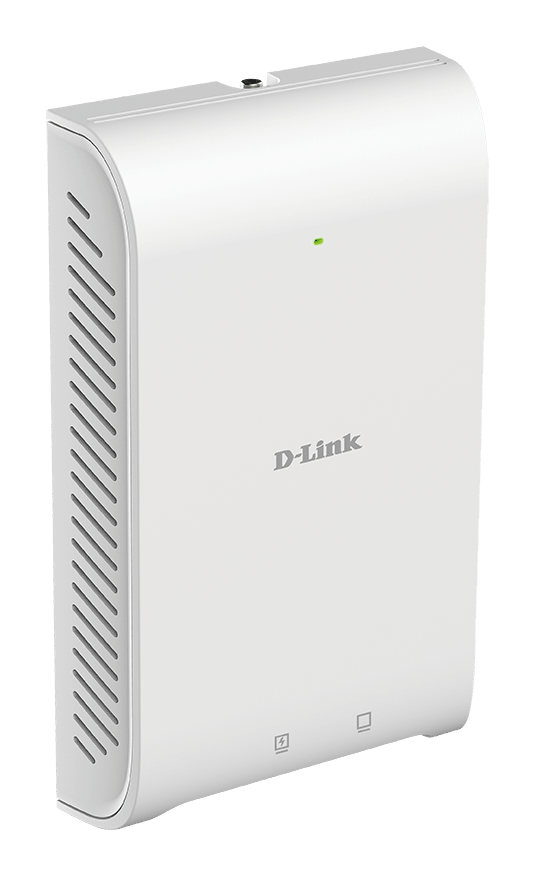




D-Link DAP-2622 Nuclias Connect AC1200 Wave 2 In-Wall Access Point
In-Room Wi-Fi with Gigabit Data and PoE Output The D-Link DAP-2622 combines dual-band Wi-Fi 5 with useful wired connections in an indoor wall-plate design. Its rear Gigabit PoE uplink connects to the building network, while two bottom Gigabit ports provide local data connections, including one with up to 12 W PoE output for a compatible device. The AC1200 Wave 2 radio, MU-MIMO and beamforming support a mix of wireless clients. Configure a single access point through its browser interface or manage compatible units centrally through Nuclias Connect with the appropriate firmware, controller and software host. Highlights Dual-Band Room Coverage Up to 300 Mbps on 2.4 GHz and 867 Mbps on 5 GHz MU-MIMO with beamforming Compact indoor wall-plate installation Three Gigabit Connections Rear Gigabit Ethernet PoE uplink Two bottom Gigabit Ethernet downlinks One downlink provides up to 12 W PoE output Managed Business Access 802.3at PoE+ power input Standalone or compatible Nuclias Connect administration Multiple SSIDs, VLAN and guest-access options Key Features Bring Wireless Access into the Room The wall-plate form fits over a suitable wired wall position, helping provide local Wi-Fi without a large ceiling-mounted unit. It suits planned room-by-room installations in accommodation, education and business premises. Check the wall box, fixing positions, cable clearance and radio placement before installation; each room's construction and wireless conditions still determine practical coverage. Connect Wired Devices Beside the Access Point Three Gigabit ports serve different roles: the rear port carries the network uplink and accepts PoE power, while the two bottom ports connect suitable wired devices. This arrangement can provide a desk-side or in-room connection without using a wireless adapter. The ports share the access point's network infrastructure and do not create three independent Internet services. Power a Compatible Low-Power Device One bottom port supplies data and up to 12 W of PoE output, useful for a compatible low-power device such as an IP phone. Match the connected device's power requirement and PoE compatibility to this limit. The access point itself requires an IEEE 802.3at PoE+ source, and the upstream power budget must cover both the access point and any powered downstream device. Give Compatible Clients Two Wireless Bands Simultaneous dual-band operation provides published maximum radio rates of 300 Mbps on 2.4 GHz and 867 Mbps on 5 GHz. MU-MIMO and beamforming assist supported clients, while band steering and airtime-management functions help organise shared wireless resources. These are capabilities for a planned network; throughput remains dependent on the client, signal, interference and network load. Control Guest and Staff Access Multiple SSIDs and VLAN configuration support appropriate user separation when combined with suitable routing and firewall rules. WPA2-Personal provides shared-key access, while WPA2-Enterprise and RADIUS support managed authentication. Captive-portal, MAC-filtering and WLAN-partitioning options give an administrator further control over access. The installed firmware and management mode determine the available options. Manage Individual Rooms or a Wider Site The browser interface supports individual setup, while Nuclias Connect can centralise compatible access points for configuration, monitoring and reporting. The software is free to download, with a suitable host or controller required separately. Access-point, WDS bridge, WDS with AP and wireless-client modes support different network layouts. Verify hardware, firmware and controller compatibility before adopting an existing unit. Summary The D-Link DAP-2622 suits an indoor wall-plate deployment that needs dual-band Wi-Fi, local Gigabit connections and a modest PoE output for a compatible device. Plan the wall mounting, upstream PoE+ budget, network segmentation and management environment together to use its in-room connectivity effectively. Frequently Asked Questions How Are the Three Ethernet Ports Used?ExpandCollapse The rear Gigabit port is the uplink and PoE input. The two bottom Gigabit ports are downlinks, with one providing PoE output up to 12 W. They are Ethernet connections; the DAP-2622 does not have the DAP-2620's RJ11 telephone pass-through. Can It Power Any PoE Device?ExpandCollapse The PoE output is limited to 12 W. Check the downstream device's PoE compatibility and required power before connection, and allow for it in the upstream budget. Devices requiring more than 12 W need another suitable power source. What Power Source Does the Access Point Need?ExpandCollapse Use a suitable IEEE 802.3at PoE+ switch or injector. Published consumption is 9.5 W for the access point and up to 21.5 W including PoE output. The access point does not include a power adapter or PoE injector. Does Nuclias Connect Require a Controller or Host?ExpandCollapse Central administration requires a compatible controller or suitable software host, together with supported access-point firmware. Nuclias Connect software is free to download. A hosted deployment needs its own hosting and network arrangements. Does AC1200 Describe the Speed of One Device?ExpandCollapse No. It is the combined radio class, based on maximum link rates up to 300 Mbps on 2.4 GHz and 867 Mbps on 5 GHz. Actual throughput depends on client capability, signal conditions, interference, shared airtime and the wired network. What Must Be Checked Before Wall Mounting?ExpandCollapse Check the existing box and fixing positions, rear Ethernet cable clearance, the PoE+ source and the planned radio location. The access point comes with a mounting plate and hardware and is intended for indoor use within its published operating conditions.
Description
In-Room Wi-Fi with Gigabit Data and PoE Output
The D-Link DAP-2622 combines dual-band Wi-Fi 5 with useful wired connections in an indoor wall-plate design. Its rear Gigabit PoE uplink connects to the building network, while two bottom Gigabit ports provide local data connections, including one with up to 12 W PoE output for a compatible device.
The AC1200 Wave 2 radio, MU-MIMO and beamforming support a mix of wireless clients. Configure a single access point through its browser interface or manage compatible units centrally through Nuclias Connect with the appropriate firmware, controller and software host.
Highlights
Dual-Band Room Coverage
- Up to 300 Mbps on 2.4 GHz and 867 Mbps on 5 GHz
- MU-MIMO with beamforming
- Compact indoor wall-plate installation
Three Gigabit Connections
- Rear Gigabit Ethernet PoE uplink
- Two bottom Gigabit Ethernet downlinks
- One downlink provides up to 12 W PoE output
Managed Business Access
- 802.3at PoE+ power input
- Standalone or compatible Nuclias Connect administration
- Multiple SSIDs, VLAN and guest-access options
Key Features
Bring Wireless Access into the Room
The wall-plate form fits over a suitable wired wall position, helping provide local Wi-Fi without a large ceiling-mounted unit. It suits planned room-by-room installations in accommodation, education and business premises. Check the wall box, fixing positions, cable clearance and radio placement before installation; each room's construction and wireless conditions still determine practical coverage.
Connect Wired Devices Beside the Access Point
Three Gigabit ports serve different roles: the rear port carries the network uplink and accepts PoE power, while the two bottom ports connect suitable wired devices. This arrangement can provide a desk-side or in-room connection without using a wireless adapter. The ports share the access point's network infrastructure and do not create three independent Internet services.
Power a Compatible Low-Power Device
One bottom port supplies data and up to 12 W of PoE output, useful for a compatible low-power device such as an IP phone. Match the connected device's power requirement and PoE compatibility to this limit. The access point itself requires an IEEE 802.3at PoE+ source, and the upstream power budget must cover both the access point and any powered downstream device.
Give Compatible Clients Two Wireless Bands
Simultaneous dual-band operation provides published maximum radio rates of 300 Mbps on 2.4 GHz and 867 Mbps on 5 GHz. MU-MIMO and beamforming assist supported clients, while band steering and airtime-management functions help organise shared wireless resources. These are capabilities for a planned network; throughput remains dependent on the client, signal, interference and network load.
Control Guest and Staff Access
Multiple SSIDs and VLAN configuration support appropriate user separation when combined with suitable routing and firewall rules. WPA2-Personal provides shared-key access, while WPA2-Enterprise and RADIUS support managed authentication. Captive-portal, MAC-filtering and WLAN-partitioning options give an administrator further control over access. The installed firmware and management mode determine the available options.
Manage Individual Rooms or a Wider Site
The browser interface supports individual setup, while Nuclias Connect can centralise compatible access points for configuration, monitoring and reporting. The software is free to download, with a suitable host or controller required separately. Access-point, WDS bridge, WDS with AP and wireless-client modes support different network layouts. Verify hardware, firmware and controller compatibility before adopting an existing unit.
Summary
The D-Link DAP-2622 suits an indoor wall-plate deployment that needs dual-band Wi-Fi, local Gigabit connections and a modest PoE output for a compatible device. Plan the wall mounting, upstream PoE+ budget, network segmentation and management environment together to use its in-room connectivity effectively.
Frequently Asked Questions
How Are the Three Ethernet Ports Used?
The rear Gigabit port is the uplink and PoE input. The two bottom Gigabit ports are downlinks, with one providing PoE output up to 12 W. They are Ethernet connections; the DAP-2622 does not have the DAP-2620's RJ11 telephone pass-through.
Can It Power Any PoE Device?
The PoE output is limited to 12 W. Check the downstream device's PoE compatibility and required power before connection, and allow for it in the upstream budget. Devices requiring more than 12 W need another suitable power source.
What Power Source Does the Access Point Need?
Use a suitable IEEE 802.3at PoE+ switch or injector. Published consumption is 9.5 W for the access point and up to 21.5 W including PoE output. The access point does not include a power adapter or PoE injector.
Does Nuclias Connect Require a Controller or Host?
Central administration requires a compatible controller or suitable software host, together with supported access-point firmware. Nuclias Connect software is free to download. A hosted deployment needs its own hosting and network arrangements.
Does AC1200 Describe the Speed of One Device?
No. It is the combined radio class, based on maximum link rates up to 300 Mbps on 2.4 GHz and 867 Mbps on 5 GHz. Actual throughput depends on client capability, signal conditions, interference, shared airtime and the wired network.
What Must Be Checked Before Wall Mounting?
Check the existing box and fixing positions, rear Ethernet cable clearance, the PoE+ source and the planned radio location. The access point comes with a mounting plate and hardware and is intended for indoor use within its published operating conditions.
Specs
D-Link DAP-2622 Nuclias Connect AC1200 Wave 2 In-Wall Access Point
The DAP-2622 is an indoor wall-plate Wi-Fi 5 access point with one rear Gigabit PoE uplink and two bottom Gigabit downlinks. One downlink provides up to 12 W PoE output for a compatible device. The access point requires IEEE 802.3at PoE+ power and supports individual configuration or Nuclias Connect management with compatible firmware and a suitable host or controller. Plan mounting, power budget and network segmentation together. Published wireless figures are maximum radio rates, with actual throughput dependent on clients and site conditions.
| Specification | Details |
|---|---|
| Wireless Connectivity | |
| Wireless Standard | IEEE 802.11a/b/g/n/ac Wave 2, Wi-Fi 5 |
| Band Operation | Simultaneous 2.4 GHz and 5 GHz |
| Maximum Radio Link Rates | 2.4 GHz up to 300 Mbps; 5 GHz up to 867 Mbps |
| Antennas | Two internal antennas; 2×2 MIMO |
| Antenna Gain | 2.8 dBi at 2.4 GHz; 4.1 dBi at 5 GHz, EU specification |
| Radio Features | MU-MIMO, beamforming, band steering, load balancing and airtime fairness |
| Published Frequency Ranges | 2.4–2.4835 GHz and 5.15–5.85 GHz; available channels depend on region and regulations |
| Published Maximum Transmit Power | 20 dBm per band, EU specification; regional and channel limits apply |
| Performance Conditions | Maximum radio rates are not guaranteed throughput; clients, interference, traffic and building conditions affect results |
| Interfaces and Operating Modes | |
| Rear Network Connection | One 10/100/1000 Mbps RJ45 uplink with PoE input |
| Bottom Network Connections | Two 10/100/1000 Mbps RJ45 downlinks; one data-only and one data plus PoE output |
| PoE Output Limit | Up to 12 W for a compatible downstream device |
| Operating Modes | Access Point, WDS bridge, WDS with AP and wireless client |
| Controls and Indicators | Factory-reset control; power/status LED |
| Security and Traffic Management | |
| Authentication | WPA2-Personal and WPA2-Enterprise; internal RADIUS server |
| Network Segmentation | Multiple SSIDs and VLAN configuration; up to eight SSIDs per radio in supported firmware |
| Access Controls | SSID broadcast control, MAC filtering and WLAN partitioning |
| Guest Access | Captive portal with supported authentication options |
| Traffic Features | QoS, traffic control, bandwidth optimisation, load balancing and airtime fairness; availability depends on firmware and mode |
| Management | |
| Individual Configuration | Web browser interface with HTTPS/SSL and SSH access |
| Central Management | Nuclias Connect software or compatible Nuclias Connect controller |
| Software and Host | Software is free to download; suitable host or controller hardware is separate |
| Central Administration | AP discovery, grouping, configuration, monitoring and reporting in a supported deployment |
| Compatibility Conditions | Installed firmware, hardware region, controller version and operating mode determine available functions |
| Power and Installation | |
| Power Input | IEEE 802.3at PoE+ through the rear LAN (PoE) port |
| Published Power Consumption | 9.5 W for the access point; up to 21.5 W including PoE output |
| Downstream Power Planning | Verify the connected device's PoE requirements and the upstream power budget; output is limited to 12 W |
| Installation | Indoor wall mounting over a suitable pre-wired position; check wall-box and fixing compatibility |
| Required Separately | Suitable network, Ethernet cable and compatible PoE+ switch or injector |
| Physical and Environmental | |
| Dimensions | 154.1 × 95 × 27.4 mm, height × width × depth |
| Device Weight | 212 g without mounting base; 250.9 g with mounting base |
| Enclosure | White wall-plate housing |
| Operating Conditions | 0–40 °C; 10–90% relative humidity |
| Storage Conditions | −20–65 °C; 5–95% relative humidity |
| Published MTBF | More than 30,000 hours; statistical reliability figure, not a guaranteed service life |
| Supplied Equipment | |
| Package Contents | Access point, mounting plate and hardware, quick-start documentation |
| Power Equipment | Power adapter and PoE injector not included |