
Cloud Gateways
UCG-Fiber vs UDM-Beast: Which UniFi Gateway Does Your Network Need?
A fast port is only part of a fast network. Compare compact UCG-Fiber and rack-based UDM-Beast through security capacity, ISP handoff, switching and a practical plan for growth.
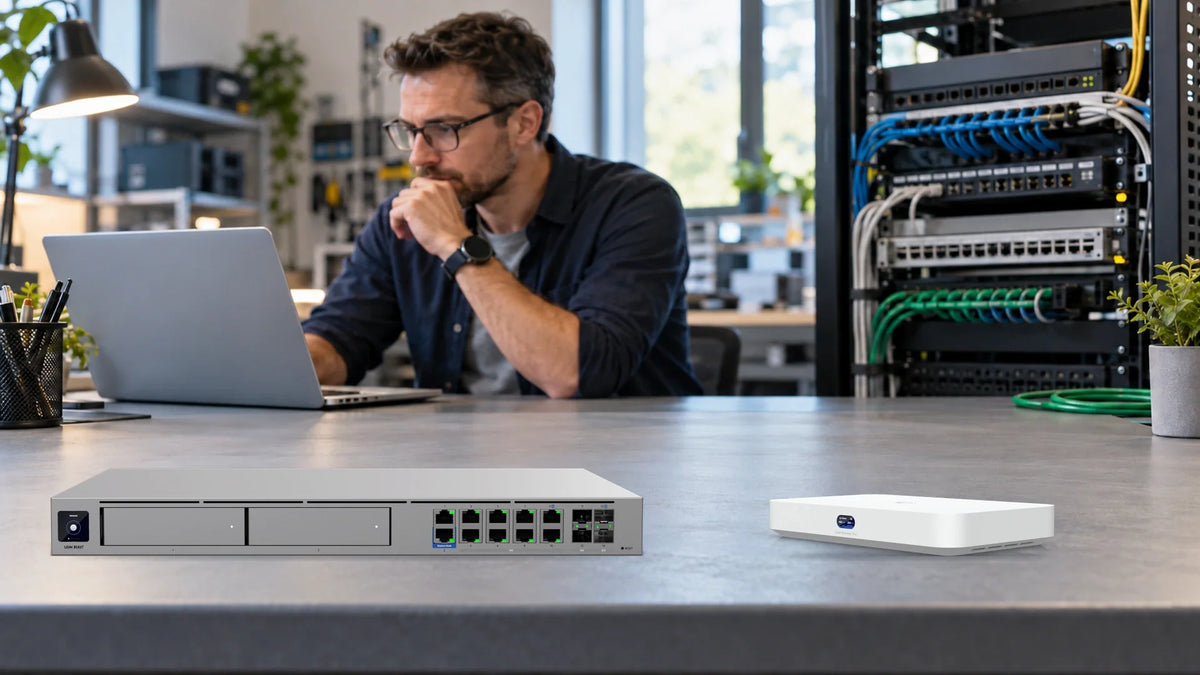
Choose UCG-Fiber when a compact gateway and its security capacity fit the network. Choose UDM-Beast when a rack installation, more high-speed ports and a substantially larger inspection workload justify the step up. Both can connect to fast wired networks, but a port’s link speed and the speed of inspected traffic are different specifications.
A gateway connects the local network to the internet and applies routing and security policies. A UniFi Cloud Gateway also runs the UniFi applications used to manage supported equipment. It is the control point in the design, rather than a substitute for every switch, wireless access point or storage server.
The UCG-Fiber and Dream Machine Beast can therefore suit quite different purchases. The useful starting point is the route your busy applications will take, the security services you intend to use and the space available for the equipment.
For a home lab, studio or small office, UCG-Fiber offers an appealing starting point: fast physical connections in a compact box, with room to expand the switching around it. The interesting question is how much of your busiest traffic actually needs to pass through the gateway.
UCG-Fiber vs UDM-Beast at a Glance
| Decision | UCG-Fiber | UDM-Beast |
|---|---|---|
| Format | Compact desktop; 212.8 × 127.6 × 30 mm. | 1U rack; 442.4 × 43.7 × 325 mm. |
| Manufacturer-rated IDS/IPS | 5 Gb/s. | 25 Gb/s. |
| Copper network ports | 4 × 2.5GbE and 1 × 10GbE RJ45. | 2 × 1GbE and 8 × 10GbE RJ45. |
| SFP interfaces | 2 × 10G SFP+. | 2 × 10G SFP+ and 2 × 25G SFP28. |
| Default WAN options | 10G SFP+ and 10GbE RJ45. | 25G SFP28 and 10GbE RJ45. |
| Useful buying position | A compact multi-gigabit design with a defined workload. | A rack design requiring greater inspection capacity and a richer high-speed port layout. |
IDS means intrusion detection: it looks for suspicious traffic and raises alerts. IPS adds prevention, which can block detected threats. The figures above are Ubiquiti’s published ratings. Internet tests, VPN performance and a particular set of enabled policies can produce different results.
Why a 10G Port Does Not Mean 10G Inspection
A 10GbE port describes the nominal Ethernet link. It does not promise that every combination of routing, security inspection and applications will move traffic at that rate. Enabling inspection uses processing resources, so the gateway’s security rating deserves its own line in the purchase decision.
Consider a business ordering a 10G internet service. UCG-Fiber has suitable 10G interfaces, but its published 5 Gb/s IDS/IPS rating is a separate capacity figure. If the requirement is to inspect a demanding routed workload above that tier, buying from the connector label alone would miss the important distinction.
The same care applies to Beast. Its higher rating does not guarantee a certain speed from a phone, a distant server or a VPN tunnel. Check the complete route and the enabled services, then test the applications that matter before repeating the design.
Can A 5Gbps Gateway Still Run A 10GbE NAS Network?
Yes, when the workstation and NAS communicate within the same suitable 10GbE switched VLAN. Picture a video editor opening large files from a NAS while colleagues make video calls and guests use WiFi. Those activities do not all follow one route.
Connect the workstation and NAS to the same 10GbE switch and VLAN, with communication permitted by the network policy. Their file-transfer traffic can stay on that switch. UCG-Fiber's published 5Gbps inspection rating therefore does not, by itself, impose a 5Gbps limit on this local switched path. Client interfaces, the switch, storage and the file protocol still determine the transfer speed.

Changing the VLAN changes the question. If the workstation and NAS sit in different VLANs, their traffic must be routed. When UCG-Fiber is the assigned router, that path crosses the gateway; a suitable Layer 3 switch can provide a different routed design, with different policy and feature support. Keep the required separation for guests, cameras and business systems when deciding where to route.
Nerd Note: Gb/s And MB/s
A 10GbE link has a raw ceiling of 1,250 MB/s: 10 gigabits divided by eight bits per byte, using decimal units. Ethernet, TCP and file-system overheads reduce the useful file-copy rate. If the copy is slow, separate the link speed from the disks, client and protocol using the NAS transfer troubleshooting guide.
Read the Port Panel Before Choosing Accessories
UCG-Fiber puts its network connections on the rear. Beast presents its main network port bank on the front. Both views below are original product photographs, so the positions and socket counts can be checked before specifying cables or modules.


An SFP cage needs a compatible module or cable for the intended connection. Specify both ends, the link rate, media type and reach. A copper RJ45 connection, a direct-attach cable and an optical link are different choices, even when they carry the same nominal speed.
For broadband, start with the provider’s supported handoff. Record whether it is copper Ethernet or another approved arrangement, plus any VLAN, PPPoE or static-address requirements. The word “Fiber” on a gateway does not establish that the provider’s optical terminal can be removed.
Three Networks That Lead to Different Decisions
A Small Office with Ordinary Internet Traffic
An office using web applications, calls and a modest internet plan may have little reason to buy a large rack gateway. Good coverage, sensible network separation, a supported backup connection and a clean installation can deliver more useful value than spare routing capacity with no identified task.
UCG-Fiber deserves consideration where its interfaces and capacity meet the plan and the compact format is helpful. It still needs the right wireless access points and enough switch ports for desks, printers and other wired equipment.
A Studio with Fast Local Storage
A studio may want a 10GbE workstation-to-NAS path while using a much slower internet service. That storage traffic should be mapped separately from internet traffic. A local transfer switched within the same network has a different path from traffic routed between networks and inspected at the gateway.
Start with the workstations, storage and switch fabric. Decide which traffic must cross a routing or security boundary. A fast NAS does not, by itself, require the largest internet gateway; a policy that sends large transfers through inspection may change that conclusion.
A Growing Rack Installation
Beast becomes more relevant when the organisation can identify a substantial routed workload, many high-speed connections or a 25G connection to the wider network. The rack format also needs proper depth, power, airflow and access for maintenance.
Plan the next funded stage, rather than every imaginable future device. A 25G port is useful when there is a compatible destination and traffic to use it. It does not increase a 1G internet subscription or turn a 1G client into a faster endpoint.
Beast also has an operational argument. Ubiquiti lists Shadow Mode gateway failover and DC power-backup support. For a site where a gateway outage would interrupt the working day, that can matter as much as a faster port. The second gateway, compatible backup power and failover configuration belong in the design and its testing; one appliance alone does not provide that redundancy.
Why the Switch and AP Still Matter
The gateway is only one part of an installation. A wireless access point needs an appropriate data connection and power source; a group of APs shares whatever uplink joins the access switch to the rest of the network.
UCG-Fiber has a limited 30 W PoE budget. It should not be treated as a replacement for a planned multi-device PoE switch. For APs, cameras and other powered endpoints, check the exact per-port requirement and the shared switch budget independently.
The PoE Detail That Is Easy To Miss
UCG-Fiber's PoE+ output is on a 2.5GbE connection. The 10GbE RJ45 port is not a combined 10G PoE output. A U7-Pro-XG therefore needs both a suitable data path and PoE+ power to use its 10GbE uplink. Power delivery and Ethernet speed are separate checks.
The USW-Pro-XG-8-PoE provides eight 10GbE copper ports with PoE++ capability, two 10G SFP+ interfaces and a shared 155 W PoE budget. That gives a compact build a useful expansion route for fast APs, a NAS and wired workstations, with each device's power requirement checked against the available budget.
Start Compact, Add The 10G Layer Later
Start with the ports and compatible powered devices the first stage needs. When faster storage or more APs arrive, add the switch and a suitable SFP+ LAN connection. UCG-Fiber can remain the gateway while the access network expands, provided its routing, security and management capacity still fit the workload. Move to Beast when the routed requirement earns that upgrade.
The WiFi 7 and switch-choice guide explains when 2.5GbE access is a sensible purchase and when a complete 10GbE path is justified. The PoE comparison separates power standards from data speed. Those choices remain necessary whichever gateway is selected.
Compare the Complete Installation Cost
A lower enclosure price is useful only if the final system still does the job. Build the quotation around the complete design:
- The gateway and the required WAN handoff accessories.
- Switch access ports, shared uplinks and the correct PoE allocation.
- Compatible DACs, transceivers, fibre or copper cabling at both ends.
- APs, mounting and the cable route to each planned coverage area.
- Power protection, rack or shelf space, installation and a documented configuration.
- The actual security services and any optional subscriptions included in the requirement.
A backup internet connection also needs a defined failure path and a test. Dual links do not make every application session survive an interruption. For equipment power, use the UPS runtime and shutdown guide to plan the supported load and the time required to respond.
What to Test Before the Design Is Repeated
Agree on acceptance tests while the requirements are still clear. Check a wired client to the internet, a local client to the NAS, traffic that crosses the intended network boundary and performance with the required security settings enabled. Keep these results separate so one good download does not stand in for the whole design.
During a representative busy period, observe latency, stability and simultaneous users as well as headline throughput. Record firmware, test endpoints, negotiated links and the enabled features. A reproducible result is more useful than a single peak figure without its conditions.
Frequently Asked Questions
Can UCG-Fiber use a 10G internet connection?
It has 10G interfaces, but the required handoff must match. Its published 5 Gb/s IDS/IPS rating also needs to be considered when choosing security settings and the workload.
Is UDM-Beast automatically the better choice?
It offers a higher inspection tier and a different port layout. It is the better purchase when those capabilities address the identified requirement, with suitable rack space and the rest of the network to use them.
Does either gateway provide WiFi coverage by itself?
These models need separate wireless access points. Choose the AP, its placement, data link and power source as part of the complete installation.
Will a 25G gateway make a 1G internet plan faster?
No. It may serve other appropriate traffic or expansion needs, but it does not change the subscribed internet rate.
Does an SFP+ port replace the ISP’s optical terminal?
Only a provider-approved arrangement can establish that. Confirm the actual service handoff, compatible equipment and authentication requirements before ordering.
Do local NAS transfers always pass through the gateway?
The path depends on the network layout. Same-network switching and routed traffic between networks are different cases; security and routing policy determine where inspection happens.
The Recommendation: Buy for the Traffic That Must Cross It
Start with UCG-Fiber when the compact form, port mix and inspection tier fit the measured requirement. Invest the remaining design effort in switching, AP placement, cabling and power protection.
Choose UDM-Beast when the identified routed workload, rack installation or high-speed port plan justifies it. Pair it with a switching and storage design that can use the additional capacity. The enterprise networking guide covers the next step into aggregation and core links.
A useful enquiry includes the internet handoff and speed, security features, busiest applications, expected users, local storage path and rack constraints. Those details make it possible to recommend a complete system and avoid paying twice for an early replacement.


