
NAS
NAS SSDs Compared: SATA, NVMe, Endurance and Failure Rates
Read SSD reliability claims properly. Match the socket and role, convert endurance into a useful write budget and separate field failures from wear ratings.
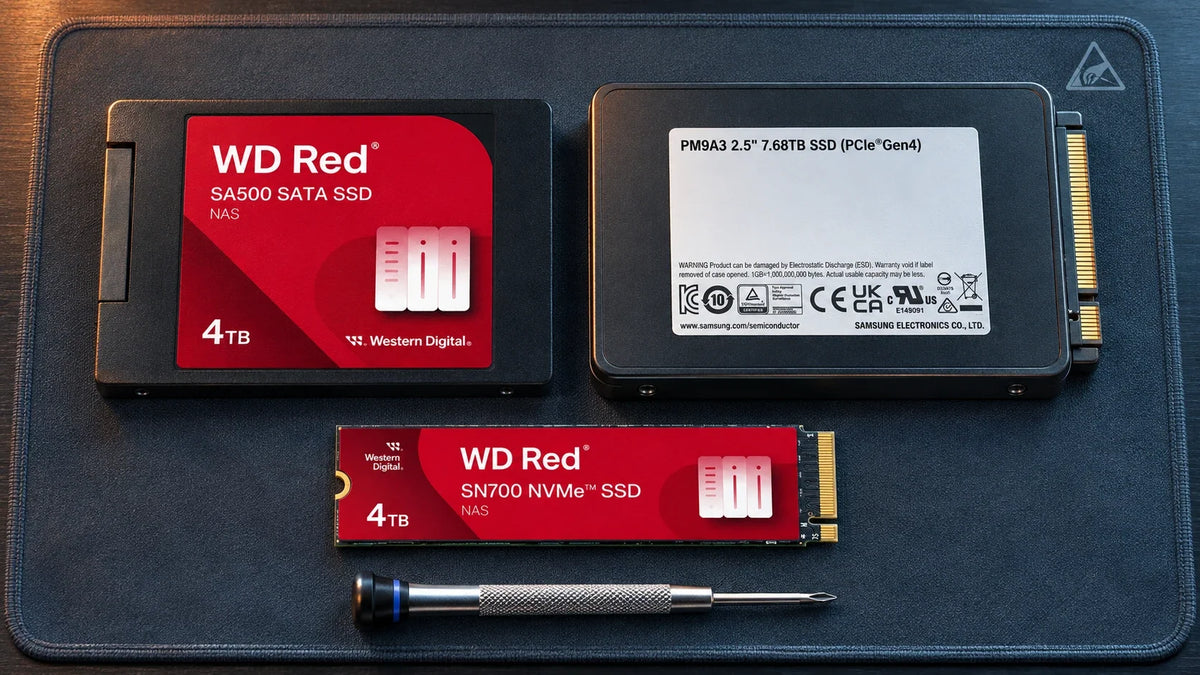
The best SSD is the supported one for the job: the right connection, enough write endurance and appropriate power-loss behaviour. SATA, M.2 NVMe and U.2 NVMe products cannot be substituted merely because they are all SSDs. TBW, DWPD and a reported failure rate answer different questions.
An SSD advertised as fast can still be the wrong purchase for a NAS cache, a database or a server bay. A cache may write frequently throughout the day. An archive may mostly read. A server may need power-loss protection and a backplane that a desktop NAS does not have. Start with the role before choosing the brand.
Three Useful Examples, Three Different Fits

The 2.5-inch cased version uses SATA. It needs a supported SATA bay and the correct intended NAS role.

M.2 2280 NVMe NAS SSD. The slot must support NVMe, and the platform must support cache or storage use for the exact model.

Data-centre PCIe NVMe family with documented power-loss protection. Check the exact U.2 or other form factor and host connection.
| Example | Connection to check | Selection focus |
|---|---|---|
| SA500 2.5-inch | SATA bay and supported 2.5-inch mounting | Capacity-specific endurance and supported NAS role |
| SN700 M.2 | M.2 2280 PCIe NVMe slot | Cache/pool support, endurance and cooling |
| PM9A3 U.2 example | PCIe-connected U.2 backplane or suitable supported host | Server fit, endurance, firmware and documented PLP |
These examples show different roles, not a three-way benchmark on the same host. In particular, a 2.5-inch U.2 NVMe drive is not a plug-in SATA replacement, and an M.2 SATA socket does not become NVMe because the connector looks similar.
Turn TBW and DWPD Into a Useful Write Budget
A Write Budget Is Not a Failure Timer
Read the rating and protect the operating path.
01 Convert the endurance rating
About 0.33 DWPD in this exampleThis is arithmetic for a hypothetical rating, not a measured result or a universal product specification.
02 Protect more than the drive
Check each protection layerDrive-level PLP does not preserve every unsaved byte still in the computer.
TBW is a specified total amount of host writes under the manufacturer’s conditions. DWPD expresses writes per day relative to the drive’s capacity for the stated period. Neither is the date on which a drive must stop working, and warranty terms can end at a time or endurance limit.
For example, a hypothetical 2 TB SSD rated at 1,200 TBW over five years averages approximately 658 GB of host writes per day: 1,200 ÷ (365 × 5). That is about 0.33 drive writes per day. This is arithmetic for understanding a rating, not the specification of every 2 TB SSD or a guarantee for your application.
Conversely, a 3.84 TB drive rated at 1 DWPD for five years corresponds to about 7,008 TB of host writes over that period. Capacity-specific ratings matter: a larger drive in the same family can have a different endurance allowance. Compare the exact part numbers on a consistent basis.
Measure the actual write rate in the NAS or server. Do not equate the network’s download total, application file size and NAND writes. RAID, filesystem behaviour, cache eviction and write amplification can make these different. Leave margin for growth and background activity.
What Published SSD Failure Rates Really Mean
Backblaze’s September 2023 SSD report described 3,144 SSDs used as storage-server boot drives as of June 2023. They also handled logs and temporary files. The Q2 annualised failure rate was 1.05%. This is useful historical field evidence, not a current universal failure rate for NAS cache or every consumer SSD.
The population, model mix, drive age and workload matter. It does not establish a head-to-head failure ranking for SA500, SN700 and PM9A3. A comparison with HDD data from another period or workload cannot isolate the effect of storage media alone.
Read three separate things: the observed field failure rate, the manufacturer’s endurance allowance and the individual drive’s health evidence. A high TBW rating does not prevent controller or firmware failure; a low fleet AFR does not make one drive safe without backup.
Power-Loss Protection, SMART and Cooling
Documented power-loss protection can help a drive complete or preserve required internal operations during sudden power interruption, within its specified behaviour. Check whether the feature protects in-flight data and mapping information for that exact drive; a vague claim of “data protection” is not equivalent.
A UPS protects a broader power path and can support controlled shutdown. It does not turn an SSD without PLP into one with PLP, and SSD-level PLP does not protect unsaved application data still in host memory. Plan both layers for important workloads.
Health monitoring should include warnings, media or data-integrity errors, spare capacity, percentage used where applicable, temperature and unexpected changes. Vendor SMART attributes differ. “99% health” alone is not proof that the interface, firmware and storage pool are healthy.
M.2 cooling must also fit the appliance. A tall gaming heatsink can obstruct the cover or airflow; a hot SSD can throttle. Use compatible thermal parts and compare sustained behaviour after the system reaches normal operating temperature.
Cache or Storage Pool: Buy for the Supported Role
Read cache and protected write cache have different consequences if a device fails. An SSD pool stores primary data and needs its own redundancy and backup plan. Check the NAS model, operating-system version, exact SSD and intended role before buying. A supported cache listing does not automatically permit an NVMe storage pool.
Use the drive compatibility guide and NAS performance and price guide to keep the purchase connected to the complete workload.
Choose the socket and supported role first. Then compare capacity-specific endurance, write behaviour, PLP, thermal fit and firmware support. Use real failure research to understand uncertainty, not to promise a failure-free SSD or rank an entire brand.
Frequently Asked Questions
Are NVMe SSDs more reliable than SATA SSDs?
The interface alone does not establish reliability. Compare the actual design, firmware, workload, age, endurance and power-loss behaviour.
Does reaching TBW mean the SSD immediately dies?
No. TBW is an endurance specification and may be a warranty limit. It is not an exact failure timer. Monitor the drive and follow the replacement policy.
Can a U.2 SSD work in my SATA bay?
Not as a direct substitution. A U.2 NVMe drive needs a suitable PCIe-connected host path and supported mounting and firmware.
Is the published 1.05% SSD AFR a current retail prediction?
No. It describes Backblaze’s Q2 2023 boot-drive population and exposure. It is historical, workload-specific evidence rather than a prediction for every SSD.
Does a UPS replace SSD power-loss protection?
No. They protect different layers. A UPS supports the system power path; drive-level PLP addresses specified internal drive operations during interruption.
Should I add SSD cache to every NAS?
No. Confirm that the workload benefits and the model supports the chosen cache design. A sequential large-file task may gain less than a repeated random-read workload.


