
Access Points
Mesh WiFi vs Access Points: Backhaul, Roaming and Choosing the Right Setup
Compare wireless mesh, Ethernet-backhaul mesh and managed wired access points. Understand what changes coverage, roaming and network capacity, then choose a setup around the building and the work it must support.
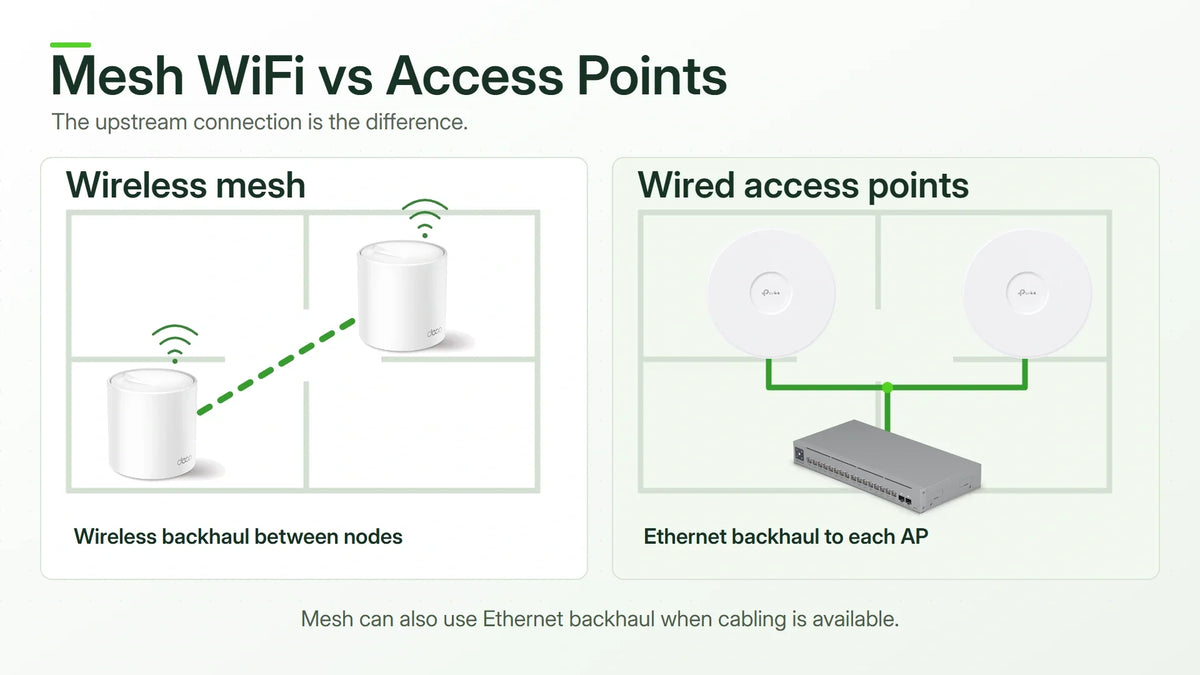
Quick answer: choose around the backhaul and management requirement, not the label alone. Wired access points are a strong option when Ethernet is available and predictable capacity or network control matters. A mesh system can be easier to deploy without new cables, and many mesh systems can also use Ethernet backhaul. The useful comparison is wireless mesh, wired-backhaul mesh and managed access points.
Two networks can use similar-looking WiFi equipment and behave very differently. The difference is often the connection between each wireless node and the rest of the network, rather than the speed printed on the box.
Highlights
- Mesh can be wired. Ethernet backhaul is supported by many mesh systems.
- Access points can be centrally managed. Individual configuration is not an inherent limitation of APs.
- Wireless backhaul needs a usable upstream signal. A node placed deep inside a dead zone cannot create a good connection from a poor one.
- Roaming and backhaul are different. Moving a client between nodes is separate from how those nodes reach the network.
- Compare the complete installation. Cabling, PoE, switching, software and support can matter more than the price of one unit.
Mesh, Access Points and Backhaul: Separate the Terms
An access point provides wireless access to a network. In a typical wired deployment, Ethernet connects each AP to the switch. A controller or management platform can coordinate multiple APs, their WiFi names, security settings and radio configuration.
A mesh system uses coordinated nodes to extend wireless access across a space. In many home mesh products, those nodes can communicate over WiFi or Ethernet. Some business AP platforms also support wireless meshing. The two product categories therefore overlap rather than forming a strict wired-versus-wireless divide.
Backhaul is the connection carrying a node’s traffic back into the network. Your phone’s WiFi link is one part of the path; the node’s backhaul is another. A strong phone-to-node connection does not prove the node has a strong route to the router or server.
Three Configurations Worth Comparing
| Configuration | How Nodes Reach the Network | Strong Fit | Main Planning Question |
|---|---|---|---|
| Wireless Mesh | One or more nodes use WiFi upstream | Homes or temporary layouts where Ethernet is impractical | Can each node receive a strong enough upstream connection? |
| Mesh with Ethernet Backhaul | Supported mesh nodes connect by Ethernet | Existing mesh owners or homes with usable network cabling | Are the wiring topology, operating mode and port speeds suitable? |
| Managed Wired APs | Each AP normally has a wired uplink to switching | Offices, planned installations and networks needing stronger control | Are the cabling, PoE, switching and management designed together? |

When Wireless Mesh Is a Sensible Choice
Wireless mesh is useful when opening walls or installing new Ethernet is disproportionate to the requirement. A supported system with straightforward management can solve a practical coverage problem without a larger infrastructure project.
Placement is the central decision. Put a satellite where it still receives a good upstream connection and can serve the target area. Placing it beside the device that struggles, behind the same difficult wall, can leave the upstream problem intact.
Radio time is shared with other activity, and a wireless hop adds another part of the path that can experience interference or congestion. Dedicated backhaul radios and higher-specification systems can help, but do not make placement or channel conditions irrelevant. Avoid treating “each hop halves the speed” as a universal rule; the actual radios, channels, traffic and topology determine the result.
A short route to a well-connected node is generally preferable to building an unnecessary chain of wireless hops. Test the required rooms and applications rather than judging the design only by the WiFi signal icon.
Ethernet Backhaul Can Improve an Existing Mesh System
If useful cabling already exists, a supported mesh system may not need replacing. Ethernet backhaul lets wired nodes send their upstream traffic over cable while continuing to provide WiFi to clients.
The TP-Link Deco X50, for example, has three Gigabit Ethernet ports and supports Ethernet backhaul. A Gigabit port is still a Gigabit connection; the combined wireless marketing rate is not the throughput of that wired port.
Deco’s Router and Access Point modes have different wiring rules. In Router mode, satellites belong on the LAN side of the main Deco, directly or through a suitable switch. In Access Point mode, the upstream router handles routing and DHCP, and supported nodes can attach through the appropriate existing LAN.
Some router functions become unavailable in Deco Access Point mode because they move to the upstream router. Confirm where parental controls, addressing, remote access or other required functions will run before changing mode. A mesh installation can also mix wired and wireless backhaul where only part of the property is cabled.

When Managed Wired Access Points Make More Sense
Wired APs are particularly useful when the installation can provide a reliable cable to each planned radio location. That removes the need to spend wireless capacity reaching another node and gives a more predictable foundation for busy rooms or important applications.
The management platform is part of the comparison. Supported systems can coordinate AP settings centrally and offer guest access, VLAN-related network separation and operational visibility. The available functions depend on the chosen APs, switches, gateway and management arrangement.
A planned office, workshop or multi-floor building may benefit from AP locations chosen around users and building materials, with PoE supplied from a protected switch. That can be easier to maintain than adding devices wherever an electrical socket happens to be available.
Wired APs are not automatically cheaper, faster or better in every property. The cost and disruption of installing cables may dominate a small project. Conversely, an inexpensive AP without the required switch, power source or management can leave an incomplete design.

A coordinated home mesh platform with wireless or supported Ethernet backhaul.

A managed access-point option for a planned wired network. Its management ecosystem is separate from Deco.
Will Devices Roam Smoothly?
Roaming describes a client changing its association from one AP or node to another. Backhaul describes how those APs or nodes reach the rest of the network. Improving one does not automatically fix the other.
Coordinated network settings and supported assistance such as 802.11k, 802.11v and 802.11r can improve the process for compatible clients. The client still makes its own association decisions, and different devices can behave differently.
Coverage overlap, radio power, interference, security configuration and the application all matter. Test a real voice or video call along the intended route. The same WiFi name on several independently configured routers is not, by itself, proof of a well-managed roaming design.
Does WiFi 7 Change the Decision?
A newer radio generation can add useful capabilities, but it does not remove a weak upstream connection. A WiFi 7 node behind a constrained Ethernet link or an unreliable wireless backhaul still shares that bottleneck.
Check the client capabilities, permitted bands, wired port speeds and required power alongside the radio features. The WiFi 7 UniFi U7 Pro, for instance, specifies a 2.5GbE uplink and PoE+ input. Its wireless generation, data connection and power requirement are three different checks.
A good WiFi 6 installation can remain the sensible choice for its workload. The upgrade should solve a known capacity, coverage or operational requirement rather than replace equipment solely because a larger number is available.
Choose Around the Building and the Workload
| Situation | Useful Starting Point | What to Verify |
|---|---|---|
| No practical Ethernet route | A supported wireless mesh design | Node placement, upstream signal and actual application performance |
| Working mesh with usable network cables | Ethernet backhaul on supported nodes | Operating mode, wiring rules and negotiated link speed |
| Planned office or building installation | Managed APs with wired uplinks | AP locations, PoE, switch capacity and network management |
| Important calls, transfers or many active users | A design with predictable backhaul and capacity | Busy-hour traffic, interference, roaming and recovery expectations |
Compare total installation cost: equipment, cabling, PoE supplies or switches, configuration, subscriptions where applicable, ongoing management and the work needed when a device fails. There is no universal price winner between mesh and APs.
A Practical Setup and Test Checklist
- Identify the router, existing cable runs and the rooms or work areas that need service.
- List the applications and devices that must work, rather than relying only on headline broadband speed.
- Choose node or AP positions around the backhaul and coverage requirement.
- Verify Ethernet speed, PoE or local power, operating mode and management compatibility.
- Test in the required locations, including movement between rooms and concurrent activity.
- Record the layout, credentials, management owner and a recoverable configuration.
Measure a wired connection near the router first, then test the wireless route. This helps separate an internet-service limit from a coverage, backhaul or client issue. A local file transfer and an internet speed test answer different questions.
Frequently Asked Questions
Can a mesh system use Ethernet?
Yes, when the chosen system supports Ethernet backhaul. Follow its wiring rules and operating mode. Some nodes can remain wireless while others use cable.
Can business access points form a wireless mesh?
Some supported AP platforms can. UniFi wireless meshing, for example, requires the supported managed setup; it is not available in the same way for an independently configured standalone AP.
Can Deco and Omada become one mesh system?
No. They are separate management and mesh ecosystems. Ethernet compatibility between network devices does not make their proprietary mesh management interchangeable.
Will adding more nodes always improve coverage?
No. Poor placement, weak backhaul and excessive radio overlap can reduce the benefit. Confirm the problem before adding another node.
Do wired APs guarantee seamless calls?
No. Wired backhaul provides a strong foundation, but client behaviour, coverage, roaming support and the application still affect the experience.
Choose the Connection Behind the WiFi
Use wireless mesh where it solves a wiring constraint. Use Ethernet backhaul where supported cables can improve an existing mesh. Consider managed wired APs when capacity, network control and maintainability justify a planned installation. The strongest choice is the one that fits the building, users and required service.
Product Details and Related Reading
- Deco X50 and Omada EAP772: compare separate deployment options.
- PoE power and compatibility: choose a suitable power source and switch budget.
- Omada and UniFi planning tools: start with a layout before choosing equipment quantities.
- Enterprise switching architecture: plan uplinks and capacity when the network grows.


