
10Gbps
Cat 6A vs Cat 7 vs Cat 8: A Singapore Home Cabling Guide
Cat 6A is a practical starting point for new 10Gbps home wiring, but existing cable may already meet your needs. Compare the real differences before choosing.
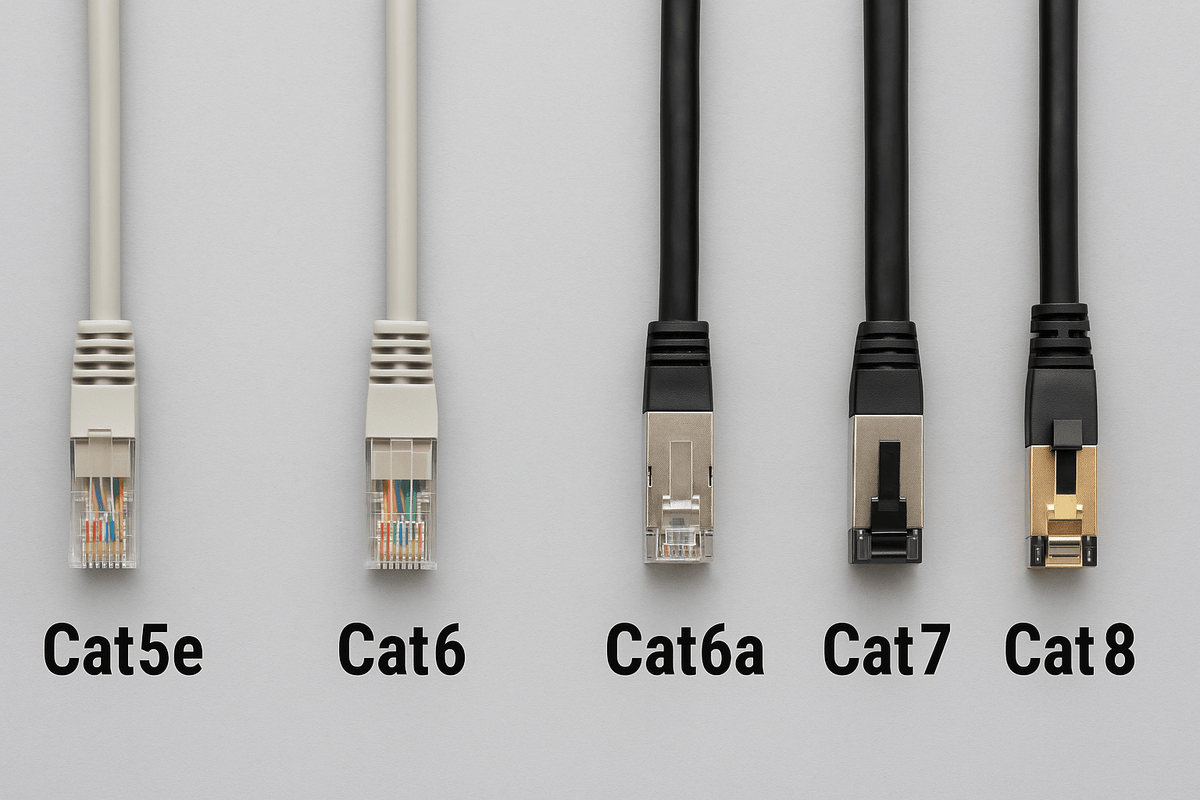
For a new Singapore home installation with a clear 10Gbps goal, Cat 6A is usually the practical starting point. Cat 6 can still make sense for a tighter budget, and working existing cabling may not need replacing. Cat 7 requires closer attention to the complete connector system; Cat 8 is mainly a short-reach data-centre option, not an automatic upgrade for home internet.
The useful question is not “Which category has the biggest number?” It is “What speed do I need, over which route, with which equipment?” That applies whether you live in an HDB flat, a condominium or a multi-storey landed home.
Ethernet cable speed and distance comparison
| Cable category | Ethernet link speed | Maximum channel distance |
|---|---|---|
| Cat 5e | 1Gbps / 2.5Gbps | Up to 100m |
| Cat 6 | 1Gbps / 2.5Gbps / 5Gbps | Up to 100m |
| Cat 6 (10Gbps use) | 10Gbps | Up to 55m, subject to qualification* |
| Cat 6A | 10Gbps | Up to 100m |
| Cat 7 / Class F | 10Gbps | Up to 100m with a compliant complete channel |
| Cat 8 | 25Gbps / 40Gbps | Up to 30m (24m fixed link + patch cords) |
How to read the table: these are common standards-based planning points for compliant installations and compatible equipment, not guaranteed internet download speeds. A channel includes the fixed cable, connections and patch cords; the 100m allowance is not 100m of in-wall cable plus unlimited leads.
- *Cat 6 at 10Gbps: 55m is conditional, not a blanket guarantee. Cable bundling and interference between cables can reduce the usable distance; test the installed channel for 10GBASE-T. For new 10Gbps wiring over longer routes, specify Cat 6A.
- Existing multi-gigabit wiring: assess the actual installation before relying on 2.5Gbps over Cat 5e or 5Gbps over Cat 6. Damaged cable, poor termination or unsuitable patching can prevent the expected speed.
- Cat 7: the 100m figure assumes a compliant Class F system, including suitable connectors; a cable label alone does not prove this.
- Cat 8: the 30m channel limit shown is for 25/40GBASE-T. It is not a statement that every lower-speed Ethernet application is limited to 30m.
Why Cat 7 and Cat 8 need a closer look
Cat 7: a real standard, but the label is not the whole system
Cat 7 is recognised by ISO/IEC, so dismissing it as “not a real category” is incorrect. However, its Class F performance involves suitable connectivity, such as GG45 or TERA. An ordinary RJ45-ended lead advertised as “Cat 7” does not, by that label alone, establish a Class F channel.
It may work perfectly well with your equipment, but ask what the finished assembly is actually certified to support. For an ordinary RJ45 home network targeting 10Gbps, a documented Cat 6A system is generally the simpler specification.
Cat 8: the 30m limit is for 25/40Gbps
Cat 8's headline application is short-reach 25/40GBASE-T, developed for data-centre connections. Its 30m channel limit should not be confused with a 30m limit for every Ethernet speed. TIA Cat 8 uses RJ45-style connectivity and is shielded; the complete installation must meet its requirements.
Buying that cable does not turn a 1Gbps router port into a 40Gbps port. Check the exact interfaces on both devices before paying for a category you cannot use.
Choose for your rooms and devices, not just your property type
Before choosing cable, sketch the intended routes from the router or switch to workspaces, televisions, access points and storage. Include vertical runs, detours and patch leads. The floor number itself does not slow Ethernet; the actual channel and equipment determine what it can support.
- Keeping an existing HDB or condo network: check negotiated link speeds and test suspect runs first. A new switch or replacement patch lead may address the limitation without reopening walls.
- Renovating with a 10Gbps target: obtain a Cat 6A system quotation alongside the lower-cost option. Specify matching outlets and patching, accessible routes, labelling and test reports.
- Connecting a landed home across floors: plan access-point locations and measure the longest route. If copper channel limits would be exceeded, discuss a fibre backbone and suitable equipment with the installer.
- Upgrading a NAS or workstation: check the network ports, switch uplinks and storage performance together. Fast cabling cannot compensate for a slower device elsewhere in the path.
Compare itemised quotations rather than a supposed universal “price per point”. Route length, existing conduits, trunking, access, making-good work and certification change the job. There is no meaningful one-price answer for every Singapore home.
Five checks that matter more than the category badge
- Specify copper conductors. Avoid copper-clad aluminium (CCA) sold as a cheap substitute for compliant category cable. Its higher resistance is particularly undesirable for Power over Ethernet. A manufacturer's “Euroclass Cca” fire classification is a different term: check the conductor specification, not those letters alone.
- Match the complete system. Cable, jacks, patch panels and leads all matter. Choose suitable components and follow their installation instructions, including bend radius and pulling limits.
- Choose shielding deliberately. Cat 6A is available in shielded and unshielded systems. Shielding requires correctly designed termination and bonding; it is not a substitute for sensible routing.
- Check PoE requirements. Access points and cameras need compatible power budgets as well as data speed. Ask about conductor resistance, resistance balance and installation conditions when specifying powered links.
- Request per-link certification. A basic continuity tester or a successful internet speed test does not certify Cat 6A performance. Specify the test standard and obtain labelled results for the finished permanent links, plus suitable patch cords.
Frequently asked questions
Will Cat 8 make my internet or gaming faster?
Not if the existing cable already supports the negotiated connection without errors. Your broadband plan, router, device ports, congestion and remote service can still be the limiting factors. Repairing a faulty cable can help; changing a working cable's category is not a guaranteed latency upgrade.
Must I replace Cat 5e to get more than 1Gbps?
No. Multi-gigabit Ethernet was designed to reuse qualifying existing cabling. Have the particular installation assessed for the intended speed instead of assuming Cat 5e stops at 1Gbps. That does not make it a general recommendation for a new 10Gbps installation.
Is Cat 6A genuinely future-proof?
It provides a defined 10Gbps capability, not a promise to support every future technology. Spare pathways, accessible outlets, documented routes and good testing can be as valuable as choosing a higher category.
Bottom line: keep cabling that meets your needs; specify a complete, tested Cat 6A system when new 10Gbps wiring is the goal. Compare networking equipment and patch cables and NAS and storage options against that plan, rather than buying by the biggest number.
Technical references reviewed 29 September 2026. This guide explains standards and purchasing considerations; it is not a benchmark or certification of a particular home installation.


