


TP-Link ER701-5G-Outdoor Omada 5G Outdoor Gateway
Put the cellular connection where the signal is stronger The TP-Link ER701-5G-Outdoor brings a 5G connection to a location where a wired broadband route is unavailable or an alternative WAN path is needed. Mounting the cellular unit outdoors can help place its antennas away from the obstructions around an indoor cabinet. Dual Nano SIM slots provide a supported failover arrangement, while a PoE-powered 2.5GbE connection carries the network back indoors. Highlights Cellular WAN for the site 5G NR with supported 4G fallback and regional band requirements. Two Nano SIM slots for a configured backup arrangement. A considered outdoor installation IP66 housing with wall, pole or window mounting options. One 2.5GbE PoE-input port and included passive PoE adapter. Useful network integration Router or IP-passthrough operation as supported. Setup Wi-Fi and app-guided alignment; compatible Omada management. Key Features Place the modem around the radio path An indoor network cabinet is often a poor location for a cellular antenna. The outdoor gateway lets the installer position the cellular unit where coverage and alignment are more favourable, then carry data indoors over Ethernet. Test the intended mobile network at the mounting location; the enclosure and antennas cannot create coverage where the operator has none. Treat two SIMs as resilience rather than bonded speed The dual Nano SIM arrangement supports a configured backup connection. It does not combine two subscriptions into an automatically faster link. Choose suitable plans and check band support, APN settings, failover behaviour and data allowances. Using different operators can address some failure scenarios, but the site still depends on local coverage and the wider mobile network. Understand the interface limits Published 5G figures are theoretical modem rates under specified conditions. The Ethernet connection is 2.5GbE, and actual service also depends on signal quality, the operator, congestion, plan limits and the local network. The small Wi-Fi radio is for convenient setup; this gateway is not a replacement for a business Wi-Fi access point serving users across the site. Power and protect the installation The device supports IEEE 802.3at PoE+ and the documented 48V passive PoE supply. The manufacturer includes a passive adapter, which must remain protected indoors. Follow the mounting and grounding guide, protect the Ethernet route and seal cable entries. IP66 applies to the correctly installed gateway, not every separate piece of power equipment. Choose the appropriate handoff to the indoor network Supported router and IP-passthrough modes provide different ways to connect the cellular service to a local network or another gateway. Decide where routing, security and failover policies will be managed before configuring the equipment. Operator carrier-grade NAT and subscription restrictions can affect inbound access; do not assume a public reachable address is included. Keep setup and ongoing management clear App-guided alignment and a local setup connection assist installation. Compatible Omada management can bring supported monitoring and configuration alongside the rest of the network. Check the controller, firmware and regional hardware against the exact features required, then document SIM ownership and service renewal as part of the handover. Summary The ER701-5G-Outdoor suits a site that needs a planned cellular WAN path with the modem positioned outside the building. Match the regional radio hardware, operator plans, power route and network handoff to the installation, then test both normal operation and the configured SIM failover. Frequently Asked Questions Does it provide everyday Wi-Fi to users?ExpandCollapse Its Wi-Fi radio is provided for setup convenience. Use a suitable access point for the site’s ordinary wireless clients. Do the two SIMs combine their speeds?ExpandCollapse No. The documented arrangement provides a configured backup/failover path. It does not establish bonded throughput from two subscriptions. Is the PoE adapter included?ExpandCollapse The manufacturer lists a passive PoE adapter. It must remain in a dry protected location. The gateway also supports the specified IEEE 802.3at PoE+ input. Will it work with any mobile plan?ExpandCollapse Check the exact regional hardware bands, SIM, APN, operator coverage and subscription terms. A working mobile service and an appropriate data plan are required. Does the advertised 5G rate equal usable Ethernet speed?ExpandCollapse No. The 5G figure is a theoretical modem rate and the wired interface is 2.5GbE. Signal conditions, operator network, plan and traffic determine practical throughput.
可在 3005, Ubi Avenue 3, #01-88 提货
通常在 2 至 4 个工作日内备妥(公共假期除外)
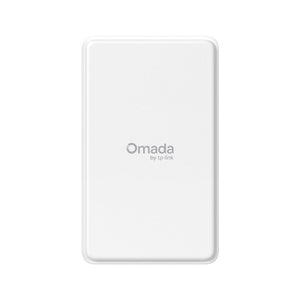
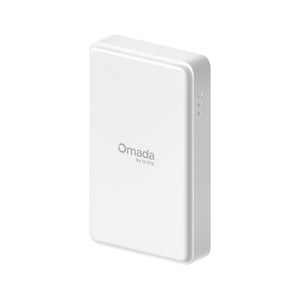
TP-Link ER701-5G-Outdoor Omada 5G Outdoor Gateway
描述
Put the cellular connection where the signal is stronger
The TP-Link ER701-5G-Outdoor brings a 5G connection to a location where a wired broadband route is unavailable or an alternative WAN path is needed. Mounting the cellular unit outdoors can help place its antennas away from the obstructions around an indoor cabinet. Dual Nano SIM slots provide a supported failover arrangement, while a PoE-powered 2.5GbE connection carries the network back indoors.
Highlights
Cellular WAN for the site
- 5G NR with supported 4G fallback and regional band requirements.
- Two Nano SIM slots for a configured backup arrangement.
A considered outdoor installation
- IP66 housing with wall, pole or window mounting options.
- One 2.5GbE PoE-input port and included passive PoE adapter.
Useful network integration
- Router or IP-passthrough operation as supported.
- Setup Wi-Fi and app-guided alignment; compatible Omada management.
Key Features
Place the modem around the radio path
An indoor network cabinet is often a poor location for a cellular antenna. The outdoor gateway lets the installer position the cellular unit where coverage and alignment are more favourable, then carry data indoors over Ethernet. Test the intended mobile network at the mounting location; the enclosure and antennas cannot create coverage where the operator has none.
Treat two SIMs as resilience rather than bonded speed
The dual Nano SIM arrangement supports a configured backup connection. It does not combine two subscriptions into an automatically faster link. Choose suitable plans and check band support, APN settings, failover behaviour and data allowances. Using different operators can address some failure scenarios, but the site still depends on local coverage and the wider mobile network.
Understand the interface limits
Published 5G figures are theoretical modem rates under specified conditions. The Ethernet connection is 2.5GbE, and actual service also depends on signal quality, the operator, congestion, plan limits and the local network. The small Wi-Fi radio is for convenient setup; this gateway is not a replacement for a business Wi-Fi access point serving users across the site.
Power and protect the installation
The device supports IEEE 802.3at PoE+ and the documented 48V passive PoE supply. The manufacturer includes a passive adapter, which must remain protected indoors. Follow the mounting and grounding guide, protect the Ethernet route and seal cable entries. IP66 applies to the correctly installed gateway, not every separate piece of power equipment.
Choose the appropriate handoff to the indoor network
Supported router and IP-passthrough modes provide different ways to connect the cellular service to a local network or another gateway. Decide where routing, security and failover policies will be managed before configuring the equipment. Operator carrier-grade NAT and subscription restrictions can affect inbound access; do not assume a public reachable address is included.
Keep setup and ongoing management clear
App-guided alignment and a local setup connection assist installation. Compatible Omada management can bring supported monitoring and configuration alongside the rest of the network. Check the controller, firmware and regional hardware against the exact features required, then document SIM ownership and service renewal as part of the handover.
Summary
The ER701-5G-Outdoor suits a site that needs a planned cellular WAN path with the modem positioned outside the building. Match the regional radio hardware, operator plans, power route and network handoff to the installation, then test both normal operation and the configured SIM failover.
Frequently Asked Questions
Does it provide everyday Wi-Fi to users?
Its Wi-Fi radio is provided for setup convenience. Use a suitable access point for the site’s ordinary wireless clients.
Do the two SIMs combine their speeds?
No. The documented arrangement provides a configured backup/failover path. It does not establish bonded throughput from two subscriptions.
Is the PoE adapter included?
The manufacturer lists a passive PoE adapter. It must remain in a dry protected location. The gateway also supports the specified IEEE 802.3at PoE+ input.
Will it work with any mobile plan?
Check the exact regional hardware bands, SIM, APN, operator coverage and subscription terms. A working mobile service and an appropriate data plan are required.
Does the advertised 5G rate equal usable Ethernet speed?
No. The 5G figure is a theoretical modem rate and the wired interface is 2.5GbE. Signal conditions, operator network, plan and traffic determine practical throughput.
规格
TP-Link ER701-5G-Outdoor Omada 5G Outdoor Gateway
An outdoor cellular WAN gateway with dual Nano SIM support, a PoE-powered 2.5GbE handoff and mounting options for placing the modem around the available signal. The table separates modem capabilities, local connections, management and installation. Published cellular speeds are theoretical figures, not an internet-service guarantee. Match the exact regional radio hardware and operator requirements before procurement, then verify the configured backup connection and network handoff during commissioning.
| Specification | Details |
|---|---|
| Cellular and SIM | |
| Network | 5G NR with supported 4G/LTE fallback; exact bands depend on regional hardware. |
| Published modem rates | Up to 7.01Gbps downlink/1.25Gbps uplink in SA; up to 4.5Gbps downlink/730Mbps uplink in NSA, under stated conditions. The Ethernet interface is 2.5GbE. |
| SIM arrangement | Two Nano SIMs for supported backup/failover; no automatic speed bonding. |
| Antennas | Nine internal cellular antennas and one internal setup-Wi-Fi antenna. |
| Network and Management | |
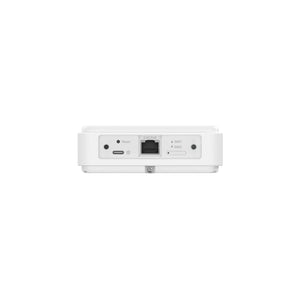
| Ethernet | 1 × 2.5GbE RJ45 port with PoE input. |
| Wi-Fi purpose | Local setup convenience; not a user-facing business Wi-Fi access point. |
| Operating modes | Supported router and IP-passthrough modes; verify exact firmware features. |
| Management | Standalone app/web or compatible Omada controller; app-guided alignment support. |
| Service prerequisites | Compatible regional hardware, operator plan, APN and coverage. Carrier-grade NAT can affect inbound access. |
| Power and Installation | |
| Power input | IEEE 802.3at PoE+ or documented 48V passive PoE; included adapter must be protected indoors. |
| Maximum consumption | Published reference 15.3W. |
| Protection | IP66 gateway housing; manufacturer-listed 6kV surge protection requires correct installation/grounding. |
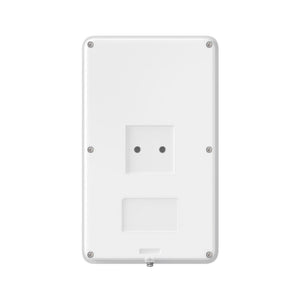
| Mounting | Wall, pole or window mounting as supported by the installation kit. |
| Dimensions | 183 × 110 × 36 mm (W × D × H). |
| Environment and Package | |
| Temperature | Operating −30°C to 60°C; storage −40°C to 70°C. |
| Humidity | Operating 5–95% RH; storage 5–90% RH, non-condensing. |
| Included equipment | Gateway, passive PoE adapter, Ethernet cable, mounting components and Installation Guide; verify the supplied regional pack. |
| Warranty | 5 years |