


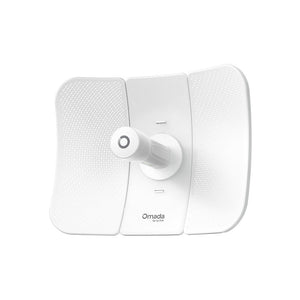
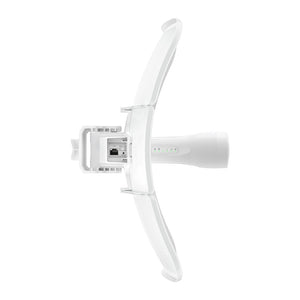
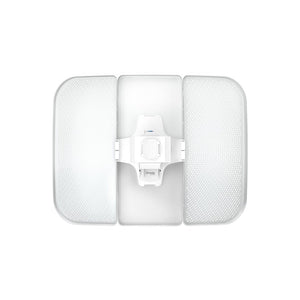
TP-Link Beam Bridge 5 UR KIT 5GHz Wireless Bridge
Connect buildings with a considered wireless link The TP-Link Beam Bridge 5 UR KIT connects two suitable outdoor locations over a directional 5GHz wireless link. Two preconfigured bridge units provide a starting point for linking a remote building, gatehouse or equipment area where a new cable route would be difficult. High-gain antennas, app-guided alignment and a Gigabit Ethernet connection at each end support a planned installation, with standalone operation or compatible Omada management. Highlights A complete point-to-point pair Two preconfigured bridge units with mounting hardware and passive PoE adapters. Directional 23dBi antennas and up to 867Mbps wireless signalling. Built for an exposed installation IP65 enclosure and manufacturer-listed operation from −40°C to 70°C. Pole mounting and app-guided antenna alignment. Management that suits the site Standalone configuration or supported Omada controller management. One Gigabit PoE-in Ethernet port per bridge. Key Features Replace a difficult cable route with a planned radio path The narrow directional antennas focus the link between two locations. Choose mounting positions with clear line of sight and sufficient clearance around the path. The manufacturer’s up-to-15km distance is a reference under stated conditions, rather than a promise for every location. Terrain, obstructions, radio rules and interference affect the usable link. Align the link around the actual installation Use the app’s alignment tools and a test of the completed link before relying on it for cameras, office traffic or remote equipment. The published 867Mbps figure is a wireless signalling rate. Actual application throughput also depends on Ethernet traffic, the radio environment, channel selection and the rest of the network. Power each end deliberately Each unit supports the manufacturer’s specified 802.3af or 24V/48V passive PoE input. The kit includes two passive adapters and power cords. Keep the adapters in suitable protected locations, confirm the supplied regional cord, and seal outdoor cable connections. Check the complete power route and grounding before commissioning. Choose the right level of management The preconfigured pair can be deployed without an Omada controller. A compatible controller adds supported central monitoring and configuration alongside other Omada devices. Check firmware and controller support for the required features; cloud management does not establish an included internet service. Build the remote network around the link Connect the remote bridge to an appropriate local switch, access point or end device. Its single Ethernet port is the handoff for that end of the link. Agree the VLANs, addressing and permitted traffic before installation, especially where several devices share the connection. Summary Choose Beam Bridge 5 UR KIT for a planned building-to-building or remote-equipment link with a suitable clear radio path. The paired hardware, alignment tools and management options make deployment practical, while a site check establishes the capacity and reliability needed by the actual application. Frequently Asked Questions Is this one bridge or a pair?ExpandCollapse One KIT contains two preconfigured bridge units, two passive PoE adapters, two power cords, mounting kits and an Installation Guide. Will it work over the full advertised distance?ExpandCollapse The manufacturer lists up to 15km under stated conditions. A clear path, alignment, radio rules, interference and the actual traffic determine what is practical at the site. Does 867Mbps describe usable application speed?ExpandCollapse It is the maximum wireless signalling rate. Actual throughput is lower and depends on the link conditions and the wider network. Do I need an Omada controller?ExpandCollapse Standalone operation is supported. Use a compatible Omada controller for the supported central-management functions you need. Can the supplied power adapters stay outside?ExpandCollapse Protect power adapters and mains connections in suitable locations. The outdoor rating applies to the correctly installed bridge housing, with cable entries sealed as instructed.
附加组件 (1)
可在 3005, Ubi Avenue 3, #01-88 提货
通常在 2 至 4 个工作日内备妥(公共假期除外)
TP-Link Beam Bridge 5 UR KIT 5GHz Wireless Bridge
描述
Connect buildings with a considered wireless link
The TP-Link Beam Bridge 5 UR KIT connects two suitable outdoor locations over a directional 5GHz wireless link. Two preconfigured bridge units provide a starting point for linking a remote building, gatehouse or equipment area where a new cable route would be difficult. High-gain antennas, app-guided alignment and a Gigabit Ethernet connection at each end support a planned installation, with standalone operation or compatible Omada management.
Highlights
A complete point-to-point pair
- Two preconfigured bridge units with mounting hardware and passive PoE adapters.
- Directional 23dBi antennas and up to 867Mbps wireless signalling.
Built for an exposed installation
- IP65 enclosure and manufacturer-listed operation from −40°C to 70°C.
- Pole mounting and app-guided antenna alignment.
Management that suits the site
- Standalone configuration or supported Omada controller management.
- One Gigabit PoE-in Ethernet port per bridge.
Key Features
Replace a difficult cable route with a planned radio path
The narrow directional antennas focus the link between two locations. Choose mounting positions with clear line of sight and sufficient clearance around the path. The manufacturer’s up-to-15km distance is a reference under stated conditions, rather than a promise for every location. Terrain, obstructions, radio rules and interference affect the usable link.
Align the link around the actual installation
Use the app’s alignment tools and a test of the completed link before relying on it for cameras, office traffic or remote equipment. The published 867Mbps figure is a wireless signalling rate. Actual application throughput also depends on Ethernet traffic, the radio environment, channel selection and the rest of the network.
Power each end deliberately
Each unit supports the manufacturer’s specified 802.3af or 24V/48V passive PoE input. The kit includes two passive adapters and power cords. Keep the adapters in suitable protected locations, confirm the supplied regional cord, and seal outdoor cable connections. Check the complete power route and grounding before commissioning.
Choose the right level of management
The preconfigured pair can be deployed without an Omada controller. A compatible controller adds supported central monitoring and configuration alongside other Omada devices. Check firmware and controller support for the required features; cloud management does not establish an included internet service.
Build the remote network around the link
Connect the remote bridge to an appropriate local switch, access point or end device. Its single Ethernet port is the handoff for that end of the link. Agree the VLANs, addressing and permitted traffic before installation, especially where several devices share the connection.
Summary
Choose Beam Bridge 5 UR KIT for a planned building-to-building or remote-equipment link with a suitable clear radio path. The paired hardware, alignment tools and management options make deployment practical, while a site check establishes the capacity and reliability needed by the actual application.
Frequently Asked Questions
Is this one bridge or a pair?
One KIT contains two preconfigured bridge units, two passive PoE adapters, two power cords, mounting kits and an Installation Guide.
Will it work over the full advertised distance?
The manufacturer lists up to 15km under stated conditions. A clear path, alignment, radio rules, interference and the actual traffic determine what is practical at the site.
Does 867Mbps describe usable application speed?
It is the maximum wireless signalling rate. Actual throughput is lower and depends on the link conditions and the wider network.
Do I need an Omada controller?
Standalone operation is supported. Use a compatible Omada controller for the supported central-management functions you need.
Can the supplied power adapters stay outside?
Protect power adapters and mains connections in suitable locations. The outdoor rating applies to the correctly installed bridge housing, with cable entries sealed as instructed.
规格
TP-Link Beam Bridge 5 UR KIT 5GHz Wireless Bridge
A paired directional wireless bridge for a planned connection between two locations, using a Gigabit Ethernet handoff at each end. The specifications distinguish the radio link, management, power and physical installation. Published distance and signalling rate describe manufacturer reference conditions; they are not guaranteed site throughput. Check path clearance, legal radio settings, antenna alignment and the actual network load before relying on the connection for business traffic.
| Specification | Details |
|---|---|
| Radio and Link | |
| Wireless standard and band | IEEE 802.11a/n/ac, 5GHz. |
| Signal rate | Up to 867Mbps; actual throughput depends on conditions. |
| Antenna | 23dBi dual-polarised directional MIMO; horizontal beamwidth 9°, vertical 7°. |
| Distance | Manufacturer reference up to 15km with suitable clear path, settings and conditions. |
| Network and Management | |
| Ethernet | One 10/100/1000Mbps RJ45 PoE-in port per bridge. |
| Deployment | Two preconfigured units for a point-to-point link; role selection and alignment support. |
| Management | Standalone web/app or compatible Omada controller; firmware-dependent features. |
| Network controls | Supported VLAN, security, channel and rate controls; verify the required configuration. |
| Power and Installation | |
| Power input | IEEE 802.3af or documented 24V/48V passive PoE; passive adapters included. |
| Maximum consumption | Manufacturer reference 15.8W per unit. |
| Protection | IP65 enclosure and 6kV Ethernet surge reference; correct sealing/grounding required. |
| Dimensions | 366 × 280 × 207 mm (W × D × H), per unit. |
| Device weight | 1.1kg per main unit, manufacturer reference. |
| Mounting | Pole mounting with included mounting kits. |
| Environment and Kit | |
| Temperature | Operating and storage −40°C to 70°C. |
| Humidity | Operating 10–90% RH; storage 5–90% RH, non-condensing. |
| Kit contents | Two bridge units, two passive PoE adapters, two power cords, two mounting kits and Installation Guide. |
| Warranty | 5 years |
附加组件

