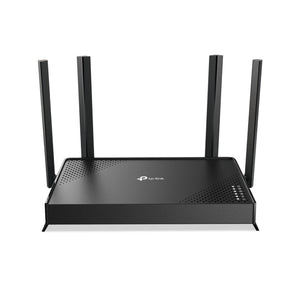
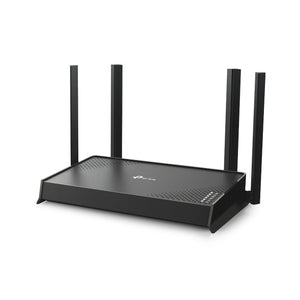

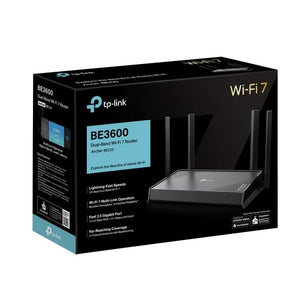
TP-Link Archer BE225 BE3600 Dual Band WiFi 7 Router
An approachable WiFi 7 upgrade with a faster WAN connection Archer BE225 brings dual-band WiFi 7 and a 2.5Gbps WAN port to a compact home router. Four Gigabit LAN ports provide wired connections for everyday devices, while app and browser management keep setup accessible. It is a practical option when upgrading compatible wireless clients without moving to a larger tri-band platform. The router uses 2.4GHz and 5GHz; its BE3600 rating combines theoretical radio rates and does not describe a single-device internet speed. Highlights Wireless capability WiFi 7; 5GHz up to 2,882Mbps; 2.4GHz up to 688Mbps. Published radio rates are theoretical, not measured internet speeds. Connections that suit the installation One 2.5Gbps WAN port; four Gigabit LAN ports. Control and compatibility Tether app and supported browser management. Active internet service and a suitable upstream connection required. Key Features Keep the Ethernet roles clear The 2.5Gbps socket is the WAN connection, while the four LAN sockets operate at up to 1Gbps each. This layout can suit faster internet access shared across several devices, but a single Gigabit LAN client remains limited by that port and its own connection. Extend through a compatible mesh arrangement EasyMesh support offers expansion with compatible routers and extenders using appropriate firmware. Place the additional unit where a dependable link remains available. EasyMesh support does not make this an Omada-managed or Deco-managed router. Match the wireless capability to the clients 5GHz up to 2,882Mbps; 2.4GHz up to 688Mbps. Actual speed depends on the router or access point, client hardware, channel conditions, distance and internet service. A combined wireless class is not a promise of single-device throughput. WiFi 7 functions such as MLO require compatible clients and software. Keep setup and day-to-day control accessible Use the Tether app or supported browser interface to configure the connection and maintain firmware. Router and access-point modes; EasyMesh with compatible firmware. Keep a record of the network settings and choose a supported secure wireless configuration. Choose the services and installation you need A suitable internet service and any required upstream modem or optical terminal are purchased separately. HomeShield offers supported security and parental-control tools; some advanced functions require a paid subscription. Summary Archer BE225 combines WiFi 7 with useful wired networking options. Match the internet handoff, local devices and installation to the actual ports and supported modes. With sensible placement and current firmware, it provides a practical foundation for the network described above. Frequently Asked Questions Can it work with my existing modem or internet connection?ExpandCollapse It supports the listed Ethernet connection and operating modes. Check the ISP handoff, authentication and any required modem or optical terminal; an internet service is not included. What wired ports does it have?ExpandCollapse One 2.5Gbps WAN port; four Gigabit LAN ports. Match the internet handoff, cabling and connected devices to these rates. Does EasyMesh mean it works as a Deco or Omada node?ExpandCollapse No. These are different management platforms. Use compatible EasyMesh equipment and firmware for the supported mesh arrangement. Is the wireless class my actual internet speed?ExpandCollapse No. Actual speed depends on the router or access point, client hardware, channel conditions, distance and internet service. A combined wireless class is not a promise of single-device throughput. What power, package and warranty apply?ExpandCollapse One router, the listed power adapter, Ethernet cable and setup guide are supplied. The travel model also includes a USB cable and WiFi information card. Warranty is 3 years. Confirm that the regional power arrangement suits the destination.
附加组件 (2)
可在 3005, Ubi Avenue 3, #01-88 提货
通常在 2 至 4 个工作日内备妥(公共假期除外)
TP-Link Archer BE225 BE3600 Dual Band WiFi 7 Router
描述
An approachable WiFi 7 upgrade with a faster WAN connection
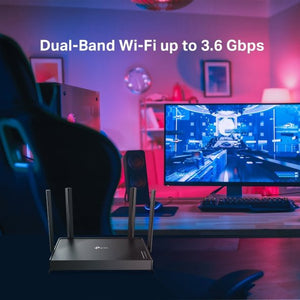
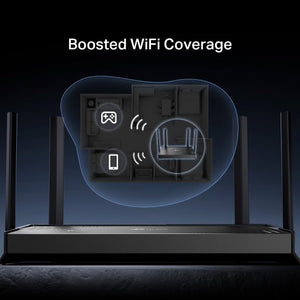
Archer BE225 brings dual-band WiFi 7 and a 2.5Gbps WAN port to a compact home router. Four Gigabit LAN ports provide wired connections for everyday devices, while app and browser management keep setup accessible. It is a practical option when upgrading compatible wireless clients without moving to a larger tri-band platform. The router uses 2.4GHz and 5GHz; its BE3600 rating combines theoretical radio rates and does not describe a single-device internet speed.
Highlights
Wireless capability
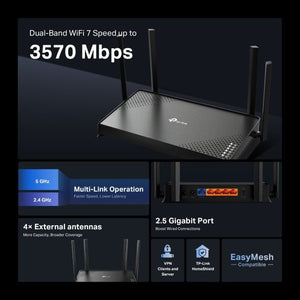
- WiFi 7; 5GHz up to 2,882Mbps; 2.4GHz up to 688Mbps.
- Published radio rates are theoretical, not measured internet speeds.
Connections that suit the installation
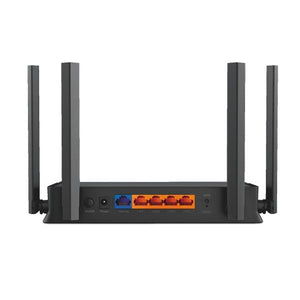
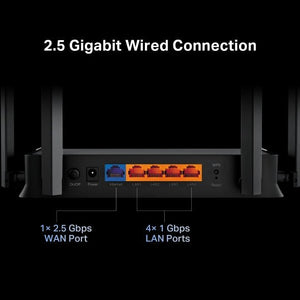
- One 2.5Gbps WAN port; four Gigabit LAN ports.
Control and compatibility
- Tether app and supported browser management.
- Active internet service and a suitable upstream connection required.
Key Features
Keep the Ethernet roles clear
The 2.5Gbps socket is the WAN connection, while the four LAN sockets operate at up to 1Gbps each. This layout can suit faster internet access shared across several devices, but a single Gigabit LAN client remains limited by that port and its own connection.
Extend through a compatible mesh arrangement
EasyMesh support offers expansion with compatible routers and extenders using appropriate firmware. Place the additional unit where a dependable link remains available. EasyMesh support does not make this an Omada-managed or Deco-managed router.
Match the wireless capability to the clients
5GHz up to 2,882Mbps; 2.4GHz up to 688Mbps. Actual speed depends on the router or access point, client hardware, channel conditions, distance and internet service. A combined wireless class is not a promise of single-device throughput. WiFi 7 functions such as MLO require compatible clients and software.
Keep setup and day-to-day control accessible
Use the Tether app or supported browser interface to configure the connection and maintain firmware. Router and access-point modes; EasyMesh with compatible firmware. Keep a record of the network settings and choose a supported secure wireless configuration.
Choose the services and installation you need
A suitable internet service and any required upstream modem or optical terminal are purchased separately. HomeShield offers supported security and parental-control tools; some advanced functions require a paid subscription.
Summary
Archer BE225 combines WiFi 7 with useful wired networking options. Match the internet handoff, local devices and installation to the actual ports and supported modes. With sensible placement and current firmware, it provides a practical foundation for the network described above.
Frequently Asked Questions
Can it work with my existing modem or internet connection?
It supports the listed Ethernet connection and operating modes. Check the ISP handoff, authentication and any required modem or optical terminal; an internet service is not included.
What wired ports does it have?
One 2.5Gbps WAN port; four Gigabit LAN ports. Match the internet handoff, cabling and connected devices to these rates.
Does EasyMesh mean it works as a Deco or Omada node?
No. These are different management platforms. Use compatible EasyMesh equipment and firmware for the supported mesh arrangement.
Is the wireless class my actual internet speed?
No. Actual speed depends on the router or access point, client hardware, channel conditions, distance and internet service. A combined wireless class is not a promise of single-device throughput.
What power, package and warranty apply?
One router, the listed power adapter, Ethernet cable and setup guide are supplied. The travel model also includes a USB cable and WiFi information card. Warranty is 3 years. Confirm that the regional power arrangement suits the destination.
规格
TP-Link Archer BE225 BE3600 Dual Band WiFi 7 Router
TP-Link Archer BE225 BE3600 Dual Band WiFi 7 Router combines WiFi 7 connectivity with the interfaces listed below. The grouped specifications distinguish theoretical wireless rates from physical connection limits, and identify the upstream equipment and operating modes needed for a working installation. Match the network hardware, cabling and regional power arrangement before ordering. Actual throughput depends on the complete connection and radio conditions; a headline wireless class is not a guaranteed internet download rate. Use the current manufacturer firmware for the exact model.
| Specification | Details |
|---|---|
| Wireless Capability | |
| Standard | WiFi 7; IEEE 802.11be. |
| Maximum radio link rates | 5GHz up to 2,882Mbps; 2.4GHz up to 688Mbps. |
| Performance conditions | Theoretical radio rates; actual throughput depends on clients, interfaces, distance, interference and internet service. |
| Security | Supported WPA2/WPA3 configurations; functions depend on mode, client and driver. |
| Interfaces and Installation | |
| Connections | One 2.5Gbps WAN port; four Gigabit LAN ports. |
| Operating Modes and Management | |
| Modes and setup | Router or access point; Tether app/browser. |
| Mesh platform | EasyMesh with compatible equipment and firmware; separate from Deco and Omada. |
| Security and parental-control services | HomeShield functions available; some advanced functions require a paid plan. |
| VPN | OpenVPN and WireGuard client/server support; compatible configuration and service required. |
| Power | |
| Power arrangement | 12V DC external adapter; manufacturer lists 1.5A EU and 2A US versions. |
| Regional connection | Use the supplied regional plug and voltage arrangement appropriate for the destination. |
| Physical and Environment | |
| Dimensions | 210 × 123.5 × 37mm, as published. |
| Operating conditions | 0 to 40°C; 10–90% RH, non-condensing. |
| Package and Warranty | |
| Included | One router, power adapter, Ethernet cable and guide. |
| Warranty | 3 years. |
附加组件