


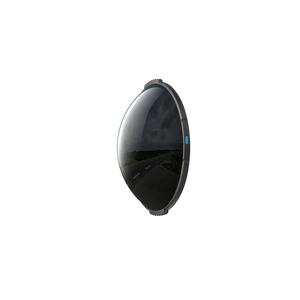
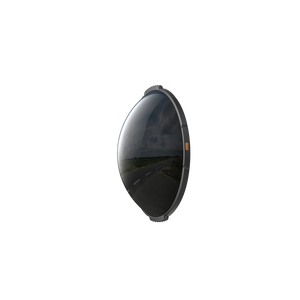


Insta360 X6 ND Filters
Give Bright-Light Movement a Different Feel Control how much light reaches your Insta360 X6 lenses when you want a slower shutter speed in bright conditions. These camera-specific neutral-density filters reduce incoming light, helping you work towards deliberate motion blur in cycling, travel and other moving scenes. A matched pair covers the front and rear lenses, while X6 recognises the installed density after correct fitting and confirmation. Highlights Matched neutral-density filters for both X6 lenses. Selectable light reduction for different daytime conditions. Supports slower-shutter creative filming when exposure is set appropriately. Automatic density recognition with on-screen confirmation. Tempered-glass construction with storage box and cleaning cloth. Key Features Reduce Light Before It Reaches the Sensor A neutral-density filter changes exposure optically, allowing more flexibility when choosing shutter speed in bright surroundings. It is useful when a very fast shutter makes movement appear too sharply frozen for the look you want. The filter does not add sensor sensitivity, recover every clipped highlight or remove the need to check the camera’s exposure settings. Match Density to the Available Light A lighter ND setting removes less light, while a stronger setting suits brighter conditions. Select the density for the actual scene and inspect the image before filming. Too much reduction in dim conditions can leave the camera short of light. The available densities and stop values are set out in the specification table for straightforward comparison. Use a Matched Front and Rear Pair Each offer supplies two filters of the selected density, so both X6 lenses receive the same optical treatment. Fit the filters securely with their positioning marks facing up, then confirm the camera’s prompt and check the density icon. A prompt is displayed when the touchscreen-side filter is installed; check the complete pair rather than relying on one side alone. Plan Motion Blur as Part of the Shot Longer exposure per frame can give moving scenery a more flowing appearance, but the result depends on shutter choice, lighting, camera movement and the final processing workflow. Take a short sample recording before committing to a sequence. ND filters provide an exposure tool; they do not guarantee a particular cinematic look or stabilised result in every scene. Keep the Glass and Fitting Clean The filters use tempered glass with a manufacturer hardness rating of 7H. Clean, undamaged surfaces remain important because smudges and scratches can affect footage, and the filters may slightly affect stitching. Avoid squeezing the bases during installation, protect them from impacts and return them to the supplied box when not in use. Use Them in Dry Conditions The filters are not sealed and should not be used in rain or water sports. Dry them carefully after accidental exposure to moisture, snow or fog. Magnetic components require separation from medical devices affected by magnets. They are exposure accessories rather than a waterproofing system or a replacement for the camera’s appropriate underwater equipment. Summary Insta360 X6 ND Filters give you a practical way to reduce bright light before capture and shape the shutter speed used for moving scenes. Choose the density for the conditions, install the matching pair correctly and check a test recording. Keep the filters clean, protected and within their intended dry-use environment. Frequently Asked Questions Does One Offer Include Every ND Strength?ExpandCollapse No. Each selected option supplies a matched pair of one density, plus a storage box and cleaning cloth. Choose the density required for your scene; different strengths are separate offers. How Much Light Does Each Density Remove?ExpandCollapse ND16 reduces light by 4 stops, ND32 by 5 stops and ND64 by 6 stops. Stronger reduction suits brighter conditions. Check the camera exposure rather than assuming one density works for every scene. Does X6 Recognise the Filters Automatically?ExpandCollapse Yes, when correctly installed. Secure both filters with their positioning marks facing up, confirm the camera’s prompt and check the density icon. The prompt is triggered by installation on the touchscreen side. Will ND Filters Guarantee Smooth Motion Blur?ExpandCollapse No. They reduce incoming light so you can use an appropriate slower shutter speed, but the look depends on exposure settings, lighting, movement and processing. Record a short test and review the result before an important sequence. Can I Use Them in Rain or Water Sports?ExpandCollapse No. Their non-sealed structure makes them unsuitable for rain and water sports. Keep the filters and camera lens area clean and dry, and store the filters in the supplied box after use.
可在 3005, Ubi Avenue 3, #01-88 提货
通常在 2 至 4 个工作日内备妥(公共假期除外)
Insta360 X6 ND Filters
描述
Give Bright-Light Movement a Different Feel
Control how much light reaches your Insta360 X6 lenses when you want a slower shutter speed in bright conditions. These camera-specific neutral-density filters reduce incoming light, helping you work towards deliberate motion blur in cycling, travel and other moving scenes. A matched pair covers the front and rear lenses, while X6 recognises the installed density after correct fitting and confirmation.
Highlights
- Matched neutral-density filters for both X6 lenses.
- Selectable light reduction for different daytime conditions.
- Supports slower-shutter creative filming when exposure is set appropriately.
- Automatic density recognition with on-screen confirmation.
- Tempered-glass construction with storage box and cleaning cloth.
Key Features
Reduce Light Before It Reaches the Sensor
A neutral-density filter changes exposure optically, allowing more flexibility when choosing shutter speed in bright surroundings. It is useful when a very fast shutter makes movement appear too sharply frozen for the look you want. The filter does not add sensor sensitivity, recover every clipped highlight or remove the need to check the camera’s exposure settings.
Match Density to the Available Light
A lighter ND setting removes less light, while a stronger setting suits brighter conditions. Select the density for the actual scene and inspect the image before filming. Too much reduction in dim conditions can leave the camera short of light. The available densities and stop values are set out in the specification table for straightforward comparison.
Use a Matched Front and Rear Pair
Each offer supplies two filters of the selected density, so both X6 lenses receive the same optical treatment. Fit the filters securely with their positioning marks facing up, then confirm the camera’s prompt and check the density icon. A prompt is displayed when the touchscreen-side filter is installed; check the complete pair rather than relying on one side alone.
Plan Motion Blur as Part of the Shot
Longer exposure per frame can give moving scenery a more flowing appearance, but the result depends on shutter choice, lighting, camera movement and the final processing workflow. Take a short sample recording before committing to a sequence. ND filters provide an exposure tool; they do not guarantee a particular cinematic look or stabilised result in every scene.
Keep the Glass and Fitting Clean
The filters use tempered glass with a manufacturer hardness rating of 7H. Clean, undamaged surfaces remain important because smudges and scratches can affect footage, and the filters may slightly affect stitching. Avoid squeezing the bases during installation, protect them from impacts and return them to the supplied box when not in use.
Use Them in Dry Conditions
The filters are not sealed and should not be used in rain or water sports. Dry them carefully after accidental exposure to moisture, snow or fog. Magnetic components require separation from medical devices affected by magnets. They are exposure accessories rather than a waterproofing system or a replacement for the camera’s appropriate underwater equipment.
Summary
Insta360 X6 ND Filters give you a practical way to reduce bright light before capture and shape the shutter speed used for moving scenes. Choose the density for the conditions, install the matching pair correctly and check a test recording. Keep the filters clean, protected and within their intended dry-use environment.
Frequently Asked Questions
Does One Offer Include Every ND Strength?
No. Each selected option supplies a matched pair of one density, plus a storage box and cleaning cloth. Choose the density required for your scene; different strengths are separate offers.
How Much Light Does Each Density Remove?
ND16 reduces light by 4 stops, ND32 by 5 stops and ND64 by 6 stops. Stronger reduction suits brighter conditions. Check the camera exposure rather than assuming one density works for every scene.
Does X6 Recognise the Filters Automatically?
Yes, when correctly installed. Secure both filters with their positioning marks facing up, confirm the camera’s prompt and check the density icon. The prompt is triggered by installation on the touchscreen side.
Will ND Filters Guarantee Smooth Motion Blur?
No. They reduce incoming light so you can use an appropriate slower shutter speed, but the look depends on exposure settings, lighting, movement and processing. Record a short test and review the result before an important sequence.
Can I Use Them in Rain or Water Sports?
No. Their non-sealed structure makes them unsuitable for rain and water sports. Keep the filters and camera lens area clean and dry, and store the filters in the supplied box after use.
规格
Insta360 X6 ND Filters
Insta360 X6 ND Filters reduce light entering both camera lenses by a selected amount. Each option is a matched pair rather than a mixed-density set. Use the stop values to plan exposure, then inspect the camera image and a sample recording in the actual conditions. Correct positioning enables automatic density recognition. The filters share a camera-specific fit and are intended for dry filming; their glass construction does not provide a waterproof seal or guarantee protection against impact.
| Specification | Details |
|---|---|
| Fit and Exposure Control | |
| Compatible Camera | Insta360 X6 |
| ND16 | 4-stop light reduction |
| ND32 | 5-stop light reduction |
| ND64 | 6-stop light reduction |
| Recognition | Automatic density recognition after correct installation; confirm prompt and check status icon |
| Physical Design | |
| Filter Dimensions | Ø43.71 × 13.03 mm |
| Published Weight | Approximately 7 g |
| Construction | Plastic, glass, metal and adhesives; contains magnetic components |
| Glass Rating | Tempered glass; manufacturer hardness rating 7H |
| Installation | Matched density on both lenses; positioning marks face up |
| Use and Care | |
| Intended Function | Reduce incoming light for exposure and shutter-speed control |
| Environment | Dry use; not for rain or water sports |
| Optical Care | Keep both surfaces clean; replace damaged filters; additional optics may slightly affect stitching |
| Storage | Use the supplied storage box when filters are not fitted |
| Magnetic Precaution | Keep away from medical devices susceptible to magnetic interference |
| Package | |
| Included | 2 filters of the selected density, 1 storage box and 1 cleaning cloth |
| Sold Separately | Insta360 X6 camera and other accessories |