

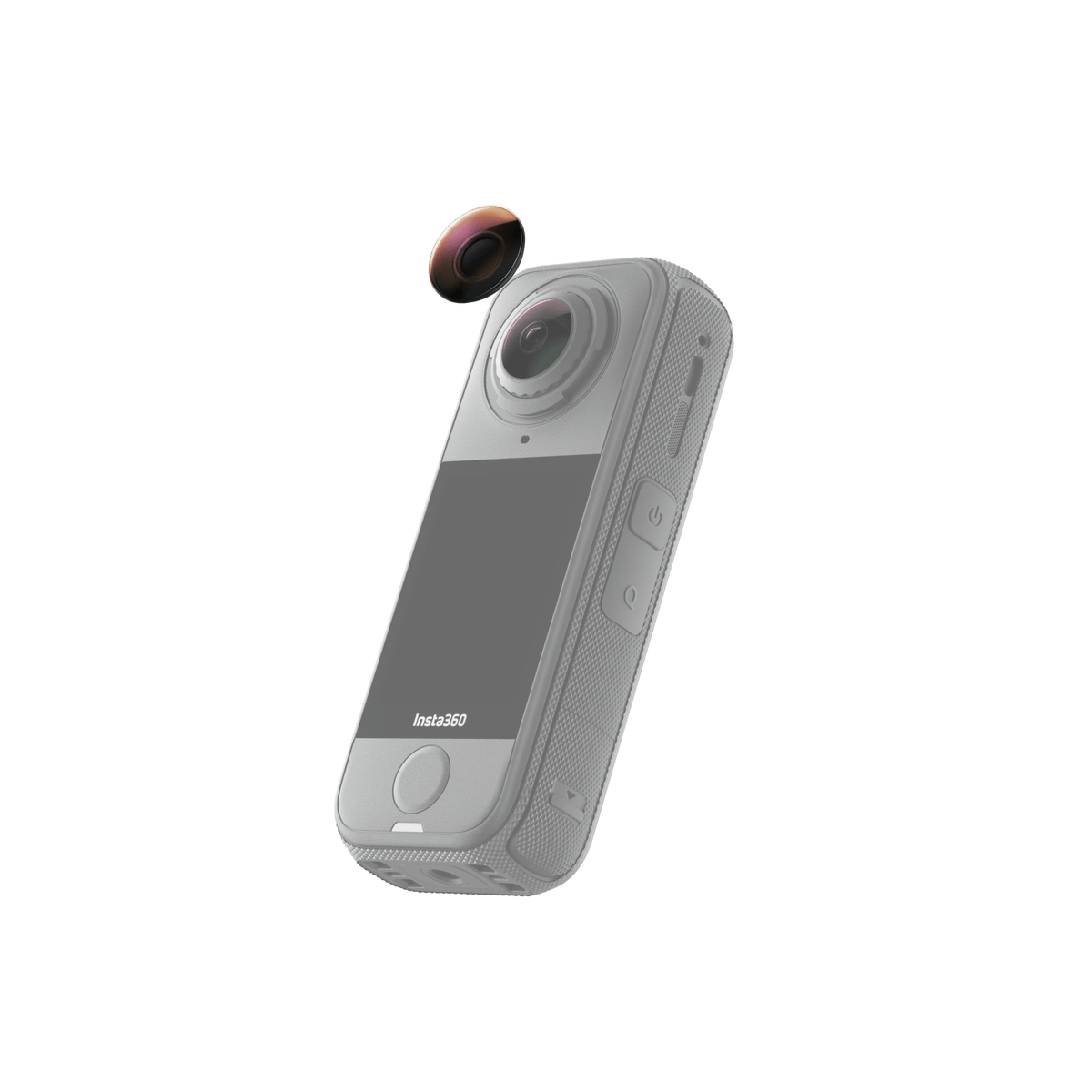





Insta360 X4 Air Replacement Lens Kit
A Fresh Outer Lens for Your Next Recording A scratched outer lens need not mean replacing your Insta360 X4 Air. This official Replacement Lens Kit supplies one model-specific lens and the tools for careful removal, fitting and cleaning. Work indoors in a clean, dry environment, check that the camera and lens ring are suitable for the procedure, then follow the X4 Air instructions. Correct alignment and the camera’s Stitching Calibration help bring the two views back together for the next recording. Highlights One official replacement outer lens for Insta360 X4 Air. Tools for lens removal, installation and cleaning are included. Use on the front or rear outer lens, following the correct ring alignment. Designed for careful indoor replacement below 60% relative humidity. Run the camera’s Stitching Calibration after installation. Key Features Replace the Affected Outer Lens The supplied glass lens is made for the X4 Air’s replaceable outer-lens system. This is the single-lens package, so it replaces one affected side. It is a replacement component rather than a protective lens guard, and it does not turn another camera model into a user-replaceable design. Keep the Original Imaging Arrangement The manufacturer specifies the same image quality as the original lens when correctly installed. Alignment matters: a lens ring that sits unevenly or is positioned incorrectly can affect clarity and stitching. Inspect the installation before recording an important trip, event or project. Prepare the Environment First Use a clean, dust-free indoor space with relative humidity below 60%. Keep the camera supported on a lens cloth and use the supplied handling and cleaning tools. Moisture or debris trapped during replacement can affect the result, so outdoor convenience should not replace a controlled workspace. Follow the X4 Air Alignment Marks Use the Lens Grip Tool and Removal Tool as instructed. The front ring’s white mark aligns with the microphone, while the rear ring aligns with the centre of the wind guard. Apply controlled, gentle force and check that the ring sits level rather than forcing a misaligned fitting. Calibrate and Know When to Stop After fitting, open Settings and run Stitching Calibration. Stop and seek assistance if the lens is cracked, the ring is deformed or worn, the threads are damaged, debris cannot be removed, or other camera components are seriously damaged. The kit is not a general repair solution for every impact. Summary Choose the X4 Air Replacement Lens Kit when a suitable scratched outer lens can be replaced using the prescribed procedure. One genuine lens, the required tools and careful preparation provide a focused repair path. Check the camera condition, keep the work clean and dry, align the correct ring and complete calibration before returning to recording. Frequently Asked Questions Is This a Lens Guard or a Replacement Lens?ExpandCollapse It replaces an X4 Air outer lens. It is not an additional protective cover fitted over an intact lens. The selected package includes one replacement lens and the associated replacement and cleaning tools. Does This Package Replace Both Camera Lenses?ExpandCollapse No. This is the single-lens kit listed for one outer lens. The X4 Air has separate front and rear lenses; follow the appropriate alignment instructions for the side being replaced. Where Should I Replace the Lens?ExpandCollapse Work indoors in a clean, dust-free environment below 60% relative humidity. Protect the other lens with a cloth, wear the supplied gloves and avoid touching the new optical surface. Follow the manufacturer’s full replacement guide. What Should I Do After Installation?ExpandCollapse Check that the lens ring sits level and the correct alignment mark is in position. Run Stitching Calibration in the camera settings, then inspect a test recording for clarity and stitching before the main shoot. Can It Repair Any Type of Camera Damage?ExpandCollapse No. Do not proceed with a cracked lens, a deformed or worn ring, damaged threads, trapped dirt that cannot be cleaned, or serious damage elsewhere on the camera. Stop and obtain technical assistance rather than forcing the replacement.
可在 3005, Ubi Avenue 3, #01-88 提货
通常在 2 至 4 个工作日内备妥(公共假期除外)
Insta360 X4 Air Replacement Lens Kit
描述
A Fresh Outer Lens for Your Next Recording
A scratched outer lens need not mean replacing your Insta360 X4 Air. This official Replacement Lens Kit supplies one model-specific lens and the tools for careful removal, fitting and cleaning. Work indoors in a clean, dry environment, check that the camera and lens ring are suitable for the procedure, then follow the X4 Air instructions. Correct alignment and the camera’s Stitching Calibration help bring the two views back together for the next recording.
Highlights
- One official replacement outer lens for Insta360 X4 Air.
- Tools for lens removal, installation and cleaning are included.
- Use on the front or rear outer lens, following the correct ring alignment.
- Designed for careful indoor replacement below 60% relative humidity.
- Run the camera’s Stitching Calibration after installation.
Key Features
Replace the Affected Outer Lens
The supplied glass lens is made for the X4 Air’s replaceable outer-lens system. This is the single-lens package, so it replaces one affected side. It is a replacement component rather than a protective lens guard, and it does not turn another camera model into a user-replaceable design.
Keep the Original Imaging Arrangement
The manufacturer specifies the same image quality as the original lens when correctly installed. Alignment matters: a lens ring that sits unevenly or is positioned incorrectly can affect clarity and stitching. Inspect the installation before recording an important trip, event or project.
Prepare the Environment First
Use a clean, dust-free indoor space with relative humidity below 60%. Keep the camera supported on a lens cloth and use the supplied handling and cleaning tools. Moisture or debris trapped during replacement can affect the result, so outdoor convenience should not replace a controlled workspace.
Follow the X4 Air Alignment Marks
Use the Lens Grip Tool and Removal Tool as instructed. The front ring’s white mark aligns with the microphone, while the rear ring aligns with the centre of the wind guard. Apply controlled, gentle force and check that the ring sits level rather than forcing a misaligned fitting.
Calibrate and Know When to Stop
After fitting, open Settings and run Stitching Calibration. Stop and seek assistance if the lens is cracked, the ring is deformed or worn, the threads are damaged, debris cannot be removed, or other camera components are seriously damaged. The kit is not a general repair solution for every impact.
Summary
Choose the X4 Air Replacement Lens Kit when a suitable scratched outer lens can be replaced using the prescribed procedure. One genuine lens, the required tools and careful preparation provide a focused repair path. Check the camera condition, keep the work clean and dry, align the correct ring and complete calibration before returning to recording.
Frequently Asked Questions
Is This a Lens Guard or a Replacement Lens?
It replaces an X4 Air outer lens. It is not an additional protective cover fitted over an intact lens. The selected package includes one replacement lens and the associated replacement and cleaning tools.
Does This Package Replace Both Camera Lenses?
No. This is the single-lens kit listed for one outer lens. The X4 Air has separate front and rear lenses; follow the appropriate alignment instructions for the side being replaced.
Where Should I Replace the Lens?
Work indoors in a clean, dust-free environment below 60% relative humidity. Protect the other lens with a cloth, wear the supplied gloves and avoid touching the new optical surface. Follow the manufacturer’s full replacement guide.
What Should I Do After Installation?
Check that the lens ring sits level and the correct alignment mark is in position. Run Stitching Calibration in the camera settings, then inspect a test recording for clarity and stitching before the main shoot.
Can It Repair Any Type of Camera Damage?
No. Do not proceed with a cracked lens, a deformed or worn ring, damaged threads, trapped dirt that cannot be cleaned, or serious damage elsewhere on the camera. Stop and obtain technical assistance rather than forcing the replacement.
规格
Insta360 X4 Air Replacement Lens Kit
This single-lens kit is specific to the Insta360 X4 Air outer-lens system. The optical dimensions and weight below refer to the replacement lens, not the full tool kit or parcel. The included tools support removal, installation and cleaning; they do not make every damaged camera suitable for self-repair. Inspect the lens ring and camera first, follow the model-specific alignment steps, work in the required indoor conditions and complete Stitching Calibration after the new lens is installed.
| Specification | Details |
|---|---|
| Optics and Fit | |
| Compatible Camera | Insta360 X4 Air |
| Package Type | Single replacement outer lens with tools |
| Lens Position | Front or rear, following the corresponding ring alignment |
| Lens Dimensions | 16 × 16 × 4.18 mm |
| Lens Weight | Approximately 2.59 g |
| Construction | |
| Lens Material | Glass |
| Tool Materials | Plastic fixture, case and removal tool; silicone suction component; PVC gloves |
| Image Quality | Manufacturer specifies the original imaging quality when correctly installed |
| Replacement Procedure | |
| Workspace | Clean, dust-free indoors; below 60% relative humidity |
| Alignment | Front ring mark to microphone; rear ring mark to centre of wind guard |
| After Installation | Run Stitching Calibration in camera settings |
| Stop Conditions | Cracked lens, damaged/worn ring or tool, damaged threads, unremovable debris or serious camera damage |
| Included Items | |
| Replacement Component | 1 × X4 Air replacement lens |
| Tools and Cleaning | Lens Grip Tool, Lens Blower, Removal Tool, Brush, 2 Lens Cloths, 2 Cleaning Wipes and 1 pair of Disposable Gloves |
| Documentation | Lens Replacement Guide and User Manual |
| Separate Equipment | Camera |