


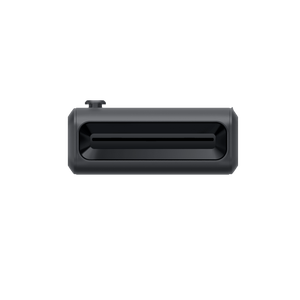


Insta360 GO Ultra Pocket Printer
Small Camera Moments, Made Tangible Choose a photograph that deserves more than a quick swipe. Insta360 GO Ultra Pocket Printer makes physical keepsakes from supported GO Ultra photos and compatible images in the Insta360 App. Its portable dye-sublimation design, wireless connection and rechargeable battery let you add a printed finish to a travel day, a gathering or a favourite everyday scene without returning to a desktop printer. Highlights Portable dye-sublimation printing at 300 dpi. Bluetooth pairing with GO Ultra for supported photo printing. Supported camera and phone-album images through the Insta360 App. Rechargeable battery with USB-C input. Starter cartridge with 10 photo sheets and a carry bag included. Key Features Select the Moment Rather Than Printing Everything Use the camera or app to choose the image, then prepare a print that can become a small gift, a travel reminder or a personal collection. The workflow encourages a deliberate selection from the day’s photographs, with a physical result that can be shared immediately after it has finished printing. Pair Directly with GO Ultra Power on the printer and connect it through the GO Ultra Bluetooth accessory controls. Once paired, use the supported photo-printing functions and follow the camera prompts. A wireless connection keeps the printer separate from the camera body while printing, so you can place it on a suitable clear surface. Print Suitable Images through the App The current Insta360 App provides a Pocket Printer connection for supported camera and phone-album photos. This also offers a route for a selected flat composition exported from a 360 image. Update the app and printer firmware, choose a supported still-image format and confirm the preview before starting the print. Keep the Consumables Simple The included starter cartridge combines a colour ribbon with ten photo sheets. The GO Ultra offer uses the manufacturer’s matching GO Ultra photo-paper presentation. Load the genuine compatible cartridge as a complete unit and keep it protected until needed, rather than trying to refill the paper or ribbon separately. Carry the Printer with the Camera Kit The printer weighs approximately 318 g and measures 125 × 84 × 36.7 mm. A carry bag and USB-C to USB-A charging cable are included, providing a practical way to keep the printer protected between locations. The camera and power adapter are separate, so the listing stays focused on the printing accessory. Prepare a Clear Space for Every Print Use the printer within the specified operating temperature and keep the paper path unobstructed. The built-in 800 mAh battery accepts 5 V /2 A charging, with the manufacturer quoting approximately ninety to one hundred and twenty minutes for a full charge. Recharge and check the cartridge before a planned photo-sharing session. Summary Insta360 GO Ultra Pocket Printer gives selected photographs a physical form without adding a desktop-printing step. Pair it with GO Ultra or use the supported mobile-app workflow, choose a suitable still image and keep the paper path clear. The supplied cartridge and carry bag make it a considered addition for photographers who enjoy sharing more than a screen. Frequently Asked Questions Can I Print Directly from GO Ultra?ExpandCollapse Yes. The manufacturer provides a Bluetooth pairing workflow through the GO Ultra accessory settings. Connect the powered printer and follow the supported photo-printing controls. The camera is not included. Can I Print Phone Photos and 360 Images?ExpandCollapse The current Insta360 App supports suitable camera and phone-album still photos. Export a 360 image as a flat photo before printing. Current app guidance supports JPEG, PNG and RAW images; HEIF files and videos are not printable. Keep the app and printer firmware updated. What Comes with This Printer?ExpandCollapse The package includes the GO Ultra Pocket Printer, one photo-paper cartridge containing a colour ribbon and ten photo sheets, a carry bag and a USB-C to USB-A charging cable. A camera, power adapter and further consumables are separate. How Large Are the Photos?ExpandCollapse The illustrated manufacturer specification lists a 54 × 72 mm printed image on 54 × 82 mm photo paper. Printing resolution is 300 dpi. Use compatible consumables and allow the printer to complete the process without blocking the paper path. How Do I Charge the Printer?ExpandCollapse Use its USB-C input with a suitable 5 V /2 A power supply. The specified battery capacity is 800 mAh and a full charge takes approximately 90–120 minutes. Charge within 0°C to 45°C and use the printer within the specified 5°C to 35°C operating range.
可在 3005, Ubi Avenue 3, #01-88 提货
通常在 2 至 4 个工作日内备妥(公共假期除外)
Insta360 GO Ultra Pocket Printer
描述
Small Camera Moments, Made Tangible
Choose a photograph that deserves more than a quick swipe. Insta360 GO Ultra Pocket Printer makes physical keepsakes from supported GO Ultra photos and compatible images in the Insta360 App. Its portable dye-sublimation design, wireless connection and rechargeable battery let you add a printed finish to a travel day, a gathering or a favourite everyday scene without returning to a desktop printer.
Highlights
- Portable dye-sublimation printing at 300 dpi.
- Bluetooth pairing with GO Ultra for supported photo printing.
- Supported camera and phone-album images through the Insta360 App.
- Rechargeable battery with USB-C input.
- Starter cartridge with 10 photo sheets and a carry bag included.
Key Features
Select the Moment Rather Than Printing Everything
Use the camera or app to choose the image, then prepare a print that can become a small gift, a travel reminder or a personal collection. The workflow encourages a deliberate selection from the day’s photographs, with a physical result that can be shared immediately after it has finished printing.
Pair Directly with GO Ultra
Power on the printer and connect it through the GO Ultra Bluetooth accessory controls. Once paired, use the supported photo-printing functions and follow the camera prompts. A wireless connection keeps the printer separate from the camera body while printing, so you can place it on a suitable clear surface.
Print Suitable Images through the App
The current Insta360 App provides a Pocket Printer connection for supported camera and phone-album photos. This also offers a route for a selected flat composition exported from a 360 image. Update the app and printer firmware, choose a supported still-image format and confirm the preview before starting the print.
Keep the Consumables Simple
The included starter cartridge combines a colour ribbon with ten photo sheets. The GO Ultra offer uses the manufacturer’s matching GO Ultra photo-paper presentation. Load the genuine compatible cartridge as a complete unit and keep it protected until needed, rather than trying to refill the paper or ribbon separately.
Carry the Printer with the Camera Kit
The printer weighs approximately 318 g and measures 125 × 84 × 36.7 mm. A carry bag and USB-C to USB-A charging cable are included, providing a practical way to keep the printer protected between locations. The camera and power adapter are separate, so the listing stays focused on the printing accessory.
Prepare a Clear Space for Every Print
Use the printer within the specified operating temperature and keep the paper path unobstructed. The built-in 800 mAh battery accepts 5 V /2 A charging, with the manufacturer quoting approximately ninety to one hundred and twenty minutes for a full charge. Recharge and check the cartridge before a planned photo-sharing session.
Summary
Insta360 GO Ultra Pocket Printer gives selected photographs a physical form without adding a desktop-printing step. Pair it with GO Ultra or use the supported mobile-app workflow, choose a suitable still image and keep the paper path clear. The supplied cartridge and carry bag make it a considered addition for photographers who enjoy sharing more than a screen.
Frequently Asked Questions
Can I Print Directly from GO Ultra?
Yes. The manufacturer provides a Bluetooth pairing workflow through the GO Ultra accessory settings. Connect the powered printer and follow the supported photo-printing controls. The camera is not included.
Can I Print Phone Photos and 360 Images?
The current Insta360 App supports suitable camera and phone-album still photos. Export a 360 image as a flat photo before printing. Current app guidance supports JPEG, PNG and RAW images; HEIF files and videos are not printable. Keep the app and printer firmware updated.
What Comes with This Printer?
The package includes the GO Ultra Pocket Printer, one photo-paper cartridge containing a colour ribbon and ten photo sheets, a carry bag and a USB-C to USB-A charging cable. A camera, power adapter and further consumables are separate.
How Large Are the Photos?
The illustrated manufacturer specification lists a 54 × 72 mm printed image on 54 × 82 mm photo paper. Printing resolution is 300 dpi. Use compatible consumables and allow the printer to complete the process without blocking the paper path.
How Do I Charge the Printer?
Use its USB-C input with a suitable 5 V /2 A power supply. The specified battery capacity is 800 mAh and a full charge takes approximately 90–120 minutes. Charge within 0°C to 45°C and use the printer within the specified 5°C to 35°C operating range.
规格
Insta360 GO Ultra Pocket Printer
Insta360 GO Ultra Pocket Printer provides portable dye-sublimation printing for supported camera and app photographs. Its rechargeable battery and Bluetooth connection let you prepare a photo print away from a desktop setup. Paper dimensions include the surrounding sheet area and are distinct from the printed image size. Select a supported still image, fit a compatible cartridge and keep the paper path clear throughout printing. Use the specified charging supply and keep the printer within its operating and charging temperature ranges.
| Specification | Details |
|---|---|
| Printing and Connection | |
| Technology and Resolution | Dye diffusion thermal transfer; 300 dpi |
| Printed Image Size | 54 × 72 mm |
| Photo Paper Size | 54 × 82 mm |
| Direct Camera Connection | Bluetooth pairing with GO Ultra |
| App Workflow | Compatible flat camera or phone photos through current Insta360 App; export 360 photos as flat images first |
| Battery and Environment | |
| Battery Capacity | 800 mAh |
| Rated Input | USB-C; 5 V / 2 A |
| Charging Time | Approximately 90–120 minutes with a 5 V / 2 A supply |
| Operating Temperature | 5°C to 35°C |
| Charging Temperature | 0°C to 45°C |
| Storage Temperature | −20°C to 70°C |
| Physical Design | |
| Dimensions | 125 × 84 × 36.7 mm, including cold shoe |
| Weight | Approximately 318 g |
| Materials | Polycarbonate, aluminium alloy, stainless steel and plastic |
| Included Items | |
| In the Box | Pocket Printer, cartridge with 1 colour ribbon and 10 photo sheets, carry bag and USB-C to USB-A charging cable |
| Separate Equipment | GO Ultra camera, power adapter and replacement consumables |