
Home Troubleshooting
Tapo Water Leak Sensor Not Alerting: Check Placement, Hub and Phone
Prove water detection, the sensor-to-hub connection and the phone alert separately. A practical Tapo T300 check for under-sink and laundry-room installations.
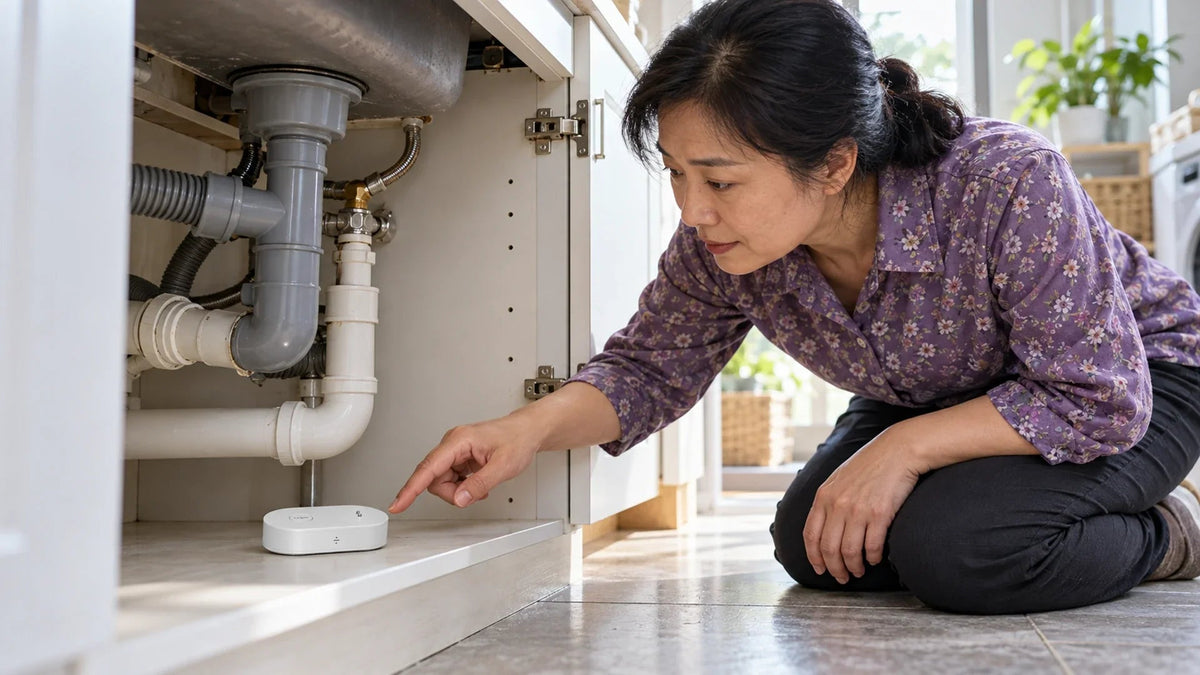
If a Tapo water-leak sensor does not alert, test local detection, the hub connection and phone notifications separately. Keep the T300 flat where water can reach its probes, confirm its battery and compatible Tapo hub, then check that a real detection event reaches the app. A hub-connection test alone does not prove the water-sensing contacts work.
The sensor is under the sink and appears in the app, but you are not sure it will warn anyone when a pipe leaks. Or the sensor beeps during a test while the phone stays quiet. Neither result should be treated as a complete end-to-end pass.
Work in a dry, safe area first. If water is already approaching sockets, appliances or wiring, make the area safe through the appropriate help before investigating the smart-home connection.
Local Detection, Hub Alarm and Phone Alert Are Different
The T300 has sensing probes and a local sounder. A compatible Tapo hub provides the sensor’s route into the connected system. Hub alarm actions and phone notifications then depend on their own setup.
Prove Detection and Delivery Separately
The sensing position and the connected alert path both matter.
01 Water must reach the probes
Position for the actual water pathA pad, shelf or gap can keep shallow water away. This is a generic section, not a mechanical drawing.
02 Follow the connected warning
Check each result in orderLocal alarm, hub action and phone notification need separate confirmation at the final location.
| Test result | What to investigate next |
|---|---|
| No local response to the proper detection test | Probe contact, sensor orientation, battery and alarm volume |
| Sensor responds, hub does not | Pairing, supported hub, placement and the configured hub alarm action |
| Event appears in the app, no phone alert | Device/app notifications and phone settings |
| Works near the hub, fails under the sink | Radio path, metalwork and final placement |
A sensor can provide a local audible warning without a configured hub, but remote app management requires its connected hub path. Do not assume that the phone can communicate directly with this sensor in place of the hub.
Place the Probes on the Likely Water Path
Lay the sensor flat on a stable surface where a leak will collect or reach the appropriate probes. A raised shelf, folded cloth or gap beneath the device can prevent the lower probes from contacting shallow water.
Under a sink, inspect the likely drip points and the base of the cabinet. Beside a washing machine, consider where a small leak would travel. Do not assume that a sensor on the opposite side of a raised threshold will detect water before it crosses that threshold.

Position the sensing contacts for the expected drip or pooling path, then test in that final location.
Keep the contacts clean and unobstructed. Do not cover them with tape, paint or a mounting pad. The installation needs to suit the sensor’s intended use, not merely hide the device neatly.

Check the Battery, Pairing and Compatible Hub
Confirm the battery insulation tab has been removed on a new unit and that the batteries are correctly installed. Respond to a low-battery reminder. Do not infer a promised remaining life from a quiet sensor.
The T300 guide uses a single press of the control button to test its connection with the hub after setup. Check that response before moving the sensor into a difficult corner. A compatible, correctly configured hub is required for the connected workflow.

Match supported regional sensor and hub models, and test from the final sensor position.
Keep the hub suitably located and online. A metal cabinet, appliance body or a different final room can change the radio path compared with a test beside the hub. Verify the supported device combination and regional model rather than assuming every smart-home hub is interchangeable.
Test Detection and Notifications as Separate Steps
First use the model’s documented connection test. Then carry out an appropriate controlled water-detection test away from electrical equipment, using a small amount of clean water to reach the sensing contacts. Avoid flooding the cabinet or opening the battery compartment while wet.
Check the local response, the event record and the phone notification. Note which stage succeeds. Review alarm volume if the local sensor is muted, and check the configured Smart Action if you expect an additional hub sounder.
If an event is recorded but the phone stays silent, check the Tapo app’s relevant notification controls and the phone’s permission and quiet-mode settings. Test the phone while it uses mobile data as well as the home connection. Menu locations vary with app and phone version.
After the test, remove the water and dry the sensing area. TP-Link notes that a manually silenced sensor does not return to normal monitoring until the water condition has cleared. Silencing the sound is not the same as resolving the leak.
Turn an Alert into a Useful Household Response
Use a location name that identifies the problem quickly, such as Kitchen Sink or Laundry Inlet. Confirm that the right authorised household members receive alerts. A notification that reaches only a spare phone in a drawer is a weak response plan.
Supported Smart Actions can add an audible or visible cue, but test the exact combination you configure. Do not assume that a water sensor automatically closes a valve, disconnects an appliance or guarantees a cloud notification during an outage.
Record a simple response: who checks the area, where the relevant shut-off is and when professional help is needed. The sensor provides warning; it does not repair a pipe or replace an inspection.
Leave a Repeatable Sensor Check
- Confirm the model, batteries and supported hub.
- Place the sensor flat on the expected water path.
- Test the connection at the final position.
- Run a controlled detection test and verify the event record.
- Confirm the intended local, hub and phone alerts.
- Dry the device and sensing area, then confirm monitoring has resumed.
Repeat the check after moving the hub, changing batteries, altering notification settings or rearranging the cabinet. If other smart-home devices also lose connectivity, the Tapo connection guide helps separate wall power, WiFi and app control; the T300’s hub-based sensor path still needs its own test.
The practical result: prove that water reaches the probes and the warning reaches the people who need it. A paired icon, a button beep and a delivered phone alert each establish a different part of that chain.
Frequently Asked Questions
Does the Tapo T300 need a hub?
A compatible Tapo hub is required for its connected app workflow. The sensor’s local sounder and the remote notification path are separate functions.
Why does the sensor beep but my phone receives nothing?
Check whether the detection event reaches the app, then inspect the relevant notification settings and phone permissions. Also confirm the hub connection is working.
Does pressing the control button prove water detection works?
The documented single-press test checks the hub connection after setup. Test the sensing contacts separately with an appropriate controlled water-detection check.
Can I put the sensor on a cloth or raised shelf?
It must be positioned so water can reach the appropriate probes. A cloth, mounting pad or raised surface can interfere with shallow-water contact.
Why does it work beside the hub but fail under the sink?
Final placement can change the radio path, especially around metal cabinets or appliances. Test the supported sensor and hub from their actual installed positions.
What should I do after silencing an alert?
Resolve the water condition and dry the sensing area. A silenced alarm is not proof that normal monitoring has resumed or that the leak has stopped.


