

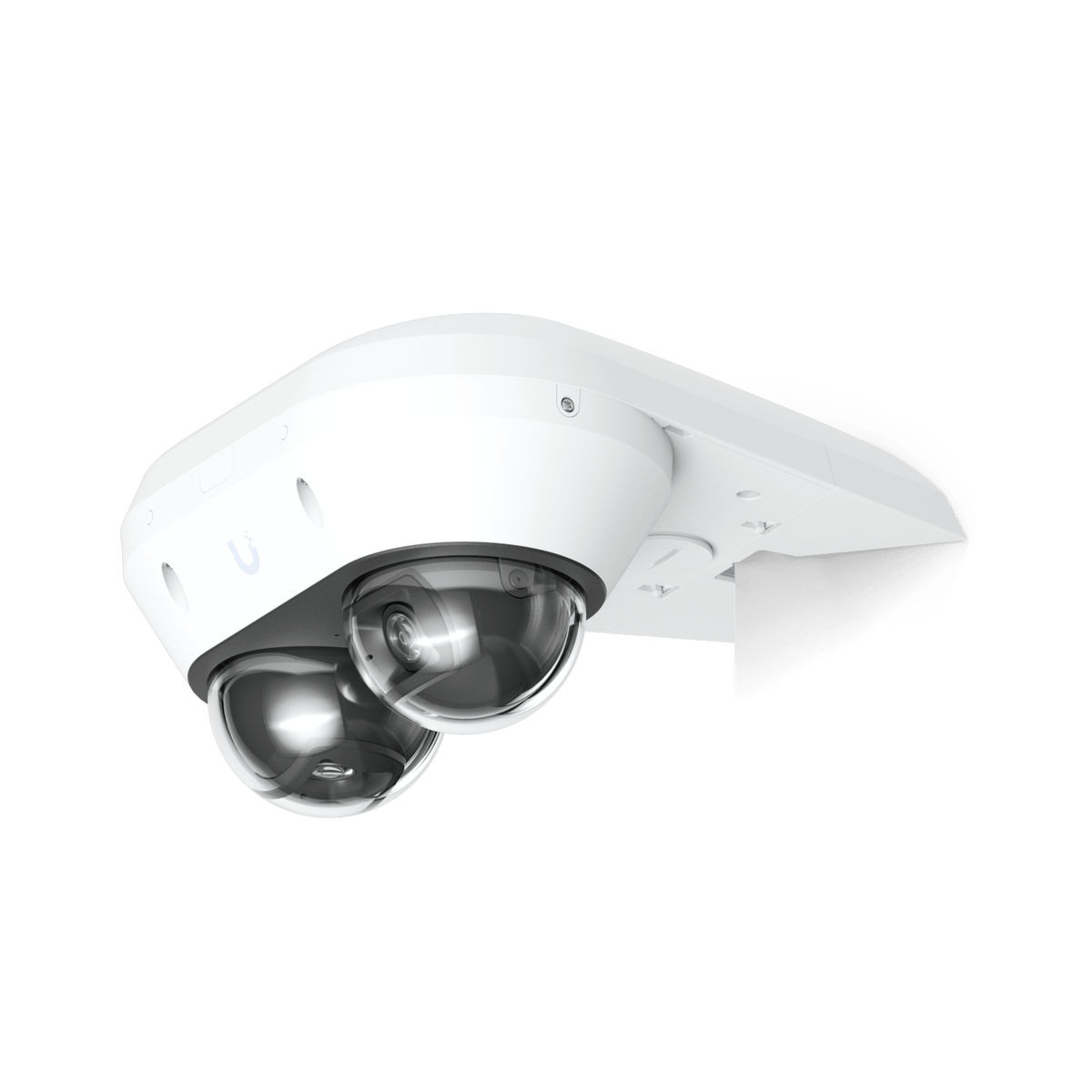


Ubiquiti UACC-AI-MS-2-AM Camera Arm Mount
Position Dual-Sensor Coverage with a Purpose-Built Mount A camera installation should look considered and provide the right physical starting point for its view. The Ubiquiti AI Multi Sensor 2 Camera Arm Mount supports wall and corner installations of the matching dual-sensor camera. Its dedicated shape, white finish and combination of polycarbonate and aluminium alloy integrate the mounting hardware with the camera, helping you plan the position around the site rather than improvise with a generic bracket. Highlights Made for the Matching Camera Designed specifically for the UVC-AI-MS-2 AI Multi Sensor 2 camera. Dedicated kit for wall and corner installation; camera supplied separately. A Considered Physical Fit Polycarbonate and aluminium-alloy construction with a white finish. Published dimensions of 243.6 × 218.6 × 39.4 mm and product weight of 600 g. Plan the Complete Installation Tapping-screw and anchor mounting specified by the manufacturer. Check the mounting surface, cable route and required camera view before fixing the kit. Key Features Choose the Position Around the View The arm mount provides an installation option for a suitable wall or building corner. Select the location around the camera’s intended coverage, the accessible mounting surface and its cable path. Final sensor direction and image framing are adjusted on the camera; the bracket does not change the camera’s optical specifications. Use a Dedicated Camera Interface This kit is shaped for the AI Multi Sensor 2. Matching the accessory to the exact camera avoids relying on a generic hole pattern or assuming that another multi-sensor model uses the same mounting parts. The camera is a separate purchase and is shown in some manufacturer images to illustrate the completed installation. Keep the Finish Cohesive White external surfaces complement the matching camera and help the assembly sit neatly against a light-coloured wall or soffit. Polycarbonate and aluminium alloy are the manufacturer’s listed materials. The compact published dimensions make the mount’s footprint clear when planning clearances near an entrance, canopy or corner. Select Fixings for the Actual Surface The manufacturer specifies tapping screws and anchors for mounting. Follow the illustrated installation guide and use a structurally suitable surface. The site’s wall material, access requirements and cable entry still need consideration; a mounting kit does not establish that every surface or installation position is suitable. Complete the Camera Installation Deliberately Allow space to route the Ethernet cable and service the camera after installation. Confirm the mounting arrangement before fixing it permanently, then check the resulting live view. Network power, the camera and the remaining installation materials form the wider system and are separate from this mechanical mounting accessory. Summary The AI Multi Sensor 2 Camera Arm Mount gives the matching camera a dedicated wall or corner installation option. Choose it when the site needs this mounting geometry, then complete the installation with the correct camera, suitable fixings and a planned cable route. Frequently Asked Questions Which Camera Does This Arm Mount Fit?ExpandCollapse It is specified for the Ubiquiti UVC-AI-MS-2 AI Multi Sensor 2 camera. Compatibility with a different camera or the AI Multi Sensor 4 should not be assumed. Can It Be Used on a Wall or Corner?ExpandCollapse Yes. The manufacturer describes the kit for wall and corner installation. Follow its illustrated guide and check that the surface and selected mounting arrangement suit the site. Is the Camera Included?ExpandCollapse No. This listing is for the mounting accessory. Manufacturer photographs showing the camera demonstrate the completed arrangement; the camera is supplied separately. What Is the Mount Made From?ExpandCollapse The listed enclosure and mounting materials are polycarbonate and aluminium alloy. The offered accessory has a white finish. Does the Mount Change the Camera’s Coverage?ExpandCollapse It provides a mounting position rather than a different lens or sensor. Set the camera’s sensor direction and check the live view after installation; the camera’s own imaging specifications still apply.
Add-ons (1)
Pickup available at 3005, Ubi Avenue 3, #01-88
通常2〜4日で準備が完了します
Ubiquiti UACC-AI-MS-2-AM Camera Arm Mount
商品説明
Position Dual-Sensor Coverage with a Purpose-Built Mount
A camera installation should look considered and provide the right physical starting point for its view. The Ubiquiti AI Multi Sensor 2 Camera Arm Mount supports wall and corner installations of the matching dual-sensor camera. Its dedicated shape, white finish and combination of polycarbonate and aluminium alloy integrate the mounting hardware with the camera, helping you plan the position around the site rather than improvise with a generic bracket.
Highlights
Made for the Matching Camera
- Designed specifically for the UVC-AI-MS-2 AI Multi Sensor 2 camera.
- Dedicated kit for wall and corner installation; camera supplied separately.
A Considered Physical Fit
- Polycarbonate and aluminium-alloy construction with a white finish.
- Published dimensions of 243.6 × 218.6 × 39.4 mm and product weight of 600 g.
Plan the Complete Installation
- Tapping-screw and anchor mounting specified by the manufacturer.
- Check the mounting surface, cable route and required camera view before fixing the kit.
Key Features
Choose the Position Around the View
The arm mount provides an installation option for a suitable wall or building corner. Select the location around the camera’s intended coverage, the accessible mounting surface and its cable path. Final sensor direction and image framing are adjusted on the camera; the bracket does not change the camera’s optical specifications.
Use a Dedicated Camera Interface
This kit is shaped for the AI Multi Sensor 2. Matching the accessory to the exact camera avoids relying on a generic hole pattern or assuming that another multi-sensor model uses the same mounting parts. The camera is a separate purchase and is shown in some manufacturer images to illustrate the completed installation.
Keep the Finish Cohesive
White external surfaces complement the matching camera and help the assembly sit neatly against a light-coloured wall or soffit. Polycarbonate and aluminium alloy are the manufacturer’s listed materials. The compact published dimensions make the mount’s footprint clear when planning clearances near an entrance, canopy or corner.
Select Fixings for the Actual Surface
The manufacturer specifies tapping screws and anchors for mounting. Follow the illustrated installation guide and use a structurally suitable surface. The site’s wall material, access requirements and cable entry still need consideration; a mounting kit does not establish that every surface or installation position is suitable.
Complete the Camera Installation Deliberately
Allow space to route the Ethernet cable and service the camera after installation. Confirm the mounting arrangement before fixing it permanently, then check the resulting live view. Network power, the camera and the remaining installation materials form the wider system and are separate from this mechanical mounting accessory.
Summary
The AI Multi Sensor 2 Camera Arm Mount gives the matching camera a dedicated wall or corner installation option. Choose it when the site needs this mounting geometry, then complete the installation with the correct camera, suitable fixings and a planned cable route.
Frequently Asked Questions
Which Camera Does This Arm Mount Fit?
It is specified for the Ubiquiti UVC-AI-MS-2 AI Multi Sensor 2 camera. Compatibility with a different camera or the AI Multi Sensor 4 should not be assumed.
Can It Be Used on a Wall or Corner?
Yes. The manufacturer describes the kit for wall and corner installation. Follow its illustrated guide and check that the surface and selected mounting arrangement suit the site.
Is the Camera Included?
No. This listing is for the mounting accessory. Manufacturer photographs showing the camera demonstrate the completed arrangement; the camera is supplied separately.
What Is the Mount Made From?
The listed enclosure and mounting materials are polycarbonate and aluminium alloy. The offered accessory has a white finish.
Does the Mount Change the Camera’s Coverage?
It provides a mounting position rather than a different lens or sensor. Set the camera’s sensor direction and check the live view after installation; the camera’s own imaging specifications still apply.
仕様
Ubiquiti UACC-AI-MS-2-AM Camera Arm Mount
This dedicated arm-mount kit provides a physical installation option for the AI Multi Sensor 2 camera on a wall or corner. Its white polycarbonate and aluminium-alloy construction complements the camera while keeping the published mounting footprint clear. Choose the position around the required view, suitable fixing surface and cable access. The camera is separate, and its sensor adjustment, network connection and weather-protection instructions remain part of the complete installation.
| Specification | Details |
|---|---|
| Compatibility and Installation | |
| Supported Camera | UVC-AI-MS-2 AI Multi Sensor 2 |
| Installation Arrangement | Wall or corner installation |
| Mounting Method | Tapping screws and anchors; follow the manufacturer’s illustrated guide |
| Camera and Network Equipment | Supplied separately |
| Construction | |
| Dimensions | 243.6 × 218.6 × 39.4 mm |
| Product Weight | 600 g |
| Enclosure Material | Polycarbonate and aluminium alloy |
| Mounting Material | Polycarbonate and aluminium alloy |
| Colour | White |
| Package and Planning | |
| Supplied Accessory | Dedicated arm-mount kit and its illustrated mounting hardware |
| Site Requirements | Suitable fixing surface, cable route and clearance for the installed camera |
| Coverage Adjustment | Adjust the camera’s sensors and confirm the live view after installation |
Add-ons

