




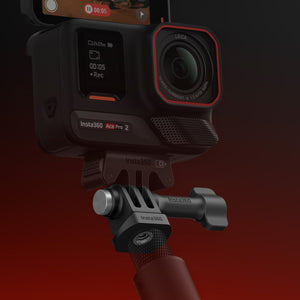


Insta360 3-Prong to 1/4" Adapter
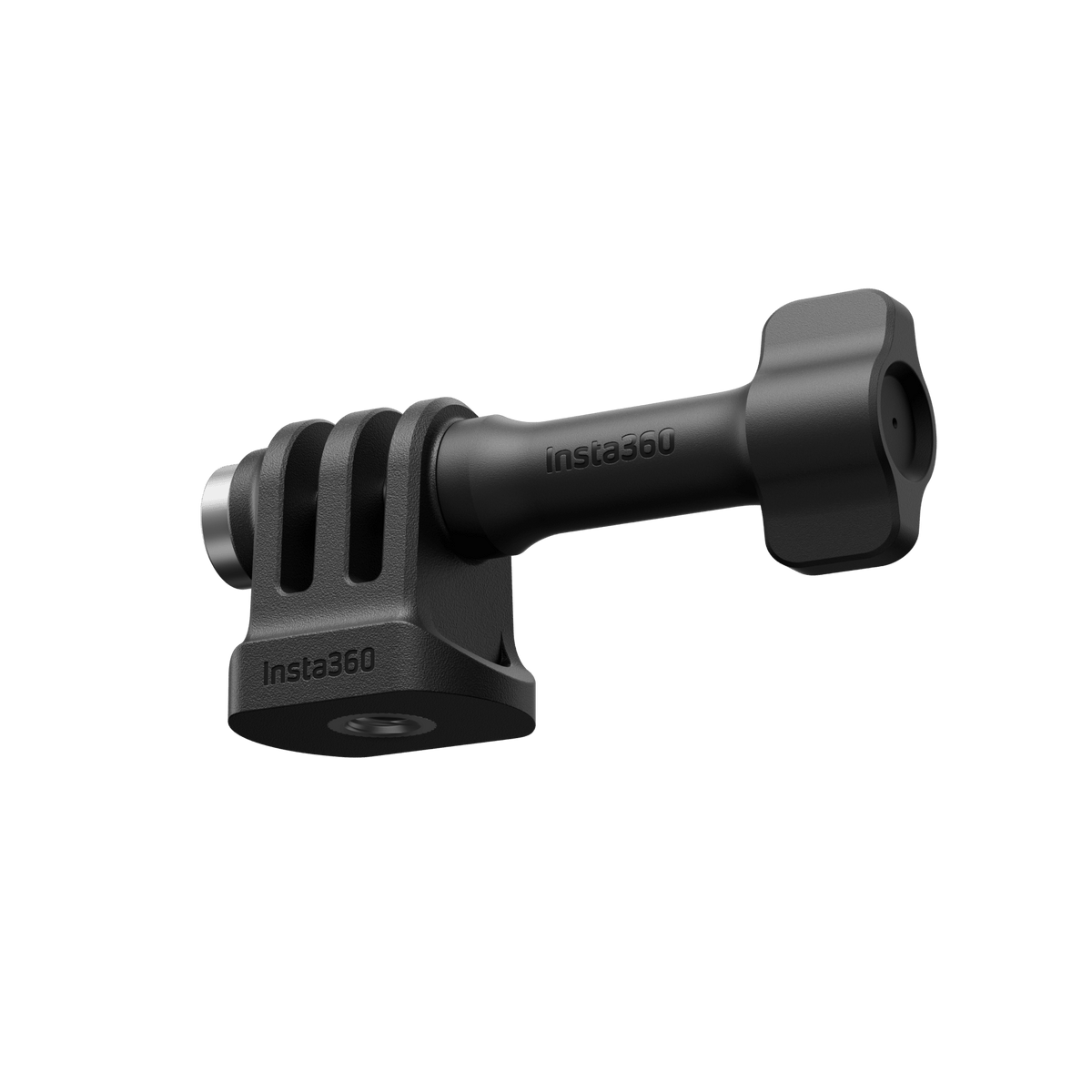
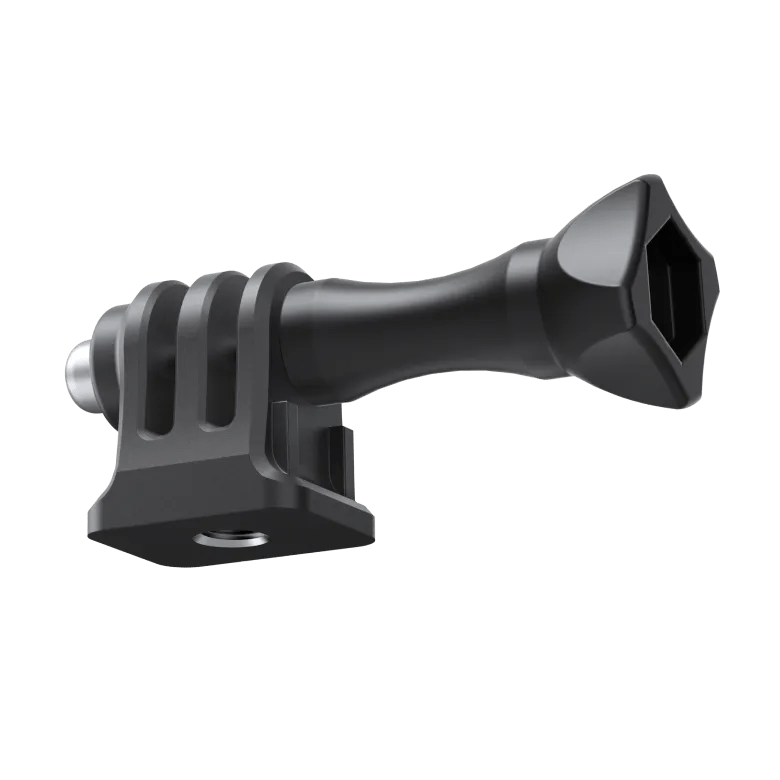
A Simple Connection for a Better Camera Angle A useful camera setup starts with the right connection. Insta360 3-Prong to 1/4" Adapter joins a suitable 1/4-inch screw support to a compatible two-prong camera mount or accessory. Its adjustable joint lets you set the viewing angle before tightening, while the included thumb screw secures the prong connection. It is a compact fitting for building a compatible setup without treating every camera and mount as interchangeable. Highlights Connect the Right Interfaces A 1/4-inch threaded base attaches to a suitable screw support. A three-prong fitting accepts the matching two-prong camera mount or accessory. Set the Viewing Angle Adjust the camera position at the joint before locking it. The supplied thumb screw secures the assembled prong connection. Keep the Setup Straightforward Plastic and stainless-steel construction. One adapter and one thumb screw are supplied; cameras and supports are separate. Key Features Bridge Two Mounting Formats Fit the threaded base onto a suitable 1/4-inch screw, then place the compatible two-prong camera mount or accessory between the adapter’s three prongs. This is a mechanical interface adapter. It does not add a magnetic camera base, electronic connection or compatibility with every camera by itself. Compose Before You Tighten The thumb-screw joint allows you to choose the viewing angle before tightening it into place. This helps when a camera needs a different perspective from the support underneath. Set the position while the equipment is stationary and check the assembled connection before filming. Use the Camera’s Required Mount Some cameras connect through a separate camera-specific mount rather than attaching directly to the adapter. For example, a compatible Ace-series mounting component provides the two-prong side of the setup. Check both the camera’s mounting accessory and the support’s screw connection before selecting the complete arrangement. Assemble and Care for It Correctly Insert the two-prong accessory before tightening the thumb screw. Tightening the empty three-prong fitting can damage it. Use the correct installation sequence and avoid strong acidic or alkaline cleaning agents, which the manufacturer warns can damage the accessory. Summary Choose this adapter when a compatible two-prong camera fitting needs to connect to a 1/4-inch screw support. It provides a small, adjustable connection with the required thumb screw included. Confirm the camera-specific mount, assemble the prongs correctly and secure the final angle before recording. Frequently Asked Questions What Does the Adapter Connect?ExpandCollapse Its threaded base attaches to a suitable 1/4-inch screw support. The upper three-prong fitting accepts a matching two-prong camera mount or accessory, secured by the included thumb screw. Can I Adjust the Camera Angle?ExpandCollapse Yes. Adjust the assembled joint to the required position, then tighten the thumb screw. Check that the camera and support are secure before filming. Does It Attach Directly to Every Insta360 Camera?ExpandCollapse No. A camera needs the correct mounting component for the two-prong connection. Check the camera-specific mount and support interface; this adapter does not replace every model’s mounting base. Is the Thumb Screw Included?ExpandCollapse Yes. The package contains one adapter and one thumb screw. The camera, camera-specific mounting components, tripod and other supports are sold separately. Can I Tighten the Adapter Before Inserting a Camera Mount?ExpandCollapse Do not tighten the empty prong fitting. The manufacturer instructs users to insert the two-prong accessory first, then fit and tighten the thumb screw to avoid damaging the adapter.
Pickup available at 3005, Ubi Avenue 3, #01-88
Usually ready in 2-4 Business Day (Excluding Public Holiday)
Insta360 3-Prong to 1/4" Adapter
Description
A Simple Connection for a Better Camera Angle
A useful camera setup starts with the right connection. Insta360 3-Prong to 1/4" Adapter joins a suitable 1/4-inch screw support to a compatible two-prong camera mount or accessory. Its adjustable joint lets you set the viewing angle before tightening, while the included thumb screw secures the prong connection. It is a compact fitting for building a compatible setup without treating every camera and mount as interchangeable.
Highlights
Connect the Right Interfaces
- A 1/4-inch threaded base attaches to a suitable screw support.
- A three-prong fitting accepts the matching two-prong camera mount or accessory.
Set the Viewing Angle
- Adjust the camera position at the joint before locking it.
- The supplied thumb screw secures the assembled prong connection.
Keep the Setup Straightforward
- Plastic and stainless-steel construction.
- One adapter and one thumb screw are supplied; cameras and supports are separate.
Key Features
Bridge Two Mounting Formats
Fit the threaded base onto a suitable 1/4-inch screw, then place the compatible two-prong camera mount or accessory between the adapter’s three prongs. This is a mechanical interface adapter. It does not add a magnetic camera base, electronic connection or compatibility with every camera by itself.
Compose Before You Tighten
The thumb-screw joint allows you to choose the viewing angle before tightening it into place. This helps when a camera needs a different perspective from the support underneath. Set the position while the equipment is stationary and check the assembled connection before filming.
Use the Camera’s Required Mount
Some cameras connect through a separate camera-specific mount rather than attaching directly to the adapter. For example, a compatible Ace-series mounting component provides the two-prong side of the setup. Check both the camera’s mounting accessory and the support’s screw connection before selecting the complete arrangement.
Assemble and Care for It Correctly
Insert the two-prong accessory before tightening the thumb screw. Tightening the empty three-prong fitting can damage it. Use the correct installation sequence and avoid strong acidic or alkaline cleaning agents, which the manufacturer warns can damage the accessory.
Summary
Choose this adapter when a compatible two-prong camera fitting needs to connect to a 1/4-inch screw support. It provides a small, adjustable connection with the required thumb screw included. Confirm the camera-specific mount, assemble the prongs correctly and secure the final angle before recording.
Frequently Asked Questions
What Does the Adapter Connect?
Its threaded base attaches to a suitable 1/4-inch screw support. The upper three-prong fitting accepts a matching two-prong camera mount or accessory, secured by the included thumb screw.
Can I Adjust the Camera Angle?
Yes. Adjust the assembled joint to the required position, then tighten the thumb screw. Check that the camera and support are secure before filming.
Does It Attach Directly to Every Insta360 Camera?
No. A camera needs the correct mounting component for the two-prong connection. Check the camera-specific mount and support interface; this adapter does not replace every model’s mounting base.
Is the Thumb Screw Included?
Yes. The package contains one adapter and one thumb screw. The camera, camera-specific mounting components, tripod and other supports are sold separately.
Can I Tighten the Adapter Before Inserting a Camera Mount?
Do not tighten the empty prong fitting. The manufacturer instructs users to insert the two-prong accessory first, then fit and tighten the thumb screw to avoid damaging the adapter.
Specs
Insta360 3-Prong to 1/4" Adapter
Insta360 3-Prong to 1/4" Adapter provides an adjustable mechanical connection between a suitable 1/4-inch screw support and a compatible two-prong camera fitting. The three-prong side is secured with the included thumb screw after the camera mount is inserted. Camera-specific mounting parts may be required separately. The table identifies the interfaces, materials, supplied parts and installation precautions; the adapter should be selected as one part of a compatible mounting setup rather than assumed to fit every camera directly.
| Specification | Details |
|---|---|
| Connections and Adjustment | |
| Support Connection | Threaded base for a suitable 1/4-inch mounting screw |
| Camera-Side Interface | Three-prong fitting accepts a matching two-prong camera mount or accessory |
| Angle Adjustment | Adjustable joint secured by the included thumb screw |
| Listed Camera Families | Compatible Ace, Ace Pro, Ace Pro 2, ONE R and ONE RS Twin/4K setups using the required camera mounting component |
| Materials and Installation | |
| Construction | Plastic and stainless steel |
| Assembly Order | Attach the threaded base, insert the two-prong accessory, then fit and tighten the thumb screw |
| Important Precaution | Do not tighten the thumb screw with the prong fitting empty |
| Supplied Parts and Care | |
| Included | 1 adapter and 1 thumb screw |
| Supplied Separately | Camera, camera-specific mounting components and supporting tripod or accessory |
| Cleaning | Avoid strong acidic or alkaline cleaning agents |