

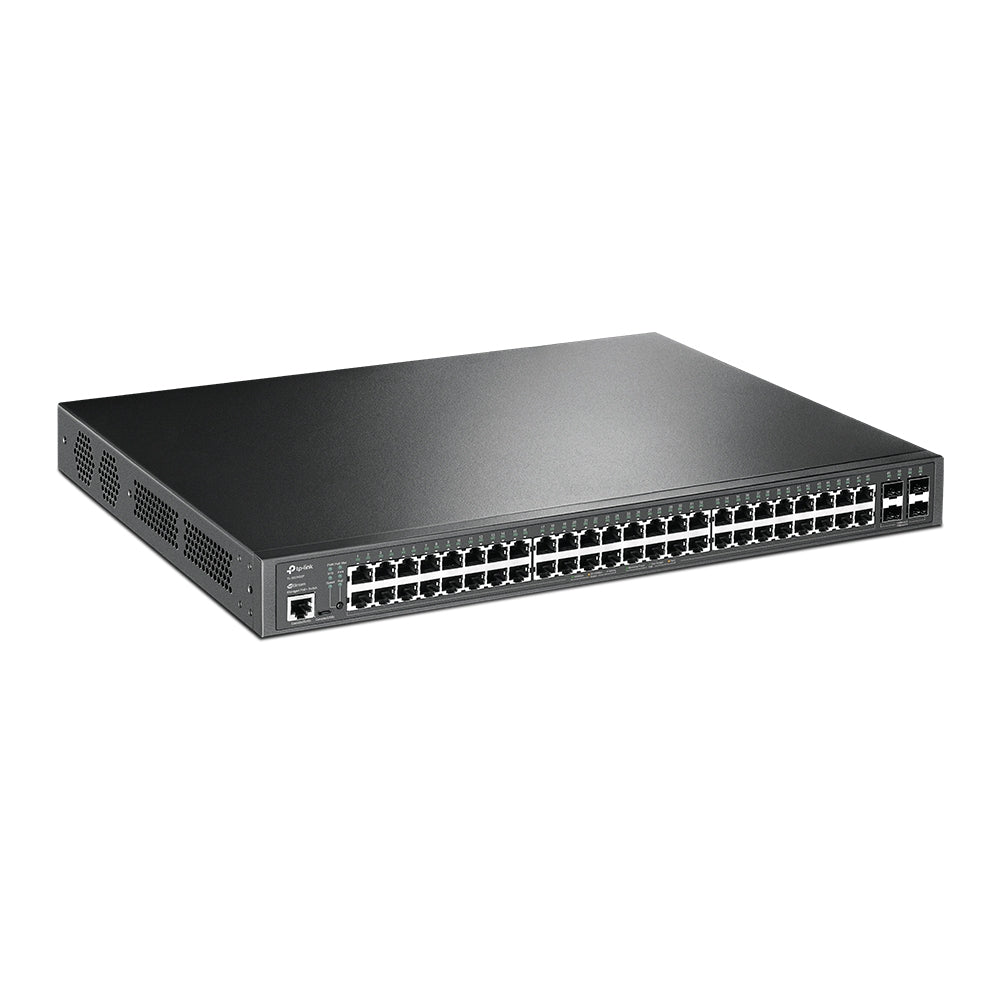


TP-Link SG3452P JetStream 52-Port Gigabit L2+ Managed Switch with 48-Port PoE+ (TL-SG3452P)
Connect a larger site with a clear power plan The TP-Link SG3452P provides 48 Gigabit copper ports and 4 Gigabit fibre slots for bringing a high number of office, voice and camera connections into a managed rack installation. A 384W shared PoE budget supports compatible powered equipment, while VLAN, traffic-priority and network-management functions give the installation a more organised foundation. Choose the port mix around the devices you need to connect and the uplink capacity the site can use, with standalone administration or compatible Omada central management. Highlights Connections with a clear purpose 48 × Gigabit RJ45 ports. Forty-eight IEEE 802.3at/af PoE+ ports rated up to 30W each. 4 × Gigabit SFP slots; compatible transceivers or direct-attach cables are selected separately. Power planned across the site 384W shared PoE budget. Choose compatible devices within both port and total power limits. Management for a structured network Standalone administration or compatible Omada central management. VLAN, QoS, access-control and multicast functions. Key Features Match the ports to the work Forty-eight copper ports provide connection density, but share 384W of PoE power. They cannot all deliver their individual 30W port rating at the same time. Plan the cable routes, link speed and connected-device requirements before installation. The negotiated speed is limited by both ends of the connection and the cabling. Size PoE by the complete connected load Forty-eight IEEE 802.3at/af PoE+ ports rated up to 30W each. All powered devices share the 384W budget. Add their requirements with suitable operating headroom; the sum of individual port ratings is not additional shared power. PSE output ratings and the power available at a device after cable loss are different. Keep uplink capacity in the design 4 × Gigabit SFP slots; compatible transceivers or direct-attach cables are selected separately. Choose matching optical standards, connector types, fibre and distance for each link. An SFP slot alone does not include an optical module, and a faster uplink does not make every client or internet connection equally fast. Separate networks and prioritise useful traffic Supported VLANs let you organise business devices, guests and compatible IP systems into planned network segments. ACLs, 802.1X authentication, QoS and multicast controls support the wider network policy. A working design also needs the appropriate gateway, addressing and consistent settings on connected equipment. Choose standalone or central management Use the supported web interface, CLI and monitoring tools for local administration, or adopt the switch into a compatible Omada controller. Central management brings supported configuration and monitoring together with other Omada devices. Check the hardware, firmware and controller release for the functions required at the site. Install for dependable operation The rack-mountable metal enclosure uses active cooling and mains power. Allow ventilation, cable-management space and access to the front connections. Maintain firmware and configuration backups, label the powered links and consider a suitable UPS for the connected system. The switch does not include battery backup. Summary The SG3452P suits bringing a high number of office, voice and camera connections into a managed rack installation. Its Gigabit copper connections, Gigabit uplinks and 384W power budget provide a defined starting point for the network. Match the powered devices, optics, controller release and installation conditions to the intended workload, then keep the configuration documented for future maintenance. Frequently Asked Questions Can every port deliver its maximum PoE rating at once?ExpandCollapse The powered ports share 384W. Check both the per-port rating and total device demand; unused power on a data-only port does not add to the shared budget. Are the fibre modules included?ExpandCollapse 4 × Gigabit SFP slots; compatible transceivers or direct-attach cables are selected separately. Do I need an Omada controller?ExpandCollapse Standalone management is available. A compatible Omada controller adds supported central configuration, monitoring and remote access. Controller-dependent functions require the controller to be available; separately selected cloud services may have their own terms. Can I connect an ordinary non-PoE computer?ExpandCollapse Yes. Compatible Ethernet devices can use the copper data ports without taking PoE power. Standards-based PoE is negotiated with a compatible powered device; do not assume support for passive or non-standard PoE equipment. Which PoE configuration does this offer describe?ExpandCollapse Forty-eight copper ports provide connection density, but share 384W of PoE power. They cannot all deliver their individual 30W port rating at the same time.
Add-ons (1)
Pickup available at 3005, Ubi Avenue 3, #01-88
Usually ready in 2-4 Business Day (Excluding Public Holiday)
TP-Link SG3452P JetStream 52-Port Gigabit L2+ Managed Switch with 48-Port PoE+ (TL-SG3452P)
Description
Connect a larger site with a clear power plan
The TP-Link SG3452P provides 48 Gigabit copper ports and 4 Gigabit fibre slots for bringing a high number of office, voice and camera connections into a managed rack installation. A 384W shared PoE budget supports compatible powered equipment, while VLAN, traffic-priority and network-management functions give the installation a more organised foundation. Choose the port mix around the devices you need to connect and the uplink capacity the site can use, with standalone administration or compatible Omada central management.
Highlights
Connections with a clear purpose
- 48 × Gigabit RJ45 ports. Forty-eight IEEE 802.3at/af PoE+ ports rated up to 30W each.
- 4 × Gigabit SFP slots; compatible transceivers or direct-attach cables are selected separately.
Power planned across the site
- 384W shared PoE budget.
- Choose compatible devices within both port and total power limits.
Management for a structured network
- Standalone administration or compatible Omada central management.
- VLAN, QoS, access-control and multicast functions.
Key Features
Match the ports to the work
Forty-eight copper ports provide connection density, but share 384W of PoE power. They cannot all deliver their individual 30W port rating at the same time. Plan the cable routes, link speed and connected-device requirements before installation. The negotiated speed is limited by both ends of the connection and the cabling.
Size PoE by the complete connected load
Forty-eight IEEE 802.3at/af PoE+ ports rated up to 30W each. All powered devices share the 384W budget. Add their requirements with suitable operating headroom; the sum of individual port ratings is not additional shared power. PSE output ratings and the power available at a device after cable loss are different.
Keep uplink capacity in the design
4 × Gigabit SFP slots; compatible transceivers or direct-attach cables are selected separately. Choose matching optical standards, connector types, fibre and distance for each link. An SFP slot alone does not include an optical module, and a faster uplink does not make every client or internet connection equally fast.
Separate networks and prioritise useful traffic
Supported VLANs let you organise business devices, guests and compatible IP systems into planned network segments. ACLs, 802.1X authentication, QoS and multicast controls support the wider network policy. A working design also needs the appropriate gateway, addressing and consistent settings on connected equipment.
Choose standalone or central management
Use the supported web interface, CLI and monitoring tools for local administration, or adopt the switch into a compatible Omada controller. Central management brings supported configuration and monitoring together with other Omada devices. Check the hardware, firmware and controller release for the functions required at the site.
Install for dependable operation
The rack-mountable metal enclosure uses active cooling and mains power. Allow ventilation, cable-management space and access to the front connections. Maintain firmware and configuration backups, label the powered links and consider a suitable UPS for the connected system. The switch does not include battery backup.
Summary
The SG3452P suits bringing a high number of office, voice and camera connections into a managed rack installation. Its Gigabit copper connections, Gigabit uplinks and 384W power budget provide a defined starting point for the network. Match the powered devices, optics, controller release and installation conditions to the intended workload, then keep the configuration documented for future maintenance.
Frequently Asked Questions
Can every port deliver its maximum PoE rating at once?
The powered ports share 384W. Check both the per-port rating and total device demand; unused power on a data-only port does not add to the shared budget.
Are the fibre modules included?
4 × Gigabit SFP slots; compatible transceivers or direct-attach cables are selected separately.
Do I need an Omada controller?
Standalone management is available. A compatible Omada controller adds supported central configuration, monitoring and remote access. Controller-dependent functions require the controller to be available; separately selected cloud services may have their own terms.
Can I connect an ordinary non-PoE computer?
Yes. Compatible Ethernet devices can use the copper data ports without taking PoE power. Standards-based PoE is negotiated with a compatible powered device; do not assume support for passive or non-standard PoE equipment.
Which PoE configuration does this offer describe?
Forty-eight copper ports provide connection density, but share 384W of PoE power. They cannot all deliver their individual 30W port rating at the same time.
Specs
TP-Link SG3452P JetStream 52-Port Gigabit L2+ Managed Switch with 48-Port PoE+ (TL-SG3452P)
The TP-Link SG3452P is designed for a structured business network with the connection and management capabilities summarised below. Match the interfaces, power requirements and supported software to the equipment at the site. The grouped table separates physical connections from network functions and installation requirements, making it easier to plan a suitable deployment. Actual performance and available features depend on the connected devices, hardware revision, firmware and configuration.
| Specification | Details |
|---|---|
| Ports and Uplinks | |
| Copper connections | 48 × Gigabit RJ45 ports. Forty-eight IEEE 802.3at/af PoE+ ports rated up to 30W each. |
| Fibre connections | 4 × Gigabit SFP slots; compatible transceivers or direct-attach cables are selected separately. |
| Console connections | One RJ45 console port and one Micro-USB console port. |
| Power over Ethernet | |
| PoE standard and port ratings | Forty-eight IEEE 802.3at/af PoE+ ports rated up to 30W each. |
| Shared PoE power budget | 384W total; actual device power depends on the applicable PoE class, cable loss and aggregate demand. |
| Switching Performance | |
| Switching capacity | 104 Gbps |
| Packet forwarding rate | 77.38 Mpps |
| MAC address table | 16 K |
| Packet buffer | 12 Mbit |
| Jumbo frames | 9 KB |
| Network Functions | |
| Traffic separation and security | Supported 802.1Q VLANs, ACLs, 802.1X authentication and access controls; available functions depend on hardware/firmware and operating mode. |
| Switching and routing | Supported link aggregation, spanning tree, loop detection and static routing; compatible configuration required. |
| Voice and multicast | Supported QoS and IGMP snooping for a planned voice, video or multicast installation. |
| Management | |
| Management options | Standalone web/CLI/SNMP administration or compatible Omada central management. |
| Controller requirements | Match the device hardware and firmware to the controller release. Selected cloud services and controller-dependent functions have separate requirements. |
| Installation and Environment | |
| Dimensions | 440 × 330 × 44 mm (W × D × H). |
| Mounting and cooling | Rack-mountable enclosure with active fan cooling; allow unobstructed ventilation. |
| AC input | 100–240V AC, 50/60Hz. |
| Operating conditions | 0°C to 45°C; 10% to 90% RH, non-condensing. |
| Storage conditions | −40°C to 70°C; 5% to 90% RH, non-condensing. |
| Included equipment | Switch, power cord, mounting equipment and installation documentation; exact cable contents follow the regional package. |
| Warranty | 5 years. |
Add-ons

