

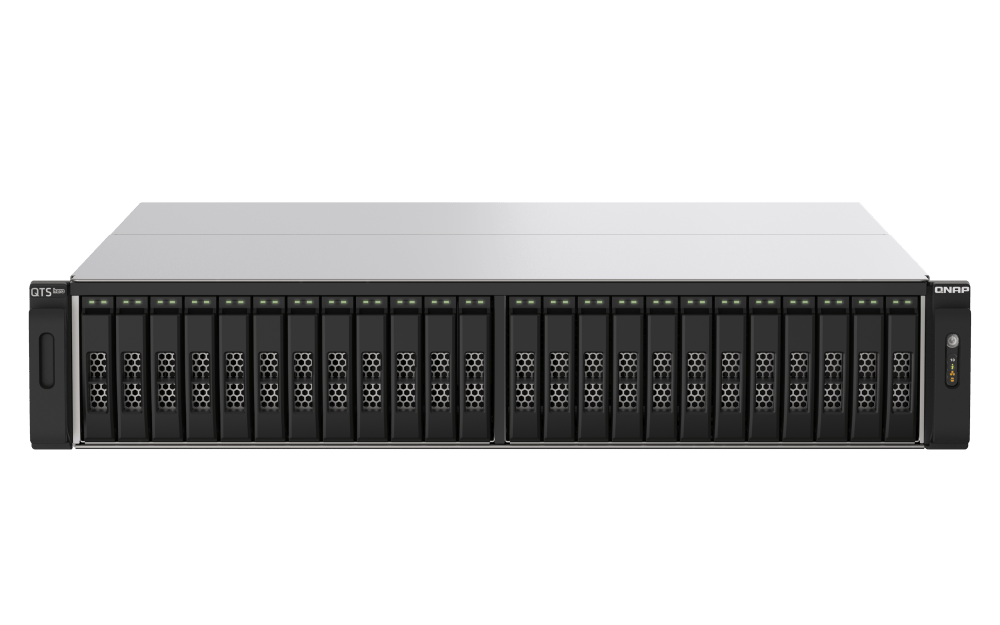


QNAP TS-h2490FU 24-Bay NVMe All-Flash Rackmount NAS
Dense NVMe Storage for a High-Speed Data Environment The QNAP TS-h2490FU houses twenty-four U.2 NVMe SSD bays in a 2U rackmount chassis. AMD EPYC processing, ECC RDIMM memory and 25GbE networking provide a platform for virtual machine storage, shared production data and other workloads that need an all-flash storage architecture. Its configuration matters beyond installed memory. Eight-core versions include two 25GbE SFP28 ports, while sixteen-core versions include four. The Configuration selector keeps processor core class and memory together so the networking and processing specification remains clear. Highlights Twenty-four 2.5-inch U.2 NVMe PCIe Gen3 x4 SSD bays AMD EPYC processing with ECC DDR4 RDIMM memory Two or four 25GbE SFP28 ports according to processor configuration Five PCIe Gen4 slots, with supplied network adapters occupying slots Redundant power supplies and five-year warranty Key Features NVMe Throughout the Main Storage Bays All twenty-four positions are intended for qualified U.2 NVMe SSDs. This is a dedicated NVMe design: SATA SSDs and hard disk drives are not supported in the main bays. Select enterprise SSDs with suitable endurance, power-loss protection and QNAP compatibility approval. Match Processing and Network Capacity Choose an eight-core EPYC 7232P or qualified 7252 revision, or a sixteen-core EPYC 7302P configuration. Dual 2.5GbE ports are complemented by two or four 25GbE ports according to configuration. Confirm the supplied processor revision and port arrangement when specifying a project. Memory and Expansion for the Storage Design Sixteen ECC RDIMM slots provide an upgrade path for memory-intensive storage services. Five PCIe Gen4 slots support selected expansion cards, with shared lanes and supplied adapters affecting the usable slots. Design the storage network and expansion layout before deployment. ZFS Protection with a Planned RAID Layout QuTS hero supports checksummed storage, snapshots and replication. For a large SSD pool, plan multiple RAID groups within the operating system limits rather than assuming a single twenty-four-drive RAID group is appropriate. Keep an independent backup for recovery beyond the NAS. Summary The TS-h2490FU is a dense NVMe platform for organisations designing a high-speed storage environment. Choose its processor and network configuration together, then plan qualified SSDs, RAID groups, rack power, cooling and independent backup as one system. Frequently Asked Questions Which configuration should I choose?ExpandCollapse Use the Configuration selector to choose the processor class and installed memory together. Size the CPU, RAM, drives and networking for the actual applications and number of users. The SKU shown for your selection identifies the exact configured offer. Which drives can I install?ExpandCollapse 24 × 2.5-inch U.2 NVMe Gen3 x4 SSD bays; SSDs separate. SATA drives and HDDs are not supported. Check each exact drive against QNAP’s compatibility list before ordering; usable capacity depends on the RAID and file-system design. Are the advertised network ports built in?ExpandCollapse 8-core configurations: 2 × 25GbE SFP28. 16-core configurations: 4 × 25GbE SFP28. All configurations also have 2 × 2.5GbE RJ45. Transceivers, network cables, switches and optional adapters are separate unless explicitly included. How many surveillance camera licences are included?ExpandCollapse On a supported QVR Surveillance installation, two camera channels are included and six more can be claimed after registration, giving eight free channels. QVR Pro offers eight included channels on supported QTS configurations. Extra-channel availability depends on the NAS and QVR version; confirm compatibility and licensing before planning beyond the free entitlement. Camera count also depends on bitrate, resolution, recording settings, storage and other workloads. Can this NAS run virtual machines and containers?ExpandCollapse Supported Virtualization Station and Container Station packages provide virtual machine and container functions. Virtualization Station requires at least 4GB RAM and Container Station at least 1GB; these are installation minimums, not a workload sizing recommendation. Allocate additional resources for the guest systems and NAS services. Does RAID replace an independent backup?ExpandCollapse No. RAID helps with selected drive failures, while snapshots can recover earlier versions under the right conditions. Neither is a complete independent backup. Keep a separate, current backup and test restoration; ransomware, deletion, theft or damage can affect data that remains only on the NAS.
Add-ons (2)
Pickup available at 3005, Ubi Avenue 3, #01-88
Usually ready in 2-4 Business Day (Excluding Public Holiday)
QNAP TS-h2490FU 24-Bay NVMe All-Flash Rackmount NAS
Description
Dense NVMe Storage for a High-Speed Data Environment
The QNAP TS-h2490FU houses twenty-four U.2 NVMe SSD bays in a 2U rackmount chassis. AMD EPYC processing, ECC RDIMM memory and 25GbE networking provide a platform for virtual machine storage, shared production data and other workloads that need an all-flash storage architecture.
Its configuration matters beyond installed memory. Eight-core versions include two 25GbE SFP28 ports, while sixteen-core versions include four. The Configuration selector keeps processor core class and memory together so the networking and processing specification remains clear.
Highlights
- Twenty-four 2.5-inch U.2 NVMe PCIe Gen3 x4 SSD bays
- AMD EPYC processing with ECC DDR4 RDIMM memory
- Two or four 25GbE SFP28 ports according to processor configuration
- Five PCIe Gen4 slots, with supplied network adapters occupying slots
- Redundant power supplies and five-year warranty
Key Features
NVMe Throughout the Main Storage Bays
All twenty-four positions are intended for qualified U.2 NVMe SSDs. This is a dedicated NVMe design: SATA SSDs and hard disk drives are not supported in the main bays. Select enterprise SSDs with suitable endurance, power-loss protection and QNAP compatibility approval.
Match Processing and Network Capacity
Choose an eight-core EPYC 7232P or qualified 7252 revision, or a sixteen-core EPYC 7302P configuration. Dual 2.5GbE ports are complemented by two or four 25GbE ports according to configuration. Confirm the supplied processor revision and port arrangement when specifying a project.
Memory and Expansion for the Storage Design
Sixteen ECC RDIMM slots provide an upgrade path for memory-intensive storage services. Five PCIe Gen4 slots support selected expansion cards, with shared lanes and supplied adapters affecting the usable slots. Design the storage network and expansion layout before deployment.
ZFS Protection with a Planned RAID Layout
QuTS hero supports checksummed storage, snapshots and replication. For a large SSD pool, plan multiple RAID groups within the operating system limits rather than assuming a single twenty-four-drive RAID group is appropriate. Keep an independent backup for recovery beyond the NAS.
Summary
The TS-h2490FU is a dense NVMe platform for organisations designing a high-speed storage environment. Choose its processor and network configuration together, then plan qualified SSDs, RAID groups, rack power, cooling and independent backup as one system.
Frequently Asked Questions
Which configuration should I choose?
Use the Configuration selector to choose the processor class and installed memory together. Size the CPU, RAM, drives and networking for the actual applications and number of users. The SKU shown for your selection identifies the exact configured offer.
Which drives can I install?
24 × 2.5-inch U.2 NVMe Gen3 x4 SSD bays; SSDs separate. SATA drives and HDDs are not supported. Check each exact drive against QNAP’s compatibility list before ordering; usable capacity depends on the RAID and file-system design.
Are the advertised network ports built in?
8-core configurations: 2 × 25GbE SFP28. 16-core configurations: 4 × 25GbE SFP28. All configurations also have 2 × 2.5GbE RJ45. Transceivers, network cables, switches and optional adapters are separate unless explicitly included.
How many surveillance camera licences are included?
On a supported QVR Surveillance installation, two camera channels are included and six more can be claimed after registration, giving eight free channels. QVR Pro offers eight included channels on supported QTS configurations. Extra-channel availability depends on the NAS and QVR version; confirm compatibility and licensing before planning beyond the free entitlement. Camera count also depends on bitrate, resolution, recording settings, storage and other workloads.
Can this NAS run virtual machines and containers?
Supported Virtualization Station and Container Station packages provide virtual machine and container functions. Virtualization Station requires at least 4GB RAM and Container Station at least 1GB; these are installation minimums, not a workload sizing recommendation. Allocate additional resources for the guest systems and NAS services.
Does RAID replace an independent backup?
No. RAID helps with selected drive failures, while snapshots can recover earlier versions under the right conditions. Neither is a complete independent backup. Keep a separate, current backup and test restoration; ransomware, deletion, theft or damage can affect data that remains only on the NAS.
Specs
QNAP TS-h2490FU 24-Bay NVMe All-Flash Rackmount NAS
The QNAP TS-h2490FU is a dense 2U all-flash NAS for virtual machine storage, production data and other demanding business workloads. Twenty-four U.2 NVMe SSD bays combine with AMD EPYC processing and ECC memory, with two or four 25GbE ports depending on the processor configuration. ZFS-based QuTS hero protection and compatible external expansion provide storage-design flexibility, subject to the chosen RAID groups, memory, network and required host adapters.
| Specification | Details |
|---|---|
| System and Memory | |
| Processor | 8-core / 16-thread EPYC 7232P or 7252, up to 3.2GHz; 16-core / 32-thread EPYC 7302P, up to 3.3GHz. Exact revision depends on configuration. |
| Memory | ECC DDR4 RDIMM; installed memory follows Configuration. 16 slots; up to 4TB with 16 × 256GB qualified modules. |
| Encryption Engine | Hardware AES-NI encryption support. |
| Operating System | QuTS hero uses ZFS; supported QTS installations use EXT4. Select the OS before creating storage. Switching between the file systems requires reinitialisation and a verified backup. |
| Storage and Data Protection | |
| Drive Bays | 24 × 2.5-inch U.2 NVMe Gen3 x4 SSD bays; SSDs separate. SATA drives and HDDs are not supported. |
| NVMe Support | U.2 NVMe through the main drive bays; use QNAP-qualified SSDs. |
| Drive Servicing | Hot-swappable U.2 NVMe SSD main bays; SATA drives are not supported. |
| RAID | Single, RAID 0, 1, 5, 6, 10, 50, 60, Triple Mirror and Triple Parity under supported QuTS hero configurations; minimum drive requirements apply. |
| RAID Group Planning | New RAID 5/6/Triple Parity groups and RAID 50/60 subgroups are limited to 16 drives per group. Supported multiple-group configurations can form a larger pool. |
| File Systems | QuTS hero uses ZFS internally. Supported QTS installations use EXT4. External file systems include EXT3, EXT4, NTFS, FAT32, HFS+ and exFAT, subject to OS support. |
| Snapshots and Replication | Shared-folder and iSCSI LUN snapshots, retention policies, self-service recovery, cloning and Snapshot Replica/Vault on supported OS configurations. Snapshots do not replace an independent backup. |
| Backup and Synchronisation | Hybrid Backup Sync for NAS, external-drive and supported cloud backup/synchronisation; Time Machine backup support. Cloud/provider charges and app/version requirements may apply. |
| Connectivity and Expansion | |
| Network | 8-core configurations: 2 × 25GbE SFP28. 16-core configurations: 4 × 25GbE SFP28. All configurations also have 2 × 2.5GbE RJ45. |
| PCIe Expansion | 5 × PCIe Gen4 slots: x4, x8/x4, x4, x8 and x16/x8. Shared-lane conditions apply; supplied 25GbE adapters occupy slots. |
| USB | 2 × USB 3.2 Gen1 Type-A, 5Gb/s. |
| File Services and Applications | |
| File Access | SMB/CIFS and NFS file sharing, plus FTP, SFTP and explicit FTPS through supported services. |
| Accounts and Permissions | QuTS hero: up to 16,000 local users; QTS: up to 4,096. Up to 512 local groups and 200,000 domain-user/group accounts. ACLs and user/group permissions apply. |
| Concurrent File Connections | Up to 10,000 concurrent CIFS connections with maximum memory; workload and service settings apply. |
| iSCSI | Block-based LUNs with thick or thin provisioning, multipath I/O, online capacity expansion and supported LUN snapshots/replication. OS and host compatibility apply. |
| Virtual Machines and Containers | Virtualization Station (minimum 4GB RAM) and Container Station (minimum 1GB RAM) on supported installations. Guest workloads require additional resources. |
| Security | Access controls, 2-step verification, network access protection and supported firewall/security applications. QuTS hero supports AES-256 folder encryption; QTS volume-encryption availability depends on the chosen installation. |
| Surveillance | |
| Included Camera Channels | QVR Surveillance: 2 included plus 6 claimable after registration, for 8 free channels on supported installations. QVR Pro: 8 included on supported QTS installations. QVR Surveillance deployments above 8 channels require compatible paid channel licences; verify OS and app availability. |
| QVR Surveillance Recording Capacity | A fixed model-specific camera maximum is not verified for QVR Surveillance. A project-specific recording design must be validated before committing the channel count; the QVR Pro application ceiling below is not a model performance rating. |
| QVR Pro Application Ceiling | Up to 128 licensed channels for compatible 64-bit x86 QTS installations; this is the software ceiling, not a measured rating for this NAS. Minimum 4GB RAM; 8GB recommended. Additional channel licences are separate. |
| QuTS hero Surveillance Expansion | The manufacturer software table lists expanded camera-channel support as under development. Confirm the installed QVR version and licence availability before planning beyond the free entitlement. |
| Compatible External Expansion | |
| SATA JBOD Enclosures | TL-D400S, TL-D800S, TL-D1600S, TL-R400S and TL-R1200S-RP; up to 2 of a listed model, subject to the host configuration. |
| Required SATA Host Adapters | TL-D400S / TL-R400S: QXP-400eS-A1164 with 1 × SFF-8088 cable. TL-D800S: QXP-800eS-A1164 with 2 × SFF-8088. TL-D1600S: QXP-1600eS-A1164 with 4 × SFF-8088-to-SFF-8644; TL-R1200S-RP uses the same HBA with 3 cables. |
| USB Expansion Enclosures | TL-D800C (up to 2), TL-R1200C-RP (up to 2). Use the enclosure-compatible direct USB cable; connection speed is limited by the NAS host port. |
| SAS Expansion Enclosures | TL-R1220Sep-RP (up to 16), TL-R1620Sep-RP (up to 16), TL-R6020Sep-RP (up to 4). Requires a compatible QNAP SAS expansion card and SFF-8644 cables. |
| Required SAS Host Adapters | QXP-830S-3808 or QXP-1630S-3816, subject to exact NAS slot/card compatibility. TL-R6020Sep-RP deployments should use the manufacturer-recommended QXP-1630S-3816. Cards and required SAS cables are separate. |
| PCIe JBOD Enclosures | TL-R1200PES-RP, TL-R1600PES-RP, TL-R2400PES-RP; up to 12 total PCIe JBOD units across the supported slots. |
| Required PCIe JBOD Adapter | QXP-3X4PES with CAB-PCIE10M-8644-4X special cable for the supported x4 JBOD path. The enclosure’s included 8X cable does not fit this card. BIOS Q03XAR19 or later; QTS / QuTS hero 5.1.2 or later. |
| PCIe JBOD Slot Support | Slot 1: x4 JBOD supported (PCIe Gen 4 x4); Slot 2: x4 JBOD supported (PCIe Gen 4 x4 or x8); Slot 3: x4 JBOD supported (PCIe Gen 4 x4). Keep factory network-card occupancy and lane-sharing requirements in the installation plan. |
| Third-Party SAS Enclosures | Seagate Exos E 5U84 (up to 2), Seagate Exos E 2U12 (up to 2). Requires compatible SAS card/cables, QuTS hero h5.1.0 or later and a separate non-transferable licence per enclosure. Its pool cannot be merged with the NAS pool. |
| Expansion Design Limits | Counts are per enclosure type, not additive totals when mixing models. Available PCIe slots, required firmware, memory, pool limits, cabling and topology must be checked for the complete design. |
| Physical and Operating | |
| Form Factor and Dimensions | 2U rackmount; 88.3 × 480.97 × 510.23mm (H × W × D). |
| Weight | 16.77kg net; 20.95kg gross. |
| Power Supply | 2 × redundant PSUs; maximum 1100W per PSU at AC 200–240V, with lower available output under the manufacturer input-voltage limits. |
| Power Consumption | 277.64W typical operating power, manufacturer test with drives fully populated. |
| Cooling | 4 × 60mm fans. |
| Environment | Operating 0–40°C; storage −20–70°C. 5–95% RH, non-condensing; maximum wet-bulb temperature 27°C. |
| Warranty | 5 years. |
| Installation | |
| Drives and Accessories | Diskless NAS. Drives, network optics/cables and optional expansion cards are separate unless expressly included. |
| Rail Kit | RAIL-A03-57 compatible rail option, supplied separately. Confirm mounting-post spacing and rack-hole requirements. |
Add-ons


NASCare Extended Warranty with Loaner Unit for 13-24 Bays

