

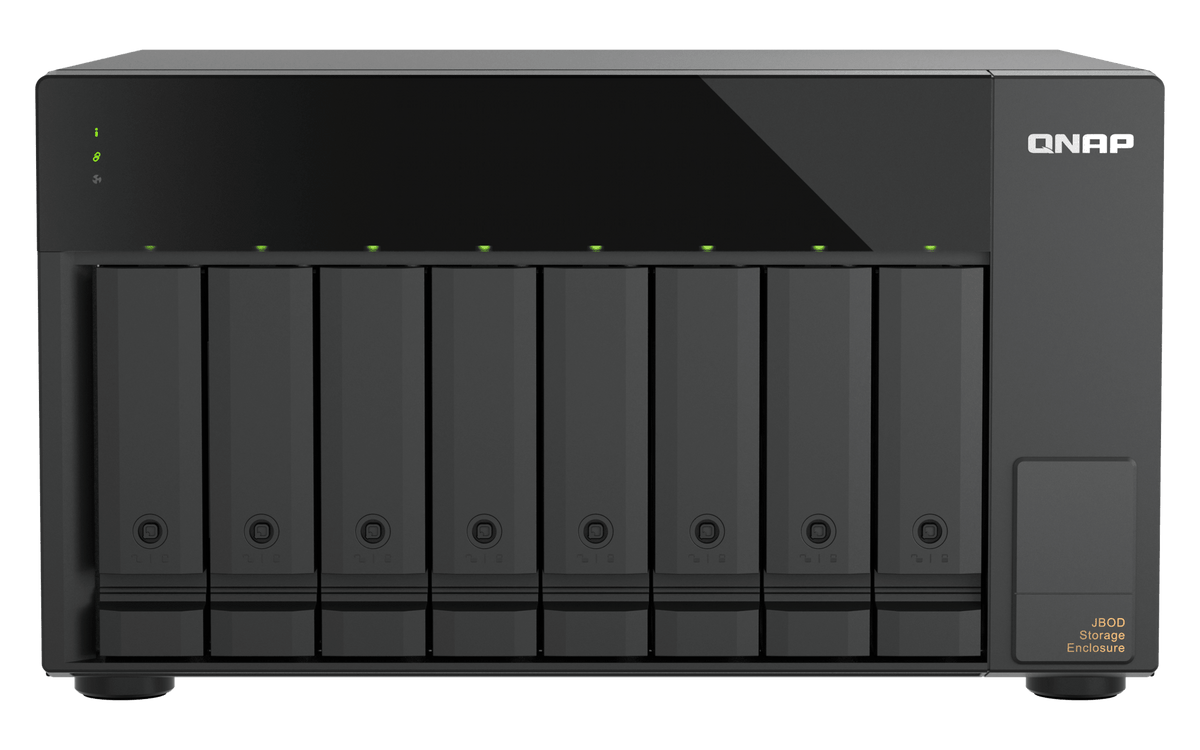


QNAP TL-D810TC4 8-Bay USB4 Desktop JBOD Expansion Enclosure
Keep More Working Data Close to Your Host The TL-D810TC4 adds 8 SATA drive bays to a compatible host through a direct USB4 Type-C connection. It is designed for growing project libraries, backup destinations and larger working datasets, with a link rated up to 40Gbps. Its desktop chassis keeps expansion storage beside your workstation or supported NAS. Choose a suitable drive layout and host connection before building the storage pool. Highlights Room to Grow 8 drive bays for compatible SATA hard drives or solid-state drives. Diskless enclosure, so drive selection can match the workload. A Faster Direct Link One USB4 Type-C host interface rated up to 40Gbps. Direct connection using the supplied USB4 cable, without a hub or dock. Practical Deployment Desktop design with an internal 250W power supply. Host-based power management and selectable fan modes. Key Features Expand Storage without Replacing the Main System Connect the enclosure to an approved host and create a separate storage area for growing files or backups. On supported QNAP NAS systems, Storage & Snapshots manages the enclosure's drives and independent storage pool. This pool cannot be merged into the NAS's internal pool, and system applications remain on the NAS. USB4 Is More than a Type-C Connector A USB-C socket alone does not establish compatibility. Use a verified USB4 or supported Thunderbolt 4 connection; USB 3 and earlier ports are unsupported. Many listed NAS models require the optional QXP-40G2UC PCIe host card and, on some models, a minimum BIOS version. The host, drives, RAID layout and cable determine real transfer performance. Connect directly and use a suitable cable no longer than 1M as recommended by QNAP. Plan the Drives and RAID Together The bays accept supported 3.5-inch SATA HDDs and 2.5-inch SATA SSDs. Keep HDDs and SSDs in separate RAID groups. RAID is managed by the connected NAS or host software; this is a JBOD expansion enclosure rather than a standalone network NAS or a hardware RAID controller. Maintain an independent backup of important data. Match the Host and Software Supported QNAP deployment requires QTS 5.2.x or later, or QuTS hero 5.2.8 or later. For direct computer use, QNAP lists Windows 11 or later, macOS 12.0 or later and Ubuntu 22.04 or later with suitable host hardware. Follow the installation guide's power-on and shutdown sequence. Existing enclosure migration is restricted to supported TL USB series JBOD paths; do not assume another enclosure or operating system can adopt the disks unchanged. Keep Everyday Operation Straightforward Drive, link, status and fan indicators make the enclosure's operating state easier to check. Two cooling fans and an Auto, High, Medium or Low fan-mode selector let you choose an appropriate cooling setting for the environment. Keep ventilation clear and follow the supported operating-temperature range. Compatible Models Supported QNAP hosts include the following models. Match the exact NAS configuration, available PCIe slot, required host card, BIOS and operating-system version before ordering. These models support up to two of this enclosure under QNAP's compatibility matrix; the correct connection is required for each unit. TS-1273AU-RP · TS-1673AU-RP · TS-873A · TS-673A · TS-473A · TS-262 · TS-462 · TS-264 TS-464 · TS-664 · TS-464U-RP · TS-464U · TS-1264U-RP · TS-864eU-RP · TS-864eU · TS-873AeU-RP TVS-h474 · TVS-h674 · TVS-h874 · TVS-h874X · TVS-h674T · TVS-h874T · TS-1655 · TS-855eU TS-855eU-RP · TS-855X · TVS-AIh1688ATX · TS-h1655XeU-RP · TVS-h877AX · TVS-h1277AX · TVS-h1677AX · TS-h665 TS-h865 · TS-h966TX · QAI-16700 · TS-467X · TS-667X · TS-867X Summary The TL-D810TC4 is a direct-attached expansion option for buyers who have a compatible USB4 host and want more drive bays without changing their primary storage platform. Choose it for desktop backup, project storage and supported NAS capacity expansion where a separate drive enclosure fits the workflow. Drives, host cards and any required mounting accessories are selected separately. Frequently Asked Questions Is this a standalone NAS?ExpandCollapse No. It connects to a supported NAS or computer. It does not provide independent Ethernet file sharing or run NAS applications on its own. Can I connect it to any USB-C port?ExpandCollapse No. Use a verified USB4 or supported Thunderbolt 4 host connection. USB 3 and earlier interfaces are unsupported, even where the connector is Type-C. Connect directly without a hub or docking station. Does my QNAP NAS need an expansion card?ExpandCollapse Many supported models require the optional QXP-40G2UC PCIe card, and some require a minimum BIOS version. Confirm the exact NAS model, free slot, card support and operating system before purchase. Can I add its disks to the existing internal NAS pool?ExpandCollapse No. QNAP treats this enclosure as an independent storage pool or external disk area. It cannot be merged with the internal NAS pool; NAS applications remain on the host. Are drives and a host card included?ExpandCollapse Drives are not included. The QXP-40G2UC host card, where required, is an optional separate purchase. A USB4 Type-C cable and drive-mounting screws are supplied. Does it add surveillance camera licences?ExpandCollapse No. It provides drive capacity to a compatible host. Camera licences, supported recording channels, surveillance applications and performance limits belong to the NAS or recording system, not the enclosure.
Add-ons (3)
Pickup available at 3005, Ubi Avenue 3, #01-88
Usually ready in 2-4 Business Day (Excluding Public Holiday)
QNAP TL-D810TC4 8-Bay USB4 Desktop JBOD Expansion Enclosure
Description
Keep More Working Data Close to Your Host
The TL-D810TC4 adds 8 SATA drive bays to a compatible host through a direct USB4 Type-C connection. It is designed for growing project libraries, backup destinations and larger working datasets, with a link rated up to 40Gbps. Its desktop chassis keeps expansion storage beside your workstation or supported NAS. Choose a suitable drive layout and host connection before building the storage pool.
Highlights
Room to Grow
- 8 drive bays for compatible SATA hard drives or solid-state drives.
- Diskless enclosure, so drive selection can match the workload.
A Faster Direct Link
- One USB4 Type-C host interface rated up to 40Gbps.
- Direct connection using the supplied USB4 cable, without a hub or dock.
Practical Deployment
- Desktop design with an internal 250W power supply.
- Host-based power management and selectable fan modes.
Key Features
Expand Storage without Replacing the Main System
Connect the enclosure to an approved host and create a separate storage area for growing files or backups. On supported QNAP NAS systems, Storage & Snapshots manages the enclosure's drives and independent storage pool. This pool cannot be merged into the NAS's internal pool, and system applications remain on the NAS.
USB4 Is More than a Type-C Connector
A USB-C socket alone does not establish compatibility. Use a verified USB4 or supported Thunderbolt 4 connection; USB 3 and earlier ports are unsupported. Many listed NAS models require the optional QXP-40G2UC PCIe host card and, on some models, a minimum BIOS version. The host, drives, RAID layout and cable determine real transfer performance. Connect directly and use a suitable cable no longer than 1M as recommended by QNAP.
Plan the Drives and RAID Together
The bays accept supported 3.5-inch SATA HDDs and 2.5-inch SATA SSDs. Keep HDDs and SSDs in separate RAID groups. RAID is managed by the connected NAS or host software; this is a JBOD expansion enclosure rather than a standalone network NAS or a hardware RAID controller. Maintain an independent backup of important data.
Match the Host and Software
Supported QNAP deployment requires QTS 5.2.x or later, or QuTS hero 5.2.8 or later. For direct computer use, QNAP lists Windows 11 or later, macOS 12.0 or later and Ubuntu 22.04 or later with suitable host hardware. Follow the installation guide's power-on and shutdown sequence. Existing enclosure migration is restricted to supported TL USB series JBOD paths; do not assume another enclosure or operating system can adopt the disks unchanged.
Keep Everyday Operation Straightforward
Drive, link, status and fan indicators make the enclosure's operating state easier to check. Two cooling fans and an Auto, High, Medium or Low fan-mode selector let you choose an appropriate cooling setting for the environment. Keep ventilation clear and follow the supported operating-temperature range.
Compatible Models
Supported QNAP hosts include the following models. Match the exact NAS configuration, available PCIe slot, required host card, BIOS and operating-system version before ordering. These models support up to two of this enclosure under QNAP's compatibility matrix; the correct connection is required for each unit.
TS-1273AU-RP · TS-1673AU-RP · TS-873A · TS-673A · TS-473A · TS-262 · TS-462 · TS-264
TS-464 · TS-664 · TS-464U-RP · TS-464U · TS-1264U-RP · TS-864eU-RP · TS-864eU · TS-873AeU-RP
TVS-h474 · TVS-h674 · TVS-h874 · TVS-h874X · TVS-h674T · TVS-h874T · TS-1655 · TS-855eU
TS-855eU-RP · TS-855X · TVS-AIh1688ATX · TS-h1655XeU-RP · TVS-h877AX · TVS-h1277AX · TVS-h1677AX · TS-h665
TS-h865 · TS-h966TX · QAI-16700 · TS-467X · TS-667X · TS-867X
Summary
The TL-D810TC4 is a direct-attached expansion option for buyers who have a compatible USB4 host and want more drive bays without changing their primary storage platform. Choose it for desktop backup, project storage and supported NAS capacity expansion where a separate drive enclosure fits the workflow. Drives, host cards and any required mounting accessories are selected separately.
Frequently Asked Questions
Is this a standalone NAS?
No. It connects to a supported NAS or computer. It does not provide independent Ethernet file sharing or run NAS applications on its own.
Can I connect it to any USB-C port?
No. Use a verified USB4 or supported Thunderbolt 4 host connection. USB 3 and earlier interfaces are unsupported, even where the connector is Type-C. Connect directly without a hub or docking station.
Does my QNAP NAS need an expansion card?
Many supported models require the optional QXP-40G2UC PCIe card, and some require a minimum BIOS version. Confirm the exact NAS model, free slot, card support and operating system before purchase.
Can I add its disks to the existing internal NAS pool?
No. QNAP treats this enclosure as an independent storage pool or external disk area. It cannot be merged with the internal NAS pool; NAS applications remain on the host.
Are drives and a host card included?
Drives are not included. The QXP-40G2UC host card, where required, is an optional separate purchase. A USB4 Type-C cable and drive-mounting screws are supplied.
Does it add surveillance camera licences?
No. It provides drive capacity to a compatible host. Camera licences, supported recording channels, surveillance applications and performance limits belong to the NAS or recording system, not the enclosure.
Specs
QNAP TL-D810TC4 8-Bay USB4 Desktop JBOD Expansion Enclosure
The TL-D810TC4 is a diskless 8-bay desktop JBOD enclosure for direct-attached storage expansion. It connects to approved QNAP NAS systems and supported computers using one USB4 Type-C interface rated up to 40Gbps. RAID and storage services are controlled by the host. Select the drives, host card and software together, and check the exact compatibility requirements before installation. An internal power supply and selectable fan modes support everyday desktop use.
| Specification | Details |
|---|---|
| Storage and Purpose | |
| Device class | 8-bay direct-attached JBOD enclosure; no standalone NAS services |
| Drive bays | 8 × 3.5-inch SATA 6Gb/s or 3Gb/s HDD bays; compatible 2.5-inch SATA SSDs supported |
| Drive access | Hot-swappable drive bays; follow host and RAID maintenance procedures |
| Drive grouping | Do not mix HDDs and SSDs in one RAID group |
| RAID management | Host software RAID; available modes depend on NAS OS or computer software |
| NAS storage layout | Independent storage pool or external disk area; cannot merge with internal NAS pool |
| Host Connection and Compatibility | |
| Host interface | 1 × USB4 40Gbps Type-C; real speed depends on host, storage layout and cable |
| Connection requirements | Verified USB4 or supported Thunderbolt 4 host; USB 3 and earlier unsupported; direct connection without hub/dock |
| QNAP host requirements | Exact supported NAS; optional QXP-40G2UC card and minimum BIOS where required |
| QNAP operating systems | QTS 5.2.x or later; QuTS hero 5.2.8 or later |
| Computer operating systems | Windows 11 or later; macOS 12.0 or later; Ubuntu 22.04 or later; suitable host hardware required |
| Expansion count | Up to 2 enclosures per supported NAS in the manufacturer compatibility matrix; card, port and firmware conditions apply |
| Migration | Supported TL USB series JBOD migration paths only; follow manual power sequencing |
| Surveillance | No included camera licences or independent camera-channel rating; recording support belongs to the connected host |
| Power and Cooling | |
| Power supply | 250W internal PSU; 100–240V AC |
| Cooling | 2 × 120mm fans; Auto, High, Medium and Low fan modes |
| Power control | Host-based power-on/off management with supported configuration |
| Indicators | Drive, status, link and fan-error LEDs; buzzer warning |
| Physical Design and Environment | |
| Form factor | Desktop tower |
| Dimensions H × W × D | 188.2 × 329.3 × 281.4mm; excludes feet |
| Device weight | 6.18kg net |
| Operating and storage temperature | Operating 0–40°C; storage −20–70°C |
| Humidity | 5–95% RH, non-condensing; wet-bulb 27°C |
| Rack mounting | Desktop placement; maintain ventilation clearance |
| Package and Warranty | |
| Included | Diskless enclosure, power cord, USB4 Type-C cable, USB cable clip, mounting screws and quick installation guide |
| Separate requirements | Compatible drives and host; QXP-40G2UC card where required |
| Warranty | 2 years |
Add-ons


NASCare Extended Warranty with Loaner Unit for 5-8 Bays


QNAP QXP-40G2UC Dual-Port USB4 PCIe Expansion Card

