


Elgato Facecam 4K 60 fps USB Webcam
Compose a detailed 4K frame from your desk Elgato Facecam 4K combines a larger Sony STARVIS 2 sensor, a fixed-focus lens and high-resolution USB capture. It suits desk presenters, creators and streamers who want a clean picture with predictable focus, along with space to add an optional 49 mm filter. Highlights Resolution Up to 4K60 colour video over USB 3.0 in MJPG mode High contrast scenes 4K30 HDR mode for compatible workflows Optics and mounting 90° field of view and a fixed-focus lens 49 mm filter support and a 1/4-inch mounting thread Key Features Give detailed footage a 4K source Facecam 4K supplies up to 4K60 video over a suitable USB 3.0 connection in the supported MJPG mode. Fine details matter for a demonstration, design review or video you want to crop in an edit. Check what resolution and frame rate your streaming or meeting software actually accepts. Choose the right mode for movement and light Use the higher frame rate when the subject or hands move quickly in the frame. Select a supported 4K30 HDR mode where the scene includes both bright and dark areas. Motion, lighting and platform support together guide which mode will look best for your shot. Frame the desk for a fixed-focus lens The stated field of view gives enough room to show a presenter or part of the working surface. Use the documented focus distances to plan the placement for 4K or Full HD. Fit the monitor mount or use a compatible 1/4-inch support when you need to move the viewpoint independently of the screen. Use an optical filter when the scene calls for it The lens supports compatible 49 mm filters. This gives you a physical option for controlling the look of the image or handling reflections before video reaches the computer. Test the selected filter with the room lighting and the selected mode, especially when product colours need to stay consistent. Set the camera and microphone independently Choose Facecam 4K as the video source, then select the separate microphone appropriate to the room or presenter. Use Camera Hub on a supported host where you want more deliberate image settings. Check the complete framing and sound in your actual app before using it for a long recording. Summary Facecam 4K suits a creator or professional who wants a sharper desk camera for demonstrations, recorded discussions or live production. Its fixed-focus range and support for optical filters reward a deliberate setup. Confirm the USB bandwidth, selected format and microphone you plan to use so the finished picture and sound fit the session. Frequently Asked Questions Do I need USB 3.0 for 4K?ExpandCollapse Yes. The manufacturer lists up to 1080p60 through USB 2.0 and up to 4K60 through USB 3.0. Can I record 4K60 HDR simultaneously?ExpandCollapse The listed maximum for 4K HDR is 30 fps. 4K60 uses a separate MJPG mode. Does the lens autofocus?ExpandCollapse It uses a fixed-focus lens. Elgato specifies a 30–120 cm focus range for 4K video. Can I attach a lens filter?ExpandCollapse It supports compatible 49 mm filters, which are selected separately. How do I adjust exposure and picture settings?ExpandCollapse Use the current Elgato Studio app on a supported host for the available camera controls.
Pickup available at 3005, Ubi Avenue 3, #01-88
Usually ready in 2-4 Business Day (Excluding Public Holiday)
Elgato Facecam 4K 60 fps USB Webcam
Description
Compose a detailed 4K frame from your desk
Elgato Facecam 4K combines a larger Sony STARVIS 2 sensor, a fixed-focus lens and high-resolution USB capture. It suits desk presenters, creators and streamers who want a clean picture with predictable focus, along with space to add an optional 49 mm filter.
Highlights
Resolution
- Up to 4K60 colour video over USB 3.0 in MJPG mode
High contrast scenes
- 4K30 HDR mode for compatible workflows
Optics and mounting
- 90° field of view and a fixed-focus lens
- 49 mm filter support and a 1/4-inch mounting thread
Key Features
Give detailed footage a 4K source
Facecam 4K supplies up to 4K60 video over a suitable USB 3.0 connection in the supported MJPG mode. Fine details matter for a demonstration, design review or video you want to crop in an edit. Check what resolution and frame rate your streaming or meeting software actually accepts.
Choose the right mode for movement and light
Use the higher frame rate when the subject or hands move quickly in the frame. Select a supported 4K30 HDR mode where the scene includes both bright and dark areas. Motion, lighting and platform support together guide which mode will look best for your shot.
Frame the desk for a fixed-focus lens
The stated field of view gives enough room to show a presenter or part of the working surface. Use the documented focus distances to plan the placement for 4K or Full HD. Fit the monitor mount or use a compatible 1/4-inch support when you need to move the viewpoint independently of the screen.
Use an optical filter when the scene calls for it
The lens supports compatible 49 mm filters. This gives you a physical option for controlling the look of the image or handling reflections before video reaches the computer. Test the selected filter with the room lighting and the selected mode, especially when product colours need to stay consistent.
Set the camera and microphone independently
Choose Facecam 4K as the video source, then select the separate microphone appropriate to the room or presenter. Use Camera Hub on a supported host where you want more deliberate image settings. Check the complete framing and sound in your actual app before using it for a long recording.
Summary
Facecam 4K suits a creator or professional who wants a sharper desk camera for demonstrations, recorded discussions or live production. Its fixed-focus range and support for optical filters reward a deliberate setup. Confirm the USB bandwidth, selected format and microphone you plan to use so the finished picture and sound fit the session.
Frequently Asked Questions
Do I need USB 3.0 for 4K?
Yes. The manufacturer lists up to 1080p60 through USB 2.0 and up to 4K60 through USB 3.0.
Can I record 4K60 HDR simultaneously?
The listed maximum for 4K HDR is 30 fps. 4K60 uses a separate MJPG mode.
Does the lens autofocus?
It uses a fixed-focus lens. Elgato specifies a 30–120 cm focus range for 4K video.
Can I attach a lens filter?
It supports compatible 49 mm filters, which are selected separately.
How do I adjust exposure and picture settings?
Use the current Elgato Studio app on a supported host for the available camera controls.
Specs
Elgato Facecam 4K 60 fps USB Webcam
Facecam 4K provides mode-dependent video output through USB, a fixed-focus lens and support for optional 49 mm filters. The connection and capture format determine which resolution, frame rate and HDR settings are available. Use the focus distances and field of view below to plan the camera position on a monitor or a compatible mount.
| Specification | Details |
|---|---|
| Imaging and Optics | |
| Sensor | Sony STARVIS 2, 1/1.8-inch CMOS |
| Lens | Fixed-focus, f/4.0, 90° field of view |
| Focus at 4K | 30–120 cm |
| Filter and mount | 49 mm filters and a 1/4-inch thread |
| Fixed focus at 1080p | Approximately 25 cm to infinity |
| Video and USB | |
| USB 3.0 video | Up to 2160p60 MJPG or 2160p30 HDR in supported modes |
| USB 2.0 video | Up to 1080p60 |
| Connection | USB-C, UVC 1.5 |
| Host operating systems | Windows 11 or later or macOS 13 or later, with compatible hardware |
| HDR mode | Up to 4K30 in the supported HDR mode over a suitable USB connection. |
| Image controls | Elgato Camera Hub with a supported system. |
| Physical and Package | |
| Dimensions and weight | 104 × 54 × 52 mm, 112 g without mount and cable. |
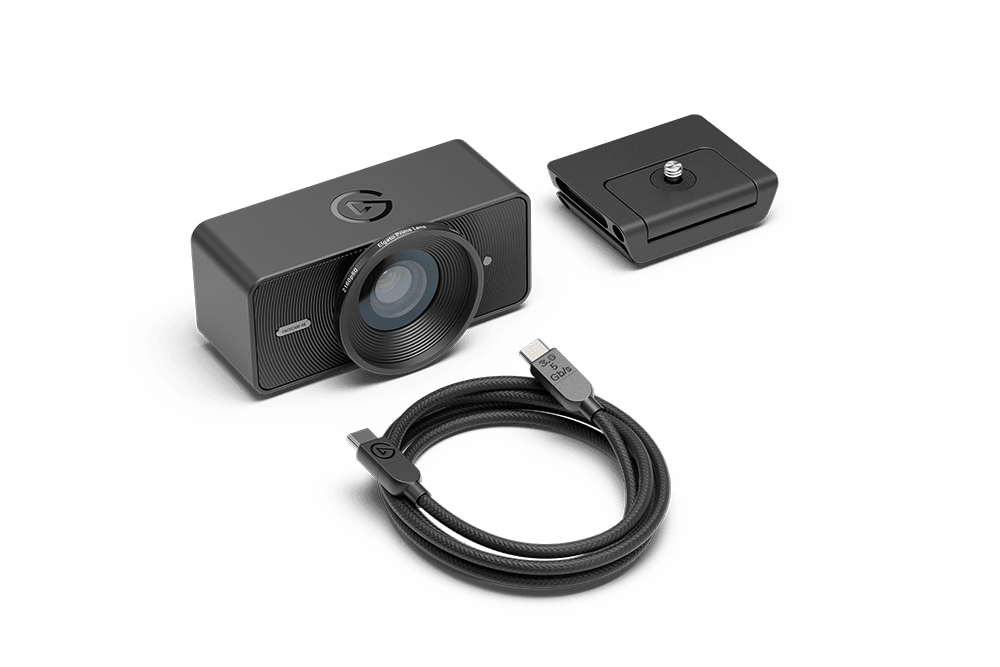
| In the box | Facecam 4K, monitor mount and 2 m detachable USB-C to USB-C USB 3.0 cable. |