


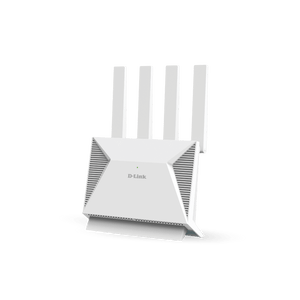
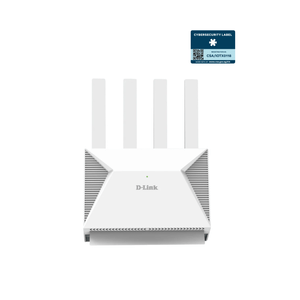
D-Link DIR-BE3602 BE3600 Wi-Fi 7 Mesh Router
A Faster Connection at the Heart of Your Home Give streaming, work and everyday connected devices a capable home network. The D-Link DIR-BE3602 combines dual-band BE3600 Wi-Fi 7 with multi-gigabit Ethernet, bringing a faster local connection to compatible wireless and wired equipment without making every device depend on a single Gigabit link. The current B1 hardware provides a 2.5GbE WAN port, a separate 2.5GbE LAN port and three Gigabit LAN ports. Use it as a router, extender or bridge, and add compatible D-Link mesh equipment when another part of the home needs coverage. A suitable Ethernet broadband service and modem or optical network terminal are required separately. Highlights Dual-Band Wi-Fi 7 BE3600 wireless class with published link rates up to 688 Mbps at 2.4 GHz and 2882 Mbps at 5 GHz. Multi-Link Operation, 4K-QAM and OFDMA support for compatible equipment. Four external antennas with beamforming to help direct the wireless connection. Multi-Gigabit Wired Connections One 2.5GbE WAN port and one 2.5GbE LAN port on the current B1 hardware. Three additional Gigabit LAN ports for computers, TVs and other wired devices. Router, extender and bridge operating modes for different network layouts. Control Your Home Network WPA3 support, guest networking and parental controls. D-Link Intelligent QoS and IPv4/IPv6 support. D-Link app and web configuration for setup and management. Key Features Move Beyond a Single Gigabit Bottleneck Connect a compatible multi-gigabit broadband handoff to the 2.5GbE WAN port, then use the separate 2.5GbE LAN port for a suitable computer, switch or other network device. The remaining three Gigabit LAN ports keep ordinary wired equipment connected. Actual end-to-end speed depends on the service, client interfaces, cabling and network load. Make Wi-Fi 7 Useful for Everyday Devices The router provides 2.4 GHz and 5 GHz wireless bands, with published link rates up to 688 Mbps and 2882 Mbps respectively. Wi-Fi 7 features include Multi-Link Operation and 4096-QAM for compatible clients. Older supported Wi-Fi devices can still connect, while the features available to each device depend on its own radio and software. The BE3600 class is not a promise of a 3.6 Gbps internet connection or a single-client transfer rate. Extend Coverage as Your Layout Changes Four external antennas and beamforming support the local wireless connection. D-Link Wi-Fi Mesh lets compatible mesh points work together across the home, making it practical to add coverage for another room or floor. The manufacturer specifically describes expansion with additional DIR-BE3602 points. Plan placement around walls, interference and backhaul quality; mesh compatibility and roaming also depend on the participating equipment. Keep Shared Access Easier to Manage Guest networking lets visitors use a separate guest connection, while parental controls help manage access for the household. WPA3-capable security modes, a stateful firewall, IP/MAC filtering and anti-spoofing checks add useful network controls. Select a wireless security mode supported by your devices; the manufacturer notes that WPS is not supported in the listed WPA3 modes. Choose a Mode That Fits the Existing Network Use router mode for the network gateway, or a supported extender or bridge mode when another device already provides routing. The WAN settings support Dynamic IP, Static IP and PPPoE, with VLAN tagging and priority options for services that require them. Match those settings to the broadband provider rather than assuming that every service uses the same configuration. Set Up and Maintain the Connection A web interface and the D-Link app provide setup and management. Intelligent QoS helps organise network traffic, while Target Wake Time supports power-saving behaviour with compatible clients. The router has a quad-core 1.1 GHz processor, 512 MB DDR3 memory and 128 MB NAND flash. Use firmware intended for the actual hardware version and review security settings when adding the router to an existing network. Summary The DIR-BE3602 is a practical dual-band Wi-Fi 7 router for a connected home that also needs useful wired capacity. Its current B1 hardware pairs 2.5GbE WAN and LAN with Gigabit ports, mesh expansion and household access controls. Match the broadband service, client capabilities and mesh layout to the installation to make the most of the available connection. Frequently Asked Questions Does BE3600 Mean a 3.6 Gbps Internet Connection?ExpandCollapse No. BE3600 is the combined wireless class. The published band link rates are up to 688 Mbps at 2.4 GHz and 2882 Mbps at 5 GHz. Internet throughput also depends on the subscription, WAN connection, client device and local conditions. These two band rates do not mean one ordinary client receives their sum. How Many 2.5GbE Ports Does It Have?ExpandCollapse The current B1 hardware has one 2.5GbE WAN port and one separate 2.5GbE LAN port, plus three Gigabit LAN ports. Older hardware information may list a different LAN arrangement. The specifications here follow the current B1 manufacturer datasheet. Can I Add Another Router for Mesh Coverage?ExpandCollapse Yes, supported D-Link Wi-Fi Mesh equipment can extend the network, and the manufacturer specifically describes adding DIR-BE3602 points. Confirm compatibility before combining models or hardware versions. Extra mesh units are sold separately; this sourced offer is a single router. Will My Existing Wi-Fi Devices Work?ExpandCollapse Devices using supported earlier Wi-Fi standards can connect. Wi-Fi 7 features such as Multi-Link Operation require compatible clients and software. This model uses 2.4 GHz and 5 GHz; it does not add a 6 GHz radio simply because it supports Wi-Fi 7. Does It Include a Mobile SIM Modem?ExpandCollapse No mobile SIM modem is specified. This is an Ethernet broadband router, using a suitable modem, optical network terminal or other Ethernet internet handoff. It supports common WAN connection types including Dynamic IP, Static IP and PPPoE. Does VPN Pass-Through Mean It Hosts Every VPN Service?ExpandCollapse No. The current B1 specification lists L2TP, PPTP and IPSec VPN pass-through. Pass-through allows suitable VPN traffic across the router and is different from proving a VPN server or client feature. Check the exact firmware and intended VPN service before planning a deployment around additional VPN functions.
Pickup available at 3005, Ubi Avenue 3, #01-88
Usually ready in 2-4 Business Day (Excluding Public Holiday)
D-Link DIR-BE3602 BE3600 Wi-Fi 7 Mesh Router
Description
A Faster Connection at the Heart of Your Home
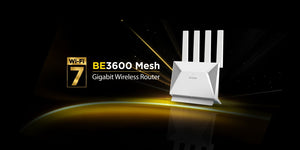
Give streaming, work and everyday connected devices a capable home network. The D-Link DIR-BE3602 combines dual-band BE3600 Wi-Fi 7 with multi-gigabit Ethernet, bringing a faster local connection to compatible wireless and wired equipment without making every device depend on a single Gigabit link.
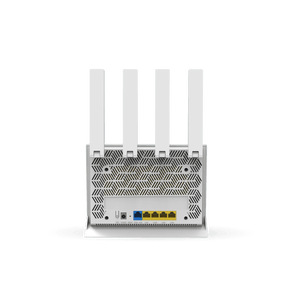
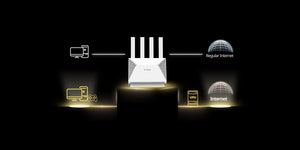
The current B1 hardware provides a 2.5GbE WAN port, a separate 2.5GbE LAN port and three Gigabit LAN ports. Use it as a router, extender or bridge, and add compatible D-Link mesh equipment when another part of the home needs coverage. A suitable Ethernet broadband service and modem or optical network terminal are required separately.
Highlights
Dual-Band Wi-Fi 7
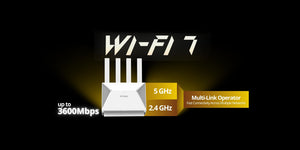
- BE3600 wireless class with published link rates up to 688 Mbps at 2.4 GHz and 2882 Mbps at 5 GHz.
- Multi-Link Operation, 4K-QAM and OFDMA support for compatible equipment.
- Four external antennas with beamforming to help direct the wireless connection.
Multi-Gigabit Wired Connections
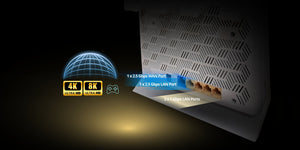
- One 2.5GbE WAN port and one 2.5GbE LAN port on the current B1 hardware.
- Three additional Gigabit LAN ports for computers, TVs and other wired devices.
- Router, extender and bridge operating modes for different network layouts.
Control Your Home Network
- WPA3 support, guest networking and parental controls.
- D-Link Intelligent QoS and IPv4/IPv6 support.
- D-Link app and web configuration for setup and management.
Key Features
Move Beyond a Single Gigabit Bottleneck
Connect a compatible multi-gigabit broadband handoff to the 2.5GbE WAN port, then use the separate 2.5GbE LAN port for a suitable computer, switch or other network device. The remaining three Gigabit LAN ports keep ordinary wired equipment connected. Actual end-to-end speed depends on the service, client interfaces, cabling and network load.
Make Wi-Fi 7 Useful for Everyday Devices
The router provides 2.4 GHz and 5 GHz wireless bands, with published link rates up to 688 Mbps and 2882 Mbps respectively. Wi-Fi 7 features include Multi-Link Operation and 4096-QAM for compatible clients. Older supported Wi-Fi devices can still connect, while the features available to each device depend on its own radio and software. The BE3600 class is not a promise of a 3.6 Gbps internet connection or a single-client transfer rate.
Extend Coverage as Your Layout Changes
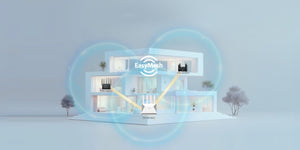
Four external antennas and beamforming support the local wireless connection. D-Link Wi-Fi Mesh lets compatible mesh points work together across the home, making it practical to add coverage for another room or floor. The manufacturer specifically describes expansion with additional DIR-BE3602 points. Plan placement around walls, interference and backhaul quality; mesh compatibility and roaming also depend on the participating equipment.
Keep Shared Access Easier to Manage
Guest networking lets visitors use a separate guest connection, while parental controls help manage access for the household. WPA3-capable security modes, a stateful firewall, IP/MAC filtering and anti-spoofing checks add useful network controls. Select a wireless security mode supported by your devices; the manufacturer notes that WPS is not supported in the listed WPA3 modes.
Choose a Mode That Fits the Existing Network
Use router mode for the network gateway, or a supported extender or bridge mode when another device already provides routing. The WAN settings support Dynamic IP, Static IP and PPPoE, with VLAN tagging and priority options for services that require them. Match those settings to the broadband provider rather than assuming that every service uses the same configuration.
Set Up and Maintain the Connection
A web interface and the D-Link app provide setup and management. Intelligent QoS helps organise network traffic, while Target Wake Time supports power-saving behaviour with compatible clients. The router has a quad-core 1.1 GHz processor, 512 MB DDR3 memory and 128 MB NAND flash. Use firmware intended for the actual hardware version and review security settings when adding the router to an existing network.
Summary
The DIR-BE3602 is a practical dual-band Wi-Fi 7 router for a connected home that also needs useful wired capacity. Its current B1 hardware pairs 2.5GbE WAN and LAN with Gigabit ports, mesh expansion and household access controls. Match the broadband service, client capabilities and mesh layout to the installation to make the most of the available connection.
Frequently Asked Questions
Does BE3600 Mean a 3.6 Gbps Internet Connection?
No. BE3600 is the combined wireless class. The published band link rates are up to 688 Mbps at 2.4 GHz and 2882 Mbps at 5 GHz. Internet throughput also depends on the subscription, WAN connection, client device and local conditions. These two band rates do not mean one ordinary client receives their sum.
How Many 2.5GbE Ports Does It Have?
The current B1 hardware has one 2.5GbE WAN port and one separate 2.5GbE LAN port, plus three Gigabit LAN ports. Older hardware information may list a different LAN arrangement. The specifications here follow the current B1 manufacturer datasheet.
Can I Add Another Router for Mesh Coverage?
Yes, supported D-Link Wi-Fi Mesh equipment can extend the network, and the manufacturer specifically describes adding DIR-BE3602 points. Confirm compatibility before combining models or hardware versions. Extra mesh units are sold separately; this sourced offer is a single router.
Will My Existing Wi-Fi Devices Work?
Devices using supported earlier Wi-Fi standards can connect. Wi-Fi 7 features such as Multi-Link Operation require compatible clients and software. This model uses 2.4 GHz and 5 GHz; it does not add a 6 GHz radio simply because it supports Wi-Fi 7.
Does It Include a Mobile SIM Modem?
No mobile SIM modem is specified. This is an Ethernet broadband router, using a suitable modem, optical network terminal or other Ethernet internet handoff. It supports common WAN connection types including Dynamic IP, Static IP and PPPoE.
Does VPN Pass-Through Mean It Hosts Every VPN Service?
No. The current B1 specification lists L2TP, PPTP and IPSec VPN pass-through. Pass-through allows suitable VPN traffic across the router and is different from proving a VPN server or client feature. Check the exact firmware and intended VPN service before planning a deployment around additional VPN functions.
Specs
D-Link DIR-BE3602 BE3600 Wi-Fi 7 Mesh Router
The D-Link DIR-BE3602 is a dual-band BE3600 Wi-Fi 7 mesh router for Ethernet broadband networks. These specifications follow the current B1 hardware, which provides separate 2.5GbE WAN and LAN ports alongside three Gigabit LAN ports. Its wireless rates are theoretical link maxima rather than guaranteed application throughput. Mesh performance depends on compatible equipment, placement and backhaul quality. The source offer is one router; additional mesh units and the broadband service are separate.
| Specification | Details |
|---|---|
| Wireless Network | |
| Wi-Fi Class and Bands | BE3600 Wi-Fi 7; dual-band 2.4 GHz and 5 GHz |
| Published Band Link Rates | 2.4 GHz up to 688 Mbps; 5 GHz up to 2882 Mbps |
| Radio Configuration | 2T2R on each band |
| Supported Standards | IEEE 802.11a/b/g/n/ac/ax/be as published; band support depends on the applicable standard |
| Wi-Fi Features | Multi-Link Operation, OFDMA, beamforming and Target Wake Time; compatible client support required |
| Modulation | OFDM with BPSK, QPSK and 16/64/256/1024/4096-QAM; DSSS with DBPSK, DQPSK and CCK |
| Channel-Width Modes | EHT20, EHT40, EHT80 and EHT160; up to 160 MHz on 5 GHz |
| Antennas | Four external antennas: 2 × 5 dBi for 2.4 GHz and 2 × 5 dBi for 5 GHz |
| Ethernet and Controls | |
| WAN Connection | 1 × RJ45 100 Mbps / 1GbE / 2.5GbE |
| LAN Connections | 1 × RJ45 100 Mbps / 1GbE / 2.5GbE; 3 × RJ45 100 Mbps / 1GbE |
| Controls | Reset button and Mesh button |
| Hardware Scope | Current B1 hardware; earlier hardware documentation may show a different LAN arrangement |
| Platform and Operation | |
| Processor | Quad-core 1.1 GHz |
| Memory and Flash | 512 MB DDR3; 128 MB NAND flash |
| Operating Modes | Router, extender and bridge |
| Mesh | D-Link Wi-Fi Mesh; additional compatible units required for expansion |
| WAN Connection Types | Dynamic IP, Static IP and PPPoE |
| VLAN and Network Protocols | IEEE 802.1p priority and 802.1Q VLAN tagging; IPv4 and IPv6 |
| QoS | D-Link Intelligent QoS Technology |
| Dynamic DNS | No-IP DDNS and Dyn DDNS |
| Management | D-Link app and web interface |
| VPN Pass-Through | L2TP, PPTP and IPSec; distinct from VPN-server/client capability |
| Security and Access | |
| Wireless Security | WPA/WPA2 Personal, WPA2 Personal, WPA2/WPA3 Personal, WPA3 Only and WPA2 Enterprise (IEEE 802.1X) as published |
| WPA3 and WPS | WPS is not supported in the listed WPA2/WPA3 Personal and WPA3 Only modes |
| Firewall | DoS protection, stateful packet inspection and anti-spoofing checking |
| Access Controls | IP/MAC address filtering, one DMZ, parental controls and guest zone |
| Power and Environment | |
| DC Power Input | 12 V / 1.5 A; adapter rating, not measured device consumption |
| Operating Temperature | 0–40°C |
| Storage Temperature | −20–70°C |
| Operating Humidity | 5–95% typical, as published |
| Warranty and Compliance | |
| Warranty | 3 years |
| Published Compliance | CE; UL safety regulation; RoHS |
| Performance Conditions | Published wireless link maxima depend on compatible clients, network traffic, building materials, interference and protocol overhead |