
Data Protection
Synology DS224+ vs DS124: One Bay, Two Bays and a Better Backup Plan
A practical look at two compact 2023 DiskStations: what the second bay changes, which workloads need more memory, and why both still need a recovery copy.

Choose by the job and recovery plan, then the bay count. The DS224+ adds a second drive bay, an Intel platform, expandable memory and a second Gigabit port. The DS124 is a simpler single-drive store. Neither turns one box into a complete backup strategy.
For an existing owner, the useful question may be whether to add a backup destination rather than replace a working NAS. For a new purchase, treat these as 2023 models and compare the current catalogue as well. Availability and a newer product’s capabilities need their own check.
The Hardware Differences That Change the Choice
| Planning point | DS224+ | DS124 |
|---|---|---|
| Drive bays | Two SATA bays | One SATA bay |
| Processor platform | Intel Celeron J4125, quad-core x64 | Realtek RTD1619B, quad-core ARM |
| Memory | 2 GB; official maximum 6 GB | 1 GB, fixed |
| Ethernet | Two Gigabit ports | One Gigabit port |
| Internal file-system options | Btrfs or ext4 | Btrfs or ext4 |
| Main protection distinction | Can mirror two suitable drives | No internal two-drive mirror |
A second bay changes how a drive failure can be handled. A second network socket changes the possible network arrangements. Neither doubles useful file capacity or single-file speed automatically. Keep those decisions separate when comparing a package price.
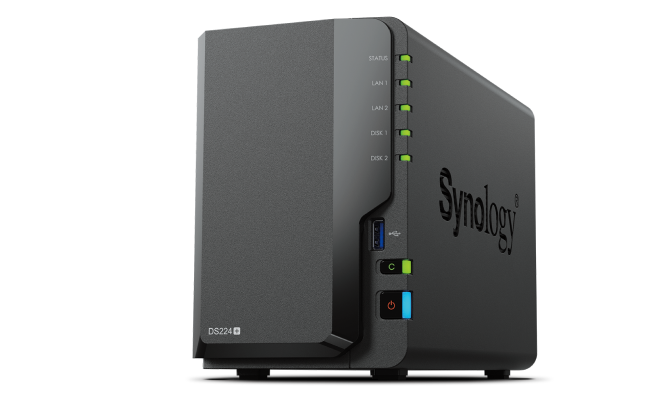
The two-bay x64 model offers more memory headroom and a wider supported application set. Check current listings separately.
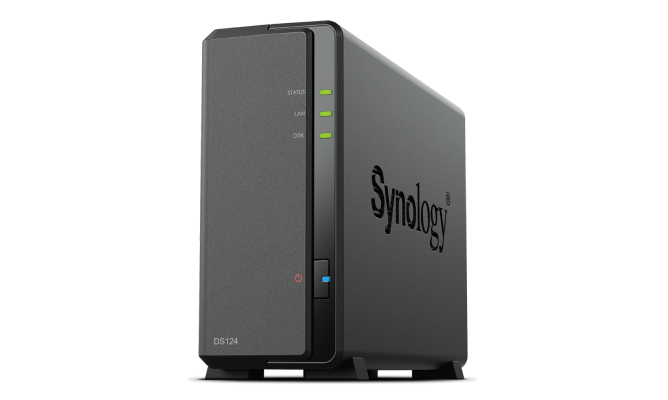
A compact single-drive model for supported file, photo and backup roles. Its one-bay design needs an external recovery route.
One Bay, Two Bays and the Copy Outside the Box
A single-drive NAS can be useful as a file store or a second destination, but failure of that one drive makes its data unavailable. An external USB backup or a copy to another system addresses a different risk from the NAS itself.
With two equal-capacity drives in a mirror, usable drive capacity is approximately that of one drive before system overhead. The benefit is tolerance of one drive failure within the supported healthy arrangement. Accidental deletion, ransomware and loss of the whole unit still require other protection.
Two Drives and Two Copies Are Different Decisions
A mirror can help service continuity; an independent recovery copy covers different failures.
01 Inside a two-bay NAS
One shared system remainsA suitable mirror can tolerate one drive failure. Deletion, theft and some system failures can still affect the whole NAS.
02 Outside the primary NAS
Check the second copyA separate USB disk, remote system or supported cloud target needs its own retention and recovery test.
A simple household plan might keep active files on the NAS, a versioned backup on a separate destination and an additional copy elsewhere. Decide who checks successful backups and how often a file is restored. The RAID calculator helps explain capacity; it cannot certify that a restore will work.
Match the Application to the Actual Platform
Both models support useful DSM workflows such as shared folders, Synology Drive and Synology Photos within their published capabilities. Their processors and memory are different, so the complete package list, indexing workload and backup features should not be treated as identical.
Choose the DS224+ platform when its supported business-backup applications, memory headroom or other x64 packages are part of the requirement. Do not infer the same virtual-machine, container or bare-metal backup support from a similar DSM screen on the DS124. Check the model’s current package listing before promising a workflow.
Start with the real activity: how many people open files together, whether a large photo import is running, and which backups overlap working hours. A quiet single-user share and a busy catalogue being indexed are different jobs even when they contain the same number of terabytes.
Why Two Gigabit Ports Do Not Mean a 2 Gb/s Copy
A single Gigabit path has a raw line rate of 1 Gb/s, equivalent to 125 MB/s before protocol overhead. Actual copies are lower and depend on storage, file sizes and the endpoints. A wireless laptop can introduce another limit before the NAS becomes busy.
Link aggregation and supported SMB Multichannel are different arrangements with their own switch, client and software requirements. A second cable alone does not make one ordinary transfer twice as fast. Use the slow NAS transfer guide to identify the busy stage before buying an adapter or replacing the enclosure.
Use Snapshots and Cameras Within Their Limits
Btrfs support is useful, but confirm the snapshot package and task support on the exact model and DSM version. A snapshot on the same storage pool is not an independent copy if the pool or enclosure is lost. Keep the required backup outside that failure boundary.
Surveillance Station support also has model-specific recording limits, stream assumptions and camera licensing. “Supports thousands of camera models” describes a compatibility catalogue, not the number of cameras that one small DiskStation can record. Calculate the actual bitrate and retention rather than choosing by the size of the compatibility list.
Keep a Useful System or Buy for the Missing Requirement
If an existing unit handles its workload and remains supported for the intended use, a better backup can be more valuable than a new enclosure. If you need a two-drive mirror, more application memory or faster networking, identify that missing requirement explicitly.
For a current purchase, compare the currently listed DS225+ and other Synology models separately. Do not assume a newer model keeps every connection or application behaviour of the older one. The NAS buying guide provides a broader workload comparison.
Frequently Asked Questions
Can DS124 use RAID 1?
No. It has one internal drive bay. A two-drive mirror requires an appropriate multi-bay system; an external backup is a separate protection method.
Does DS224+ double usable capacity with two mirrored drives?
No. Two equal-capacity mirrored drives provide approximately one drive’s capacity before overhead. The second drive supplies redundancy.
Do both models support Btrfs?
Yes, their published specifications include Btrfs. Check the exact snapshot and package features for the model and DSM version.
Can I add memory to DS124?
Its published 1 GB memory is fixed. DS224+ has an official maximum of 6 GB using the supported expansion arrangement.
Will two LAN cables double every file copy?
No. The selected aggregation or SMB Multichannel design and the endpoints must support the intended behaviour.
Should an existing owner replace the NAS immediately?
Start with the missing requirement, support status and recovery plan. A working file store may need a better second copy rather than an immediate enclosure replacement.


