


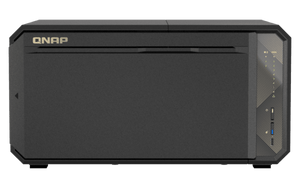

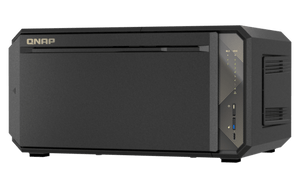


QNAP TS-867X 8-Bay Dual 10GbE Tower NAS
Build a Stronger Home for Growing Team Data The TS-867X brings dual 10GbE networking to a compact business-storage platform built for shared projects, backup and everyday collaboration. Its AMD Ryzen Embedded V1500B processor gives teams four cores and eight threads, while SATA drive bays and dedicated M.2 slots let you plan bulk storage and SSD acceleration separately. It suits studios and smaller organisations moving beyond a single-workstation storage routine. Choose the drives, protection level and network path around the way your team works. Fast network ports help only when the switching, client connections and storage layout can support them. This diskless NAS gives you that flexibility without requiring a separate network expansion card for its built-in 10GbE connections. Highlights AMD Ryzen Embedded V1500B quad-core eight-thread processing Two built-in 10GBASE-T network ports SATA storage plus two dedicated M.2 NVMe slots Memory expansion to 64GB with optional ECC support QTS supplied with a qualified upgrade path to QuTS hero PCIe expansion and USB-A/USB-C connections at up to 10Gbps Key Features A Faster Route to Shared Files Two built-in 10GBASE-T ports serve high-bandwidth file access, large backups and multi-user work. Supported port trunking and suitable switch configurations can share traffic across links, while one client’s actual transfer rate still depends on its network path, the workload and the installed storage. Use the NAS alongside appropriate cabling, switching and workstation adapters. Separate Bulk Storage from SSD Acceleration SATA bays support compatible hard drives and SATA SSDs, with two dedicated M.2 2280 PCIe Gen3 x2 slots for NVMe SSDs. Supported SSD caching can improve random-access workloads; QTS also supports Qtier auto-tiering. These functions have different drive, memory and software requirements. Select suitable heatsinks for M.2 SSDs and shut down before working on non-hot-swappable M.2 or PCIe devices. Start with QTS and Plan Any ZFS Upgrade QTS is supplied as the default operating system. The platform also supports QuTS hero for a ZFS-based deployment, with at least 8GB RAM required. The standard 4GB configuration therefore needs a memory upgrade before using QuTS hero. Inline deduplication requires at least 16GB RAM. Back up important data and plan initialisation before switching operating systems; application availability and storage features differ between them. Make Protection Part of the Workflow Hybrid Backup Sync supports planned backup and synchronisation to supported NAS, external and cloud destinations. Qsync provides supported file synchronisation between devices. Combine these tools with appropriate snapshots, permissions and independent backup copies. RAID and snapshots help with particular failures or mistakes, while a tested separate backup remains essential for ransomware, device loss and wider incidents. Plan Cameras with the Right Entitlement On a supported configuration, QVR Surveillance provides two base camera channels, with six additional channels claimable after registration for a total of eight. QVR Pro separately provides eight built-in channels on compatible QTS installations. Choose the application, camera settings, storage retention and RAM together. Maximum recording capacity depends on the model, operating system, camera bitrate and licence support; plan the system before going beyond the free entitlement. Keep Expansion Deliberate One PCIe Gen3 x4 slot accepts compatible expansion cards, while the built-in USB connections run at up to 10Gbps. USB4 expansion requires the optional QXP-40G2UC card; it is not a built-in USB4 port. Check card dimensions, software support and connected expansion-unit compatibility before allocating the single slot. Memory can expand to 64GB, and ECC requires replacing the supplied non-ECC memory with a supported matched configuration. Summary TS-867X is a considered choice for a team that wants faster shared storage, adaptable drive layouts and a clear backup strategy. Begin with the supplied QTS configuration, then plan memory, SSD acceleration and expansion around the workload. Storage drives are sold separately. Match the NAS, network and protection plan so the finished system is comfortable to manage as your data and applications grow. Frequently Asked Questions Are Hard Drives or M.2 SSDs Included?ExpandCollapse No. This is a diskless NAS. Choose compatible SATA drives and any required M.2 2280 NVMe SSDs separately. The M.2 slots use PCIe Gen3 x2; appropriate SSD heatsinks are recommended. Is ECC Memory Installed as Standard?ExpandCollapse No. The listed configuration includes 4GB of non-ECC DDR4 memory. ECC is supported as an upgrade. Remove the supplied non-ECC module before installing a compatible ECC configuration, and do not mix ECC with non-ECC modules. The two SODIMM slots support up to 64GB. Can I Use QuTS hero with the Standard Memory?ExpandCollapse The standard 4GB configuration uses QTS. QuTS hero requires at least 8GB RAM, and inline deduplication requires at least 16GB. Upgrade memory and confirm application support before changing the operating system. Back up your data before initialising a different storage environment. How Many Camera Channels Are Included?ExpandCollapse QVR Surveillance includes two base channels, with six more claimable after registration on a supported configuration, for eight in total. QVR Pro separately lists eight built-in channels on compatible QTS systems. These are separate application entitlements. Camera resolution, bitrate, operating system, RAM, storage and licence support determine a suitable recording design; the free-channel count is not a fixed maximum. Does It Have Built-in USB4?ExpandCollapse No. Its built-in USB-A and USB-C ports are USB 3.2 Gen2 at up to 10Gbps. Connecting supported USB4 expansion hardware requires the optional QXP-40G2UC PCIe card and a compatible expansion unit. Does RAID Replace a Backup?ExpandCollapse No. An appropriate RAID layout can tolerate certain drive failures. It does not replace an independent backup for accidental deletion, ransomware, theft or a wider system failure. Use separate backup copies and test that important files can be restored.
附加组件 (2)
可在 3005, Ubi Avenue 3, #01-88 提货
通常在 2 至 4 个工作日内备妥(公共假期除外)
QNAP TS-867X 8-Bay Dual 10GbE Tower NAS
描述
Build a Stronger Home for Growing Team Data
The TS-867X brings dual 10GbE networking to a compact business-storage platform built for shared projects, backup and everyday collaboration. Its AMD Ryzen Embedded V1500B processor gives teams four cores and eight threads, while SATA drive bays and dedicated M.2 slots let you plan bulk storage and SSD acceleration separately. It suits studios and smaller organisations moving beyond a single-workstation storage routine.
Choose the drives, protection level and network path around the way your team works. Fast network ports help only when the switching, client connections and storage layout can support them. This diskless NAS gives you that flexibility without requiring a separate network expansion card for its built-in 10GbE connections.
Highlights
- AMD Ryzen Embedded V1500B quad-core eight-thread processing
- Two built-in 10GBASE-T network ports
- SATA storage plus two dedicated M.2 NVMe slots
- Memory expansion to 64GB with optional ECC support
- QTS supplied with a qualified upgrade path to QuTS hero
- PCIe expansion and USB-A/USB-C connections at up to 10Gbps
Key Features
A Faster Route to Shared Files
Two built-in 10GBASE-T ports serve high-bandwidth file access, large backups and multi-user work. Supported port trunking and suitable switch configurations can share traffic across links, while one client’s actual transfer rate still depends on its network path, the workload and the installed storage. Use the NAS alongside appropriate cabling, switching and workstation adapters.
Separate Bulk Storage from SSD Acceleration
SATA bays support compatible hard drives and SATA SSDs, with two dedicated M.2 2280 PCIe Gen3 x2 slots for NVMe SSDs. Supported SSD caching can improve random-access workloads; QTS also supports Qtier auto-tiering. These functions have different drive, memory and software requirements. Select suitable heatsinks for M.2 SSDs and shut down before working on non-hot-swappable M.2 or PCIe devices.
Start with QTS and Plan Any ZFS Upgrade
QTS is supplied as the default operating system. The platform also supports QuTS hero for a ZFS-based deployment, with at least 8GB RAM required. The standard 4GB configuration therefore needs a memory upgrade before using QuTS hero. Inline deduplication requires at least 16GB RAM. Back up important data and plan initialisation before switching operating systems; application availability and storage features differ between them.
Make Protection Part of the Workflow
Hybrid Backup Sync supports planned backup and synchronisation to supported NAS, external and cloud destinations. Qsync provides supported file synchronisation between devices. Combine these tools with appropriate snapshots, permissions and independent backup copies. RAID and snapshots help with particular failures or mistakes, while a tested separate backup remains essential for ransomware, device loss and wider incidents.
Plan Cameras with the Right Entitlement
On a supported configuration, QVR Surveillance provides two base camera channels, with six additional channels claimable after registration for a total of eight. QVR Pro separately provides eight built-in channels on compatible QTS installations. Choose the application, camera settings, storage retention and RAM together. Maximum recording capacity depends on the model, operating system, camera bitrate and licence support; plan the system before going beyond the free entitlement.
Keep Expansion Deliberate
One PCIe Gen3 x4 slot accepts compatible expansion cards, while the built-in USB connections run at up to 10Gbps. USB4 expansion requires the optional QXP-40G2UC card; it is not a built-in USB4 port. Check card dimensions, software support and connected expansion-unit compatibility before allocating the single slot. Memory can expand to 64GB, and ECC requires replacing the supplied non-ECC memory with a supported matched configuration.
Summary
TS-867X is a considered choice for a team that wants faster shared storage, adaptable drive layouts and a clear backup strategy. Begin with the supplied QTS configuration, then plan memory, SSD acceleration and expansion around the workload. Storage drives are sold separately. Match the NAS, network and protection plan so the finished system is comfortable to manage as your data and applications grow.
Frequently Asked Questions
Are Hard Drives or M.2 SSDs Included?
No. This is a diskless NAS. Choose compatible SATA drives and any required M.2 2280 NVMe SSDs separately. The M.2 slots use PCIe Gen3 x2; appropriate SSD heatsinks are recommended.
Is ECC Memory Installed as Standard?
No. The listed configuration includes 4GB of non-ECC DDR4 memory. ECC is supported as an upgrade. Remove the supplied non-ECC module before installing a compatible ECC configuration, and do not mix ECC with non-ECC modules. The two SODIMM slots support up to 64GB.
Can I Use QuTS hero with the Standard Memory?
The standard 4GB configuration uses QTS. QuTS hero requires at least 8GB RAM, and inline deduplication requires at least 16GB. Upgrade memory and confirm application support before changing the operating system. Back up your data before initialising a different storage environment.
How Many Camera Channels Are Included?
QVR Surveillance includes two base channels, with six more claimable after registration on a supported configuration, for eight in total. QVR Pro separately lists eight built-in channels on compatible QTS systems. These are separate application entitlements. Camera resolution, bitrate, operating system, RAM, storage and licence support determine a suitable recording design; the free-channel count is not a fixed maximum.
Does It Have Built-in USB4?
No. Its built-in USB-A and USB-C ports are USB 3.2 Gen2 at up to 10Gbps. Connecting supported USB4 expansion hardware requires the optional QXP-40G2UC PCIe card and a compatible expansion unit.
Does RAID Replace a Backup?
No. An appropriate RAID layout can tolerate certain drive failures. It does not replace an independent backup for accidental deletion, ransomware, theft or a wider system failure. Use separate backup copies and test that important files can be restored.
规格
QNAP TS-867X 8 盘位双 10GbE 塔式 NAS
QNAP TS-867X 是一款8 盘位塔式 NAS,适用于共享工作空间、企业备份和 IP 监控。Ryzen 处理器、双 10GbE 端口及专用 NVMe 插槽,将高速文件访问与 SATA 存储及 SSD 加速相结合。PCIe 扩展和兼容的外接扩展机箱,可随存储需求增长提供扩展路径,QTS 则负责日常存储管理。将随附内存升级至满足要求后,也可选择基于 ZFS 的 QuTS hero。
| 规格 | 详细信息 |
|---|---|
| 处理器与内存 | |
| 处理器 | AMD Ryzen Embedded V1500B;4 核心 / 8 线程;2.2GHz |
| 架构与加密 | 64-bit x86;AES-NI 硬件加密引擎 |
| 已安装内存 | 4GB non-ECC DDR4 |
| 内存插槽与最大容量 | 2 × DDR4 SODIMM 插槽;使用 2 × 32GB 受支持的匹配内存模块,最高可达 64GB |
| ECC 升级 | 支持;须更换随附的 non-ECC 内存。请勿混用 ECC 与 non-ECC 模块。 |
| 系统闪存 | 8GB,具备双启动操作系统保护 |
| 硬盘存储与 RAID | |
| SATA 硬盘位 | 8 × SATA 6Gb/s 硬盘位 |
| 兼容的 SATA 硬盘 | 3.5-inch SATA HDD;2.5-inch SATA HDD;2.5-inch SATA SSD |
| M.2 插槽 | 2 × M.2 2280 NVMe PCIe Gen3 x2 插槽;SSD 及建议使用的散热片另售 |
| 热插拔 | 受支持的 SATA 硬盘位支持热插拔;M.2 SSD、SSD 缓存硬盘及 PCIe 扩展 SSD 不支持热插拔 |
| QTS SATA RAID 模式 | 单盘;JBOD;RAID 0、1、5、6 和 10;RAID 50 和 60;须满足硬盘数量要求 |
| 双 M.2 硬盘配置 | 支持单盘、RAID 0 及 RAID 1 配置;可用的卷及缓存模式取决于操作系统和 SSD 用途 |
| 存储加速 | 支持 SSD 缓存;QTS 可使用 Qtier 自动分层。须满足内存及硬盘要求。 |
| 网络与扩展 | |
| 内置网络接口 | 2 × 10GBASE-T 端口 |
| 网络功能 | 支持端口聚合、VLAN、巨型帧及 Wake-on-LAN;须采用适用的网络配置 |
| PCIe 扩展 | 1 × PCIe Gen3 x4 插槽,适用于兼容的可选扩展卡 |
| 内置 USB | 2 × USB 3.2 Gen2 Type-A;1 × USB 3.2 Gen2 Type-C;最高 10Gbps |
| 兼容的 USB4 扩展 | 最多支持 2 × TL-D810TC4 八盘位 JBOD 扩展机箱;须在 NAS 的 PCIe 插槽中安装可选的 QXP-40G2UC 扩展卡。内置 USB-C 端口不支持此 USB4 连接。 |
| USB4 线缆与设置 | 每台 TL-D810TC4 随附 USB4 Type-C 线缆;须直接连接,不可经由集线器。需要受支持的 NAS 固件及 BIOS。扩展机箱、扩展卡及硬盘均与 NAS 分开销售。 |
| 兼容的 USB RAID 扩展 | 最多支持 2 × TR-004 四盘位 RAID 扩展机箱,使用机箱随附的 USB-C 转 USB-A 线缆连接至内置 USB Type-A 端口;接口为 5Gbps,无需 PCIe 扩展卡。 |
| 扩展存储布局 | TR-004 提供独立的存储池或卷,并非扩展 NAS 内部存储池。TL-D810TC4 在受支持的 QTS 或 QuTS hero 配置下支持独立存储池。 |
| 操作系统与数据保护 | |
| 标准操作系统 | QTS,内部存储使用 EXT4 |
| QuTS hero 选项 | 将 RAM 升级至至少 8GB 后,可支持基于 ZFS 的 QuTS hero;在线重复数据删除至少需要 16GB |
| 快照 | QTS 卷/LUN 快照,以及受支持的 QuTS hero 共享文件夹/LUN 快照;限制取决于OS、RAM 及配置 |
| 备份与同步 | Hybrid Backup Sync、受支持的外接/云端/NAS 目标、Qsync,以及受支持的 Time Machine 备份 |
| 文件访问 | 为受支持的 Windows、macOS 及 Linux/UNIX 客户端提供 SMB/CIFS 和 NFS 网络服务 |
| 公布的 QTS 访问上限 | 最多 4,096 个本地用户、512 个本地群组及 512 个共享文件夹;实际容量取决于资源与工作负载 |
| CIFS 并发连接 | 使用最大受支持内存时,最多 1,200 个;不保证标准 RAM 配置可达到此数量 |
| iSCSI | 厚置备/精简置备 LUN、受支持的基于文件/块的 LUN、MPIO,以及 LUN 快照/复制功能;须遵守OS及资源限制 |
| 安全与权限 | 支持 ACL、用户/群组配额、两步验证、防火墙及加密连接 |
| 监控 | |
| QVR Surveillance 免费通道权益 | 2 个基础通道;在受支持的配置上注册后,可申领 6 个额外免费通道,合计 8 个 |
| QVR Pro 通道权益 | 兼容的 QTS 安装环境内置 8 个通道;与 QVR Surveillance 分开计算 |
| 应用程序要求 | QVR Surveillance 至少需要 1GB RAM;QVR Pro 至少需要 4GB。须满足操作系统及应用程序兼容性要求。 |
| QVR Surveillance 录像估算 | QNAP 的 QTS 规划示例中,最多为 55 个摄像机通道;这是估算值,并非该型号固定或经认证的最大值。 |
| 摄像机规划条件 | 每台摄像机采用 1080p H.264、30fps 及 4.096Mbps;标准 4GB RAM;所有存储盘位均安装硬盘并配置 RAID 6;仅录像,不运行 AI 分析或本地播放。实际容量随工作负载及配置而变。 |
| 通道扩展要求 | 超过八通道免费权益时,需要额外的摄像机许可证。请确认所选 OS、应用程序、许可证及资源要求。QTS 规划数字并不能确定 QuTS hero 的录像容量或许可证是否可用。 |
| 电源与环境 | |
| 电源供应 | 150W 内置电源;100–240V AC |
| 典型功耗 | 运行时 48W;硬盘待机时 24W。以上为制造商数据;配置及工作负载会影响功耗。 |
| 散热 | 2 × 92mm 风扇 |
| 运行温度 | 0–40°C |
| 存储温度 | −20–70°C |
| 湿度 | 5–95% RH,无凝露;湿球温度 27°C |
| 物理设计与包装 | |
| 机型 | 塔式 |
| 尺寸 H × W × D | 171 × 332 × 232mm |
| 重量 | 设备净重 3.92kg;制造商标示毛重 5.32kg |
| 控制与指示灯 | 电源、重置及 USB Auto Copy 按钮;电源/状态、USB、LAN、SATA 硬盘及 M.2 指示灯;蜂鸣器 |
| 包装内含 | 无盘 NAS;一条 10GBASE-T 以太网线;电源线;快速安装指南 |
| 保修 | 3 年 |
附加组件


