



Elgato Stream Deck Neo LCD Shortcut Controller
Keep everyday shortcuts within reach Elgato Stream Deck Neo gives eight LCD keys to tasks you use repeatedly, such as switching an OBS scene, opening a project folder or running a meeting shortcut. The separate information strip leaves those keys available for actions while the touch points help move between pages. Highlights LCD shortcuts Eight individually customisable LCD shortcut keys Page navigation Two touch points for moving between action pages Status and connection Customisable Infobar for at-a-glance information USB-C connectivity with the Stream Deck desktop app Key Features Keep everyday shortcuts visible The eight LCD keys show the icons you choose for the actions you assign. They suit a set of controls you use several times a day, such as opening a workspace, switching a microphone input in a supported app or running a shortcut. Build the first screen around the tasks you would normally search for. Move between pages without spending a key The two touch points switch between action pages, leaving the physical LCD keys to run your shortcuts. That means you can reserve one page for calls and another for editing or streaming. Put the actions you rely on in consistent positions so switching pages does not slow you down. Check useful context on the Infobar Use the separate Infobar to show supported status or page context. It helps when a compact controller serves different tasks and a glance is enough to tell you which layout you are using. Set a simple label so you recognise the page quickly, even when you change workspaces several times a day. Start with the Stream Deck app Connect the controller by USB and set up profiles, icons and supported actions on the host. The available integrations depend on your desktop app and enabled plugins. Start with a small number of commands, try them in context and add more only where they replace a repetitive step. Summary Stream Deck Neo suits a compact desk that needs more than a few keyboard shortcuts. Its page controls give the eight LCD keys room to serve several tasks, while the Infobar gives the active layout some context. Use it for calls, everyday workstation actions or an introductory streaming setup on a compatible desktop computer. Frequently Asked Questions Can I change what each key does?ExpandCollapse Yes. Assign supported actions, icons, folders and profiles in the Stream Deck app. What do the two touch points do?ExpandCollapse They provide quick page navigation without using one of the eight LCD keys. Will it work with OBS Studio?ExpandCollapse Yes. Use the supported Stream Deck integration and configure your scene or source actions in the app. Does it connect wirelessly?ExpandCollapse It connects to your computer by USB-C. Which desktop systems does Elgato list?ExpandCollapse Elgato lists Windows 11 or later and macOS 13 or later for this model.
可在 3005, Ubi Avenue 3, #01-88 提货
通常在 2 至 4 个工作日内备妥(公共假期除外)
Elgato Stream Deck Neo LCD Shortcut Controller
描述
Keep everyday shortcuts within reach
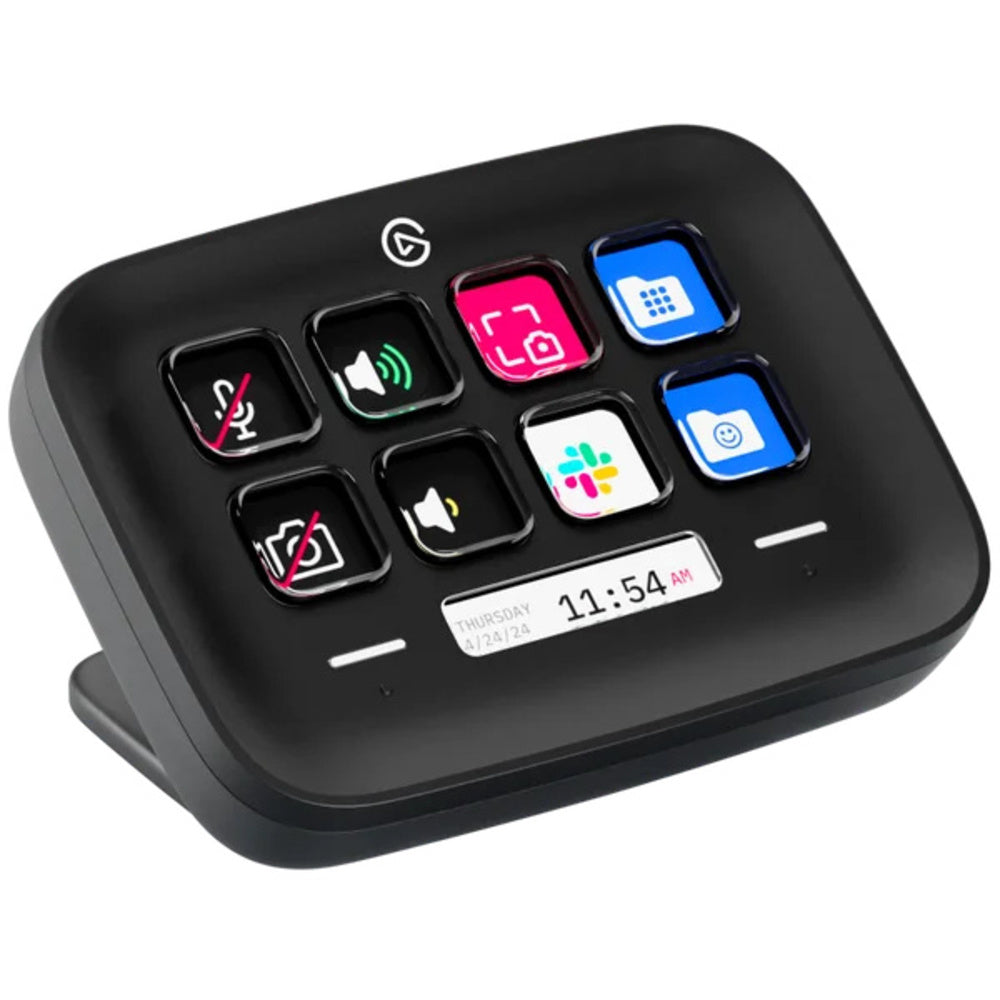
Elgato Stream Deck Neo gives eight LCD keys to tasks you use repeatedly, such as switching an OBS scene, opening a project folder or running a meeting shortcut. The separate information strip leaves those keys available for actions while the touch points help move between pages.
Highlights
LCD shortcuts
- Eight individually customisable LCD shortcut keys
Page navigation
- Two touch points for moving between action pages
Status and connection
- Customisable Infobar for at-a-glance information
- USB-C connectivity with the Stream Deck desktop app
Key Features
Keep everyday shortcuts visible
The eight LCD keys show the icons you choose for the actions you assign. They suit a set of controls you use several times a day, such as opening a workspace, switching a microphone input in a supported app or running a shortcut. Build the first screen around the tasks you would normally search for.
Move between pages without spending a key
The two touch points switch between action pages, leaving the physical LCD keys to run your shortcuts. That means you can reserve one page for calls and another for editing or streaming. Put the actions you rely on in consistent positions so switching pages does not slow you down.
Check useful context on the Infobar
Use the separate Infobar to show supported status or page context. It helps when a compact controller serves different tasks and a glance is enough to tell you which layout you are using. Set a simple label so you recognise the page quickly, even when you change workspaces several times a day.
Start with the Stream Deck app
Connect the controller by USB and set up profiles, icons and supported actions on the host. The available integrations depend on your desktop app and enabled plugins. Start with a small number of commands, try them in context and add more only where they replace a repetitive step.
Summary
Stream Deck Neo suits a compact desk that needs more than a few keyboard shortcuts. Its page controls give the eight LCD keys room to serve several tasks, while the Infobar gives the active layout some context. Use it for calls, everyday workstation actions or an introductory streaming setup on a compatible desktop computer.
Frequently Asked Questions
Can I change what each key does?
Yes. Assign supported actions, icons, folders and profiles in the Stream Deck app.
What do the two touch points do?
They provide quick page navigation without using one of the eight LCD keys.
Will it work with OBS Studio?
Yes. Use the supported Stream Deck integration and configure your scene or source actions in the app.
Does it connect wirelessly?
It connects to your computer by USB-C.
Which desktop systems does Elgato list?
Elgato lists Windows 11 or later and macOS 13 or later for this model.
规格
Elgato Stream Deck Neo LCD Shortcut Controller
Stream Deck Neo pairs eight programmable LCD keys with two separate page-navigation touch points and a status strip. The Stream Deck app manages actions, profiles and compatible integrations. The controller uses a USB connection to the host, with configuration and available actions dependent on the software and operating system in use.
| Specification | Details |
|---|---|
| Controls | |
| Keys | 8 customisable LCD keys |
| Page navigation | Two touch points switch between pages. |
| Infobar | Separate status display, independent of the eight LCD keys. |
| Connection and Software | |
| Host interface | USB-C with USB 2.0 data |
| USB cable | Fixed 0.9 m braided cable |
| Supported desktop systems | Windows 11 or later, macOS 13 or later |
| Configuration | Elgato Stream Deck app |
| Physical | |
| Dimensions | 107 × 26 × 78 mm (W × D × H) |
| Device weight | 210 g |
| Desktop stand | Integrated stand with three viewing positions |
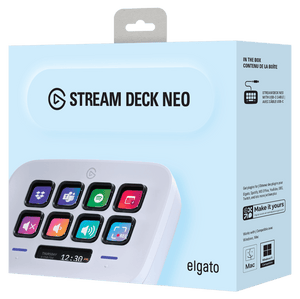
| In the box | Stream Deck Neo with fixed USB-C cable and quick-start guide |