Elgato Stream Deck Module Embeddable LCD Keypad
Build Stream Deck controls into the panel you already use Elgato Stream Deck Module puts programmable LCD keys into a bare, unbranded assembly for custom hardware. Mount it in a control panel, production cart or project enclosure and connect it to a compatible USB host. Choose a key layout to suit the space, workflow and number of functions you need at a glance. Highlights Custom installations Bare LCD keypad intended for integration into custom hardware Key layouts 6-, 15- and 32-key layouts ordered by key count Software and connection USB-C connection and support for Stream Deck software Custom labels, profiles and workflow actions Key Features Build controls into the panel you already use Stream Deck Module is intended for desks, simulators and operator stations that need their controls mounted into a custom enclosure. The unclad keypad fits into a panel opening while the integration stays under your control. Confirm the internal depth and cable exit before cutting the panel or fabricating a bracket. Choose the layout by the available space A smaller key grid suits a few frequent actions, and the larger layouts keep more commands directly visible. Look at the footprint for the selected variant and leave room around the keys for access to the panel. A small module can also serve as a dedicated control point for one function. Put meaningful labels on physical actions Give each LCD key its own icon or label through the Stream Deck app. For shared equipment, plain labels and consistent profile order make controls easier to learn. Use folders or profiles for infrequent actions and keep commands needed during a production or simulation in predictable positions. Route USB into the installation The module connects to a supported host through USB-C. A straight workbench connection is useful to set up the control profile first, then refit the module in the panel after testing. Check the selected pack contents and provide the correct data cable and mounting parts for your design. Check software before producing a panel Use a supported version of the Stream Deck app and check the intended integrations before finalising the hardware. Test the most important commands with the computer you plan to use, along with any plugin they depend on. That lets the panel layout reflect the workflow you can actually run. Summary Stream Deck Module is a good choice when the controls should look and work as part of a workstation, flight simulator or production panel. Choose the footprint to suit the enclosure and plan the USB path before building the mount. A finished desktop Stream Deck makes more sense when you simply want a controller that can be moved around a desk. Frequently Asked Questions Is Stream Deck Module ready to put on a desk?ExpandCollapse It is a bare unit for mounting in your own panel or enclosure. For a finished desktop controller, choose a Stream Deck with its own enclosure or stand. How do I choose the key count?ExpandCollapse Start with the mounting area and the number of controls the operator needs visible at once. Use the dimensions in Specs and the manufacturer's mechanical references to plan your panel. Can the keys run multiple actions?ExpandCollapse Stream Deck software supports profiles, folders and multi-action workflows. Check the particular actions and plugins you need in your application. Which cable is required?ExpandCollapse These versions use USB-C for USB 2.0 data. Elgato lists a cable with the 6-key option. Plan a suitable cable separately for the other two options. Can I place a Module away from its host over Ethernet?ExpandCollapse Elgato offers the compatible Network Dock separately. Check the dock, software and network requirements before installing it.
附加组件 (1)
可在 3005, Ubi Avenue 3, #01-88 提货
通常在 2 至 4 个工作日内备妥(公共假期除外)
Elgato Stream Deck Module Embeddable LCD Keypad
描述
Build Stream Deck controls into the panel you already use
Elgato Stream Deck Module puts programmable LCD keys into a bare, unbranded assembly for custom hardware. Mount it in a control panel, production cart or project enclosure and connect it to a compatible USB host. Choose a key layout to suit the space, workflow and number of functions you need at a glance.
Highlights
Custom installations
- Bare LCD keypad intended for integration into custom hardware
Key layouts
- 6-, 15- and 32-key layouts ordered by key count
Software and connection
- USB-C connection and support for Stream Deck software
- Custom labels, profiles and workflow actions
Key Features
Build controls into the panel you already use
Stream Deck Module is intended for desks, simulators and operator stations that need their controls mounted into a custom enclosure. The unclad keypad fits into a panel opening while the integration stays under your control. Confirm the internal depth and cable exit before cutting the panel or fabricating a bracket.
Choose the layout by the available space
A smaller key grid suits a few frequent actions, and the larger layouts keep more commands directly visible. Look at the footprint for the selected variant and leave room around the keys for access to the panel. A small module can also serve as a dedicated control point for one function.
Put meaningful labels on physical actions
Give each LCD key its own icon or label through the Stream Deck app. For shared equipment, plain labels and consistent profile order make controls easier to learn. Use folders or profiles for infrequent actions and keep commands needed during a production or simulation in predictable positions.
Route USB into the installation
The module connects to a supported host through USB-C. A straight workbench connection is useful to set up the control profile first, then refit the module in the panel after testing. Check the selected pack contents and provide the correct data cable and mounting parts for your design.
Check software before producing a panel
Use a supported version of the Stream Deck app and check the intended integrations before finalising the hardware. Test the most important commands with the computer you plan to use, along with any plugin they depend on. That lets the panel layout reflect the workflow you can actually run.
Summary
Stream Deck Module is a good choice when the controls should look and work as part of a workstation, flight simulator or production panel. Choose the footprint to suit the enclosure and plan the USB path before building the mount. A finished desktop Stream Deck makes more sense when you simply want a controller that can be moved around a desk.
Frequently Asked Questions
Is Stream Deck Module ready to put on a desk?
It is a bare unit for mounting in your own panel or enclosure. For a finished desktop controller, choose a Stream Deck with its own enclosure or stand.
How do I choose the key count?
Start with the mounting area and the number of controls the operator needs visible at once. Use the dimensions in Specs and the manufacturer's mechanical references to plan your panel.
Can the keys run multiple actions?
Stream Deck software supports profiles, folders and multi-action workflows. Check the particular actions and plugins you need in your application.
Which cable is required?
These versions use USB-C for USB 2.0 data. Elgato lists a cable with the 6-key option. Plan a suitable cable separately for the other two options.
Can I place a Module away from its host over Ethernet?
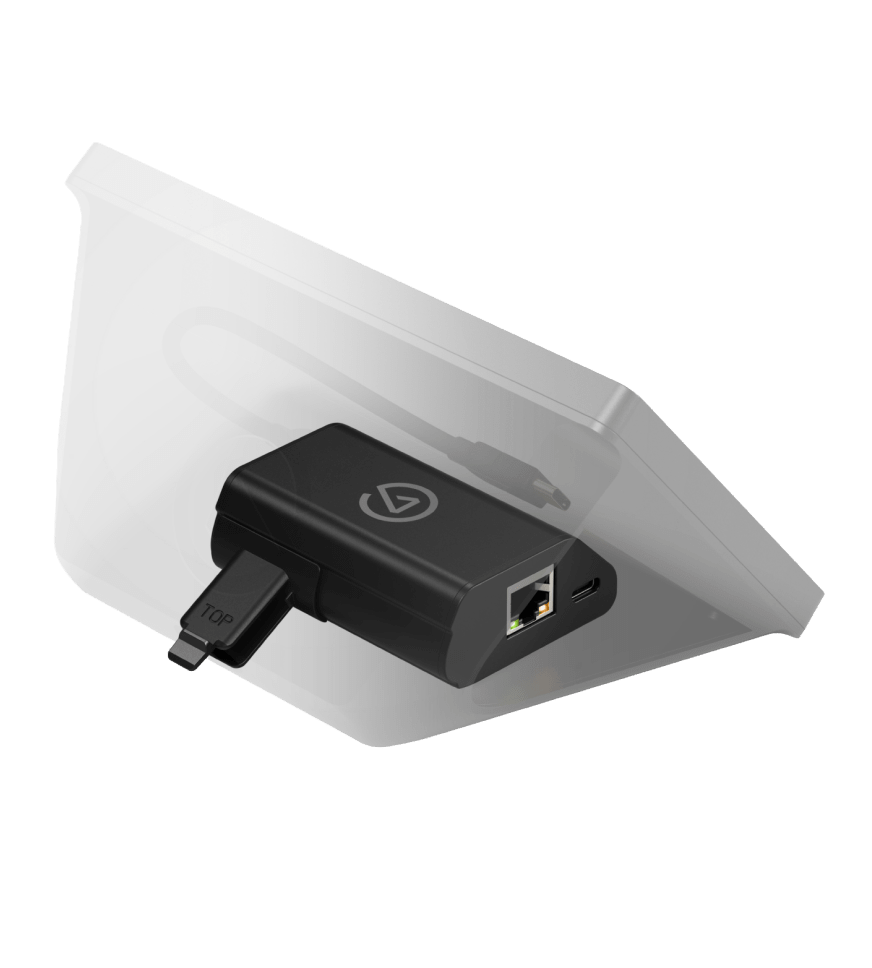
Elgato offers the compatible Network Dock separately. Check the dock, software and network requirements before installing it.
规格
Elgato Stream Deck Module Embeddable LCD Keypad
Stream Deck Module is a bare USB-C LCD keypad for installation into a custom panel, enclosure or operator station. Select the key layout using the dimensions for the corresponding footprint. The Stream Deck app supplies profiles and supported actions on the host. Allow space for mounting hardware and cable clearance when designing the enclosure.
| Specification | Details |
|---|---|
| Control and Software | |
| Key technology | Customisable LCD membrane keys |
| Host interface | USB 2.0 over USB-C |
| Operating systems | Windows 11 64-bit or newer or macOS 13 or newer |
| Software | Stream Deck 6.9 or newer. Confirm supported third-party integrations for your build |
| Minimum Stream Deck app | Version 6.9 or newer, per manufacturer requirements. |
| Configuration | Custom icons and actions for each LCD key, with profiles and supported plugins in Stream Deck software. |
| Key Layout and Mounting | |
| 6 Keys | 80 x 80 pixels per key. 19 x 71 x 51 mm (D x W x H). 57 g |
| 15 Keys | 72 x 72 pixels per key. 20 x 107 x 70 mm (D x W x H). 115 g |
| 32 Keys | 72 x 72 pixels per key. 25 x 169 x 103 mm (D x W x H). 292 g |
| Construction | Bare module for a customer-supplied enclosure or mount |
| Installation context | Integrated panel or enclosure supplied separately. Confirm the selected footprint and USB cable routing before fabrication |
| Package Contents | |
| 6-Key package | Module and 1.5 m USB-C cable |
| 15- and 32-Key packages | Selected module. Use a suitable USB-C data cable for the installation |
附加组件