TP-Link Tapo RV50 Pro Omni Robot Vacuum and Mop with Self Cleaning Station
A more complete cleaning routine from floor to dock The Tapo RV50 Pro Omni combines powerful vacuuming, adaptive edge mopping and a station that handles several routine maintenance tasks. It maps rooms with dToF LiDAR, uses dual-laser obstacle avoidance and returns to the Omni dock for dust collection, hot-water mop washing and warm-air drying. Automatic detergent dispensing and a clean/dirty water arrangement support regular mopping. Choose room settings and boundaries in the Tapo app, then maintain the tanks, brushes and consumables as the system requires. Highlights Vacuum and mop in a planned route 15,000Pa maximum suction; dToF LiDAR with dual-laser obstacle avoidance. Room maps, scheduled cleaning and app-defined boundaries. Choose a maintenance arrangement Auto-empty dock included. Hot-water mop washing and warm-air drying. Everyday operation 2.4GHz WiFi and Tapo app control. Recharge-and-resume support and adjustable cleaning settings. Key Features Map rooms before planning the routine The robot uses dToF LiDAR with dual-laser obstacle avoidance to map rooms and plan routes. Dual-laser sensing helps it respond to nearby objects, while room maps and no-go areas let you guide the cleaning plan. Adjust pickup for everyday dirt 15,000Pa is the published maximum suction setting. Choose among the available suction levels and use carpet boost where appropriate. Actual pickup depends on floor type, debris, maintenance and the selected mode. Keep cords, loose fabric and small objects away from the route. A mopping arrangement suited to the floor Dual spinning mops and adaptive edge mopping help clean around the room perimeter. The robot can remove its mops for carpet cleaning and return to the dock for mop care. Choose the mode and water setting around the floor finish and follow the flooring manufacturer's care instructions. Know what the supplied dock handles The included Omni station collects dust into a disposable bag, washes the mops with water heated up to 60°C and dries them with air up to 50°C. Automatic detergent dispensing and separate clean/dirty water tanks support repeated mopping. Empty and refill the tanks, replace the bag and clean the dock as instructed. Set rooms, zones and cleaning times Use the Tapo app to set schedules, room or zone cleaning, virtual walls and no-go areas. Multi-floor mapping supports separate maps, but the robot must be moved between floors. Wireless control uses 2.4GHz WiFi; Bluetooth is used for initial setup. Maintain the parts that do the cleaning Inspect the main brush, side brush, filter and mop as part of routine care. Remove wrapped hair, replace damaged or worn parts and let washable components dry fully before refitting. Use the exact compatible consumables listed for RV50 Pro Omni; a similar-looking dust bag or brush from another Tapo series may not fit. Summary Tapo RV50 Pro Omni combines mapped navigation, adjustable vacuuming and mopping with an Omni station that handles dust collection and mop care. Match the floor plan, furniture clearance and maintenance routine to the system, then set the room preferences in the Tapo app. Regular brush, filter and mop care helps keep everyday cleaning consistent. Frequently Asked Questions Which dock is included?ExpandCollapse The included Omni station collects dust into a disposable bag, washes the mops with water heated up to 60°C and dries them with air up to 50°C. Automatic detergent dispensing and separate clean/dirty water tanks support repeated mopping. Empty and refill the tanks, replace the bag and clean the dock as instructed. Can it vacuum and mop?ExpandCollapse Dual spinning mops and adaptive edge mopping help clean around the room perimeter. The robot can remove its mops for carpet cleaning and return to the dock for mop care. Choose the mode and water setting around the floor finish and follow the flooring manufacturer's care instructions. Which WiFi connection does it need?ExpandCollapse It uses 2.4GHz WiFi for app control. Bluetooth is used for setup only. Multi-floor mapping does not let a robot travel between storeys by itself. Does it avoid every obstacle?ExpandCollapse No. Navigation and supported obstacle sensing assist with route planning, but small cables, loose fabric and unusual objects can still cause a problem. Clear the route, set no-go areas and check the first cleaning runs. Which replacement parts should I choose?ExpandCollapse Use RVA110 maintenance kits, RVA210 dust bags, RVA310 mop cloths and RVA520 filters for the RV50 series. RVA450 cleaning solution is specified for RV50 Pro Omni. Check the exact accessory compatibility before ordering.
追加商品 (5)
3005, Ubi Avenue 3, #01-88で受け取り可能
通常2〜4日で準備が完了します
TP-Link Tapo RV50 Pro Omni Robot Vacuum and Mop with Self Cleaning Station
商品説明
A more complete cleaning routine from floor to dock
The Tapo RV50 Pro Omni combines powerful vacuuming, adaptive edge mopping and a station that handles several routine maintenance tasks. It maps rooms with dToF LiDAR, uses dual-laser obstacle avoidance and returns to the Omni dock for dust collection, hot-water mop washing and warm-air drying. Automatic detergent dispensing and a clean/dirty water arrangement support regular mopping. Choose room settings and boundaries in the Tapo app, then maintain the tanks, brushes and consumables as the system requires.
Highlights
Vacuum and mop in a planned route
- 15,000Pa maximum suction; dToF LiDAR with dual-laser obstacle avoidance.
- Room maps, scheduled cleaning and app-defined boundaries.
Choose a maintenance arrangement
- Auto-empty dock included.
- Hot-water mop washing and warm-air drying.
Everyday operation
- 2.4GHz WiFi and Tapo app control.
- Recharge-and-resume support and adjustable cleaning settings.
Key Features
Map rooms before planning the routine
The robot uses dToF LiDAR with dual-laser obstacle avoidance to map rooms and plan routes. Dual-laser sensing helps it respond to nearby objects, while room maps and no-go areas let you guide the cleaning plan.
Adjust pickup for everyday dirt
15,000Pa is the published maximum suction setting. Choose among the available suction levels and use carpet boost where appropriate. Actual pickup depends on floor type, debris, maintenance and the selected mode. Keep cords, loose fabric and small objects away from the route.
A mopping arrangement suited to the floor
Dual spinning mops and adaptive edge mopping help clean around the room perimeter. The robot can remove its mops for carpet cleaning and return to the dock for mop care. Choose the mode and water setting around the floor finish and follow the flooring manufacturer's care instructions.
Know what the supplied dock handles
The included Omni station collects dust into a disposable bag, washes the mops with water heated up to 60°C and dries them with air up to 50°C. Automatic detergent dispensing and separate clean/dirty water tanks support repeated mopping. Empty and refill the tanks, replace the bag and clean the dock as instructed.
Set rooms, zones and cleaning times
Use the Tapo app to set schedules, room or zone cleaning, virtual walls and no-go areas. Multi-floor mapping supports separate maps, but the robot must be moved between floors. Wireless control uses 2.4GHz WiFi; Bluetooth is used for initial setup.
Maintain the parts that do the cleaning
Inspect the main brush, side brush, filter and mop as part of routine care. Remove wrapped hair, replace damaged or worn parts and let washable components dry fully before refitting. Use the exact compatible consumables listed for RV50 Pro Omni; a similar-looking dust bag or brush from another Tapo series may not fit.
Summary
Tapo RV50 Pro Omni combines mapped navigation, adjustable vacuuming and mopping with an Omni station that handles dust collection and mop care. Match the floor plan, furniture clearance and maintenance routine to the system, then set the room preferences in the Tapo app. Regular brush, filter and mop care helps keep everyday cleaning consistent.
Frequently Asked Questions
Which dock is included?
The included Omni station collects dust into a disposable bag, washes the mops with water heated up to 60°C and dries them with air up to 50°C. Automatic detergent dispensing and separate clean/dirty water tanks support repeated mopping. Empty and refill the tanks, replace the bag and clean the dock as instructed.
Can it vacuum and mop?
Dual spinning mops and adaptive edge mopping help clean around the room perimeter. The robot can remove its mops for carpet cleaning and return to the dock for mop care. Choose the mode and water setting around the floor finish and follow the flooring manufacturer's care instructions.
Which WiFi connection does it need?
It uses 2.4GHz WiFi for app control. Bluetooth is used for setup only. Multi-floor mapping does not let a robot travel between storeys by itself.
Does it avoid every obstacle?
No. Navigation and supported obstacle sensing assist with route planning, but small cables, loose fabric and unusual objects can still cause a problem. Clear the route, set no-go areas and check the first cleaning runs.
Which replacement parts should I choose?
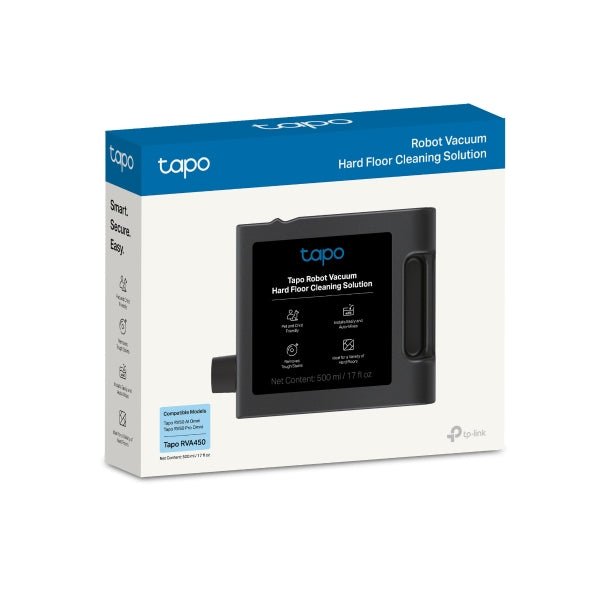
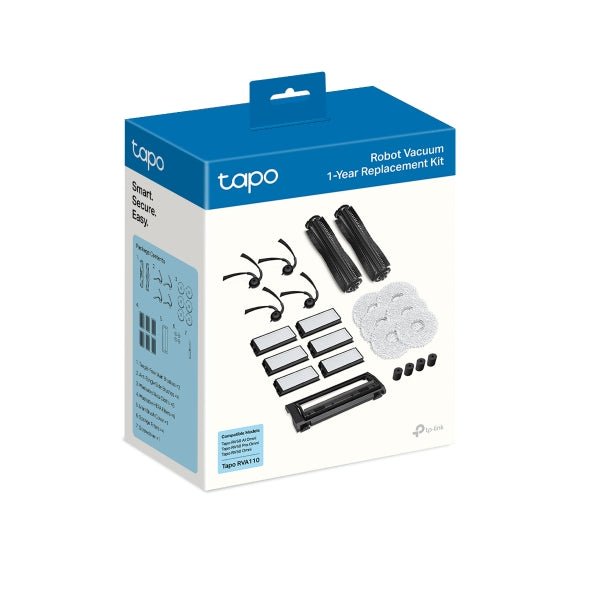
Use RVA110 maintenance kits, RVA210 dust bags, RVA310 mop cloths and RVA520 filters for the RV50 series. RVA450 cleaning solution is specified for RV50 Pro Omni. Check the exact accessory compatibility before ordering.
仕様
TP-Link Tapo RV50 Pro Omni Robot Vacuum and Mop with Self Cleaning Station
TP-Link Tapo RV50 Pro Omni Robot Vacuum and Mop with Self Cleaning Station combines dToF LiDAR with dual-laser obstacle avoidance with adjustable vacuuming and mopping. The supplied station handles automatic dust collection and the listed mop-care functions. The grouped specifications cover navigation, cleaning, dock functions, battery, connectivity, power and the package. Choose the system around the floor plan, furniture clearance and maintenance routine. Published suction and obstacle limits do not guarantee the same result on every floor.
| Specification | Details |
|---|---|
| Navigation and Cleaning | |
| Navigation | dToF LiDAR with dual-laser obstacle avoidance |
| Maximum suction | 15,000Pa; actual pickup depends on floor, mode and maintenance. |
| Suction settings | 5 levels |
| Obstacle sensing | Dual-Laser Precision Avoidance |
| Threshold crossing | Up to 20mm, depending on the threshold and floor. |
| Carpet boost | Yes |
| Vacuuming and Mopping | |
| Dustbin capacity | 280 ml |
| Filter | H11 |
| Mopping arrangement | Adaptive edge mopping with two spinning mop pads. |
| Water-flow settings | 3 levels |
| Water capacity | Robot tank: 95ml; clean-water tank: 5L; dirty-water tank: 4L. |
| Dock and Maintenance | |
| Supplied dock | All-in-one Omni dock. |
| Automatic dust collection | Included dock uses a 3L disposable bag. |
| Mop washing | Hot water up to 60°C. |
| Mop drying | Warm air up to 50°C. |
| Detergent dispensing | Automatic; use the specified cleaning solution. |
| Mop removal | Automatic mop removal for carpet cleaning. |
| Battery and Connectivity | |
| Battery | 5200 mAh |
| Recharge and resume | Yes |
| Wireless | 2.4GHz WiFi; Bluetooth 4.2 for setup only. |
| App functions | Scheduled and zone cleaning, multi-floor maps, virtual walls and no-go areas. |
| Voice platforms | Works with Amazon Alexa and Google Home. |
| Matter | Supported with compatible firmware and platform. |
| Power and Physical Design | |
| Power input | Local mains-voltage dock; check the rating label before use in another country. |
| Maximum working power | Robot: 75W; dust collection: 600W; mop washing: up to 1,500W, depending on the regional version. |
| Charging power | 30 W (DC20 V 1.5 A) |
| Robot dimensions | 350mm diameter × 100.3mm high. |
| Dock dimensions | 350 × 475 × 480mm. |
| Package and Warranty | |
| Included equipment | Robot with HEPA filter and side brush, Omni dock with dust bag, spare dust bag, deodorising module, cleaning solution, mop attachments, detachable base, power cable and user manual. |
| Warranty | 18 months for the robot; 6 months for the battery. |
追加商品

TP-Link Tapo RVA110 Robot Vacuum Maintenance Replacement Kit