







TP-Link Archer MX700 4G Plus AX1500 WiFi 6 Gigabit Router
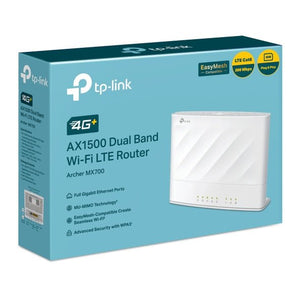
A flexible 4G plus connection with useful Gigabit ports Archer MX700 combines a Cat6 4G+ modem with dual-band AX1500 WiFi 6 and four Gigabit Ethernet ports. It is a practical connection point for a temporary workspace, holiday property or location where a suitable mobile-data plan is more convenient than a new fixed line. Use a compatible nano-SIM and check reception before choosing the final position. The supported Ethernet WAN arrangement also allows the router to work with a suitable wired broadband connection. Highlights Capability 5GHz up to 1,201Mbps; 2.4GHz up to 300Mbps. Connections and setup One Gigabit LAN/WAN port and three Gigabit LAN ports; nano-SIM slot; two external cellular antenna ports. Tether app and supported browser management. Supplied package One router, external power adapter, RJ45 Ethernet cable and quick-installation guide. SIM and mobile-data service are separate. Warranty is 3 years. Key Features Match the SIM and operator first Use a compatible nano-sim with an active data plan. LTE-Advanced Cat6; up to 300Mbps download / 50Mbps upload, theoretical. Check coverage at the installation point, supported bands, any APN settings and the operator’s tethering or router terms. Keep the wired limits clear One Gigabit LAN/WAN port and three Gigabit LAN ports; nano-SIM slot; two external cellular antenna ports. Gigabit Ethernet is useful for compatible computers, access points and other wired devices, but the mobile connection can be slower than a local wired link. Place the router for useful reception Test the mobile connection in a few suitable positions before fixing the location. Keep the router ventilated and use the supplied power arrangement. Optional external cellular antennas need the correct connector, supported frequency bands and installation; they do not guarantee a faster service. Manage the connection around the people using it Tether app and supported browser management. Configure a secure wireless password, review connected devices and keep the appropriate firmware current. Use the supported app or browser controls rather than assuming features from a different router model are included. Plan the complete connection Radio link rates describe wireless capability, not a guaranteed download speed. Actual throughput depends on the router, client, interfaces, placement, interference and internet service. The mobile-data connection also depends on the service plan and conditions at the location. This is a mains-powered router; a portable battery is not included. Summary Archer MX700 brings cellular and wired networking options to a compatible installation. Match the SIM, operator bands and reception, then use the actual ports and supported wireless modes to plan the network. Position the router carefully and maintain the supported firmware for dependable day-to-day control. Frequently Asked Questions Does it include a SIM card or mobile-data plan?ExpandCollapse No. Supply a compatible active nano-sim and data plan. Check the operator’s bands, APN, coverage and roaming or router-use terms. What wired connections does it provide?ExpandCollapse One Gigabit LAN/WAN port and three Gigabit LAN ports; nano-SIM slot; two external cellular antenna ports. Match the cable and receiving device to these rates. The mobile-data service may be slower than the local Ethernet connection. Is this a battery-powered travel hotspot?ExpandCollapse No. This model needs its external mains power arrangement. A SIM and data plan do not provide power; use a portable battery-powered hotspot if independent mobile operation is required. Will it always deliver the published maximum speed?ExpandCollapse No. The operator, plan, reception, network congestion, connected clients and interfaces determine real throughput. Wireless and cellular maximum figures describe hardware capability rather than an assured internet-service speed. What is included and what warranty applies?ExpandCollapse One router, external power adapter, RJ45 Ethernet cable and quick-installation guide. SIM and mobile-data service are separate. Warranty is 3 years.
3005, Ubi Avenue 3, #01-88で受け取り可能
通常2〜4日で準備が完了します
TP-Link Archer MX700 4G Plus AX1500 WiFi 6 Gigabit Router
商品説明
A flexible 4G plus connection with useful Gigabit ports
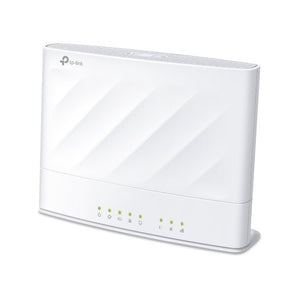
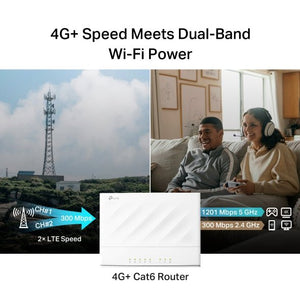
Archer MX700 combines a Cat6 4G+ modem with dual-band AX1500 WiFi 6 and four Gigabit Ethernet ports. It is a practical connection point for a temporary workspace, holiday property or location where a suitable mobile-data plan is more convenient than a new fixed line. Use a compatible nano-SIM and check reception before choosing the final position. The supported Ethernet WAN arrangement also allows the router to work with a suitable wired broadband connection.
Highlights
Capability
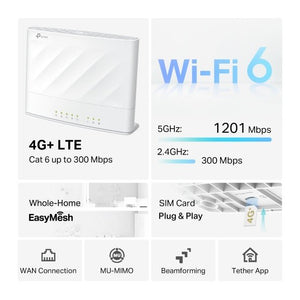
- 5GHz up to 1,201Mbps; 2.4GHz up to 300Mbps.
Connections and setup
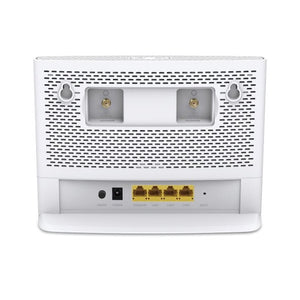
- One Gigabit LAN/WAN port and three Gigabit LAN ports; nano-SIM slot; two external cellular antenna ports.
- Tether app and supported browser management.
Supplied package
- One router, external power adapter, RJ45 Ethernet cable and quick-installation guide. SIM and mobile-data service are separate.
- Warranty is 3 years.
Key Features
Match the SIM and operator first
Use a compatible nano-sim with an active data plan. LTE-Advanced Cat6; up to 300Mbps download / 50Mbps upload, theoretical. Check coverage at the installation point, supported bands, any APN settings and the operator’s tethering or router terms.
Keep the wired limits clear
One Gigabit LAN/WAN port and three Gigabit LAN ports; nano-SIM slot; two external cellular antenna ports. Gigabit Ethernet is useful for compatible computers, access points and other wired devices, but the mobile connection can be slower than a local wired link.
Place the router for useful reception
Test the mobile connection in a few suitable positions before fixing the location. Keep the router ventilated and use the supplied power arrangement. Optional external cellular antennas need the correct connector, supported frequency bands and installation; they do not guarantee a faster service.
Manage the connection around the people using it
Tether app and supported browser management. Configure a secure wireless password, review connected devices and keep the appropriate firmware current. Use the supported app or browser controls rather than assuming features from a different router model are included.
Plan the complete connection
Radio link rates describe wireless capability, not a guaranteed download speed. Actual throughput depends on the router, client, interfaces, placement, interference and internet service. The mobile-data connection also depends on the service plan and conditions at the location. This is a mains-powered router; a portable battery is not included.
Summary
Archer MX700 brings cellular and wired networking options to a compatible installation. Match the SIM, operator bands and reception, then use the actual ports and supported wireless modes to plan the network. Position the router carefully and maintain the supported firmware for dependable day-to-day control.
Frequently Asked Questions
Does it include a SIM card or mobile-data plan?
No. Supply a compatible active nano-sim and data plan. Check the operator’s bands, APN, coverage and roaming or router-use terms.
What wired connections does it provide?
One Gigabit LAN/WAN port and three Gigabit LAN ports; nano-SIM slot; two external cellular antenna ports. Match the cable and receiving device to these rates. The mobile-data service may be slower than the local Ethernet connection.
Is this a battery-powered travel hotspot?
No. This model needs its external mains power arrangement. A SIM and data plan do not provide power; use a portable battery-powered hotspot if independent mobile operation is required.
Will it always deliver the published maximum speed?
No. The operator, plan, reception, network congestion, connected clients and interfaces determine real throughput. Wireless and cellular maximum figures describe hardware capability rather than an assured internet-service speed.
What is included and what warranty applies?
One router, external power adapter, RJ45 Ethernet cable and quick-installation guide. SIM and mobile-data service are separate. Warranty is 3 years.
仕様
TP-Link Archer MX700 4G Plus AX1500 WiFi 6 Gigabit Router
TP-Link Archer MX700 4G Plus AX1500 WiFi 6 Gigabit Router uses the connections and operating arrangement set out below. These grouped specifications separate the cellular modem, WiFi radio and physical interfaces so that the installation can be planned around actual limits. Check the compatible equipment, SIM and operator service before ordering. Published maximum rates are capability figures; actual throughput depends on the complete connection and the conditions where it is used.
| Specification | Details |
|---|---|
| Cellular and Wireless | |
| Modem | LTE-Advanced Cat6; up to 300Mbps download / 50Mbps upload, theoretical. |
| Cellular bands | LTE FDD B1/3/5/7/8/20/28; TDD B38/40/41; 3G B1/5/8. |
| SIM | Nano-SIM with a compatible active data plan. |
| WiFi | WiFi 6; 5GHz up to 1,201Mbps; 2.4GHz up to 300Mbps. |
| Connections and Management | |
| Interfaces | One Gigabit LAN/WAN port and three Gigabit LAN ports; nano-SIM slot; two external cellular antenna ports. |
| Operating arrangement | Cellular router or supported Ethernet WAN router configuration; WAN failover where supported. |
| Management | Tether app and browser interface; IPv4/IPv6 support. |
| Mesh support | EasyMesh with compatible equipment and firmware. |
| Wireless security | WPA/WPA2 and WPA3 Personal with compatible clients. |
| Power and Physical | |
| Power | External power adapter supplied; use the rating specified for the delivered hardware revision. |
| Dimensions | 199.7 × 148.6 × 67.5mm (W × D × H). |
| Operating conditions | 0 to 40°C; 10–90% RH, non-condensing. |
| Package and Warranty | |
| Included | One router, external power adapter, RJ45 Ethernet cable and quick-installation guide. SIM and mobile-data service are separate. |
| Warranty | 3 years. |