


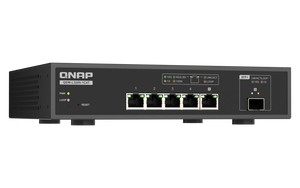


QNAP QSW-L3205-1C4T 5-Port 10GbE Lite Managed Switch
High-Speed Storage Networking with Less Complexity Give a small creative workspace a useful step up in network speed and control. The QSW-L3205-1C4T combines five 10GbE connections with practical Lite Managed functions for VLANs, link aggregation and traffic monitoring. Its compact, fanless metal chassis suits a desk or supported wall placement, while the copper/SFP+ combo connection adds a choice of cabling. Highlights Flexible 10GbE Connections 4 dedicated multi-gig RJ45 ports 1 shared 10GbE SFP+/RJ45 combo port Control the Traffic VLAN, QoS and supported LACP aggregation Port monitoring, mirroring and loop protection A Practical Desktop Format Fanless metal chassis Included 12V power adapter and wallmount accessories Key Features Connect Copper and Fibre Deliberately Each dedicated copper port negotiates supported 10G,5G,2.5G,1G or 100M speeds with the connected equipment. A combo port offers either its RJ45 socket or its SFP+ cage, not two simultaneous connections. Choose compatible optics or a DAC separately for the SFP+ connection. Actual transfer speed still depends on the client, network storage, cabling and workload. Give Shared Storage More Network Headroom The switch can connect compatible faster NAS systems and workstations without forcing every device to run at the same rate. Use suitable cabling and check negotiated links after installation. LACP supports up to 20Gbps aggregate bandwidth in a supported arrangement, distributing eligible traffic across links. It does not make a single ordinary 10GbE connection run at the total aggregate rate. Separate Traffic and Set Priorities IEEE 802.1Q VLANs help separate departments or device groups on an appropriately configured network. QoS, CoS, DSCP and supported rate limits help administrators prioritise traffic. VLAN-aware routing, access rules and endpoint configuration are separate tasks; the presence of a VLAN control is not a complete security policy or a replacement for a suitable router or firewall. See What Is Happening on the Network The QSS interface provides port status, traffic information and configuration without a full enterprise management stack. Port mirroring supports investigation with an appropriate analysis device, while loop detection can block a looped connection. Supported live or manual firmware updates help maintain the switch. Back up the intended configuration and apply updates deliberately. Handle Video and Multicast More Carefully IGMP snooping and the supported querier help manage multicast traffic when the network and endpoints are configured accordingly. This is useful for suitable streaming and surveillance environments. The switch moves network traffic; it is not a recorder and does not include storage, camera licences or PoE power. Cameras and access points need their own compatible power arrangement. Install with Power and Cooling in Mind A fanless metal enclosure avoids fan noise at the switch itself, which is useful close to a desk or editing station. Keep the ventilation clear and operate it within the specified temperature range. The included 12V adapter supplies the switch. Wallmount components and foot pads support the manufacturer’s installation options. Summary The QSW-L3205-1C4T suits a compact office, studio or advanced home workspace with useful network controls. Choose the copper or SFP+ connections correctly, configure the VLAN and aggregation plan, and verify the complete path from workstation to storage. How Many Devices Can Use the Ports at Once?ExpandCollapse There are 5 simultaneous switch ports: 4 dedicated RJ45 ports plus 1 combo port. Each combo pair shares one logical port, so its RJ45 socket and SFP+ cage cannot be used as two independent connections. Does It Power Cameras or Access Points?ExpandCollapse No PoE output is specified for this model. Cameras and wireless access points need their own compatible power supply, injector or PoE switch. Are Fibre Modules or DAC Cables Included?ExpandCollapse No. Select compatible SFP/SFP+ modules or direct-attach cables separately if using the cages. Copper connections require suitable Ethernet cabling. Check both ends of every connection. Will Link Aggregation Speed Up One File Transfer?ExpandCollapse LACP combines supported links to increase aggregate capacity across eligible traffic. An ordinary single connection generally remains limited by one member link, the endpoints and storage. Both connected systems and the configuration must support the intended arrangement. Is It a Fully Managed Enterprise Switch?ExpandCollapse It is a Lite Managed QSS switch with practical features such as VLANs, LACP, QoS, mirroring and loop protection. Confirm any requirement for advanced security, routing, SNMP or spanning-tree functions against the exact feature list before purchase. Can I Put It on a Desk or Wall?ExpandCollapse Yes, the manufacturer supplies foot pads and a wallmount kit with installation hardware. Keep ventilation clear, use the included adapter and follow the installation guide. This model is fanless.
Pickup available at 3005, Ubi Avenue 3, #01-88
通常2〜4日で準備が完了します
QNAP QSW-L3205-1C4T 5-Port 10GbE Lite Managed Switch
商品説明
High-Speed Storage Networking with Less Complexity
Give a small creative workspace a useful step up in network speed and control. The QSW-L3205-1C4T combines five 10GbE connections with practical Lite Managed functions for VLANs, link aggregation and traffic monitoring. Its compact, fanless metal chassis suits a desk or supported wall placement, while the copper/SFP+ combo connection adds a choice of cabling.
Highlights
Flexible 10GbE Connections
- 4 dedicated multi-gig RJ45 ports
- 1 shared 10GbE SFP+/RJ45 combo port
Control the Traffic
- VLAN, QoS and supported LACP aggregation
- Port monitoring, mirroring and loop protection
A Practical Desktop Format
- Fanless metal chassis
- Included 12V power adapter and wallmount accessories
Key Features
Connect Copper and Fibre Deliberately
Each dedicated copper port negotiates supported 10G,5G,2.5G,1G or 100M speeds with the connected equipment. A combo port offers either its RJ45 socket or its SFP+ cage, not two simultaneous connections. Choose compatible optics or a DAC separately for the SFP+ connection. Actual transfer speed still depends on the client, network storage, cabling and workload.
Give Shared Storage More Network Headroom
The switch can connect compatible faster NAS systems and workstations without forcing every device to run at the same rate. Use suitable cabling and check negotiated links after installation. LACP supports up to 20Gbps aggregate bandwidth in a supported arrangement, distributing eligible traffic across links. It does not make a single ordinary 10GbE connection run at the total aggregate rate.
Separate Traffic and Set Priorities
IEEE 802.1Q VLANs help separate departments or device groups on an appropriately configured network. QoS, CoS, DSCP and supported rate limits help administrators prioritise traffic. VLAN-aware routing, access rules and endpoint configuration are separate tasks; the presence of a VLAN control is not a complete security policy or a replacement for a suitable router or firewall.
See What Is Happening on the Network
The QSS interface provides port status, traffic information and configuration without a full enterprise management stack. Port mirroring supports investigation with an appropriate analysis device, while loop detection can block a looped connection. Supported live or manual firmware updates help maintain the switch. Back up the intended configuration and apply updates deliberately.
Handle Video and Multicast More Carefully
IGMP snooping and the supported querier help manage multicast traffic when the network and endpoints are configured accordingly. This is useful for suitable streaming and surveillance environments. The switch moves network traffic; it is not a recorder and does not include storage, camera licences or PoE power. Cameras and access points need their own compatible power arrangement.
Install with Power and Cooling in Mind
A fanless metal enclosure avoids fan noise at the switch itself, which is useful close to a desk or editing station. Keep the ventilation clear and operate it within the specified temperature range. The included 12V adapter supplies the switch. Wallmount components and foot pads support the manufacturer’s installation options.
Summary
The QSW-L3205-1C4T suits a compact office, studio or advanced home workspace with useful network controls. Choose the copper or SFP+ connections correctly, configure the VLAN and aggregation plan, and verify the complete path from workstation to storage.
How Many Devices Can Use the Ports at Once?
There are 5 simultaneous switch ports: 4 dedicated RJ45 ports plus 1 combo port. Each combo pair shares one logical port, so its RJ45 socket and SFP+ cage cannot be used as two independent connections.
Does It Power Cameras or Access Points?
No PoE output is specified for this model. Cameras and wireless access points need their own compatible power supply, injector or PoE switch.
Are Fibre Modules or DAC Cables Included?
No. Select compatible SFP/SFP+ modules or direct-attach cables separately if using the cages. Copper connections require suitable Ethernet cabling. Check both ends of every connection.
Will Link Aggregation Speed Up One File Transfer?
LACP combines supported links to increase aggregate capacity across eligible traffic. An ordinary single connection generally remains limited by one member link, the endpoints and storage. Both connected systems and the configuration must support the intended arrangement.
Is It a Fully Managed Enterprise Switch?
It is a Lite Managed QSS switch with practical features such as VLANs, LACP, QoS, mirroring and loop protection. Confirm any requirement for advanced security, routing, SNMP or spanning-tree functions against the exact feature list before purchase.
Can I Put It on a Desk or Wall?
Yes, the manufacturer supplies foot pads and a wallmount kit with installation hardware. Keep ventilation clear, use the included adapter and follow the installation guide. This model is fanless.
仕様
QNAP QSW-L3205-1C4T 5-Port 10GbE Lite Managed Switch
The QSW-L3205-1C4T connects five devices through multi-gig copper and a shared SFP+/RJ45 combo port. QSS Lite Managed controls support VLANs, aggregation, priorities and monitoring. Its fanless desktop chassis includes a power adapter and wallmount hardware. Choose suitable cables or optics, and verify the complete path between workstations, storage and other network equipment before deployment.
| Specification | Details |
|---|---|
| Switching and Interfaces | |
| Management Class | Lite Managed; QSS web interface |
| Simultaneous Ports | 5 total: 4 dedicated RJ45 plus 1 SFP+/RJ45 combo port |
| Copper Speeds | 10G /5G /2.5G /1G /100M auto-negotiation |
| SFP+ Speeds | 10GbE SFP+ or compatible 1GbE SFP; one connection per combo pair |
| Switching Capacity | 100Gbps switching capacity; 50Gbps total non-blocking throughput |
| MAC Table and Frames | 16K MAC addresses; 12K jumbo-frame support |
| Console | RJ45 console interface listed by manufacturer; not an additional Ethernet switch port |
| Traffic and Management | |
| VLAN | IEEE 802.1Q VLAN configuration and port isolation |
| Aggregation | Static aggregation and LACP; up to 20Gbps supported aggregate bandwidth; single-flow limits apply |
| Quality of Service | Port-based,802.1p CoS, IPv4 DSCP/ToS and supported rate limiting |
| Multicast | IGMP snooping v2, IGMP querier and supported multicast controls |
| Monitoring | Port status/statistics, port mirroring, system log and ping |
| Protection | Loop detection/protection and IEEE 802.3x flow control |
| Administration | HTTPS web interface, Qfinder Pro, SNTP/DNS/DHCP client and live/manual firmware update |
| Power and Cooling | |
| Supply | Included external 12V/3A DC adapter |
| Maximum Consumption | 36W manufacturer reference; actual use varies |
| PoE | No PoE output specified |
| Cooling | Fanless metal enclosure |
| Energy Saving | IEEE 802.3az Energy Efficient Ethernet |
| Physical and Environment | |
| Form Factor | Desktop; supported wallmount installation |
| Dimensions H × W × D | 44 × 210 × 160mm |
| Weight | 1.17kg net; 2.49kg gross |
| Environment | Operating 0–40°C; 0–90% RH non-condensing |
| Indicators and Reset | Per-port speed/link/activity; power, loop/fan system indicators; reset button |
| Compliance | Manufacturer lists CE, UKCA, FCC, IC, VCCI, RCM, BSMI, LVD and KC; Class A electromagnetic category |
| Package and Warranty | |
| Included | Switch, power supply, bracket screws, anchors, foot pads, wallmount kit and installation guide |
| Separate Items | Ethernet cables, compatible SFP/SFP+ modules or DACs and endpoint power where needed |
| Warranty | 2 years |