











Insta360 Ace Pro 2 Lens Guard
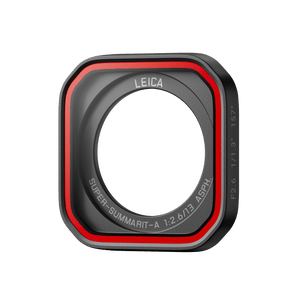
Keep the Lens Ready for the Next Scene A clear view starts with the surface in front of the camera. This removable Lens Guard is shaped for Insta360 Ace Pro 2 and uses high-strength tempered glass with water- and smudge-resistant coatings. Its model-specific fit keeps the protective surface aligned with the lens, while the included wrench supports careful replacement. Keep it clean, fit it correctly and return the camera’s surrounding parts to their proper positions before recording. Highlights Model-specific removable Lens Guard for Insta360 Ace Pro 2. High-strength tempered glass protective surface. Hydrophobic and oleophobic coatings resist water spots and smudges. Included wrench supports removal and fitting. Compact 7.1g guard with glass, metal and plastic construction. Key Features Fit the Ace Pro 2 Lens Arrangement The guard is designed to align with the Ace Pro 2 lens and provide a protective outer surface. It is a model-specific replacement rather than a universal cover. Check the installed guard for marks or damage and make a short test recording after changing it to confirm a clean view. Use Coatings That Help the Surface Stay Clear The tempered glass has hydrophobic and oleophobic coatings to resist water spots and oily smudges. Keep the surface clean as part of the camera routine, particularly after handling the guard. The coating helps with surface contamination; it does not make scratches or physical damage disappear. Replace the Guard with the Included Wrench Follow the fitting sequence instead of forcing the surrounding parts. Slide the Wind Guard to the right to remove it, then remove the Silicone Lens Guard Ring before using the supplied wrench. The manufacturer’s guide shows a 45-degree anticlockwise turn for removal and a 45-degree clockwise turn to secure the guard. Return the Surrounding Parts to Their Correct Positions After replacement, refit the Silicone Lens Guard Ring and Wind Guard. Align the Wind Guard with the red indication mark, press it against the camera and slide it left until it clicks. Check that the red mark is fully covered, as shown in the installation guide. Carry a Focused Replacement Kit One Lens Guard and one wrench are supplied. The guard weighs 7.1g and measures 35.3 × 35.3 × 6.4mm, keeping the replacement accessory compact in a camera kit. Protect its glass and fitting surfaces while carrying it, and use the camera’s own instructions for water and activity limits. Summary Insta360 Ace Pro 2 Lens Guard combines a precise removable fit with tempered glass and water- and smudge-resistant coatings. The included wrench makes it a focused replacement kit. Clean handling, the correct turning sequence and careful refitting of the Silicone Lens Guard Ring and Wind Guard help keep the camera ready for its next recording. Frequently Asked Questions What Is Included?ExpandCollapse One Ace Pro 2 Lens Guard and one fitting wrench are included. The camera, Wind Guard and Silicone Lens Guard Ring shown in the installation sequence are existing camera components, not additional items in this package. Will It Fit Ace Pro or Another Camera?ExpandCollapse The manufacturer lists this Lens Guard for Insta360 Ace Pro 2. Do not substitute it for an Ace Pro or another camera’s model-specific lens accessory. How Do I Remove the Existing Guard?ExpandCollapse Remove the Wind Guard and Silicone Lens Guard Ring in the prescribed order, then use the supplied wrench. The guide shows turning the Lens Guard anticlockwise by 45 degrees for removal. Follow the complete instructions and avoid forcing the connection. What Must I Refit After Changing the Guard?ExpandCollapse Reinstall the Silicone Lens Guard Ring and Wind Guard. Slide the Wind Guard into place until it clicks, and confirm that the red indication mark is fully covered. Do the Coatings Remove the Need for Cleaning?ExpandCollapse No. The hydrophobic and oleophobic coatings resist water spots and smudges, but the optical surface still needs clean handling and inspection. A scratch or damaged guard requires attention before an important recording.
Pickup available at 3005, Ubi Avenue 3, #01-88
通常2〜4日で準備が完了します
Insta360 Ace Pro 2 Lens Guard
商品説明
Keep the Lens Ready for the Next Scene
A clear view starts with the surface in front of the camera. This removable Lens Guard is shaped for Insta360 Ace Pro 2 and uses high-strength tempered glass with water- and smudge-resistant coatings. Its model-specific fit keeps the protective surface aligned with the lens, while the included wrench supports careful replacement. Keep it clean, fit it correctly and return the camera’s surrounding parts to their proper positions before recording.
Highlights
- Model-specific removable Lens Guard for Insta360 Ace Pro 2.
- High-strength tempered glass protective surface.
- Hydrophobic and oleophobic coatings resist water spots and smudges.
- Included wrench supports removal and fitting.
- Compact 7.1g guard with glass, metal and plastic construction.
Key Features
Fit the Ace Pro 2 Lens Arrangement
The guard is designed to align with the Ace Pro 2 lens and provide a protective outer surface. It is a model-specific replacement rather than a universal cover. Check the installed guard for marks or damage and make a short test recording after changing it to confirm a clean view.
Use Coatings That Help the Surface Stay Clear
The tempered glass has hydrophobic and oleophobic coatings to resist water spots and oily smudges. Keep the surface clean as part of the camera routine, particularly after handling the guard. The coating helps with surface contamination; it does not make scratches or physical damage disappear.
Replace the Guard with the Included Wrench
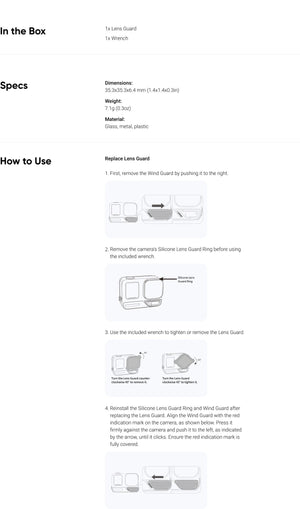
Follow the fitting sequence instead of forcing the surrounding parts. Slide the Wind Guard to the right to remove it, then remove the Silicone Lens Guard Ring before using the supplied wrench. The manufacturer’s guide shows a 45-degree anticlockwise turn for removal and a 45-degree clockwise turn to secure the guard.
Return the Surrounding Parts to Their Correct Positions
After replacement, refit the Silicone Lens Guard Ring and Wind Guard. Align the Wind Guard with the red indication mark, press it against the camera and slide it left until it clicks. Check that the red mark is fully covered, as shown in the installation guide.
Carry a Focused Replacement Kit
One Lens Guard and one wrench are supplied. The guard weighs 7.1g and measures 35.3 × 35.3 × 6.4mm, keeping the replacement accessory compact in a camera kit. Protect its glass and fitting surfaces while carrying it, and use the camera’s own instructions for water and activity limits.
Summary
Insta360 Ace Pro 2 Lens Guard combines a precise removable fit with tempered glass and water- and smudge-resistant coatings. The included wrench makes it a focused replacement kit. Clean handling, the correct turning sequence and careful refitting of the Silicone Lens Guard Ring and Wind Guard help keep the camera ready for its next recording.
Frequently Asked Questions
What Is Included?
One Ace Pro 2 Lens Guard and one fitting wrench are included. The camera, Wind Guard and Silicone Lens Guard Ring shown in the installation sequence are existing camera components, not additional items in this package.
Will It Fit Ace Pro or Another Camera?
The manufacturer lists this Lens Guard for Insta360 Ace Pro 2. Do not substitute it for an Ace Pro or another camera’s model-specific lens accessory.
How Do I Remove the Existing Guard?
Remove the Wind Guard and Silicone Lens Guard Ring in the prescribed order, then use the supplied wrench. The guide shows turning the Lens Guard anticlockwise by 45 degrees for removal. Follow the complete instructions and avoid forcing the connection.
What Must I Refit After Changing the Guard?
Reinstall the Silicone Lens Guard Ring and Wind Guard. Slide the Wind Guard into place until it clicks, and confirm that the red indication mark is fully covered.
Do the Coatings Remove the Need for Cleaning?
No. The hydrophobic and oleophobic coatings resist water spots and smudges, but the optical surface still needs clean handling and inspection. A scratch or damaged guard requires attention before an important recording.
仕様
Insta360 Ace Pro 2 Lens Guard
This Lens Guard is designed for the removable external guard system on Insta360 Ace Pro 2. It combines tempered glass with metal and plastic components, and includes the wrench used in the manufacturer’s replacement procedure. The dimensions and weight below refer to the guard itself. Follow the removal and refitting sequence for the Wind Guard and Silicone Lens Guard Ring, then check that all components are seated correctly before recording.
| Specification | Details |
|---|---|
| Optics and Compatibility | |
| Compatible Camera | Insta360 Ace Pro 2 |
| Optical Surface | High-strength tempered glass |
| Coatings | Hydrophobic and oleophobic; water-spot and smudge resistance |
| Fitting | Removable model-specific Lens Guard |
| Physical Design | |
| Dimensions | 35.3 × 35.3 × 6.4 mm |
| Guard Weight | 7.1 g |
| Materials | Glass, metal and plastic |
| Package and Replacement | |
| Included | 1 Lens Guard; 1 wrench |
| Removal | Remove Wind Guard and Silicone Lens Guard Ring before using the wrench |
| Turning Sequence | 45° anticlockwise to remove; 45° clockwise to tighten |
| Final Check | Refit surrounding parts; Wind Guard clicks into place and fully covers the red indication mark |