


Elgato Stream Deck + XL Desktop Control Surface
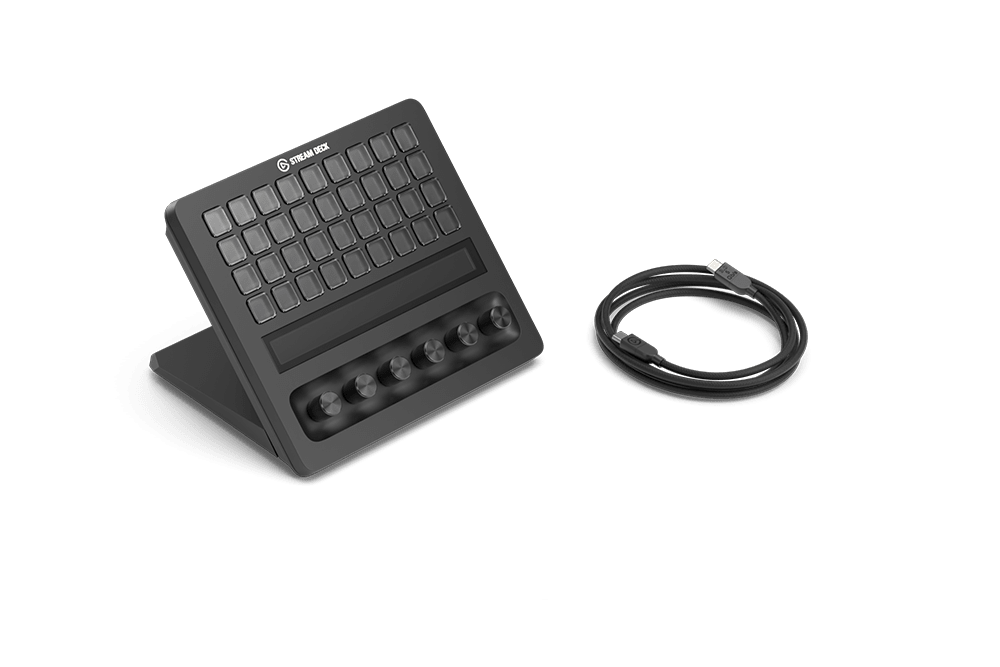
Put more of your production within reach Elgato Stream Deck + XL is a desktop control surface with 36 programmable LCD keys, six push dials and a touch strip. Keep commonly used actions visible while reserving the dials for changes that benefit from turning a control, such as compatible audio levels or editing adjustments. Highlights Shortcut keys 36 customisable LCD keys Rotary control Six push encoders for dial actions Workflow and connection 161 x 14 mm touch strip Windows and macOS support through Stream Deck software Key Features Build one visible layout for a demanding session The 36 LCD keys give a multi-app workflow room for visible labels and frequently used actions. Keep mission-critical commands on the main screen for a broadcast, edit or recording session. Organise the grid by task, such as sources, audio and workspaces, so the related controls are easy to locate without breaking focus. Keep continuous adjustments separate from commands Six push dials let you assign compatible actions with a turning or pressing motion. This is useful for supported audio mix adjustments, editing parameters or other controls that change by a range. Check the exact integration in your app and select a consistent layout for neighbouring keys and dials. Check context on the touch strip The touch strip provides supported readouts and page controls. Use it to identify the active parameter or layout at a glance before changing a setting. Give your most important profiles simple names so shifting between an editing desk and a live control layout does not make you guess. Set up profiles around the software you use Use the Stream Deck app on a supported host to configure keys, multi-actions and compatible plugins. Verify the target application and available dial workflows before planning your desk around them. A short run-through with the apps already open helps establish what is controllable and what still needs a keyboard shortcut. Give the larger controller a permanent place Check available desk depth and cable clearance for the larger chassis. The supplied USB-C cable needs a host connection of the stated speed. Arrange the controller so the outer buttons and dials are easy to reach with the keyboard, mouse or audio gear in their normal positions. Summary Stream Deck + XL suits a workstation where a compact shortcut controller would leave too many controls hidden. Its large key grid and six dials are useful for creators who work across several apps and want direct access during a session. Confirm the plugin support and set aside enough desk space to benefit from the larger layout. Frequently Asked Questions How is Stream Deck + XL different from Stream Deck +?ExpandCollapse The + XL provides more directly visible buttons with 36 LCD keys and six push dials. Both work with the Stream Deck application on supported systems. What can I assign to the dials?ExpandCollapse That depends on the app and plugin. Compatible actions can adjust a setting such as audio level or offer a press action as a shortcut. Can I use it on both Windows and Mac?ExpandCollapse Elgato lists Windows 11 or later and macOS 13 or later. Check that the computer has a suitable USB-C 3.0 data port. Will it run without the Stream Deck app?ExpandCollapse Use the Stream Deck application for the standard setup. Confirm any intended third-party workflow and its supported features separately. Can I organise controls for several apps?ExpandCollapse Yes. Build profiles, pages and folders in the software, and choose the actions and plugins you want accessible for each app.
3005, Ubi Avenue 3, #01-88で受け取り可能
通常2〜4日で準備が完了します
Elgato Stream Deck + XL Desktop Control Surface
商品説明
Put more of your production within reach
Elgato Stream Deck + XL is a desktop control surface with 36 programmable LCD keys, six push dials and a touch strip. Keep commonly used actions visible while reserving the dials for changes that benefit from turning a control, such as compatible audio levels or editing adjustments.
Highlights
Shortcut keys
- 36 customisable LCD keys
Rotary control
- Six push encoders for dial actions
Workflow and connection
- 161 x 14 mm touch strip
- Windows and macOS support through Stream Deck software
Key Features
Build one visible layout for a demanding session
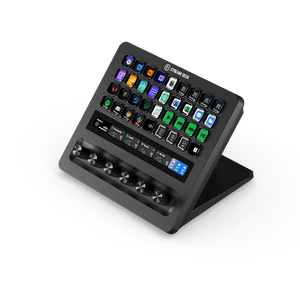
The 36 LCD keys give a multi-app workflow room for visible labels and frequently used actions. Keep mission-critical commands on the main screen for a broadcast, edit or recording session. Organise the grid by task, such as sources, audio and workspaces, so the related controls are easy to locate without breaking focus.
Keep continuous adjustments separate from commands
Six push dials let you assign compatible actions with a turning or pressing motion. This is useful for supported audio mix adjustments, editing parameters or other controls that change by a range. Check the exact integration in your app and select a consistent layout for neighbouring keys and dials.
Check context on the touch strip
The touch strip provides supported readouts and page controls. Use it to identify the active parameter or layout at a glance before changing a setting. Give your most important profiles simple names so shifting between an editing desk and a live control layout does not make you guess.
Set up profiles around the software you use
Use the Stream Deck app on a supported host to configure keys, multi-actions and compatible plugins. Verify the target application and available dial workflows before planning your desk around them. A short run-through with the apps already open helps establish what is controllable and what still needs a keyboard shortcut.
Give the larger controller a permanent place
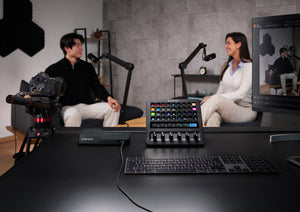
Check available desk depth and cable clearance for the larger chassis. The supplied USB-C cable needs a host connection of the stated speed. Arrange the controller so the outer buttons and dials are easy to reach with the keyboard, mouse or audio gear in their normal positions.
Summary
Stream Deck + XL suits a workstation where a compact shortcut controller would leave too many controls hidden. Its large key grid and six dials are useful for creators who work across several apps and want direct access during a session. Confirm the plugin support and set aside enough desk space to benefit from the larger layout.
Frequently Asked Questions
How is Stream Deck + XL different from Stream Deck +?
The + XL provides more directly visible buttons with 36 LCD keys and six push dials. Both work with the Stream Deck application on supported systems.
What can I assign to the dials?
That depends on the app and plugin. Compatible actions can adjust a setting such as audio level or offer a press action as a shortcut.
Can I use it on both Windows and Mac?
Elgato lists Windows 11 or later and macOS 13 or later. Check that the computer has a suitable USB-C 3.0 data port.
Will it run without the Stream Deck app?
Use the Stream Deck application for the standard setup. Confirm any intended third-party workflow and its supported features separately.
Can I organise controls for several apps?
Yes. Build profiles, pages and folders in the software, and choose the actions and plugins you want accessible for each app.
仕様
Elgato Stream Deck + XL Desktop Control Surface
Elgato Stream Deck + XL combines 36 programmable LCD keys, six push dials and a touch strip in one desktop controller. The keys suit actions such as switching sources, while compatible plugins can use the dials for gradual adjustments. Its USB-C connection carries data and power. Use the Stream Deck app on a compatible Windows or Mac computer to assign profiles and controls, and check the dimensions before allowing space for it on a desk.
| Specification | Details |
|---|---|
| Keys, Dials and Display | |
| Keys | 36 customisable LCD keys, Classic type. |
| Dials | Six 360° encoders with push action. |
| Touch strip size | 161 × 14 mm. |
| Touch strip resolution | 1200 × 100 px. |
| Screensaver artwork | 1280 × 800 px. |
| Software and Host Requirements | |
| Windows | Windows 11 or later. |
| macOS | macOS 13 or later. |
| Configuration software | Elgato Stream Deck app for profiles, folders, multi-actions and compatible plugins. |
| Host connection | USB-C 3.0 data port. |
| USB power specification | 5 V, 900 mA. |
| Physical Design and Box Contents | |
| Dimensions | 205 × 147 × 175 mm. |
| Device weight | 1,085 g. |
| In the box | Stream Deck + XL and a 1.5 m USB-C to USB-C cable. |