


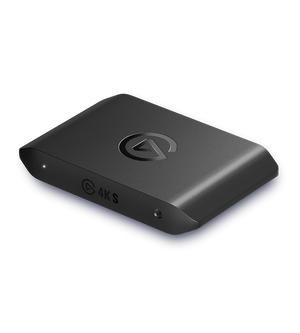
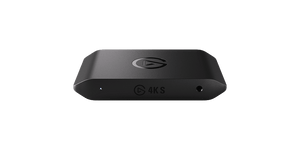
Elgato Game Capture 4K S External HDMI Capture Card
Capture in 4K60 with a compact USB setup Elgato Game Capture 4K S is an external capture card for console and camera workflows. Connect the source over HDMI, pass the picture through to your display and send the recording feed to a compatible computer. It keeps the capture equipment separate from the gaming screen. Highlights Capture Capture up to 4K60 over USB Passthrough Pass through up to 4K60, 1440p120 or 1080p240 HDMI and audio HDMI 2.0 passthrough with VRR support 3.5 mm analogue audio input for supported audio connections Key Features Capture detail for a stream or edit The 4K S sends supported video to your recording device over USB-C, including up to 4K at 60 fps. This is useful when you need a detailed master for edits or want to preserve small details in a game or demonstration. Match the capture mode to your host and recording software. Keep a separate screen for gameplay Connect a compatible gaming display to the HDMI output so you can play on its own screen while your host independently handles the recording. Passthrough supports modes including 4K60, 1440p120 and 1080p240. Verify the source and screen support the chosen mode before fixing the recording format. Set up high refresh with the right signal chain HDMI 2.0 and compatible variable refresh rate modes let you keep more of the display experience through the card. Resolution, refresh rate and HDR can interact. If a specific combination matters, check the manufacturer’s mode chart for that source, display and capture software, rather than assuming every maximum applies at once. Bring in the audio your recording needs The 3.5 mm analogue input offers another route for compatible audio when HDMI audio alone does not suit the setup. Select the right source in the capture software and record a short clip before going live. Game sound, commentary and conversation can need different settings at the console or host. Use a small capture box outside the computer The wired USB connection allows the card to sit beside a console, a laptop or a supported tablet. The supplied HDMI and USB-C cables cover the basic connections. Use a compatible data port and an unencrypted HDMI source, and confirm your device’s performance requirements for 4K capture. Summary Game Capture 4K S is suited to console or camera workflows where you want detailed 4K capture and a separate HDMI display without fitting a PCIe card. It is especially practical for a compact desk or a setup that moves between rooms. Plan the capture format, display format and audio path before connecting your recording device. Frequently Asked Questions Can I record at 4K60?ExpandCollapse Yes, with a supported HDMI source and host. Check the capture mode in your software. Can I play at 120 fps and record at 60 fps?ExpandCollapse Yes at supported input modes such as 1440p120 passthrough. The capture feed is limited by the selected recording mode. What HDR capture is supported?ExpandCollapse HDR10 passthrough reaches 4K60. HDR10 recording is supported at up to 1080p60 on Windows. Can it record protected video?ExpandCollapse Capture requires an unencrypted HDMI signal. Protected video cannot be recorded through the card. Which cables are included?ExpandCollapse A USB-C to USB-C cable and HDMI 2.0 cable are included.
3005, Ubi Avenue 3, #01-88で受け取り可能
通常2〜4日で準備が完了します
Elgato Game Capture 4K S External HDMI Capture Card
商品説明
Capture in 4K60 with a compact USB setup
Elgato Game Capture 4K S is an external capture card for console and camera workflows. Connect the source over HDMI, pass the picture through to your display and send the recording feed to a compatible computer. It keeps the capture equipment separate from the gaming screen.
Highlights
Capture
- Capture up to 4K60 over USB
Passthrough
- Pass through up to 4K60, 1440p120 or 1080p240
HDMI and audio
- HDMI 2.0 passthrough with VRR support
- 3.5 mm analogue audio input for supported audio connections
Key Features
Capture detail for a stream or edit
The 4K S sends supported video to your recording device over USB-C, including up to 4K at 60 fps. This is useful when you need a detailed master for edits or want to preserve small details in a game or demonstration. Match the capture mode to your host and recording software.
Keep a separate screen for gameplay
Connect a compatible gaming display to the HDMI output so you can play on its own screen while your host independently handles the recording. Passthrough supports modes including 4K60, 1440p120 and 1080p240. Verify the source and screen support the chosen mode before fixing the recording format.
Set up high refresh with the right signal chain
HDMI 2.0 and compatible variable refresh rate modes let you keep more of the display experience through the card. Resolution, refresh rate and HDR can interact. If a specific combination matters, check the manufacturer’s mode chart for that source, display and capture software, rather than assuming every maximum applies at once.
Bring in the audio your recording needs
The 3.5 mm analogue input offers another route for compatible audio when HDMI audio alone does not suit the setup. Select the right source in the capture software and record a short clip before going live. Game sound, commentary and conversation can need different settings at the console or host.
Use a small capture box outside the computer
The wired USB connection allows the card to sit beside a console, a laptop or a supported tablet. The supplied HDMI and USB-C cables cover the basic connections. Use a compatible data port and an unencrypted HDMI source, and confirm your device’s performance requirements for 4K capture.
Summary
Game Capture 4K S is suited to console or camera workflows where you want detailed 4K capture and a separate HDMI display without fitting a PCIe card. It is especially practical for a compact desk or a setup that moves between rooms. Plan the capture format, display format and audio path before connecting your recording device.
Frequently Asked Questions
Can I record at 4K60?
Yes, with a supported HDMI source and host. Check the capture mode in your software.
Can I play at 120 fps and record at 60 fps?
Yes at supported input modes such as 1440p120 passthrough. The capture feed is limited by the selected recording mode.
What HDR capture is supported?
HDR10 passthrough reaches 4K60. HDR10 recording is supported at up to 1080p60 on Windows.
Can it record protected video?
Capture requires an unencrypted HDMI signal. Protected video cannot be recorded through the card.
Which cables are included?
A USB-C to USB-C cable and HDMI 2.0 cable are included.
仕様
Elgato Game Capture 4K S External HDMI Capture Card
Game Capture 4K S is an external HDMI capture device with USB-C data output and a separate HDMI connection for the gaming display. Capture resolution and display passthrough have separate limits. Check both against your source and screen, especially for HDR or high refresh rates. A dedicated analogue audio input gives supported workflows another path for sound.
| Specification | Details |
|---|---|
| Video | |
| Input and output | HDMI 2.0 input and passthrough output |
| Capture | Up to 2160p60, with 1440p60 and 1080p120 modes |
| Passthrough | Up to 2160p60, 1440p120 or 1080p240 |
| HDR and VRR | HDR10 passthrough up to 4K60, HDR10 capture up to 1080p60 on Windows, VRR passthrough |
| HDMI source | Unencrypted input signal required for recording. |
| Connections and Setup | |
| Host | Compatible computer or USB-C iPad. Use a direct suitable USB data connection. |
| Audio input | 3.5 mm analogue |
| Dimensions and weight | 112 × 72 × 18 mm, 90 g |
| Included cables | 1.5 m USB-C to USB-C cable and 1.5 m HDMI 2.0 cable. |
| USB host interface | USB-C, USB 3.2 Gen 1 at 5 Gbps |
| Host operating systems | Windows 11 or later, macOS 14.2 or later, or USB-C iPad with iPadOS 18 |
| Host performance | Windows or Apple Silicon hardware must meet the capture mode’s CPU and graphics requirements |
| Apple host | Apple Silicon M1 class or newer for supported Mac capture modes. |
| USB Type-A compatibility | Requires a suitable USB 3.0 Type-C to Type-A cable or adapter, supplied separately. |