


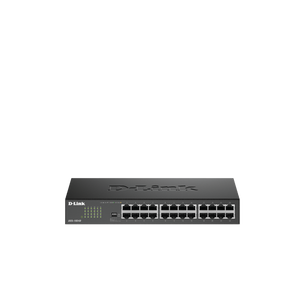
D-Link DGS-1024D 24-Port Gigabit Unmanaged Desktop Rackmount Switch
A Straightforward Gigabit Hub for a Busy Office The D-Link DGS-1024D is built for an office or equipment rack with a larger number of wired endpoints. Twenty-four Gigabit ports bring computers, printers and other network equipment together in a compact, fanless metal switch. Its plug-and-play design automatically negotiates 10/100/1000Mbps connections and works without a software controller. Connect it to an existing router or network to add wired ports; it does not replace the Internet router or add Wi-Fi. Highlights Wired Connectivity 24 × 10/100/1000BASE-T ports with auto-negotiation Automatic MDI/MDI-X for ordinary Ethernet patch cables 48Gbps switching capacity and store-and-forward forwarding Simple Deployment Unmanaged plug-and-play operation No controller or subscription required Connect to a router or upstream switch for Internet access Practical Installation Metal desktop/rackmount Fanless operation without cooling-fan noise 3-year warranty Key Features More Places for Wired Equipment Add wired connections for computers, printers, storage or other Ethernet devices without replacing the rest of the network. Every port supports Gigabit Ethernet and automatically negotiates with compatible 10Mbps or 100Mbps equipment. Local transfer speed still depends on the connected equipment, cabling and network load. Hardware Controls for a Larger Wired Layout The current J1 specification combines plug-and-play switching with DIP controls for EEE, flow control, port isolation and storm control. This provides useful installation choices without a web management console. It remains an unmanaged switch, so deployments needing configurable VLANs, link aggregation policies or routing should use a suitable managed model instead. Start With a Simple Physical Connection Connect the switch to the existing network and attach the endpoints using suitable Ethernet cabling. Auto-negotiation selects the supported link rate and Auto MDI/MDI-X removes the need to choose crossover cables. A connected router continues to provide services such as Internet routing and DHCP. Quiet Operation Where People Work The fanless design avoids cooling-fan noise in the office or equipment area. Metal desktop/rackmount construction keeps the installation compact. Provide ventilation, keep the unit within its operating conditions and support cables properly rather than treating a silent switch as equipment that can be enclosed without airflow. Efficient Switching for Everyday Traffic Store-and-forward switching and IEEE 802.3x flow control support ordinary wired traffic, while Energy-Efficient Ethernet can reduce link power during suitable idle periods. The 48Gbps switching fabric describes aggregate switch capacity; it does not increase a single Gigabit port or the speed of an Internet subscription. Know the Limits Before Connecting Devices This model does not supply PoE power. This is an unmanaged Gigabit switch rather than a multi-gigabit router or wireless access point. Choose a model with the appropriate managed features or higher-speed interfaces when the wider network requires them. Summary The D-Link DGS-1024D offers 24 straightforward Gigabit connections for an office or equipment rack with a larger number of wired endpoints. Its practical value is a compact, fanless connection point with simple setup, while the existing router continues to handle the Internet connection. Frequently Asked Questions Does This Switch Replace My Router?ExpandCollapse No. The DGS-1024D expands a wired Ethernet network. Connect it to a router or another suitable upstream network device for Internet access and routing services. It does not provide a mobile modem or Wi-Fi. Does It Supply Power over Ethernet?ExpandCollapse No. The DGS-1024D carries Ethernet data but is not a PoE power source. Cameras, access points or phones needing power must use their own suitable power arrangement or a compatible PoE switch/injector. Does It Need Configuration or a Controller?ExpandCollapse No controller is required for ordinary plug-and-play switching. The current hardware also has DIP controls for EEE, flow control, port isolation and storm control; these are not a web-based managed-switch interface. Will It Work With Older Ethernet Devices?ExpandCollapse Yes. Its RJ45 ports support 10/100/1000Mbps auto-negotiation. Each link runs at a speed supported by both connected devices and the cable; Gigabit capability does not make a slower endpoint or broadband service faster. Can I Use It Beside My Desk?ExpandCollapse The switch is fanless and produces no cooling-fan noise. Metal desktop/rackmount placement is supported. Keep it ventilated and within the specified temperature limits, with cables and power connections arranged safely. What Warranty Is Included?ExpandCollapse A 3-year warranty applies, subject to the applicable product and component terms.
Pickup available at 3005, Ubi Avenue 3, #01-88
通常2〜4日で準備が完了します
D-Link DGS-1024D 24-Port Gigabit Unmanaged Desktop Rackmount Switch
商品説明
A Straightforward Gigabit Hub for a Busy Office
The D-Link DGS-1024D is built for an office or equipment rack with a larger number of wired endpoints. Twenty-four Gigabit ports bring computers, printers and other network equipment together in a compact, fanless metal switch.
Its plug-and-play design automatically negotiates 10/100/1000Mbps connections and works without a software controller. Connect it to an existing router or network to add wired ports; it does not replace the Internet router or add Wi-Fi.
Highlights
Wired Connectivity
- 24 × 10/100/1000BASE-T ports with auto-negotiation
- Automatic MDI/MDI-X for ordinary Ethernet patch cables
- 48Gbps switching capacity and store-and-forward forwarding
Simple Deployment
- Unmanaged plug-and-play operation
- No controller or subscription required
- Connect to a router or upstream switch for Internet access
Practical Installation
- Metal desktop/rackmount
- Fanless operation without cooling-fan noise
- 3-year warranty
Key Features
More Places for Wired Equipment
Add wired connections for computers, printers, storage or other Ethernet devices without replacing the rest of the network. Every port supports Gigabit Ethernet and automatically negotiates with compatible 10Mbps or 100Mbps equipment. Local transfer speed still depends on the connected equipment, cabling and network load.
Hardware Controls for a Larger Wired Layout
The current J1 specification combines plug-and-play switching with DIP controls for EEE, flow control, port isolation and storm control. This provides useful installation choices without a web management console. It remains an unmanaged switch, so deployments needing configurable VLANs, link aggregation policies or routing should use a suitable managed model instead.
Start With a Simple Physical Connection
Connect the switch to the existing network and attach the endpoints using suitable Ethernet cabling. Auto-negotiation selects the supported link rate and Auto MDI/MDI-X removes the need to choose crossover cables. A connected router continues to provide services such as Internet routing and DHCP.
Quiet Operation Where People Work
The fanless design avoids cooling-fan noise in the office or equipment area. Metal desktop/rackmount construction keeps the installation compact. Provide ventilation, keep the unit within its operating conditions and support cables properly rather than treating a silent switch as equipment that can be enclosed without airflow.
Efficient Switching for Everyday Traffic
Store-and-forward switching and IEEE 802.3x flow control support ordinary wired traffic, while Energy-Efficient Ethernet can reduce link power during suitable idle periods. The 48Gbps switching fabric describes aggregate switch capacity; it does not increase a single Gigabit port or the speed of an Internet subscription.
Know the Limits Before Connecting Devices
This model does not supply PoE power. This is an unmanaged Gigabit switch rather than a multi-gigabit router or wireless access point. Choose a model with the appropriate managed features or higher-speed interfaces when the wider network requires them.
Summary
The D-Link DGS-1024D offers 24 straightforward Gigabit connections for an office or equipment rack with a larger number of wired endpoints. Its practical value is a compact, fanless connection point with simple setup, while the existing router continues to handle the Internet connection.
Frequently Asked Questions
Does This Switch Replace My Router?
No. The DGS-1024D expands a wired Ethernet network. Connect it to a router or another suitable upstream network device for Internet access and routing services. It does not provide a mobile modem or Wi-Fi.
Does It Supply Power over Ethernet?
No. The DGS-1024D carries Ethernet data but is not a PoE power source. Cameras, access points or phones needing power must use their own suitable power arrangement or a compatible PoE switch/injector.
Does It Need Configuration or a Controller?
No controller is required for ordinary plug-and-play switching. The current hardware also has DIP controls for EEE, flow control, port isolation and storm control; these are not a web-based managed-switch interface.
Will It Work With Older Ethernet Devices?
Yes. Its RJ45 ports support 10/100/1000Mbps auto-negotiation. Each link runs at a speed supported by both connected devices and the cable; Gigabit capability does not make a slower endpoint or broadband service faster.
Can I Use It Beside My Desk?
The switch is fanless and produces no cooling-fan noise. Metal desktop/rackmount placement is supported. Keep it ventilated and within the specified temperature limits, with cables and power connections arranged safely.
What Warranty Is Included?
A 3-year warranty applies, subject to the applicable product and component terms.
仕様
D-Link DGS-1024D 24-Port Gigabit Unmanaged Desktop Rackmount Switch
The DGS-1024D provides 24 Gigabit Ethernet ports for an office or equipment rack with a larger number of wired endpoints. The switch operates without a controller and uses automatic link negotiation. Match cabling, power requirements and mounting arrangements to the installation. Published switching capacity is an aggregate measure; individual port rates, endpoint capability and the wider network determine actual transfers. Provide suitable power, ventilation and support for the connected cables.
| Specification | Details |
|---|---|
| Ports and Deployment | |
| Ethernet Ports | 24 × 10/100/1000BASE-T RJ45 |
| Operation | Unmanaged plug-and-play |
| Auto-Negotiation | 10/100/1000Mbps with Auto MDI/MDI-X |
| Form Factor | Metal desktop/rackmount |
| PoE | Not supported |
| Hardware Specification | J1 manufacturer specification |
| Switching and Traffic | |
| Switching Capacity | 48Gbps |
| Maximum Forwarding Rate | 35.71Mpps |
| Forwarding Method | Store-and-forward |
| MAC Address Table | 8K entries |
| Packet Buffer | 512KB |
| Flow Control | IEEE 802.3x |
| Energy Saving | IEEE 802.3 az Energy-Efficient Ethernet |
| QoS | IEEE 802.1p priority with 8 queues |
| DIP Controls | EEE, flow control, port isolation and storm control |
| Cable Diagnostics | Indicated through port LEDs |
| Maximum Heat Dissipation | 51.45BTU/h |
| Power and Physical | |
| Power Input | Internal 100–240V AC50/60Hz;0.35A maximum |
| Power Consumption | 15.08W maximum;4.4W standby |
| Cooling | Fanless |
| Dimensions | 280 × 126 × 44 mm |
| Environment and Warranty | |
| Operating Temperature | 0–40°C |
| Storage Temperature | −10–70°C |
| Humidity | Operating 10–90%RH non-condensing; storage 5–90%RH |
| Warranty | 3 years |