

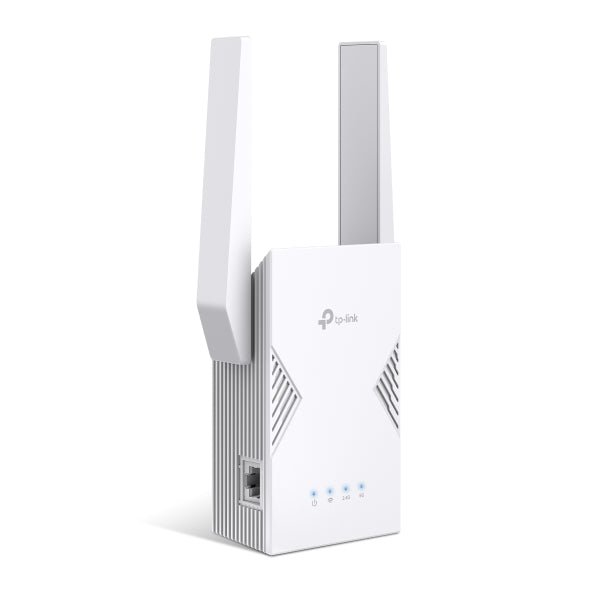



TP-Link RE225BE BE3600 Dual Band WiFi 7 Range Extender
Extend an everyday wireless network with straightforward control RE225BE adds dual-band WiFi 7 and a Gigabit Ethernet connection to a suitable extension point in the home. Choose range-extender mode for an existing wireless network or supported access-point mode with Ethernet. EasyMesh compatibility, the Tether app and a signal indicator help with setup and placement. This model has a 1Gbps Ethernet port, making it a simpler wired option than the RE235BE’s 2.5Gbps connection, while retaining BE3600-class wireless capability. Highlights Wireless capability WiFi 7; 5GHz up to 2,882Mbps; 2.4GHz up to 688Mbps. Published radio rates are theoretical, not measured internet speeds. Connections that suit the installation One Gigabit Ethernet port. Control and compatibility Range-extender and access-point modes. Tether app; EasyMesh with compatible equipment and firmware. Key Features Choose a socket with a useful upstream signal Place the extender between the router and the area needing better coverage, while retaining a reliable connection to the main network. Use the signal indicator to guide placement. An extender cannot recover a strong connection from a location where the incoming signal is already unusable. Use the supported wireless bands 5GHz up to 2,882Mbps; 2.4GHz up to 688Mbps. Actual speed depends on the router or access point, client hardware, channel conditions, distance and internet service. A combined wireless class is not a promise of single-device throughput. This model uses 2.4GHz and 5GHz, rather than adding a 6GHz radio. Make use of the Ethernet connection One Gigabit Ethernet port. Connect a suitable wired client in range-extender mode, or use the supported Ethernet uplink in access-point mode. Match the cable and equipment to the port rate; a faster port alone does not guarantee the same speed across a wireless backhaul. Expand through a compatible mesh platform EasyMesh can coordinate compatible routers and extenders with suitable firmware. Deco and Omada are separate management platforms; do not assume this extender becomes a managed Deco node or Omada access point. Standard extender operation and EasyMesh operation have different setup requirements. Manage the connection without adding complexity Use the Tether app or supported setup controls to configure the connection, review placement and maintain firmware. Check the regional plug and destination mains socket before installation, and allow ventilation around the device. Keep the network secured with a supported WPA2 or WPA3 configuration. Summary RE225BE offers dual-band wireless extension with one gigabit ethernet port. Choose a position with a useful upstream signal and use the appropriate extender or access-point mode. It is a practical coverage addition when the network, placement and clients are matched to its capabilities. Frequently Asked Questions Does it replace my internet router?ExpandCollapse No. Range-extender mode expands an existing wireless network. Access-point mode uses a suitable Ethernet connection to an upstream router or network. Where should I place it?ExpandCollapse Choose a socket where the main router’s signal is still reliable, between the router and the area needing coverage. Use the signal indicator and check actual performance after setup. Can it join a Deco or Omada managed network?ExpandCollapse EasyMesh, Deco and Omada are different management platforms. Do not assume this becomes a managed Deco node or Omada access point. Use compatible EasyMesh equipment or the supported ordinary extender/access-point arrangement. What does the Ethernet port support?ExpandCollapse One Gigabit Ethernet port. It can connect a wired client or provide the supported access-point uplink. The complete path can be slower than the Ethernet port rating. Is WiFi 7 required on every device?ExpandCollapse Older supported WiFi clients can connect, but advanced WiFi 7 features need compatible equipment and software. The package contains one extender and a setup guide; warranty is 3 years. Check the regional mains plug for the destination.
Pengambilan tersedia di 3005, Ubi Avenue 3, #01-88
Biasanya siap dalam 2-4 hari kerja (tidak termasuk hari libur)
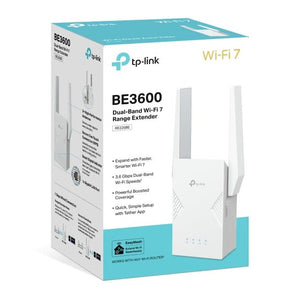
TP-Link RE225BE BE3600 Dual Band WiFi 7 Range Extender
Deskripsi
Extend an everyday wireless network with straightforward control
RE225BE adds dual-band WiFi 7 and a Gigabit Ethernet connection to a suitable extension point in the home. Choose range-extender mode for an existing wireless network or supported access-point mode with Ethernet. EasyMesh compatibility, the Tether app and a signal indicator help with setup and placement. This model has a 1Gbps Ethernet port, making it a simpler wired option than the RE235BE’s 2.5Gbps connection, while retaining BE3600-class wireless capability.
Highlights
Wireless capability
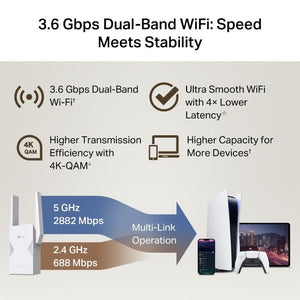
- WiFi 7; 5GHz up to 2,882Mbps; 2.4GHz up to 688Mbps.
- Published radio rates are theoretical, not measured internet speeds.
Connections that suit the installation
- One Gigabit Ethernet port.
Control and compatibility
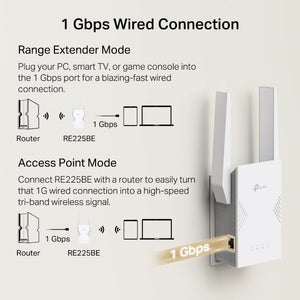
- Range-extender and access-point modes.
- Tether app; EasyMesh with compatible equipment and firmware.
Key Features
Choose a socket with a useful upstream signal
Place the extender between the router and the area needing better coverage, while retaining a reliable connection to the main network. Use the signal indicator to guide placement. An extender cannot recover a strong connection from a location where the incoming signal is already unusable.
Use the supported wireless bands
5GHz up to 2,882Mbps; 2.4GHz up to 688Mbps. Actual speed depends on the router or access point, client hardware, channel conditions, distance and internet service. A combined wireless class is not a promise of single-device throughput. This model uses 2.4GHz and 5GHz, rather than adding a 6GHz radio.
Make use of the Ethernet connection
One Gigabit Ethernet port. Connect a suitable wired client in range-extender mode, or use the supported Ethernet uplink in access-point mode. Match the cable and equipment to the port rate; a faster port alone does not guarantee the same speed across a wireless backhaul.
Expand through a compatible mesh platform
EasyMesh can coordinate compatible routers and extenders with suitable firmware. Deco and Omada are separate management platforms; do not assume this extender becomes a managed Deco node or Omada access point. Standard extender operation and EasyMesh operation have different setup requirements.
Manage the connection without adding complexity
Use the Tether app or supported setup controls to configure the connection, review placement and maintain firmware. Check the regional plug and destination mains socket before installation, and allow ventilation around the device. Keep the network secured with a supported WPA2 or WPA3 configuration.
Summary
RE225BE offers dual-band wireless extension with one gigabit ethernet port. Choose a position with a useful upstream signal and use the appropriate extender or access-point mode. It is a practical coverage addition when the network, placement and clients are matched to its capabilities.
Frequently Asked Questions
Does it replace my internet router?
No. Range-extender mode expands an existing wireless network. Access-point mode uses a suitable Ethernet connection to an upstream router or network.
Where should I place it?
Choose a socket where the main router’s signal is still reliable, between the router and the area needing coverage. Use the signal indicator and check actual performance after setup.
Can it join a Deco or Omada managed network?
EasyMesh, Deco and Omada are different management platforms. Do not assume this becomes a managed Deco node or Omada access point. Use compatible EasyMesh equipment or the supported ordinary extender/access-point arrangement.
What does the Ethernet port support?
One Gigabit Ethernet port. It can connect a wired client or provide the supported access-point uplink. The complete path can be slower than the Ethernet port rating.
Is WiFi 7 required on every device?
Older supported WiFi clients can connect, but advanced WiFi 7 features need compatible equipment and software. The package contains one extender and a setup guide; warranty is 3 years. Check the regional mains plug for the destination.
Spesifikasi
TP-Link RE225BE BE3600 Dual Band WiFi 7 Range Extender
TP-Link RE225BE BE3600 Dual Band WiFi 7 Range Extender combines WiFi 7 connectivity with the interfaces listed below. The grouped specifications distinguish theoretical wireless rates from physical connection limits, and identify the upstream equipment and operating modes needed for a working installation. Match the network hardware, cabling and regional power arrangement before ordering. Actual throughput depends on the complete connection and radio conditions; a headline wireless class is not a guaranteed internet download rate. Use the current manufacturer firmware for the exact model.
| Specification | Details |
|---|---|
| Wireless Capability | |
| Standard | WiFi 7; IEEE 802.11be. |
| Maximum radio link rates | 5GHz up to 2,882Mbps; 2.4GHz up to 688Mbps. |
| Performance conditions | Theoretical radio rates; actual throughput depends on clients, interfaces, distance, interference and internet service. |
| Security | Supported WPA2/WPA3 configurations; functions depend on mode, client and driver. |
| Interfaces and Installation | |
| Connections | One Gigabit Ethernet port. |
| Operating Modes and Management | |
| Modes and setup | Range extender or access point; Tether app and supported setup controls. |
| Mesh platform | EasyMesh with compatible equipment and firmware; separate from Deco and Omada. |
| Power | |
| Power arrangement | 100–240V AC, 50/60Hz, 0.3A; maximum consumption 15W. |
| Regional connection | Use the supplied regional plug and voltage arrangement appropriate for the destination. |
| Physical and Environment | |
| Dimensions | 97 × 46 × 158mm, as published; regional plug may affect dimensions. |
| Operating conditions | 0 to 40°C; 10–90% RH, non-condensing. |
| Package and Warranty | |
| Included | One range extender and quick-installation guide. |
| Warranty | 3 years. |