


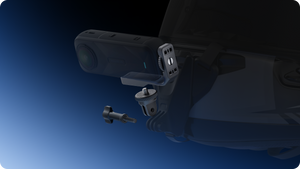

Insta360 X5 Vertical-Horizontal Mount
A Different Position for the Same Adventure Change the way your camera sits on a support without changing the camera itself. Insta360 X5 Vertical-Horizontal Mount provides two mounting positions for compatible X5, X4 and X4 Air cameras, letting you move between an upright arrangement and a lower horizontal setup. The lightweight bracket brings quick-release mounting points and familiar accessory connections into a compact design for considered helmet, chest and other supported action-camera installations. Highlights Supports Insta360 X5, X4 and X4 Air. Two quick-release mounting points for different camera positions. Horizontal mounting lowers the camera’s centre of gravity. 1/4-inch and two-prong accessory connections. Approximately 28.9 g, with adapter and wrench supplied. Key Features Choose the Camera Position for the Activity An upright camera arrangement and a horizontal mounting position place the camera differently on a support. Choose the position that suits the activity, clearance and intended handling, then check that the complete setup is secure. Changing the physical mount does not itself change the camera’s recording resolution, stabilisation system or video settings. Bring the Camera Closer to the Support Mounting the camera horizontally lowers its centre of gravity. This can make an action-camera installation more compact and better balanced than a taller upright arrangement. The final result still depends on the support, camera settings and movement; the bracket complements a correctly fitted mount rather than compensating for a loose or unsuitable installation. Switch Through Two Mounting Points The bracket has two quick-release connection points for supported Insta360 Quick Release Mount and Ace-series Standard Mount accessories. These quick-release accessories are separate from the bracket. Once the appropriate interface is fitted, the two positions make it easier to prepare a different camera arrangement without rebuilding every part of the support. Connect Through Familiar Interfaces A 1/4-inch mounting connection and the supplied 1/4-inch-to-two-prong adapter provide options for compatible camera supports. Match the thread, prong fitting and quick-release interface before assembly. A shared connector does not establish the suitability of every third-party support or every camera; use the specified camera models and the correct attachment method. Keep the Controls Accessible Secure the bracket to the camera’s bottom 1/4-inch mounting point with the supplied wrench. Position it on the battery side as instructed so that the bracket does not block the camera buttons. Check the camera, attachment points and support before recording, especially when changing between mounting positions. Travel with a Focused Mounting Kit The bracket weighs approximately 28.9 g and uses aluminium alloy, silicone and plastic. Its compact construction is easy to carry alongside the camera’s other mounting accessories. The package includes the bracket, a two-prong adapter and a wrench; the camera, Quick Release Mount, Standard Mount and activity-specific supports are separate. Summary Insta360 X5 Vertical-Horizontal Mount gives compatible X5, X4 and X4 Air cameras a flexible physical mounting arrangement. Choose an upright or lower horizontal position, connect the appropriate support and keep the controls accessible. It is a compact addition for a filming kit that needs more than one way to carry the camera. Frequently Asked Questions Which Cameras Does This Mount Fit?ExpandCollapse It supports Insta360 X5, X4 and X4 Air. It is not a universal cage for every X-series or Ace-series camera. Use the bottom 1/4-inch camera connection and the fitting instructions for the exact model. Does It Include a Quick Release Mount?ExpandCollapse No. The package includes the Vertical-Horizontal Mount, a 1/4-inch-to-two-prong adapter and a wrench. The compatible Insta360 Quick Release Mount and Ace-series Standard Mount are separate accessories. Does Horizontal Mounting Change the Video Format?ExpandCollapse The bracket changes the physical camera position. Recording format, resolution, reframing and stabilisation remain camera and software functions. Check the camera settings for the footage you want to produce. Where Should I Position the Bracket?ExpandCollapse Attach it to the bottom 1/4-inch mounting point and tighten it with the supplied wrench. Place the bracket on the battery side as instructed so that it does not obstruct the camera buttons. Can I Use It with My Existing Camera Support?ExpandCollapse Match the support’s 1/4-inch, two-prong or supported Insta360 quick-release interface. The bracket provides connection options, but the complete installation must suit the camera and activity. Check every attachment before use.
Pengambilan tersedia di 3005, Ubi Avenue 3, #01-88
Biasanya siap dalam 2-4 hari kerja (tidak termasuk hari libur)
Insta360 X5 Vertical-Horizontal Mount
Deskripsi
A Different Position for the Same Adventure
Change the way your camera sits on a support without changing the camera itself. Insta360 X5 Vertical-Horizontal Mount provides two mounting positions for compatible X5, X4 and X4 Air cameras, letting you move between an upright arrangement and a lower horizontal setup. The lightweight bracket brings quick-release mounting points and familiar accessory connections into a compact design for considered helmet, chest and other supported action-camera installations.
Highlights
- Supports Insta360 X5, X4 and X4 Air.
- Two quick-release mounting points for different camera positions.
- Horizontal mounting lowers the camera’s centre of gravity.
- 1/4-inch and two-prong accessory connections.
- Approximately 28.9 g, with adapter and wrench supplied.
Key Features
Choose the Camera Position for the Activity
An upright camera arrangement and a horizontal mounting position place the camera differently on a support. Choose the position that suits the activity, clearance and intended handling, then check that the complete setup is secure. Changing the physical mount does not itself change the camera’s recording resolution, stabilisation system or video settings.
Bring the Camera Closer to the Support
Mounting the camera horizontally lowers its centre of gravity. This can make an action-camera installation more compact and better balanced than a taller upright arrangement. The final result still depends on the support, camera settings and movement; the bracket complements a correctly fitted mount rather than compensating for a loose or unsuitable installation.
Switch Through Two Mounting Points
The bracket has two quick-release connection points for supported Insta360 Quick Release Mount and Ace-series Standard Mount accessories. These quick-release accessories are separate from the bracket. Once the appropriate interface is fitted, the two positions make it easier to prepare a different camera arrangement without rebuilding every part of the support.
Connect Through Familiar Interfaces
A 1/4-inch mounting connection and the supplied 1/4-inch-to-two-prong adapter provide options for compatible camera supports. Match the thread, prong fitting and quick-release interface before assembly. A shared connector does not establish the suitability of every third-party support or every camera; use the specified camera models and the correct attachment method.
Keep the Controls Accessible
Secure the bracket to the camera’s bottom 1/4-inch mounting point with the supplied wrench. Position it on the battery side as instructed so that the bracket does not block the camera buttons. Check the camera, attachment points and support before recording, especially when changing between mounting positions.
Travel with a Focused Mounting Kit
The bracket weighs approximately 28.9 g and uses aluminium alloy, silicone and plastic. Its compact construction is easy to carry alongside the camera’s other mounting accessories. The package includes the bracket, a two-prong adapter and a wrench; the camera, Quick Release Mount, Standard Mount and activity-specific supports are separate.
Summary
Insta360 X5 Vertical-Horizontal Mount gives compatible X5, X4 and X4 Air cameras a flexible physical mounting arrangement. Choose an upright or lower horizontal position, connect the appropriate support and keep the controls accessible. It is a compact addition for a filming kit that needs more than one way to carry the camera.
Frequently Asked Questions
Which Cameras Does This Mount Fit?
It supports Insta360 X5, X4 and X4 Air. It is not a universal cage for every X-series or Ace-series camera. Use the bottom 1/4-inch camera connection and the fitting instructions for the exact model.
Does It Include a Quick Release Mount?
No. The package includes the Vertical-Horizontal Mount, a 1/4-inch-to-two-prong adapter and a wrench. The compatible Insta360 Quick Release Mount and Ace-series Standard Mount are separate accessories.
Does Horizontal Mounting Change the Video Format?
The bracket changes the physical camera position. Recording format, resolution, reframing and stabilisation remain camera and software functions. Check the camera settings for the footage you want to produce.
Where Should I Position the Bracket?
Attach it to the bottom 1/4-inch mounting point and tighten it with the supplied wrench. Place the bracket on the battery side as instructed so that it does not obstruct the camera buttons.
Can I Use It with My Existing Camera Support?
Match the support’s 1/4-inch, two-prong or supported Insta360 quick-release interface. The bracket provides connection options, but the complete installation must suit the camera and activity. Check every attachment before use.
Spesifikasi
Insta360 X5 Vertical-Horizontal Mount
Insta360 X5 Vertical-Horizontal Mount changes the physical mounting position of compatible X5, X4 and X4 Air cameras. Two connection points support upright and horizontal arrangements, with familiar threaded and prong interfaces for suitable accessories. The measurements below describe the bracket rather than a complete camera installation. Position it on the camera’s battery side, keep the controls accessible and secure the appropriate support before recording. Cameras and separate quick-release or activity mounts are not included.
| Specification | Details |
|---|---|
| Camera Fit and Mounting | |
| Compatible Cameras | Insta360 X5, X4 and X4 Air |
| Mounting Positions | Upright and horizontal, using two bracket connection points |
| Quick-Release Fit | Compatible Insta360 Quick Release Mount and Ace-series Standard Mount; sold separately |
| Accessory Interfaces | 1/4-inch connection and supplied 1/4-inch-to-two-prong adapter |
| Physical Design | |
| Dimensions | 80.3 × 49.7 × 24 mm |
| Weight | Approximately 28.9 g |
| Materials | Aluminium alloy, silicone and plastic |
| Installation | |
| Camera Attachment | Camera’s bottom 1/4-inch mounting point; tighten with supplied wrench |
| Bracket Position | Battery side of the camera, keeping buttons unobstructed |
| Included Items | |
| In the Box | Vertical-Horizontal Mount, 1/4-inch-to-two-prong adapter and wrench |
| Separate Equipment | Camera, Quick Release Mount, Standard Mount and other camera supports |