









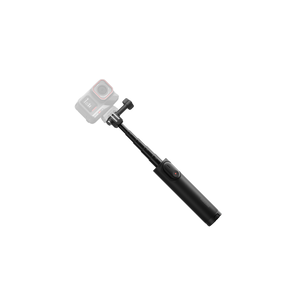


Insta360 Mini 2-in-1 Tripod 2.0
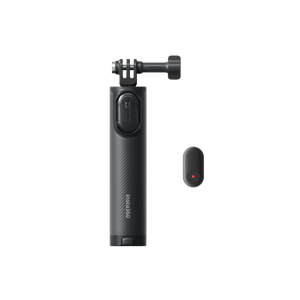
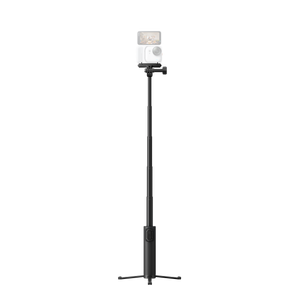
One Compact Support for More Ways to Film Move from a handheld view to a stable tabletop composition without changing the support in your bag. Insta360 Mini 2-in-1 Tripod 2.0 Remote Kit combines a compact grip, extending selfie stick and fold-out tripod with an Insta360 Mini Remote for supported camera control. The adjustable camera fitting and supplied adapters help you prepare the right mounting arrangement for your camera, whether you are recording a travel moment, a presentation or a group shot. Highlights Handheld grip, selfie stick and built-in tripod in one design. Extends from 18 cm to 58.5 cm with the tripod retracted. 172 g support with a maximum camera load of 300 g. Supplied camera adapters support the appropriate mounting interfaces. Mini Remote included for supported camera-control functions. Check remote function separately from the tripod’s physical camera fit. Key Features Change the Composition Without Changing the Support Keep the legs folded for a handheld grip, extend the stick for a wider view, or open the built-in tripod on a smooth, level surface. The compact folded form makes it easy to carry between locations, while the extending design offers more framing distance when a close handheld shot feels too tight. Choose the Setup That Suits Your Workflow The included Insta360 Mini Remote can sit in the handle for a supported camera-control workflow. The remote and Storage Cover occupy the same position, so configure the handle for the fitting you intend to use. Check the available remote functions for your camera before recording. Fit and Tilt the Camera Deliberately Use the supplied adapter that matches the camera’s mounting interface and keep the combined camera load within 300 g. The adapter adjusts through 180° for changes in framing. Loosen the thumb screw before adjusting, then retighten it so the camera stays at the intended angle. Match Remote Control to the Camera Physical tripod compatibility does not establish remote-control compatibility. Camera model, mounting arrangement and current firmware determine the available functions. For GO-series cameras, the manufacturer notes that the Mini Remote button can only wake the standalone camera. Check the intended camera-control workflow before choosing the Remote Kit. Give the Tripod a Stable Surface Place the unfolded tripod on a smooth, flat and stable surface. Avoid full extension outdoors, take care in strong winds and remove the camera before moving the tripod. With X-series 360 cameras, the storage-cover area may remain visible in footage when the stick is extended, so check framing before the main recording. Summary A practical support for moving between handheld, extended and tabletop views, with a Mini Remote for supported camera control. Fit the camera with the correct adapter and check control compatibility separately. Stable placement and a checked connection give the compact design the right starting point for recording. Frequently Asked Questions What Is Included in the Remote Kit?ExpandCollapse The Remote Kit includes the Mini 2-in-1 Tripod 2.0, an Insta360 Mini Remote and the specified mounting accessories. Select the available finish in the selector. Camera hardware and microSD cards are not included. Will the Mini Remote Control Every Camera That Fits?ExpandCollapse No. Physical mounting compatibility and remote-control support are different. Check the exact camera and current remote firmware. The manufacturer states that, for GO-series cameras, the remote button can only wake the standalone camera. How Tall Is It and What Can It Support?ExpandCollapse The support measures 18 cm at minimum and extends to 58.5 cm with the tripod retracted. The tripod itself weighs 172 g and supports a camera load up to 300 g. Use the appropriate supplied adapter and secure the thumb screw. Can I Use It Fully Extended Outdoors?ExpandCollapse The manufacturer advises against full extension outdoors and recommends caution in strong winds. Open the tripod on a smooth, flat and stable surface. Remove the camera before moving it and do not force the legs to bend. Will the Support Disappear in 360 Footage?ExpandCollapse Do not assume that every part will disappear. The manufacturer notes that the handle’s storage-cover area may remain visible with X-series cameras when the stick is extended. Check the framing and follow the intended camera alignment.
Pengambilan tersedia di 3005, Ubi Avenue 3, #01-88
Biasanya siap dalam 2-4 hari kerja (tidak termasuk hari libur)
Insta360 Mini 2-in-1 Tripod 2.0
Pesan beberapa pilihan
Atur jumlah setiap pilihan. Keranjang diperbarui secara otomatis.
Varian
Jumlah
Harga
Total varian
Varian
Total barang
Total barang
Subtotal produk
Deskripsi
One Compact Support for More Ways to Film
Move from a handheld view to a stable tabletop composition without changing the support in your bag. Insta360 Mini 2-in-1 Tripod 2.0 Remote Kit combines a compact grip, extending selfie stick and fold-out tripod with an Insta360 Mini Remote for supported camera control. The adjustable camera fitting and supplied adapters help you prepare the right mounting arrangement for your camera, whether you are recording a travel moment, a presentation or a group shot.
Highlights
- Handheld grip, selfie stick and built-in tripod in one design.
- Extends from 18 cm to 58.5 cm with the tripod retracted.
- 172 g support with a maximum camera load of 300 g.
- Supplied camera adapters support the appropriate mounting interfaces.
- Mini Remote included for supported camera-control functions.
- Check remote function separately from the tripod’s physical camera fit.
Key Features
Change the Composition Without Changing the Support
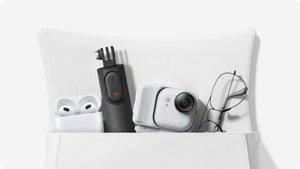
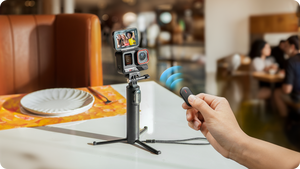
Keep the legs folded for a handheld grip, extend the stick for a wider view, or open the built-in tripod on a smooth, level surface. The compact folded form makes it easy to carry between locations, while the extending design offers more framing distance when a close handheld shot feels too tight.
Choose the Setup That Suits Your Workflow
The included Insta360 Mini Remote can sit in the handle for a supported camera-control workflow. The remote and Storage Cover occupy the same position, so configure the handle for the fitting you intend to use. Check the available remote functions for your camera before recording.
Fit and Tilt the Camera Deliberately
Use the supplied adapter that matches the camera’s mounting interface and keep the combined camera load within 300 g. The adapter adjusts through 180° for changes in framing. Loosen the thumb screw before adjusting, then retighten it so the camera stays at the intended angle.
Match Remote Control to the Camera
Physical tripod compatibility does not establish remote-control compatibility. Camera model, mounting arrangement and current firmware determine the available functions. For GO-series cameras, the manufacturer notes that the Mini Remote button can only wake the standalone camera. Check the intended camera-control workflow before choosing the Remote Kit.
Give the Tripod a Stable Surface
Place the unfolded tripod on a smooth, flat and stable surface. Avoid full extension outdoors, take care in strong winds and remove the camera before moving the tripod. With X-series 360 cameras, the storage-cover area may remain visible in footage when the stick is extended, so check framing before the main recording.
Summary
A practical support for moving between handheld, extended and tabletop views, with a Mini Remote for supported camera control. Fit the camera with the correct adapter and check control compatibility separately. Stable placement and a checked connection give the compact design the right starting point for recording.
Frequently Asked Questions
What Is Included in the Remote Kit?
The Remote Kit includes the Mini 2-in-1 Tripod 2.0, an Insta360 Mini Remote and the specified mounting accessories. Select the available finish in the selector. Camera hardware and microSD cards are not included.
Will the Mini Remote Control Every Camera That Fits?
No. Physical mounting compatibility and remote-control support are different. Check the exact camera and current remote firmware. The manufacturer states that, for GO-series cameras, the remote button can only wake the standalone camera.
How Tall Is It and What Can It Support?
The support measures 18 cm at minimum and extends to 58.5 cm with the tripod retracted. The tripod itself weighs 172 g and supports a camera load up to 300 g. Use the appropriate supplied adapter and secure the thumb screw.
Can I Use It Fully Extended Outdoors?
The manufacturer advises against full extension outdoors and recommends caution in strong winds. Open the tripod on a smooth, flat and stable surface. Remove the camera before moving it and do not force the legs to bend.
Will the Support Disappear in 360 Footage?
Do not assume that every part will disappear. The manufacturer notes that the handle’s storage-cover area may remain visible with X-series cameras when the stick is extended. Check the framing and follow the intended camera alignment.
Spesifikasi
Insta360 Mini 2-in-1 Tripod 2.0
Insta360 Mini 2-in-1 Tripod 2.0 Remote Kit combines handheld and tabletop support with an extending selfie-stick form and an included Mini Remote. Its physical camera fit, maximum load and remote-control functions should be considered separately. Use the correct camera adapter, check the available control functions for your model and place the unfolded tripod on a stable surface.
| Specification | Details |
|---|---|
| Format and Camera Fit | |
| Functions | Handheld grip, extending selfie stick and built-in tripod |
| Maximum Camera Load | 300 g |
| Camera Connection | 1/4-inch screw and supplied adapters for supported camera interfaces |
| Adapter Adjustment | 180°; loosen the thumb screw before adjusting and retighten afterwards |
| Compatibility | Supported Insta360 camera families using the correct interface; remote support must be checked separately |
| Construction and Dimensions | |
| Minimum Length | 18 cm |
| Maximum Length | 58.5 cm with the tripod retracted |
| Tripod Weight | 172 g |
| Materials | Aluminium alloy, plastic and thermoplastic elastomers (TPE) |
| Storage Cover | Holds two microSD cards; cards supplied separately |
| Bundle and Remote | |
| Remote Kit | Mini 2-in-1 Tripod 2.0 and Mini Remote |
| Remote Kit Adapters | Universal three-prong adapter and 1/4-inch-to-two-prong adapter |
| Handle Arrangement | Mini Remote replaces the Storage Cover |
| Remote Compatibility | Model- and firmware-dependent; physical tripod fit does not imply camera-control support |
| GO-Series Limitation | Mini Remote button can only wake the standalone camera |
| Setup and Care | |
| Standard Accessories | Thumb screw, 1/4-inch-to-two-prong adapter, Storage Cover, four anti-slip rings and wrist strap; includes Mini Remote |
| Tripod Surface | Smooth, flat and stable |
| Outdoor Use | Avoid full extension; use caution in strong wind |
| 360 Capture Note | Handle storage-cover area may remain visible in extended X-series footage |
| Moving the Tripod | Remove the camera first; do not force the legs to bend |