



Insta360 GO Ultra ND Filter Set
Give Movement A More Deliberate Look Control the light reaching your GO Ultra when you want a slower shutter and more visible movement in the image. The Insta360 GO Ultra ND Filter Set includes ND8, ND16 and ND32 filters, giving you three strengths for different lighting conditions. From a moving landscape to a planned long exposure, it offers an optical tool for shaping the capture, with a compact storage box to keep the set together. Highlights Three-filter set designed specifically for GO Ultra ND8, ND16 and ND32 light-reduction strengths Supports slower-shutter motion-blur and long-exposure techniques Replaces the camera’s removable Lens Guard during use Includes a protective storage box Key Features Choose The Strength For The Available Light ND8 reduces light by three stops, ND16 by four and ND32 by five. Insta360 presents them for progressively brighter conditions, from cloudy daylight to strong sunlight. Select the strength that lets you achieve the shutter and exposure you need, then check the image. The filters do not automatically set exposure or make every lighting condition suitable for the same settings. Capture Motion Blur At The Shutter Reducing incoming light gives you more room to use a slower shutter in bright conditions without overexposing the image. Moving subjects and backgrounds can then carry more motion blur in the captured footage. The result depends on shutter speed, movement and exposure choices; an ND filter is not a software effect or an automatic promise of a cinematic result. A Tool For Considered Long Exposures The set can also support planned long-exposure photographs, including scenes where bright light sources would otherwise limit the exposure. Choose the filter for the actual scene and keep the camera steady when the exposure requires it. ND filters reduce light rather than brighten a dark scene, so a stronger filter is not automatically the better choice at night. Fit The Correct Optical Accessory Remove GO Ultra’s Lens Guard by turning it anticlockwise, then fit the chosen ND filter and turn it clockwise to secure it. The set is specific to GO Ultra and is not the GO 3 or GO 3S filter set. Work with clean, dry optical surfaces and return the unused filters to their storage box between changes. Balance Motion Blur With Stabilisation A slower shutter can affect stabilisation during movement. Insta360’s support guidance recommends checking shutter speed and stabilisation settings if footage becomes jittery, including increasing shutter speed where needed. Treat the filter strength as part of the whole camera setup, particularly for fast or uneven movement, rather than assuming that more blur always improves a shot. Summary The GO Ultra ND Filter Set is for creators who want to make intentional choices about exposure and motion. Three strengths, a camera-specific fitting and a protective box give you a compact kit, with the best result coming from matching the filter to the light, shutter speed and movement. Frequently Asked Questions What Is Included In The Set?ExpandCollapse The set includes one ND8 filter, one ND16 filter, one ND32 filter and one storage box. The GO Ultra camera, Action Pod and camera mounts shown in some application images are sold separately. What Is The Difference Between ND8, ND16 And ND32?ExpandCollapse They reduce incoming light by three, four and five stops respectively. ND8 is the lighter option, while ND32 provides the greatest reduction. Select the strength for the lighting and shutter speed you want, rather than using the strongest filter for every scene. Do I Remove The GO Ultra Lens Guard?ExpandCollapse Yes. Remove the Lens Guard by turning it anticlockwise, then install the chosen ND filter and turn it clockwise until secure. This is a model-specific GO Ultra set, not a filter set for GO 3 or GO 3S. Will An ND Filter Improve Stabilisation?ExpandCollapse Not automatically. Slower shutter speeds can add motion blur but may reduce the effectiveness of stabilisation during movement. If footage looks jittery, check exposure and stabilisation settings and consider a faster shutter or a lighter filter. Do These Filters Make Night Scenes Brighter?ExpandCollapse No. ND filters reduce the light entering the camera. They can be useful for a planned long exposure with bright light sources, but they are not low-light boosters. Select an appropriate strength and support the camera when using a long exposure.
Pengambilan tersedia di 3005, Ubi Avenue 3, #01-88
Biasanya siap dalam 2-4 hari kerja (tidak termasuk hari libur)
Insta360 GO Ultra ND Filter Set
Deskripsi
Give Movement A More Deliberate Look
Control the light reaching your GO Ultra when you want a slower shutter and more visible movement in the image. The Insta360 GO Ultra ND Filter Set includes ND8, ND16 and ND32 filters, giving you three strengths for different lighting conditions. From a moving landscape to a planned long exposure, it offers an optical tool for shaping the capture, with a compact storage box to keep the set together.
Highlights
- Three-filter set designed specifically for GO Ultra
- ND8, ND16 and ND32 light-reduction strengths
- Supports slower-shutter motion-blur and long-exposure techniques
- Replaces the camera’s removable Lens Guard during use
- Includes a protective storage box
Key Features
Choose The Strength For The Available Light
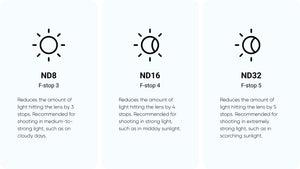
ND8 reduces light by three stops, ND16 by four and ND32 by five. Insta360 presents them for progressively brighter conditions, from cloudy daylight to strong sunlight. Select the strength that lets you achieve the shutter and exposure you need, then check the image. The filters do not automatically set exposure or make every lighting condition suitable for the same settings.
Capture Motion Blur At The Shutter
Reducing incoming light gives you more room to use a slower shutter in bright conditions without overexposing the image. Moving subjects and backgrounds can then carry more motion blur in the captured footage. The result depends on shutter speed, movement and exposure choices; an ND filter is not a software effect or an automatic promise of a cinematic result.
A Tool For Considered Long Exposures
The set can also support planned long-exposure photographs, including scenes where bright light sources would otherwise limit the exposure. Choose the filter for the actual scene and keep the camera steady when the exposure requires it. ND filters reduce light rather than brighten a dark scene, so a stronger filter is not automatically the better choice at night.
Fit The Correct Optical Accessory
Remove GO Ultra’s Lens Guard by turning it anticlockwise, then fit the chosen ND filter and turn it clockwise to secure it. The set is specific to GO Ultra and is not the GO 3 or GO 3S filter set. Work with clean, dry optical surfaces and return the unused filters to their storage box between changes.
Balance Motion Blur With Stabilisation
A slower shutter can affect stabilisation during movement. Insta360’s support guidance recommends checking shutter speed and stabilisation settings if footage becomes jittery, including increasing shutter speed where needed. Treat the filter strength as part of the whole camera setup, particularly for fast or uneven movement, rather than assuming that more blur always improves a shot.
Summary
The GO Ultra ND Filter Set is for creators who want to make intentional choices about exposure and motion. Three strengths, a camera-specific fitting and a protective box give you a compact kit, with the best result coming from matching the filter to the light, shutter speed and movement.
Frequently Asked Questions
What Is Included In The Set?
The set includes one ND8 filter, one ND16 filter, one ND32 filter and one storage box. The GO Ultra camera, Action Pod and camera mounts shown in some application images are sold separately.
What Is The Difference Between ND8, ND16 And ND32?
They reduce incoming light by three, four and five stops respectively. ND8 is the lighter option, while ND32 provides the greatest reduction. Select the strength for the lighting and shutter speed you want, rather than using the strongest filter for every scene.
Do I Remove The GO Ultra Lens Guard?
Yes. Remove the Lens Guard by turning it anticlockwise, then install the chosen ND filter and turn it clockwise until secure. This is a model-specific GO Ultra set, not a filter set for GO 3 or GO 3S.
Will An ND Filter Improve Stabilisation?
Not automatically. Slower shutter speeds can add motion blur but may reduce the effectiveness of stabilisation during movement. If footage looks jittery, check exposure and stabilisation settings and consider a faster shutter or a lighter filter.
Do These Filters Make Night Scenes Brighter?
No. ND filters reduce the light entering the camera. They can be useful for a planned long exposure with bright light sources, but they are not low-light boosters. Select an appropriate strength and support the camera when using a long exposure.
Spesifikasi
Insta360 GO Ultra ND Filter Set
This camera-specific set provides three neutral-density strengths for controlling the light entering Insta360 GO Ultra. The filters replace the removable Lens Guard and support exposure choices such as slower-shutter video or planned long-exposure photography. Their effect depends on the scene and camera settings, while slower shutters can affect stabilisation during movement. The supplied box keeps the three filters together between uses. Camera, Action Pod and mounting accessories are supplied separately.
| Specification | Details |
|---|---|
| Optics And Camera Fit | |
| Compatible Camera | Insta360 GO Ultra only |
| Filter Strengths | ND8, ND16 and ND32 |
| Light Reduction | ND8 3 stops; ND16 4 stops; ND32 5 stops |
| Typical Use | Exposure control for motion-blur video and planned long-exposure photography |
| Installation And Shooting | |
| Fitting | Remove the Lens Guard anticlockwise; fit the selected ND filter clockwise |
| Lighting Choice | Select strength for available light, desired shutter speed and exposure |
| Stabilisation | Slower shutter speeds may affect stabilisation; check settings and adjust shutter or filter strength where necessary |
| Physical Details | |
| Filter Dimensions | 24.5 × 24.5 × 4.8mm |
| Storage Box Dimensions | 91.6 × 43.3 × 12.2mm |
| Manufacturer-Listed Set Weight | 46.2g |
| Materials | Plastic, silicone, glass and metal |
| Package | |
| Included | 1 × ND8 filter; 1 × ND16 filter; 1 × ND32 filter; 1 × storage box |
| Supplied Separately | GO Ultra camera, Action Pod and mounting accessories |