





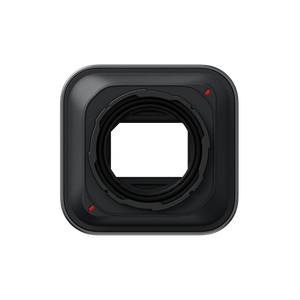
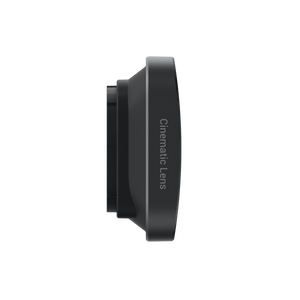




Insta360 Ace Pro 2 Cinematic Lens
Give Everyday Scenes A Cinematic Perspective The Insta360 Ace Pro 2 Cinematic Lens brings a widescreen 2.35:1 format and distinctive optical effects to a compact camera. Strong light can create horizontal flares, while the lens and the camera’s processing produce a wider horizontal perspective than shooting without it. Pair the look with Ace Pro 2’s in-camera colour profiles to shape travel films, street scenes and considered everyday stories. Highlights Removable Cinematic Lens designed specifically for Insta360 Ace Pro 2 2.35:1 widescreen imaging with distinctive flare and streak effects Dedicated Cinematic Lens option in Lens Master Photo and Video modes supported with the accessory enabled Includes a silicone lens cap, cleaning cloth and wrench Key Features Widescreen Framing With An Optical Character The lens creates a 2.35:1 cinematic format and a wider horizontal view than recording without it. It also changes the optical rendering, rather than simply adding black bars to an ordinary frame. Official support describes a softer, film-like tonality designed to complement the widescreen composition. Use Strong Light Creatively Bright light sources can produce horizontal flares and streaks that become part of the composition. MegaView is the manufacturer’s recommended option for straight flares and streaks, while UltraWide uses the fuller field of view. The effect is less pronounced in Linear mode, so choose the setting deliberately for each scene. Choose A Colour Profile To Suit The Story Pair the optical look with the camera’s supported in-camera colour profiles to adjust the character of your footage. This is useful when you want a consistent visual direction across a short film or travel sequence. The final result still depends on exposure, lighting and composition rather than a guaranteed cinematic result from the lens alone. Set Up The Camera For The Lens Update the firmware and Insta360 app, fit the lens and select Cinematic Lens under Accessories > Lens Master. Photo and Video are the supported shooting modes with this setting; PureVideo and zoom are not supported. Only Face Priority metering is available, so plan the shot around the controls the accessory provides. Fit Carefully And Protect Between Shoots Remove the standard Lens Guard using the supplied wrench. Align the rear red marks at the left and right, turn the lens 45° clockwise and confirm the final orientation shown in the guide. Keep the connection clean and dry, use the silicone cap between shoots and avoid underwater shooting, which can distort the image. Summary The Ace Pro 2 Cinematic Lens offers a purposeful change in framing and optical character for creators who want widescreen storytelling from a compact camera. Use the matching camera mode, work with the available light and protect the lens carefully between scenes. Frequently Asked Questions Is This Just A Widescreen Crop?ExpandCollapse No. In addition to the 2.35:1 format, official support describes a wider horizontal field of view, optical flare and streak effects, and specially optimised film-like tonality compared with shooting without the lens. Which Shooting Modes Can I Use?ExpandCollapse Photo and Video modes are supported with the Cinematic Lens setting enabled. PureVideo and zoom are not supported, and only Face Priority metering is available. Which Field-Of-View Setting Should I Choose?ExpandCollapse MegaView can produce straight flares and streaks, while UltraWide uses the full field of view. Official support says the effect is less pronounced in Linear. Choose the setting for the composition and check the preview before recording. Can I Use The Lens Underwater?ExpandCollapse Insta360 advises against underwater use because it can cause image distortion. Keep the lens and its connection clean and dry, and fit the supplied silicone cap when storing it. What Is Included And How Do I Enable It?ExpandCollapse The box includes the Cinematic Lens, a silicone lens cap, cleaning cloth and wrench. After installing it, select Accessories > Lens Master > Cinematic Lens. Return the setting to Standard when refitting the original Lens Guard. The camera is sold separately.
Pengambilan tersedia di 3005, Ubi Avenue 3, #01-88
Biasanya siap dalam 2-4 hari kerja (tidak termasuk hari libur)
Insta360 Ace Pro 2 Cinematic Lens
Deskripsi
Give Everyday Scenes A Cinematic Perspective
The Insta360 Ace Pro 2 Cinematic Lens brings a widescreen 2.35:1 format and distinctive optical effects to a compact camera. Strong light can create horizontal flares, while the lens and the camera’s processing produce a wider horizontal perspective than shooting without it. Pair the look with Ace Pro 2’s in-camera colour profiles to shape travel films, street scenes and considered everyday stories.
Highlights
- Removable Cinematic Lens designed specifically for Insta360 Ace Pro 2
- 2.35:1 widescreen imaging with distinctive flare and streak effects
- Dedicated Cinematic Lens option in Lens Master
- Photo and Video modes supported with the accessory enabled
- Includes a silicone lens cap, cleaning cloth and wrench
Key Features
Widescreen Framing With An Optical Character
The lens creates a 2.35:1 cinematic format and a wider horizontal view than recording without it. It also changes the optical rendering, rather than simply adding black bars to an ordinary frame. Official support describes a softer, film-like tonality designed to complement the widescreen composition.
Use Strong Light Creatively
Bright light sources can produce horizontal flares and streaks that become part of the composition. MegaView is the manufacturer’s recommended option for straight flares and streaks, while UltraWide uses the fuller field of view. The effect is less pronounced in Linear mode, so choose the setting deliberately for each scene.
Choose A Colour Profile To Suit The Story
Pair the optical look with the camera’s supported in-camera colour profiles to adjust the character of your footage. This is useful when you want a consistent visual direction across a short film or travel sequence. The final result still depends on exposure, lighting and composition rather than a guaranteed cinematic result from the lens alone.
Set Up The Camera For The Lens
Update the firmware and Insta360 app, fit the lens and select Cinematic Lens under Accessories > Lens Master. Photo and Video are the supported shooting modes with this setting; PureVideo and zoom are not supported. Only Face Priority metering is available, so plan the shot around the controls the accessory provides.
Fit Carefully And Protect Between Shoots
Remove the standard Lens Guard using the supplied wrench. Align the rear red marks at the left and right, turn the lens 45° clockwise and confirm the final orientation shown in the guide. Keep the connection clean and dry, use the silicone cap between shoots and avoid underwater shooting, which can distort the image.
Summary
The Ace Pro 2 Cinematic Lens offers a purposeful change in framing and optical character for creators who want widescreen storytelling from a compact camera. Use the matching camera mode, work with the available light and protect the lens carefully between scenes.
Frequently Asked Questions
Is This Just A Widescreen Crop?
No. In addition to the 2.35:1 format, official support describes a wider horizontal field of view, optical flare and streak effects, and specially optimised film-like tonality compared with shooting without the lens.
Which Shooting Modes Can I Use?
Photo and Video modes are supported with the Cinematic Lens setting enabled. PureVideo and zoom are not supported, and only Face Priority metering is available.
Which Field-Of-View Setting Should I Choose?
MegaView can produce straight flares and streaks, while UltraWide uses the full field of view. Official support says the effect is less pronounced in Linear. Choose the setting for the composition and check the preview before recording.
Can I Use The Lens Underwater?
Insta360 advises against underwater use because it can cause image distortion. Keep the lens and its connection clean and dry, and fit the supplied silicone cap when storing it.
What Is Included And How Do I Enable It?
The box includes the Cinematic Lens, a silicone lens cap, cleaning cloth and wrench. After installing it, select Accessories > Lens Master > Cinematic Lens. Return the setting to Standard when refitting the original Lens Guard. The camera is sold separately.
Spesifikasi
Insta360 Ace Pro 2 Cinematic Lens
Designed for Insta360 Ace Pro 2, the Cinematic Lens works with a dedicated camera setting to provide widescreen framing and its intended optical rendering. It is important to distinguish the supported Photo and Video modes from the camera’s wider standard feature set: zoom and PureVideo are unavailable with this lens enabled. Correct orientation affects image quality, and the manufacturer advises against underwater use. Keep the optical surfaces clean and use the included cap when carrying or storing the accessory.
| Specification | Details |
|---|---|
| Camera And Imaging | |
| Compatible Camera | Insta360 Ace Pro 2 |
| Aspect Ratio | 2.35:1 |
| Optical Character | Wider horizontal view, horizontal flares and streaks under strong light, and film-like tonality |
| FOV Options | MegaView for straight flares and streaks; UltraWide for full FOV; effect less pronounced in Linear |
| Supported Shooting Modes | Photo and Video |
| Control Limits | Zoom and PureVideo not supported; Face Priority metering only |
| Installation And Use | |
| Attachment | Remove standard Lens Guard; align rear red marks at left and right and rotate 45° clockwise; check final orientation against guide |
| Required Camera Setting | Accessories > Lens Master > Cinematic Lens |
| After Removal | Refit the standard Lens Guard and silicone ring; select Lens Master > Standard |
| Software Preparation | Update camera firmware and Insta360 app to current supported versions |
| Water Use | Avoid underwater use, which may distort the image |
| Care | Keep clean and dry, protect against impacts and use the supplied silicone cap |
| Physical Details And Contents | |
| Dimensions | 47 × 45 × 19 mm |
| Manufacturer Weight | 33.7 g; lens weight, not packed shipping weight |
| Materials | Plastic, glass, silicone and metal |
| In The Box | 1 Cinematic Lens, 1 silicone lens cap, 1 lens cleaning cloth and 1 wrench |
| Warranty | 6 months |
| Sold Separately | Insta360 Ace Pro 2 camera |