

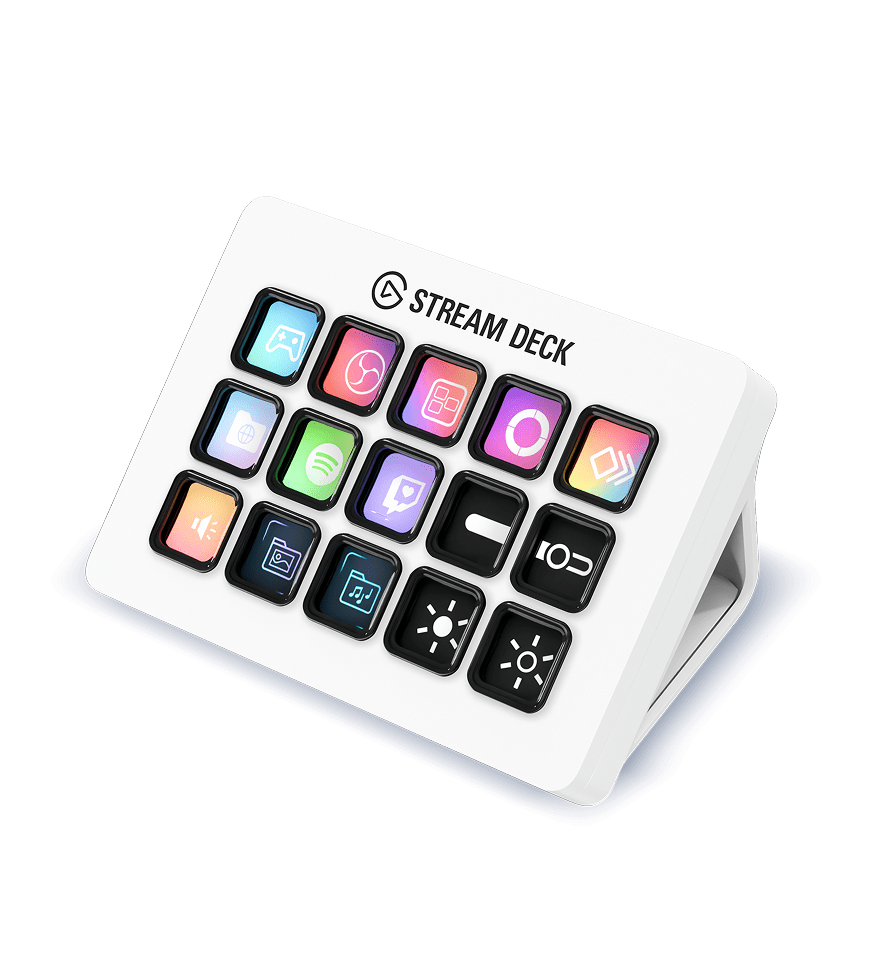
Elgato Stream Deck MK.2 15-Key LCD Controller
Put fifteen useful actions on one desk controller Keep essential commands visible while switching between apps. Elgato Stream Deck MK.2 gives you fifteen individually labelled LCD keys for scenes, hotkeys, timers and workflows. Profiles and folders allow a compact panel to serve different tasks without making you remember key combinations. Highlights LCD keys Fifteen individually customisable LCD keys Profiles and workflows Folders, profiles and multi-actions through the Stream Deck app Desk hardware Detachable desktop stand and USB-C cable Interchangeable faceplate for supported accessories Key Features Keep fifteen actions visible at once Label each LCD key with an icon that matches the action it runs. Put a frequently used set of streaming, meeting or editing controls on one page and separate routine actions from the controls you need quickly. This makes it easier to see what will happen before you press a key. Organise by task or application Build profiles and folders in the Stream Deck app to keep related actions together. A broadcaster can reserve one profile for scenes and sources, then switch to another for editing. App integrations and the actions available through them depend on the supported plugins you install. Run repeated steps as a sequence A multi-action can combine supported tasks that usually take several clicks. For example, set up a compatible scene change and then run another software action as part of the same workflow. Test the sequence against your application and check its order before relying on it live. Set the position and finish for your desk The removable desktop stand gives you another way to position the controller, and a detachable USB-C cable makes it easier to route or swap the lead. Compatible faceplates let you change how the unit looks while keeping the fifteen keys and saved workflows. Leave the computer in control Profiles and supported integrations run through the Stream Deck app on a compatible host. Before committing a production workflow, check that the target app and any plugin you need are supported there. The controller is particularly useful when your work already happens across several desktop apps. Summary Stream Deck MK.2 sits between the smallest shortcut decks and the larger production panels. It gives you enough visible buttons for everyday streaming, meetings or an editing workspace without taking over a desk. Choose it when tactile, clearly labelled keys matter most, and use profiles for work you only need in certain applications. Frequently Asked Questions Can I assign different icons to the keys?ExpandCollapse Yes. Choose or upload icons for configured actions in the Stream Deck app. Is software setup required?ExpandCollapse Use the Stream Deck desktop app to configure profiles, actions and supported plug-ins. Is this the model with dials?ExpandCollapse This model has 15 LCD keys. Choose Stream Deck + if rotary dials are important. Does it come with a stand?ExpandCollapse Yes. The desktop stand and USB-C cable are included. Can one button run several actions?ExpandCollapse Yes. Use Multi Action to combine supported actions in a sequence.
Pengambilan tersedia di 3005, Ubi Avenue 3, #01-88
Biasanya siap dalam 2-4 hari kerja (tidak termasuk hari libur)
Elgato Stream Deck MK.2 15-Key LCD Controller
Pesan beberapa pilihan
Atur jumlah setiap pilihan. Keranjang diperbarui secara otomatis.
Varian
Jumlah
Harga
Total varian
Varian
Total barang
Total barang
Subtotal produk
Deskripsi
Put fifteen useful actions on one desk controller
Keep essential commands visible while switching between apps. Elgato Stream Deck MK.2 gives you fifteen individually labelled LCD keys for scenes, hotkeys, timers and workflows. Profiles and folders allow a compact panel to serve different tasks without making you remember key combinations.
Highlights
LCD keys
- Fifteen individually customisable LCD keys
Profiles and workflows
- Folders, profiles and multi-actions through the Stream Deck app
Desk hardware
- Detachable desktop stand and USB-C cable
- Interchangeable faceplate for supported accessories
Key Features
Keep fifteen actions visible at once
Label each LCD key with an icon that matches the action it runs. Put a frequently used set of streaming, meeting or editing controls on one page and separate routine actions from the controls you need quickly. This makes it easier to see what will happen before you press a key.
Organise by task or application
Build profiles and folders in the Stream Deck app to keep related actions together. A broadcaster can reserve one profile for scenes and sources, then switch to another for editing. App integrations and the actions available through them depend on the supported plugins you install.
Run repeated steps as a sequence
A multi-action can combine supported tasks that usually take several clicks. For example, set up a compatible scene change and then run another software action as part of the same workflow. Test the sequence against your application and check its order before relying on it live.
Set the position and finish for your desk
The removable desktop stand gives you another way to position the controller, and a detachable USB-C cable makes it easier to route or swap the lead. Compatible faceplates let you change how the unit looks while keeping the fifteen keys and saved workflows.
Leave the computer in control
Profiles and supported integrations run through the Stream Deck app on a compatible host. Before committing a production workflow, check that the target app and any plugin you need are supported there. The controller is particularly useful when your work already happens across several desktop apps.
Summary
Stream Deck MK.2 sits between the smallest shortcut decks and the larger production panels. It gives you enough visible buttons for everyday streaming, meetings or an editing workspace without taking over a desk. Choose it when tactile, clearly labelled keys matter most, and use profiles for work you only need in certain applications.
Frequently Asked Questions
Can I assign different icons to the keys?
Yes. Choose or upload icons for configured actions in the Stream Deck app.
Is software setup required?
Use the Stream Deck desktop app to configure profiles, actions and supported plug-ins.
Is this the model with dials?
This model has 15 LCD keys. Choose Stream Deck + if rotary dials are important.
Does it come with a stand?
Yes. The desktop stand and USB-C cable are included.
Can one button run several actions?
Yes. Use Multi Action to combine supported actions in a sequence.
Spesifikasi
Elgato Stream Deck MK.2 15-Key LCD Controller
Stream Deck MK.2 is a fifteen-key desktop controller for shortcuts, folders and multi-action sequences. Each LCD key can display its own icon. The detachable stand, removable USB-C cable and compatible replacement faceplates let the controller fit different desk arrangements. Profiles and supported integrations are configured in the Stream Deck app on the host.
| Specification | Details |
|---|---|
| Controls | |
| Keys | 15 customisable LCD keys |
| Layout | Profiles, folders and multi-actions via Stream Deck |
| Mount | Detachable desktop stand |
| Profiles and navigation | Folders, profiles and multi-actions configured through the Stream Deck app. |
| Faceplate | Interchangeable with supported MK.2 faceplates. |
| Connectivity and Size | |
| Interface | USB 2.0, USB-C |
| Dimensions | 118 × 84 × 25 mm without stand |
| Weight | 145 g without stand, 270 g with stand. |
| In the box | Stream Deck, desktop stand, USB-C cable and guide |
| Host operating systems | Windows 11 or later or macOS 13 or later |
| Supplied USB cable | 1.5 m detachable USB-C data cable. |