


TP-Link Omada Cloud-Based Controller (Global Edition)
TP-Link Omada Cloud Management for Multi-Site Networks The TP-Link Omada Cloud-Based Controller provides hosted management for compatible Omada access points, switches and gateways without running a controller appliance or server at each site. This listing supplies a network-device licence for the selected one-year, three-year or five-year term. The paid controller service is now described as Omada Cloud Standard, the networking module of Omada Central. It is distinct from the free Cloud Essentials plan and from local hardware or software controllers that offer remote cloud access. One licence covers one compatible managed network device for the selected term; it does not license an entire site. Highlights Hosted controller: manage compatible Omada networking equipment without an on-site controller installation. One device per licence: choose the term and quantity for the network devices you need to manage. Multi-site visibility: use the web interface or Omada app to check devices, clients, topology and alerts. Remote deployment: zero-touch provisioning and batch configuration on supported devices. Advanced administration: role-based access and MSP workflows for supported multi-customer deployments. Electronic fulfilment: provide the intended TP-Link ID email address in the order note. Key Features Choose the Correct Licence Quantity and Term Each compatible access point, managed switch or gateway requires an active network-device licence for management under Cloud Standard. For example, one gateway, one switch and two access points require four device licences. Select the same number of licences as the devices you intend to manage, and choose the required subscription term. The selected licence term applies to the service entitlement. Keep track of expiry and renew the required devices to retain paid controller management. This network licence does not include an Omada camera licence, internet access, network hardware or installation services. Manage Several Sites from One Platform A central dashboard brings together network status, client activity, device topology and alerts. Administrators can work through a browser or the Omada app instead of visiting each location for routine configuration and monitoring. Multi-site administration is useful for offices, hospitality, retail and managed-service deployments. Permissions and MSP functions help separate administration responsibilities. The functions available at a site depend on its adopted devices, hardware revisions and firmware, so a controller subscription does not add hardware capabilities that a device lacks. Prepare and Maintain Devices Remotely Zero-touch provisioning lets an administrator prepare supported devices for adoption and configuration remotely. Batch configuration and firmware-management tools reduce repetitive work across a deployment. Supported wireless equipment can also use controller-assisted features such as WLAN optimisation, roaming and mesh. Confirm the exact device model and hardware revision against the Cloud Standard compatibility list before buying licences. Some models require a minimum hardware version or updated firmware. Omada branding alone is not sufficient proof that every older device can be adopted. Understand the Cloud Connection The controller handles management functions while devices continue handling normal local network traffic. If the site loses its cloud-management connection, configured network devices can continue operating locally. Live monitoring, configuration changes and controller-dependent services may be affected until connectivity returns. Cloud management still requires working internet access, an appropriate TP-Link account and access permissions. The licence does not provide an internet circuit, a VPN service subscription or a guarantee of end-to-end network uptime. Provide the TP-Link ID for Fulfilment Enter the TP-Link ID email address intended for this licence in the order note at checkout. Licences are issued during ACE business hours from Monday to Friday. Make sure the account belongs to the organisation or administrator that should control the subscription. This is an electronic service entitlement rather than a physical controller. Keep your activation and account details securely, and confirm the intended account and deployment region before ordering. Summary Choose this Omada Cloud-Based Controller network licence when you need hosted Cloud Standard management for compatible Omada devices. Match the licence quantity to your device count, select the term and confirm hardware compatibility and the intended TP-Link account before deployment.
TP-Link Omada Cloud-Based Controller (Global Edition)
제품 설명
TP-Link Omada Cloud Management for Multi-Site Networks
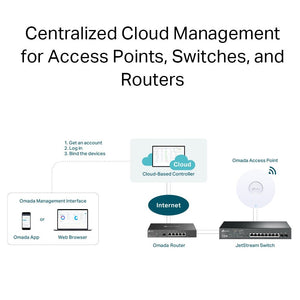
The TP-Link Omada Cloud-Based Controller provides hosted management for compatible Omada access points, switches and gateways without running a controller appliance or server at each site. This listing supplies a network-device licence for the selected one-year, three-year or five-year term.
The paid controller service is now described as Omada Cloud Standard, the networking module of Omada Central. It is distinct from the free Cloud Essentials plan and from local hardware or software controllers that offer remote cloud access. One licence covers one compatible managed network device for the selected term; it does not license an entire site.
Highlights
- Hosted controller: manage compatible Omada networking equipment without an on-site controller installation.
- One device per licence: choose the term and quantity for the network devices you need to manage.
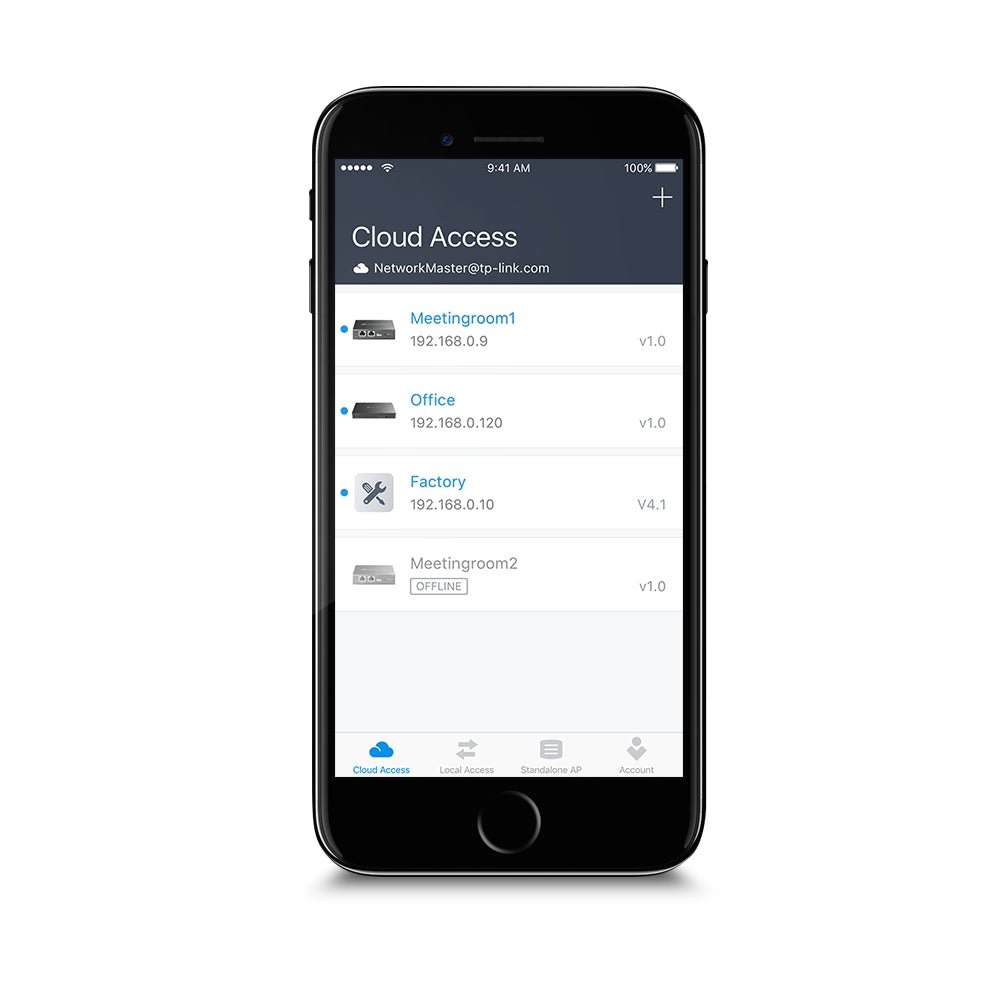
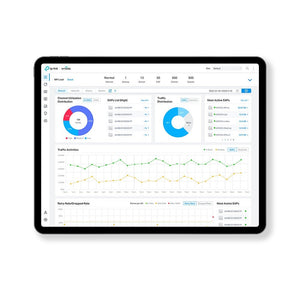
- Multi-site visibility: use the web interface or Omada app to check devices, clients, topology and alerts.
- Remote deployment: zero-touch provisioning and batch configuration on supported devices.
- Advanced administration: role-based access and MSP workflows for supported multi-customer deployments.
- Electronic fulfilment: provide the intended TP-Link ID email address in the order note.
Key Features
Choose the Correct Licence Quantity and Term
Each compatible access point, managed switch or gateway requires an active network-device licence for management under Cloud Standard. For example, one gateway, one switch and two access points require four device licences. Select the same number of licences as the devices you intend to manage, and choose the required subscription term.
The selected licence term applies to the service entitlement. Keep track of expiry and renew the required devices to retain paid controller management. This network licence does not include an Omada camera licence, internet access, network hardware or installation services.
Manage Several Sites from One Platform
A central dashboard brings together network status, client activity, device topology and alerts. Administrators can work through a browser or the Omada app instead of visiting each location for routine configuration and monitoring. Multi-site administration is useful for offices, hospitality, retail and managed-service deployments.
Permissions and MSP functions help separate administration responsibilities. The functions available at a site depend on its adopted devices, hardware revisions and firmware, so a controller subscription does not add hardware capabilities that a device lacks.
Prepare and Maintain Devices Remotely
Zero-touch provisioning lets an administrator prepare supported devices for adoption and configuration remotely. Batch configuration and firmware-management tools reduce repetitive work across a deployment. Supported wireless equipment can also use controller-assisted features such as WLAN optimisation, roaming and mesh.
Confirm the exact device model and hardware revision against the Cloud Standard compatibility list before buying licences. Some models require a minimum hardware version or updated firmware. Omada branding alone is not sufficient proof that every older device can be adopted.
Understand the Cloud Connection
The controller handles management functions while devices continue handling normal local network traffic. If the site loses its cloud-management connection, configured network devices can continue operating locally. Live monitoring, configuration changes and controller-dependent services may be affected until connectivity returns.
Cloud management still requires working internet access, an appropriate TP-Link account and access permissions. The licence does not provide an internet circuit, a VPN service subscription or a guarantee of end-to-end network uptime.
Provide the TP-Link ID for Fulfilment
Enter the TP-Link ID email address intended for this licence in the order note at checkout. Licences are issued during ACE business hours from Monday to Friday. Make sure the account belongs to the organisation or administrator that should control the subscription.
This is an electronic service entitlement rather than a physical controller. Keep your activation and account details securely, and confirm the intended account and deployment region before ordering.
Summary
Choose this Omada Cloud-Based Controller network licence when you need hosted Cloud Standard management for compatible Omada devices. Match the licence quantity to your device count, select the term and confirm hardware compatibility and the intended TP-Link account before deployment.
사양
TP-Link Omada Cloud-Based Controller (Global Edition)
Electronic network-device licensing for Omada Cloud Standard hosted management. Select the term and order enough licences for the compatible devices you intend to manage.
| Specification | Details |
|---|---|
| Licence and Delivery | |
| Product | Omada Cloud-Based Controller network-device licence; Global Edition listing |
| Current service naming | Omada Cloud Standard; networking module of Omada Central |
| Licence unit | One compatible network device per licence |
| Available terms | 1-Year; 3-Year; 5-Year |
| Delivery | Electronic licence; provide intended TP-Link ID email address in checkout order note |
| ACE fulfilment | During business hours, Monday to Friday |
| Not included | Physical controller, network devices, internet service, installation or camera-device licences |
| Supported Management | |
| Device categories | Compatible Omada access points, switches and gateways |
| Deployment | Hosted in the cloud; no on-premises controller installation required |
| Management interfaces | Web browser and Omada app |
| Multi-site management | Supported |
| Management scale | Manufacturer describes unlimited cloud management scale; each managed device still requires an active applicable licence |
| Adoption | Automatic device discovery and zero-touch provisioning on supported models |
| Administrative access | Multi-user privilege assignment; MSP mode for supported deployments |
| Monitoring and Maintenance | |
| Network visibility | Device and client monitoring; topology; site map and network insights |
| Alerts | Abnormal-event warnings, notifications and logs |
| Configuration | Batch configuration |
| Maintenance | Batch firmware upgrading and scheduling features where supported |
| Wireless functions | Automatic channel selection, transmit-power adjustment and WLAN optimisation on supported devices |
| Portal functions | Supported captive-portal authentication methods depend on adopted devices and controller software |
| Advanced functions | VPN, PPSK, IPS/IDS, DPI and Open API availability depends on device capabilities and software support |
| Requirements and Limits | |
| Account | TP-Link ID with the required organisation and controller permissions |
| Connection | Internet access required for cloud management |
| Compatibility | Exact model, hardware version and firmware must be supported by Cloud Standard |
| Plan distinction | Paid device licensing is separate from free Cloud Essentials and local controllers with remote cloud access |
| Camera licensing | Standard Camera licences are separate; this listing covers network devices |
| Interrupted management connection | Configured local device operation continues; remote management and controller-dependent features may be unavailable |
| Renewal | Keep required device licences active for continued paid management |
| Activation region | Confirm the intended account and deployment region before purchase |
Feature support varies by device model, hardware revision, firmware and service version. A network-device licence is not a camera licence or a site-wide entitlement.