


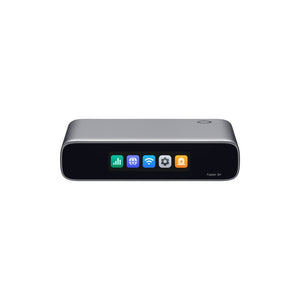


TP-Link Fusion G+ Omada Gateway Router with 2.5G WAN
A Compact Gateway with Omada Management Built In The TP-Link Fusion G+ brings business routing and Omada network management into one fanless appliance. Its 2.5GbE WAN connection accepts a faster internet handoff, with four Gigabit LAN/WAN ports for the local network and additional internet services. The built-in Omada Network application removes the need for a separate controller at a compact site. A colour touchscreen, Bluetooth onboarding and local or cloud access make it well suited to a small office, shop or branch. Highlights Gateway and Controller Together Built-in Omada Network application. Recommended for up to 30 managed devices and 300 connected clients. A Clear Wired Foundation 1 × 2.5Gb/s RJ45 WAN; 4 × Gigabit RJ45 LAN/WAN. Up to 4 simultaneous WAN ports. Multi-WAN load balancing and failover. Discreet Local Management Fanless enclosure with a 2.51-inch colour touchscreen. Local, cloud and Omada app access with supported firmware. Key Features One Appliance for Routing and Control The built-in Omada Network application adopts and manages compatible Omada devices, so a separate OC200 or OC300 is not required for this role. The recommended scale is up to 30 managed devices and 300 connected clients. Plan the device mix and workload rather than treating those figures as a guarantee. Understand Every Ethernet Port Only the dedicated WAN port is 2.5GbE. Each of the four LAN/WAN ports is Gigabit, so a single wired LAN connection cannot deliver 2.5Gb/s. The configurable interfaces support an appropriate mix of LAN and WAN roles. They do not supply PoE; wireless access points still need a compatible PoE source or their own power adapter. Give the Site More Than One Internet Path Load balancing and failover support multiple internet services, with up to four simultaneous WAN ports. Correct health checks and routing policies are needed. Individual application sessions may need to reconnect after a change, and multiple lines do not automatically combine into one faster single transfer. Manage Access and Remote Connections Supported firmware provides firewall policies, VLAN segmentation, VPN connections and application-aware controls. Use suitable current VPN protocols, keep the appliance updated and plan guest access separately from business systems. Inspection and encryption affect achievable throughput. Setup and Maintenance Within Reach Use the touchscreen and Bluetooth onboarding to help establish the local setup, then manage supported functions through local web access, the Omada app or cloud access. The built-in Network application and its cloud access do not require a separate controller licence. Optional external services remain separate. A Small Appliance with a Defined Role The fanless enclosure fits a desktop installation and uses the included USB-C power adapter. Optional matching hardware is needed for magnetic wall mounting or rack installation. This Fusion model provides wired networking and network management; it is not a Wi-Fi access point or a surveillance recorder. Summary The Fusion G+ suits a site that wants business routing and central Omada management in one compact appliance. Its value comes from a simpler equipment layout with a clear wired port configuration. Add switching, wireless coverage and power for connected devices to match the space, then keep the network within the recommended management scale. Frequently Asked Questions Do I need an OC200 or OC300 as well? Expand Collapse No. The Omada Network application is built into this gateway for managing compatible devices. Plan migration carefully if an existing controller already manages the network; a device cannot simply be adopted by two controllers at once. What is the difference between Fusion 2.5G and Fusion G+? Expand Collapse Fusion 2.5G has five 2.5GbE Ethernet ports. Fusion G+ has one 2.5GbE WAN port and four Gigabit LAN/WAN ports. Both combine routing with the Omada Network application. Does it include Wi-Fi or PoE power? Expand Collapse No. This is a wired gateway without Wi-Fi radios or PoE output. Add compatible access points and a correctly sized PoE switch, injector or suitable adapter. How large a network can it manage? Expand Collapse The manufacturer recommends up to 30 managed Omada devices and 300 connected clients. Device mix, traffic, firmware and enabled services affect the practical scale. Does cloud management need a controller licence? Expand Collapse The built-in Network application and supported cloud access do not require a separate controller licence. Internet access, compatible accounts and firmware are still needed; separately chosen services can have their own terms. Can this model record surveillance cameras? Expand Collapse No. These Fusion models run the Network application. They do not include a camera recorder, storage bays or surveillance licences. Choose a separate recording system when surveillance is required.
추가 상품 (3)
3005, Ubi Avenue 3, #01-88에서 픽업 가능
일반적으로 2~4일 후 준비 완료
TP-Link Fusion G+ Omada Gateway Router with 2.5G WAN
제품 설명
A Compact Gateway with Omada Management Built In
The TP-Link Fusion G+ brings business routing and Omada network management into one fanless appliance. Its 2.5GbE WAN connection accepts a faster internet handoff, with four Gigabit LAN/WAN ports for the local network and additional internet services. The built-in Omada Network application removes the need for a separate controller at a compact site. A colour touchscreen, Bluetooth onboarding and local or cloud access make it well suited to a small office, shop or branch.
Highlights
Gateway and Controller Together
- Built-in Omada Network application.
- Recommended for up to 30 managed devices and 300 connected clients.
A Clear Wired Foundation
- 1 × 2.5Gb/s RJ45 WAN; 4 × Gigabit RJ45 LAN/WAN. Up to 4 simultaneous WAN ports.
- Multi-WAN load balancing and failover.
Discreet Local Management
- Fanless enclosure with a 2.51-inch colour touchscreen.
- Local, cloud and Omada app access with supported firmware.
Key Features
One Appliance for Routing and Control
The built-in Omada Network application adopts and manages compatible Omada devices, so a separate OC200 or OC300 is not required for this role. The recommended scale is up to 30 managed devices and 300 connected clients. Plan the device mix and workload rather than treating those figures as a guarantee.
Understand Every Ethernet Port
Only the dedicated WAN port is 2.5GbE. Each of the four LAN/WAN ports is Gigabit, so a single wired LAN connection cannot deliver 2.5Gb/s. The configurable interfaces support an appropriate mix of LAN and WAN roles. They do not supply PoE; wireless access points still need a compatible PoE source or their own power adapter.
Give the Site More Than One Internet Path
Load balancing and failover support multiple internet services, with up to four simultaneous WAN ports. Correct health checks and routing policies are needed. Individual application sessions may need to reconnect after a change, and multiple lines do not automatically combine into one faster single transfer.
Manage Access and Remote Connections
Supported firmware provides firewall policies, VLAN segmentation, VPN connections and application-aware controls. Use suitable current VPN protocols, keep the appliance updated and plan guest access separately from business systems. Inspection and encryption affect achievable throughput.
Setup and Maintenance Within Reach
Use the touchscreen and Bluetooth onboarding to help establish the local setup, then manage supported functions through local web access, the Omada app or cloud access. The built-in Network application and its cloud access do not require a separate controller licence. Optional external services remain separate.
A Small Appliance with a Defined Role
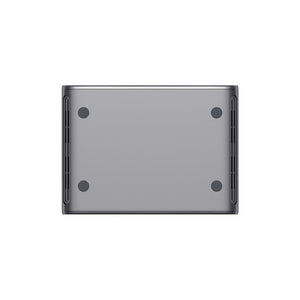
The fanless enclosure fits a desktop installation and uses the included USB-C power adapter. Optional matching hardware is needed for magnetic wall mounting or rack installation. This Fusion model provides wired networking and network management; it is not a Wi-Fi access point or a surveillance recorder.
Summary
The Fusion G+ suits a site that wants business routing and central Omada management in one compact appliance. Its value comes from a simpler equipment layout with a clear wired port configuration. Add switching, wireless coverage and power for connected devices to match the space, then keep the network within the recommended management scale.
Frequently Asked Questions
Do I need an OC200 or OC300 as well?
No. The Omada Network application is built into this gateway for managing compatible devices. Plan migration carefully if an existing controller already manages the network; a device cannot simply be adopted by two controllers at once.
What is the difference between Fusion 2.5G and Fusion G+?
Fusion 2.5G has five 2.5GbE Ethernet ports. Fusion G+ has one 2.5GbE WAN port and four Gigabit LAN/WAN ports. Both combine routing with the Omada Network application.
Does it include Wi-Fi or PoE power?
No. This is a wired gateway without Wi-Fi radios or PoE output. Add compatible access points and a correctly sized PoE switch, injector or suitable adapter.
How large a network can it manage?
The manufacturer recommends up to 30 managed Omada devices and 300 connected clients. Device mix, traffic, firmware and enabled services affect the practical scale.
Does cloud management need a controller licence?
The built-in Network application and supported cloud access do not require a separate controller licence. Internet access, compatible accounts and firmware are still needed; separately chosen services can have their own terms.
Can this model record surveillance cameras?
No. These Fusion models run the Network application. They do not include a camera recorder, storage bays or surveillance licences. Choose a separate recording system when surveillance is required.
사양
TP-Link Fusion G+ Omada Gateway Router with 2.5G WAN
The TP-Link Fusion G+ combines a wired gateway and the Omada Network application. The integrated controller is intended for a compact managed network, with recommended limits for connected devices and clients. Its touchscreen and fanless enclosure support a discreet desktop installation. The table separates gateway interfaces, management functions and measured performance from power and mounting requirements. Wireless access points, PoE power and optional mounting accessories are separate, and performance depends on the traffic, firmware and enabled services.
| Specification | Details |
|---|---|
| Architecture and Network Interfaces | |
| Appliance role | Wired gateway with built-in Omada Network application; no Wi-Fi radio or surveillance recorder. |
| Ethernet ports | 1 × 2.5Gb/s RJ45 WAN; 4 × Gigabit RJ45 LAN/WAN. Up to 4 simultaneous WAN ports. |
| PoE output | Not provided. |
| Recommended deployment scale | Up to 30 managed Omada devices and 300 connected clients; actual capacity depends on device mix and enabled features. |
| Routing and Security | |
| Internet resilience | Multiple WAN services with load balancing and failover; up to 4 simultaneous WAN ports. |
| Network services | DHCP, VLAN segmentation, static and policy routing, bandwidth/QoS controls, supported IPv6 and mDNS functions. |
| Security | Firewall, IDS/IPS, application-based access rules, content filtering and supported DNS/security controls; features depend on firmware. |
| Remote access | Supported LightLink, WireGuard, IPsec, OpenVPN and SSL VPN functions; available server/client roles depend on software. |
| VPN and SD-WAN | Supported site-to-site VPN and full-mesh SD-WAN; endpoint compatibility and configuration are required. |
| Performance | |
| IPS throughput | Up to 1Gb/s IPS in the current regional manufacturer specification. |
| Published VPN tests | IPsec up to 1,023Mb/s; WireGuard up to 605Mb/s; OpenVPN up to 223Mb/s in the referenced test configurations. |
| Performance conditions | Manufacturer laboratory results. Enabled inspection, encryption, packet sizes, firmware and traffic mix affect throughput; the physical port limits still apply. |
| Management and Hardware | |
| Management access | Built-in controller, local web access, Omada app and supported cloud management; no separate controller appliance required. |
| Monitoring and maintenance | Device discovery, topology, logs, alerts, client information, backup/restore and supported batch firmware updates. |
| Display and onboarding | 2.51-inch colour touchscreen; Bluetooth or Ethernet onboarding. |
| Memory | 2GB DDR4. |
| Cloud licensing | Built-in Network application and supported cloud access without a separate controller licence; optional services can have separate terms. |
| Power and Installation | |
| Power supply | Included USB-C adapter, 100–240V AC, 50/60Hz input; 5V DC, 3A output. |
| Maximum power consumption | Up to 6.18W including the power adapter. |
| Dimensions W × D × H | 130 × 95 × 30mm |
| Net device weight | 351g; shipping packing is separate. |
| Cooling and enclosure | Fanless polycarbonate enclosure. |
| Mounting | Desktop; optional matching magnetic mounting plate for wall installation or separate rackmount kit. |
| Environment and Package | |
| Operating temperature | −10–40°C |
| Storage and humidity | Storage −30–70°C; operating 10–90% RH and storage 5–90% RH, non-condensing. |
| Package essentials | Gateway with built-in Network application and USB-C power adapter. Optional mounting hardware, access points and PoE equipment are separate. |
| Warranty | 5 years |
추가 상품


TP-Link SG2210XMP-M2 Omada 8-Port 2.5GBASE-T and 2-Port 10GE SFP+ Smart Switch with 8-Port PoE+


TP-Link EAP723 BE5000 Ceiling Mount Dual-Band Wi-Fi 7 Access Point

